Subcategories

  • Large screen adventure watch for outdoor expeditions and training V2

    236 Topics
    3k Posts
    ravenR
    @elbee For your example, “ride for fun” you may not even need to record it at all if you see no value in the data being correct. Sometimes I take my longboard out and spend an hour skating around, carving and going downhill. I don’t record it as “skating metrics” aren’t really a thing I’m interested in. Like your example, I’m not interested in my heart rate when I’m skateboarding, so don’t record it. I also don’t record a lot of my walking on my college campus for similar reasons. In theory, I could record ten minutes of walking, pause then after class record another ten minutes going to another building, pause again, etc. But what point would that serve?
  • Ultimate performance watch for racing and training V2

    255 Topics
    2k Posts
    E
    @the_jav You also talked about this interaction with data, like zoom and selecting a display window. That is what a mean by too complex for a tiny screen. And I don’t think you can draw a conclusion how data is handled based on how different parts of the ui look. The data can be the same but the widgets might be programmed by different people over a longer period in time (older widgets might not have been rewritten to benefit from newer functions in the os)
  • Large screen adventure watch for outdoor expeditions and training.

    1k Topics
    15k Posts
    thailonT
    Maybe, they could fix the firmware just to get live tracking app functional again.
  • Ultimate performance watch for racing and training.

    854 Topics
    8k Posts
    isaziI
    @sky-runner I asked again
  • Light and compact but ultimate performance watch for racing and training.

    480 Topics
    4k Posts
    E
    My race s shutdown shortly after finishing a 7 hour hike (started at 48% and just before the finish went into a ultralow battery usage mode, registering next to nothing). Since then I don’t have 15% battery loss per night and today’s hike used about 35% (default gnns, no aod, used maps with navigation). Which is okayish. This leads to 2 possibilities. Suunto firmware is suboptimal written. Suunto doesn’t do endurance tests with their firmware. The watch needs regular reboots to clear overfull memory/buffers/caches. Solution: suunto should optimize their code, look for memoryleaks etc. The battery needs calibration. I do notice that after the forced shutdown, the watch has a hardtime charging to 100%. This could be caused by a reset of the battery management system and consequently a recalibration of the battery capacity. So, the 15% nightly battery loss could by a lot less due to misalignment and the battery not being charged to it’s full capacity. Sure this is (educated) speculation and only suunto developers could say something about it. But for now I plan to do more planned reboots abd maybe do a forced emptying of the battery now and then.
  • Suunto 9 Peak Pro

    437 Topics
    6k Posts
    E
    @DavidCuenca Hey, About the GPS accuracy, waiting on shore is indeed a good idea, but you should try staying longer (12 minutes and a half precisely). Basically, all satellites broadcast the positions of the other sats in their constellation, as well as atmospheric conditions, this data is the mos up to date (updated every 2 hours, valid 4 hours) but the bit rate is very slow (Galileo has a higher bit rate and needs only about 6 minutes) : https://en.wikipedia.org/wiki/GPS_signals#Almanac That should be more efficient than lifting your arms ^^ About HR, the HRM of 9PP isn’t great, but what worked for me is to wear the watch a lot higher on the wrist (almost 1 third of the arms length), and have it almost uncomfortably tight
  • Lightweight sports watch designed for runners

    197 Topics
    2k Posts
    isaziI
    @boxwex no, I only know that this is being tested
  • Suunto 9 Peak

    453 Topics
    6k Posts
    N
    @lothoreSimon Bonsoir, Avez-vous essayé de laisser la montre charger pendant une longue période ? Ne pas se rallumer comme ça, c’est étrange. Peut-être que le câble est mort ou que la brique de charge est morte, à vérifier en premier. Sinon, oui, vous avez raison : la réparation et la maintenance des montres, à long terme, ce n’est vraiment pas super. Ils ne peuvent que vous accorder une réduction et ne peuvent pas reprendre la montre en échange d’une réduction. Après, c’est une histoire de coûts : maintenir des montres de sport leur coûterait énormément, malheureusement. Je crois qu’aucune marque ne fait mieux en la matière. Sinon il y a la Suunto Core Alpha…
  • Suunto 9

    1k Topics
    15k Posts
    turbogolubT
    @laurent.claustre well yes, updated the app yesterday and immediately synced a route i had in library - which i know was not working previously. Now, i didn’t hike it to confirm, but preview (from navigation) shows it is fine now, as opposed to how it was before. I encourage you to update the app and try.
  • Suunto's first smart-with WearOS

    678 Topics
    10k Posts
    E
    Bonjour, Comment se fait-il que chez Suunto,il n’y ai pas la possibilité de voir les parcours avec différentes couleur suivant les difficultés ? À moins que je ne l’ai pas trouvé. Voir modèle de “Oruxmaps” [image: 1780729547970-7ea60608-3e85-4e93-9a70-ae5776765c0b-oruxmaps.jpg]
  • Suunto 5 Peak

    63 Topics
    718 Posts
    A
    I know that HR measurement at the wrist can be difficult and it is better to use a chest strap. However, even for normal walking (not even Nordic walking) I get horribly wrong measurements, e.g. yesterday the watch showed a maximum of 139 bpm in the afternoon, but an 24h-ECG (which should be 100% accurate) shows a maximum of 106 bpm in the morning (it is hard to search for the same time span). Anyhow, the difference is not acceptable! Yes the watch has correct settings (left arm) and is correctly attached to the wrist. What can I do? I need to track my pulse.
  • All Suunto Spartan Series

    328 Topics
    3k Posts
    S
    Good day, I have a Suunto Spartan Ultra and have had it for 8 years. From my last Samsung UI update my watch has not synced my daily steps with the Suunto app. I have tried the following but not success: Restart phone and watch. Reinstall Suunto App Force stop Suunto App Unpair watch from phones Bluetooth and reconnect. Gave all items on Suunto App permission. Made sure Suunto APP and phone is not on energy saving mode. If anyone has a solution please assist. Kind regards
  • Ambit 1,2,3 Series

    289 Topics
    3k Posts
    VoiGASV
    @André-Faria it was Bluetooth, I have no USB-c to A converter so far.
  • Suunto 5

    215 Topics
    2k Posts
    A
    I haven’t used my D5 since January; I got it out of the cupboard today to charge it as it’s dead, but I can’t remember how to attach the charger. I’ve searched the manual but it just says ‘attach’, it doesn’t explain how. There’s a red thing on the end of the cable which I seem to recall ‘snaps’ onto the watch, but right now it’s not snapping onto anything - it doesn’t stick to the back of the watch like I seem to remember. Have I got this totally wrong? Please can someone explain in simple terms how to attach the charger?! Thanks
  • Suunto 3 and Suunto 3 Fitness

    55 Topics
    550 Posts
    Steven SmithS
    Interesting take! A lightweight Suunto with Stryd support would be a game-changer for runners. I doubt they’ll add it, but if they did, I’d consider it too. The T6c was legendary—2000 miles is impressive!
  • Traverse Series

    76 Topics
    449 Posts
    No new posts.
  • 25 Votes
    212 Posts
    22k Views
    SquirrelS
    @Speed-Man Sync the watch and send logs from Suunto app, as detailed in: https://forum.suunto.com/topic/15153/crash-reports-collection-q1-2026
  • Suunto Software update Q1 (2.53.42)

    Pinned
    347
    31 Votes
    347 Posts
    79k Views
    S
    Don’t know if this is expected behavior or a “bug”, but in indoor swimming, I have to set again the pool length after each reboot of the watch. This does not happen with other sport mode setting (like selected suunto-plus, brightness settings ecc). It would be nice if also the pool length setting is remembered. I think that many swimmers (or at least me) most of the time swim in the same pool, with the same pool length
  • Maps Update Rollout, March 2026, Staged

    Pinned
    118
    1
    39 Votes
    118 Posts
    18k Views
    HonzaSH
    @elbee I meant city main names, not quartes names. Sorry, bad english
  • What sport mode is missing from our watches in your opinion?

    Pinned
    276
    4 Votes
    276 Posts
    87k Views
    S
    +1 for thru hiking Stairstepper in gym
  • Firmware Collection

    Pinned
    114
    19 Votes
    114 Posts
    46k Views
    V
    Hi everyone, I accidentally deleted all pkg in my Race 2 during bug diagnose. Could anyone please check their watch and give me the file names of the old pkgs so I can create a download link? That would be of tremendous help, thanks.
  • Race 3S & Race 3 rumours

    114
    2 Votes
    114 Posts
    10k Views
    dreamer_D
    There’s a thread on reddit. It seems something was going to be announced today but it also happened the Fenix 9/Pro presentation.
  • Crash reports collection Q1 2026

    56
    9 Votes
    56 Posts
    7k Views
    R
    I sent several logs and always emailed support@suunto.com as well. I never received a meaningful reply. A simple “we know about this and we are working on a fix” would have been enough. In the end, I took the watch to a Suunto service center. Today is the 8th day and I still have no update on the resolution.
  • Feature Request: Bluetooth Disconnection Alert

    Moved
    2
    3 Votes
    2 Posts
    51 Views
    J
    @skh8634 I would extend this monitoring to HR strap, footpod and powermeter. HR belt might get lost not very easily but footpod happened to me once (Stryd) as the clip was worn out and powermeter would be nice as I lost connection during a break on the weekend and some two hours of cycling power data / cadence were not recorded. Wahoo (ANT+) recorded all data, so it must have been the connection to the watch…
  • What happened to Suunto Core2

    Moved
    4
    0 Votes
    4 Posts
    365 Views
    isaziI
    @HoBart we should have a proper Core 2 section in the forum soon.
  • Firmware overhaul

    4
    0 Votes
    4 Posts
    354 Views
    brechtvbB
    Judging the long time of receiving updates i dearly hope some proper features or firmware overhaul is being prepared.
  • option to disable the insane alerts during structured workputs

    Moved
    16
    13 Votes
    16 Posts
    2k Views
    isaziI
    @Stanislav-Kuzmin I understand now, my mistake, it is still not possible to only mute (or configure) S+ guides “notifications”
  • Suunto Core 2 - Feature request, Weather trend indicator

    Moved
    3
    1 Votes
    3 Posts
    195 Views
    A
    @Egika Yes, the indicator is displayed, but only after you switch to the “BARO” page. You obviously don’t stay on that screen 24/7 (if only because button lock and additional views don’t work on that view). On the original first-generation Suunto Core, that indicator in the top-left was visible right on the main locked screen. The huge advantage was that when you were at a camp, for example, a quick glance at the watch told you how the weather was developing without having to switch over to the barometer— but this feature has disappeared. Don’t worry, I’m not jumping to conclusions; I’ve gone through the whole watch and read plenty of reviews, also I’m owner of first generation for years. The feature I’m talking about simply isn’t there. Besides, on the BARO screen itself, that trend indicator is practically useless anyway since you already have a detailed graph right below it.
  • 0 Votes
    2 Posts
    72 Views
    isaziI
    @pg1999 thanks, I forwarded this to Suunto.
  • I have zero confidence in Suunto route navigation!

    29
    3
    14 Votes
    29 Posts
    5k Views
    sky-runnerS
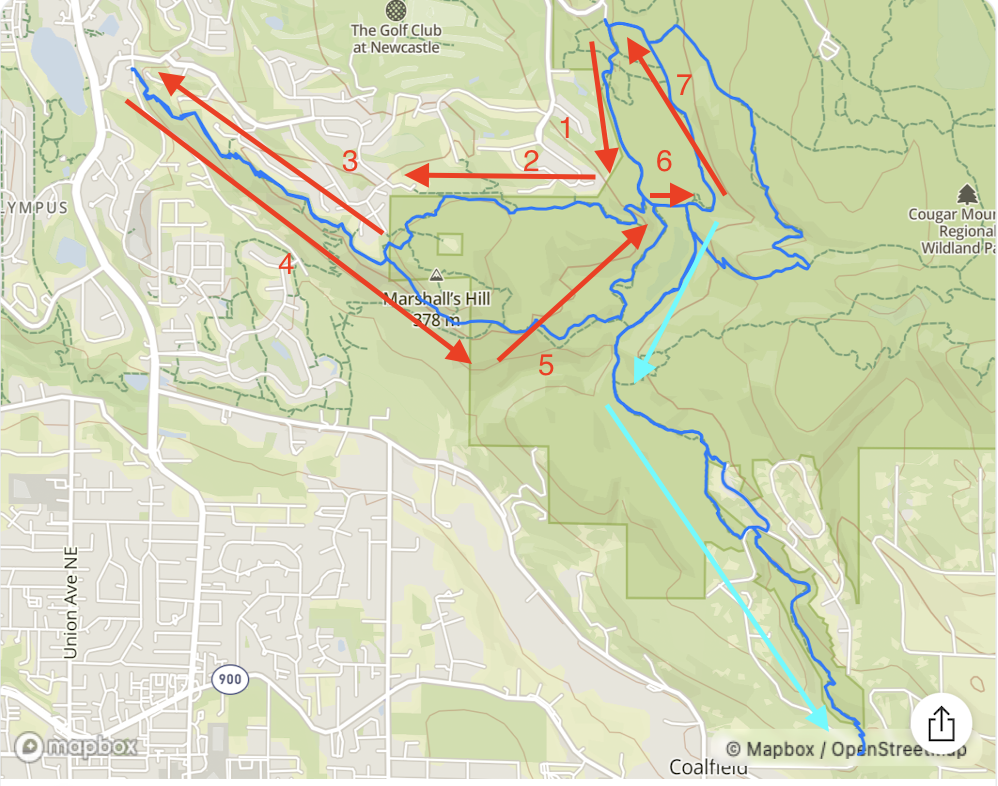
    @runyx17 said: Reading about these problems here makes me worry if it will ever be fixed at all. I think the main problem is that Suunto navigation doesn’t simply guide you though a planned route. It continuously guesses where you want to go based on your current position. I think, internally there are invisible “checkpoints” along the route that you must pass for the watch to determine that you are on-route. Based on what the checkpoint that you passed last it draws the light blue arrows pointing you toward the next checkpoint. The reason I think it works this way is because these light blue arrows sometimes lag behind and then jump forward. In my example the route goes over itself twice for a short distance so there would be two checkpoints from different distances. When the watch sees the one from the later distance, it probably decides at that point that I have already skipped a part of the route, so it simply shows the light blue arrows based on where it thinks I am and not where I should be according to the planned route. This is a subtle but important difference. And because of that sometimes it randomly reverses the direction. There may be a momentary GPS glitch, and it readily accepts that, assuming that I started moving in the opposite direction. Also, Garmin handles routes where Suunto fails much better. I know exactly how Garmin navigation works because I helped them to fix a bug a few years ago where Garmin navigation would repeatedly go off route at sharp nearly 180 degree turns. The way I helped is that I kept hammering them with bug reports on their forum and produced simple and detailed repro steps. I was in communication with one of their reps and and eventually they had fixed it. Garmin has similar invisible “checkpoints” on route that I described above - perhaps every 30-50 meters or so. While you are on route you are expected to move towards the next checkpoint. Once you passed that - move to the next one, and so on. Garmin navigation makes sure you stick to the route as a sequence of these checkpoints in the exact order as planned. If course, if you intentionally skipped a part of the route it would tell you that you went off route. Then it would recapture you later on the route. But it doesn’t do that proactively and without letting the user know as Suunto does it. And this is exactly how Suunto should do that. Even if there is still an auto-reversal logic, you should do the best effort to stick to the original route, and only when that fails, show the notification, and only then after some distance of going off the original route, try to recapture it. That would give user a chance to correct themselves if they mistakenly went off route or cut a part of it, or reversed direction.
  • Scrolling lap screen

    Moved race laps
    1
    4 Votes
    1 Posts
    77 Views
    No one has replied
  • Core 2 functionality update..

    1
    1 Votes
    1 Posts
    109 Views
    No one has replied
  • Improvement in Climb Guidance layout

    Moved
    2
    3
    4 Votes
    2 Posts
    162 Views
    sky-runnerS
    @SergioB This has already been suggested and seemingly ignored. Also, the font size for the remaining distance in the zoomed in mode should be increased - it is difficult to see. And yes, because of the blue labels rendered on top of the screen it is now impossible to see remaining ascent/descent in the zoomed in mode.
  • Feature Request: Strokes per lane while pool swimming

    1
    1 Votes
    1 Posts
    87 Views
    No one has replied
  • Core 2?

    21
    1 Votes
    21 Posts
    3k Views
    A
    @Elipsus Ultimately, it doesn’t really matter. According to Suunto’s specifications, the Core 1 watch could be used at depths of up to 10 meters. You can even use the buttons underwater. This has been tested many times without damaging the watch. Whereas, according to these specifications, the Core 2 can be used at depths of up to 2 meters only. So, it’s a hardware downgrade. This was confirmed in an email exchange with Suunto support.
  • Black grid issue

    48
    10 Votes
    48 Posts
    8k Views
    J
    On my Race S, black grids occur at least once on every walk or hike. I have not noticed a change in frequency over several watch updates.

Suunto Terms | Privacy Policy