• Recovery watch & App

    10
    1 Votes
    10 Posts
    618 Views
    Kraisun TuntaK
    @emkei said in Recovery watch & App: @Kraisun-Tunta said in Recovery watch & App: Even with this new firmware, the datat feature still requires a sync to app before showing on the watch. This needs to be calculated on-device just like any other feature like training , sleep, hrv status, training status etc. Having to sync to app defeats the point of having an independent watch. Not sure if I understand you correctly. I thought that basic calculations are happening on the watch, and the more sophisticated ones in the app (therefore, sync is needed). And having the data sync with the app keeps the history and reports possible. However, if I have such different values for metrics like Recovery, TSS, and Resources, those values become unusable. Which ones are the correct ones? And having different values in iOS and iPadOS is even worse (both refreshed) - it should be using server data, right? I have never experienced a difference in values (unit vs app) at other brands. A bit disappointing, especially as I like the HW. I think the concern here is not about advanced analytics, but about basic post-activity summaries that should be available directly on the watch. For example, after a run, the watch itself should be able to summarize: Total duration Total distance Basic recovery / rest time indication These are fundamental metrics that are already recorded on-device during the activity. On the Suunto Race 2 (for example, on the watch face), I notice that after finishing a run, the data is not updated until I sync with the phone app. If I don’t sync, the watch face still shows old values. In real use, this is a bit problematic: Many of us run in parks or outdoors without carrying a phone After finishing the run, we naturally look at the watch expecting a quick summary Being forced to sync first breaks the idea of the watch being truly independent To be clear: I fully understand that more advanced training metrics (Training Load, TSS, long-term trends, deeper analysis) may require app-side or server-side calculations. That makes sense. But basic summaries like time, distance, and simple recovery indicators should be: Calculated on-device Immediately visible on the watch, without requiring a sync This is not meant as a comparison or criticism of other brands, but objectively speaking, many other sports watches can already do this on the watch itself. I really like the Suunto hardware and overall direction — this is just feedback on user experience. Improving on-device summaries would make the watch feel far more complete and independent.
  • Race 2 - Crashing During a Run

    2
    0 Votes
    2 Posts
    22 Views
    AudaxjoeA
    @sniemi I haven’t had any issues but Zonesence is now native I believe. It is an option when you start the activity. This may be causing the issue?
  • Race 2 heart rate issues

    7
    1 Votes
    7 Posts
    323 Views
    Adam RickA
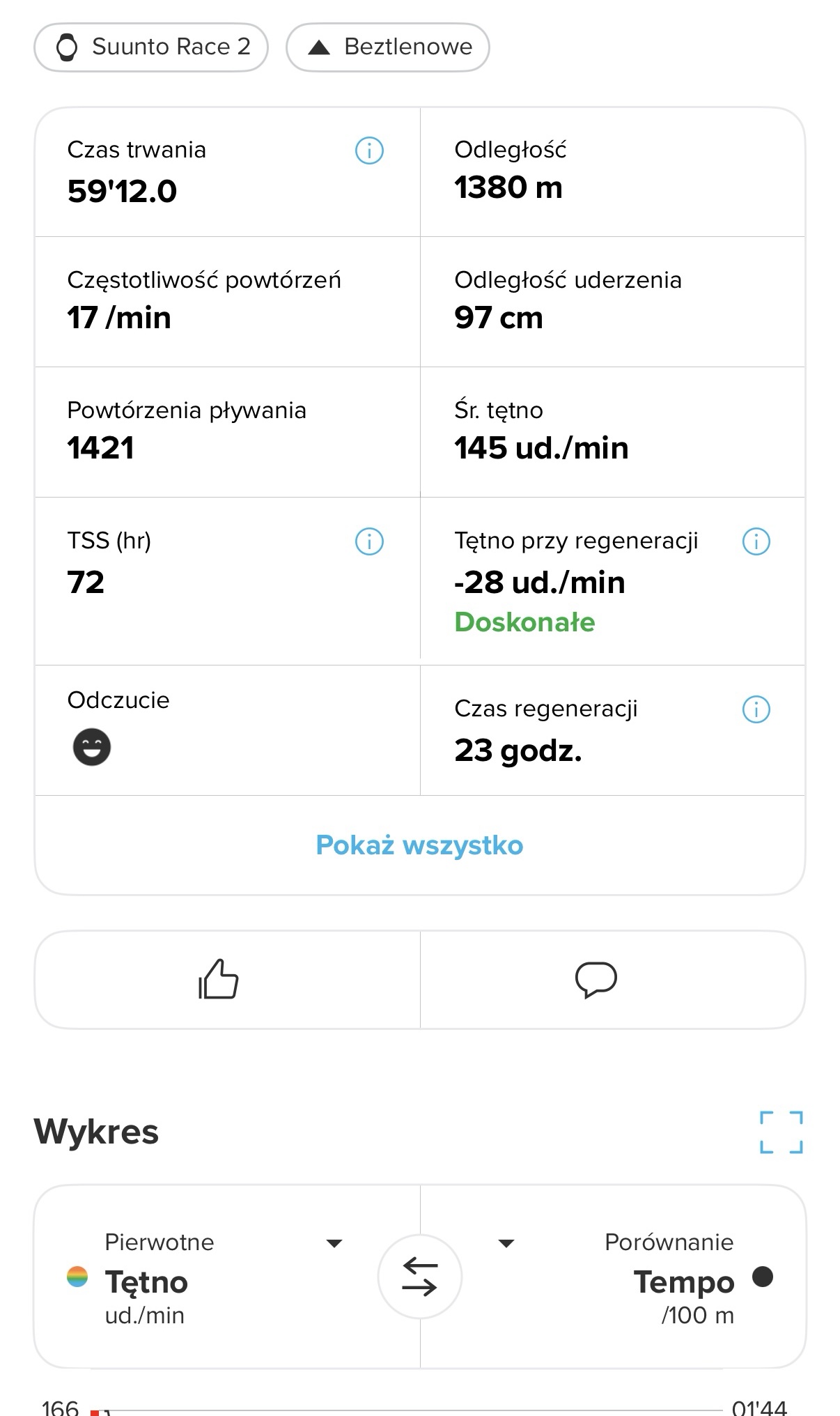
    I have a similarly suspicious HR output from a pool swim yesterday. [image: 1768420859900-screenshot_20260114_145808_suunto.jpg]
  • Race 2: GPS and distance accuracy vs previous Suunto models

    27
    2 Votes
    27 Posts
    1k Views
    jjpazJ
    @duffman19 Thanks for your comment. Yes, I take the AI’s results with a grain of salt. The thing is, what it indicates aligns very closely with my feelings and what I’ve seen in Race 2. It’s clear that nowadays "sport/smart"watch users are more concerned with the accuracy of the optical sensor, clean tracks, health features and watchfaces, rather than the absolute precision of GPS metrics like they were a few years ago. DC_Rainmaker himself no longer shows distance comparisons in his reviews to test GPS accuracy between watches, only images of the tracks to see if they are clean. We now take for granted that this data has reached an incredible level of accuracy, that all brands are there, and people are looking for other things. In my case, it’s a bit of “occupational hazard” and a desire to investigate further and learn during the process. Maybe with more activities the GPS+Acelerometer twin will be more aligned with my Vertical and RaceS data. I’ve been using Race 2 only for two weeks now. We’ll see how evolves. Hope you find this thread interesting
  • Race 2 Photos :)

    29
    0 Votes
    29 Posts
    2k Views
    SportsfreundS
    … ach mit light Flow verwechselt.
  • Alpine skiing downhill

    50
    1 Votes
    50 Posts
    3k Views
    K
    Today it worked for me without any problems. No reset before or anything else
  • Aerobic Decoupling AND a Guide?

    1
    1
    0 Votes
    1 Posts
    97 Views
    No one has replied
  • Sleep Tracking sucks…

    11
    2 Votes
    11 Posts
    685 Views
    V
    @Mff73 said in Sleep Tracking sucks…: @vinc14 Do you have Race2 or Vertical1? No nap with Vertical1 Have a Vertical 1 , so no Nap report
  • Race 2 - two Triathlon modes ? Where Auto mode ?

    8
    0 Votes
    8 Posts
    279 Views
    EgikaE
    @dani_degi the default tri sport mode has auto transition enabled. in the custom sport mode you can select to have auto or manual transition [image: 1768158603421-img_2960.jpeg]
  • Barometer Telefonfunktion Bezahlapp

    2
    1 Votes
    2 Posts
    115 Views
    LederbergrunnerL
    @Siegfried Hej… Die Höhe kannst du manuell korrigieren. Der Rest… Es ist in erster Linie eine Sportuhr. Diese Smartfunktionen werden sehr wahrscheinlich nicht kommen. Ich persönlich bin genau deshalb von Garmin zu Suunto gewechselt. Garmin legt mehr focus auf Lifestyle und Smarte Funktionen. Suunto legt den Schwerpunkt auf Sport und ist vll dadurch auch etwas preiswerter. HTH Sven
  • New OHR sensor design causing skin issues

    23
    2
    0 Votes
    23 Posts
    2k Views
    OutdoorManO
    So I let my skin to fully heal and was instead wearing the watch on my right hand, upside down. Today I have noticed that I have red skin, or a rash there also. This is a bit weird now, as I never had this issue in the past and started about the time (on my left arm) when I got the Race 2. I simply cannot wear it for a longer period of time. I am cleaning it after every activity. Can it be that the material from which the sensor is made is somehow different?
  • Bug récupération

    1
    0 Votes
    1 Posts
    56 Views
    No one has replied
  • Suunto Race 2 General Discussion

    308
    1
    4 Votes
    308 Posts
    38k Views
    Mff73M
    @Egika You are so patient to help lazy forumers.
  • Suunto 2.50.26 RACE 2 Update Januar 2026 video

    3
    -3 Votes
    3 Posts
    319 Views
    AntoineA
    @dani_degi said in Suunto 2.50.26 RACE 2 Update Januar 2026: Supported devices Suunto 9 Peak Pro Suunto Race S Suunto Race Suunto Race 2 Suunto Vertical Suunto Vertical 2 Overview The Q4 2025 update represents one of the most significant software evolutions in Suunto’s history, with a clear shift toward a broader multisport focus. This update expands beyond Suunto’s traditional outdoor core to deliver a more complete and versatile experience, with major advancements in triathlon, SwimRun, circular multisport, advanced sensor management, ZoneSense, new data fields, navigation, training intelligence, and key improvements in usability, barometer behavior, and sport algorithms. SuuntoPlus Up to 3 SuuntoPlus apps running simultaneously during an activity (Exclusive to Suunto Race 2 and Suunto Vertical 2) New multisport features Automatic transitions in Triathlon Automatic transitions in SwimRun Circular multisport with full block repetition New data fields Instant NGP Average NGP Lap average NGP Ascent to next waypoint or end of route Descent to next waypoint or end of route Peak power (3 s, 1 min, 3 min, 5 min) Peak speed (3 s, 1 min, 3 min, 5 min) ZoneSense ZoneSense time-in-zone summary directly on the watch after the activity ZoneSense intensity ring available across all cardiovascular sport modes (including hiking, mountaineering, gym, etc.) Per-sport mode persistent configuration Each sport mode stores its own user configuration: Intensity zones Map color Connected sensors Data screens Autolap Custom settings such as autopause, voice feedback, etc. Advanced sensor management per sport mode Independent sensor activation and deactivation per sport Automatic activation of all sensor services upon pairing Selective use of sensor services (example: using only power data from Stryd) New sport modes Duathlon SwimRun Aquathlon Navigation improvements Larger arrows, turn icons, and POIs Optional north-up map orientation General watch improvements Automatic weather data download via Wi-Fi during the night Exclusive improvements for Suunto Vertical 2 Flashlight remembers last used mode and intensity Flashlight available as a secondary option in activity settings Quick switch-off via touch gesture Interval training integration in Suunto App and watch Detailed interval structure displayed during workouts Intervals are no longer recorded as manual laps Correct visualization of all workout phases New optical heart rate algorithms 12.1 In-house OHR algorithm for Suunto Race and Suunto Race S Completely new in-house optical HR algorithm Significantly improved stability and realism compared to the previous LifeQ-based solution Much better behavior during descents and rapid terrain changes Faster and more reliable recovery after pauses Closer alignment with HR belt data across the full activity 12.2 Updated OHR algorithm for Suunto Race 2 and Suunto Vertical 2 Improved HR acquisition at the start of the activity Optimized filtering for activities with rapid altitude changes, such as trail running descents AI Coach Interval descriptions included in training plans Direct creation of interval sessions on the watch Improved swimming algorithm Faster stroke detection Faster rest detection Correct interval detection in all scenarios User experience improvements Smoother transitions between menus Reduced map loading times Demo mode Looping demo mode for in-store product presentation New “SMART” barometric algorithm Initial threshold reduced to 2 m (previously 3 m) Meter-by-meter measurement after the initial threshold New air/water filtering (wind, rain, humidity, friction) Elimination of false ascent and descent spikes Improved altimeter accuracy and stability Bug fixes Airplane mode now works correctly from the control panel Fixed an issue where sleep was incorrectly displayed as a nap https://forum.suunto.com/post/182494
  • Test cardiofréquencemètre Suunto Race 2

    1
    0 Votes
    1 Posts
    77 Views
    No one has replied
  • Default Watch Face - Please give complication options!

    2
    3 Votes
    2 Posts
    207 Views
    tuxbusterT
    @James-Wylie That would also be great on the default watch face of the V2 as well. Currently, you can’t edit the bottom section. The weather information is rarely accurate for my location, which makes it pretty useless for me. Being able to choose a different option there would be a nice improvement.
  • New Update Today

    Locked
    3
    1 Votes
    3 Posts
    525 Views
    Brad_OlwinB
    Locking this as there is a thread on new firmware.
  • Can't remove routes that were synced from Strava

    10
    0 Votes
    10 Posts
    435 Views
    sky-runnerS
    @MdzOtt said in Can't remove routes that were synced from Strava: However, if you have an Android tablet or you run an Android emulator on Windows, suddenly SA is a decent option Another option is to run an iOS Suunto app on MacBook - this way I have a full screen route editor on laptop. But I still prefer Strava route editor because heatmap data is better and because I can overlay Strava segments. And by the way, Strava route editor does support on-route waypoints.
  • 2 Votes
    2 Posts
    153 Views
    cpinkyC
    @tobiasbecker850 I fully agree
  • Map disappears in activity

    1
    0 Votes
    1 Posts
    58 Views
    No one has replied

Suunto Terms | Privacy Policy