• 0 Votes
    25 Posts
    2k Views
    leafs93L
    @zhang965 walking will definitely get more distance as the gps track will not be smooth and is more zig Zac.
  • notification for iPhone message and incoming call alert

    9
    0 Votes
    9 Posts
    1k Views
    EgikaE
    In the watch details (sorry, screenshots in German) If you don’t have it, then it is in beta and will come later into production SA [image: 1695714556724-img_7305.jpeg] [image: 1695714556934-img_7306.png]
  • When your watch “crashes” what should I expect when it happens?

    7
    0 Votes
    7 Posts
    603 Views
    mikekoski490M
    @Tieutieu Just one several months ago. Vertical just stopped my workout and noticed I was suddenly on the main screen. I just restarted the trail run. I had the no map problem but on restart and reconnect with SA maps were back.
  • General thoughts and suggestions

    2
    6 Votes
    2 Posts
    333 Views
    flucaF
    @Jan-Van-de-Velde Welcome in our suunto community. I share most of your remarks and I can say they are spread in several different posts in this forum already. Let’s hope this will get read and suunto developers will decide to address some.
  • HotFix release 2.25.66

    78
    6 Votes
    78 Posts
    17k Views
    J
    @Mff73 said in HotFix release 2.25.66: if only the watch could buzz and ring when rebooted, it could enable at least to notice quickly that something happen and react (if not in a hurry race ). I was thinking the exact same thing! Where should this suggestion go so that the folks at Suunto would see it and maybe implement it in the upcoming year or two?
  • WhatsApp Messages bad readable

    8
    0 Votes
    8 Posts
    1k Views
    BrunoHB
    @EricChandler The font size is not configurable, at least not yet. And emoji support is also missing. Many improvements and fixes have been rumoured to come in the next release. Those who know won’t tell.
  • 10 Votes
    8 Posts
    1k Views
    EgikaE
    @Mff73 yeah- my comment was based on those surveys. I don’t know if something about this is actually cooking
  • Training Peaks Guides Sync Issue

    5
    1
    1 Votes
    5 Posts
    894 Views
    isaziI
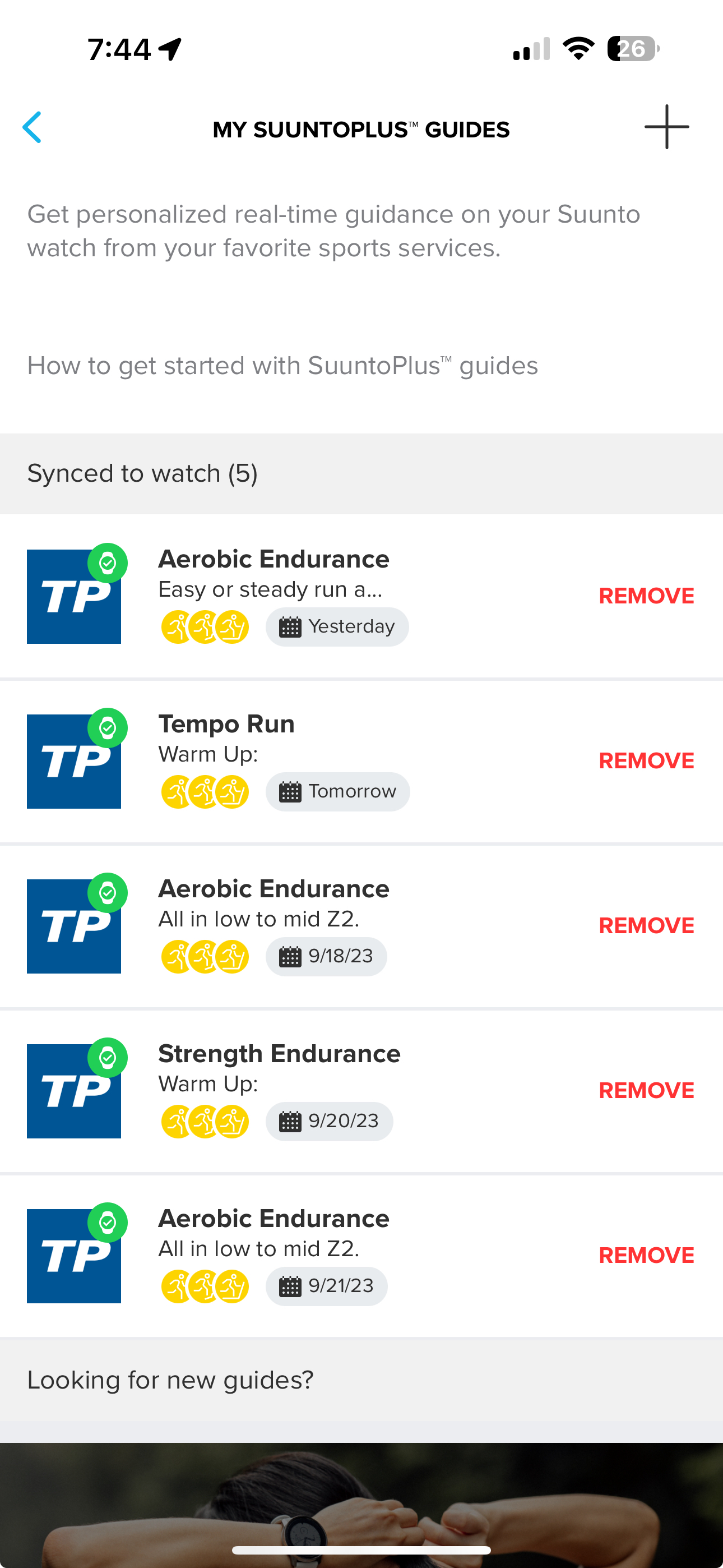
    @stromdiddily I just checked the guides on the app, and for HumanGo now I have three workouts: today, 21/09, and 03/10. Between 21/09 and 03/10 there are other workouts that are not synced. Not sure about the logic, nor if the workouts are pulled by Suunto or pushed by HumanGo (the latter I would guess). The good thing is that everything worked so far, every day the correct workout is there for me. Anyway, if people with wrong dates could send screenshots of both the source app and Suunto app, and logs (and everything in a PM to me), I will open a bug with Suunto, and app developers can check.
  • Interval training

    7
    0 Votes
    7 Posts
    527 Views
    herlasH
    This feature “on lap button press” is available on SA, TP ICU and others, the existing bug described above by @Ketoohs is the only issue I’m aware of.
  • Differences of total ascent between Suunto Vertical and other apps

    2
    2
    0 Votes
    2 Posts
    254 Views
    DMytroD
    @joacoastete I sometimes have the same with my S9. Honestly, I’m not sure that the watch is at fault, perhaps it’s just the vertical analogue of the coastal paradox: https://www.google.com/url?sa=t&source=web&rct=j&opi=89978449&url=https://en.m.wikipedia.org/wiki/Coastline_paradox&ved=2ahUKEwjj0p_errSBAxUKQvEDHYLfC-0QFnoECAwQAQ&usg=AOvVaw0XtcxpYkHpieszmKKlYzeg If you want to make sure the altitude is correct, you could go the same route a few more times to at least check if it’s consistent.
  • Where to find free training program ?

    3
    0 Votes
    3 Posts
    1k Views
    H
    @Topforum the app “Runmotion coach” may be interesting for you. Its free version creates training plans just like you described, but you’ll need to create the interval sessions manually in Suunto app as sync to watch is only available in paid version.
  • Public promise

    12
    0 Votes
    12 Posts
    1k Views
    freeheelerF
    @matus69 deactivate auto DND and activate it manually (auto DND is related to sleep times and to be found in sleep widget settings)
  • Watch turns off mid run

    3
    0 Votes
    3 Posts
    366 Views
    isaziI
    @Matt-Montague I believe (2) and (3) are connected, have you tried using the performance battery mode? Are you sure your watch is not in power save mode?
  • Zoomed-out map detail feedback

    6
    5 Votes
    6 Posts
    847 Views
    Thomas HertzT
    @MiniForklift 100%. as i replace my garmin i was used showing basic information on top of the map (for me it was pace and HR, but of course other fields make sense). so adding the possibility to overlay 1-2 fields over the map would be highly appreciated. otherwise > best map on a watch I’ve ever seen.
  • remaining battery life

    9
    0 Votes
    9 Posts
    957 Views
    MiniForkliftM
    @Tieutieu I can agree with this. I did a two hour run in and around a forest at the weekend, the map screen was on the whole time and I think I used about 2% battery from memory
  • When will we get new firmware from Suunto?

    80
    4 Votes
    80 Posts
    16k Views
    O
    @Brad_Olwin we hope
  • 1 Votes
    6 Posts
    1k Views
    EgikaE
    @Twan-Lange said in Suunto support not answering for days and I just have a few questions.: Just gonna copy paste my message to suunto support, because I’m tired of typing it over and over. I’d appreciate any help regarding these questions and how to more easily get in touch with customer support, since I don’t have multiple hours to spend watching the chat window or waiting for an email from the support team for days… Dear Suunto Support Team, I am looking into buying a new sportswatch and I used your comparison site to compare between the 9 peak pro and the Vertical. There seems to be quite a few odd pieces of information. under “Language” the peak pro lists multiple languages, while the vertical just has a checkmark. Does that mean the same list applies to the vertical? The site also highlights the section, meaning there is a difference between the two models. Languages are the same (and Chinese is included :)) Declination correction: Is there no declination correction on the vertical? How come? Does the “-” sign mean that it is totally absent or just manual? Also, does the compass still function if i stand still and rotate the watch or does it need 2 points to calculate my direction from that? Declination can be set manually in 0.5° steps Compass is just a magnetic compass and shows your direction when standing still. Activity targets: again, the peak pro lists 2, while the vertical only has a checkmark. Does this mean it has the same targets as the peak pro or are there more? If so, which ones? There are the same two targets in both watches. One for steps one for calories Route planning with altitude profile: the Vertical seems to lack this feature, which is surprising considering the model name. Does this mean that there is no screen for navigating using the altitude profile of a predetermined route (like this)? Or does “route planning with altitude profile” describe a different feature? While I would say that the planning part is a feature of the Suunto App, the altitude profile in the watch showing you where you are altitude wise on a route, is the same. “Outdoor maps by satellite, terrain and topography in web by Mapbox, Google Maps & Android” feature is not available on the vertical, but I couldn’t find much information about it on the internet. What does it entail? Does it just mean you could download the maps from Mapbox / Google maps? It says “in web”, does that mean they are only available while connected to the internet or only on a PC / phone? Don’t know what it means in detail, but you get the maps for planning in the Suunto App (different layers (summer, winter, satellite, outdoor, etc), but all based on Mapbox afaik. And then the Vertical has maps on the watch. “Bearing navigation”: How come it’s not available on the Vertical? Seems like a pretty easy to implement feature, while also being very crucial for navigating. The comparison page lists it as not included, but then again, this other suunto support page lists it as a feature of the Vertical model? Bearing navigation is available in Vertical “Setup intervals”: Looks like this is a feature that you can only use “on watch” with the Vertical? This seems impractical. Im guessing you can still make interval training plans using the suunto app? Yes. There is a simple interval screen on the watch and pre planned trainings plans from the App synced to the watch. Same functionality in both models. The whole “speed and distance” section (cadence based speed and distance, GPS speed and distance, chrono, foot POD support etc.) This is surely a mistake, There is no way the Vertical model has none of these. Is it all the same as the peak pro? Yes. All the same. Recovery time daily view: One has a checkmark, the other has “on watch”. Does this mean the peak pro only has it in the app, and the Vertical has it on the watch as well. Or does the vertical only show it on the watch? Also the same with both watches. Recovery is shown on the watch and synced to the app. On this part of your site you list products that are compatible with your partner “Trainingpeaks”, but the 9 peak pro and the vertical are both absent from that list, even though they are both in the suuntoPlus program. Does that mean you can only access parts of the suuntoplus partnerships and if so, is there a list somewhere? The Suunto+ TrainingPeaks screen is there to be selected from the S+ selection. It works on both watches. Thanks in advance for the response and best regards, [name] Cheers!

  • Heart rate recording paused.LED does not flash

    ohr heartrate
    3
    0 Votes
    3 Posts
    577 Views
    S
    @zhang965 no I haven’t yet… I think this is a problem with the software and I hope for a fundamental update so that the Vertical’s software finally runs stably. Maybe the memory is full or something similar… ? Even if Suunto were to offer me the exchange of a new watch, I don’t think it would work more stably… I hope for an update soon…I was just interested if other users had observed something similar. That’s only noticeable if you want to do sports and the watch doesn’t find a heart rate. I usually use a heart rate belt and it has always worked.
  • Issues with Manual Laps

    4
    0 Votes
    4 Posts
    892 Views
    Mark PittsM
    I tried again today with a new activity profile and autolap disabled and it worked as desired! I can reproduce the issue now. If I have a profile with autolap enabled and select it, then go through the menu and toggle autolap off, and then start the workout, manual laps won’t show in lap data fields. But if I load a profile that has autolaps already off by default, manual laps are reflected in lap data fields correctly. So if I change the autolap setting, I need to exit to the watchface and reload the profile to get it working all the way.
  • Location cannot be found

    4
    0 Votes
    4 Posts
    578 Views
    ?
    @BrunoH said in Location cannot be found: @freeheeler Max might be talking about the route planner; a blue dot appears on the app map showing your current location. And the dot appears fast! @maxthetravelor With a smartphone it’s a bit different than with your watch. The phone is using also cell tower triangulation to determine your location in addition to the satellite transmissions. Also the phone probably has better gps antenna, faster CPU and overall better capacity to do these calculations. I live up north in Finland and even with the AGPS file up-to-date in my watch it usually takes 30 seconds to get the location fix. You are trying it out on a balcony, that might be challenging for the watch with the satellite transmissions bouncing from the walls. You see, it takes minimum three individual satellite signals to pinpoint a location. You must be patient and take a walk with your watch. That’s what it is for Sorry to say but since ambit 2 times, if my watches were synchronized with Suunto app or suuntolink they would never take 30sec to lock. Much less.

Suunto Terms | Privacy Policy