• Skip lap button not working in workouts with Custom Sports Mode

    13
    0 Votes
    13 Posts
    2k Views
    F
    I’m not sure if this is related but today I had a workout where the last step was an open one to ‘run back’ and I completed it with the lap button. I believe it did complete the workout and I soon after stopped the activity as usual however I then found the laps that should have been created as part of the structured workout had disappeared and the entire structured workout duration was lumped into a single lap and where I’d pressed the lap button to complete the workout step had been recorded as the transition from lap 1 to lap 2 rather than appending the workout laps. I hope that makes sense! Basically I expected laps for warmup, tempo interval, recovery, another tempo interval, and a cooldown (with the manual end on lap button). What I actually got was 47 mins (the entire structured workout) for lap 1 and 20s for lap 2 where I walked, paused then stopped the activity.
  • Persistent data between activities

    3
    0 Votes
    3 Posts
    354 Views
    Ze StuartZ
    @isazi thanks, I completely forgot about them.
  • Dexcom/Suunto compatibility

    1
    8 Votes
    1 Posts
    839 Views
    No one has replied
  • Possibility to choose ghost runner pace

    10
    5 Votes
    10 Posts
    2k Views
    G
    @Zdeněk-Hruška Thanks, but since I do not use Strava, the discussion is about helpful improvements of the Ghost Runner app.
  • Naak nutrition planner

    5
    1 Votes
    5 Posts
    795 Views
    GiPFELKiNDG
    @kamarasm hey guys any news about that questions? @peegee
  • Golf Score

    1
    0 Votes
    1 Posts
    207 Views
    No one has replied
  • variometer setings

    Moved variometer
    8
    0 Votes
    8 Posts
    859 Views
    Danny polegD
    @Mff73 You are indeed right, I understand the comment about providing the most details. And thanks again for the help
  • Meditation

    12
    5 Votes
    12 Posts
    2k Views
    Dimitrios KanellopoulosD
    @Ze-Stuart I asked about it now.
  • This topic is deleted!

    Locked
    2
    0 Votes
    2 Posts
    51 Views
  • How does Burner work

    3
    0 Votes
    3 Posts
    643 Views
    J
    @Raimo-Järvi Thanks, I kind of figured that but just wanted a confirmation.
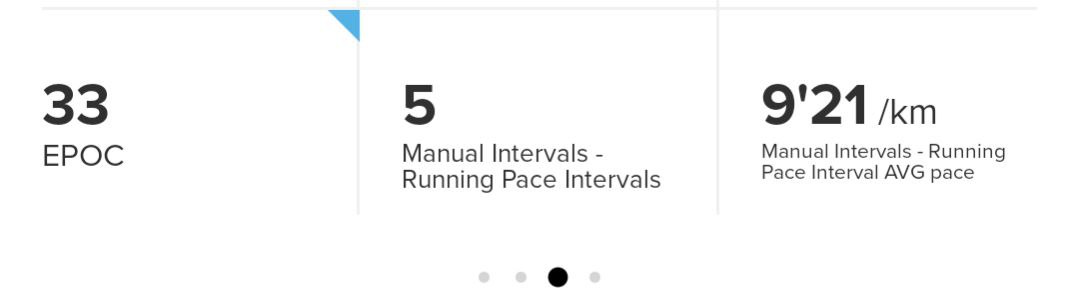
  • Suunto+ - manual intervals pace issue

    4
    1 Votes
    4 Posts
    542 Views
    herlasH
    @Marius-Jacobsen-Eggerud did you mean to say upper button? That’s the one used to stop/pause an activity , then end it if desire
  • Sports apps sail racer

    Moved
    17
    0 Votes
    17 Posts
    4k Views
    surfboomerangS
    @Raimo-Järvi It is! Thank you very much!
  • Defining Sport Specific SuuntoPlus Apps to reduce menu lag

    suuntoplus
    4
    0 Votes
    4 Posts
    765 Views
    T
    That’s a bug I would like to see resolved as well. Why can I see running specific S+ apps, like Cooper test, when I’m setting up an indoor cycling workout? S+ apps should only be visible under the workouts/activities/sports modes they relate to.
  • S+ Topos

    1
    1 Votes
    1 Posts
    232 Views
    No one has replied
  • Summer 2024 big bike update?

    1
    1 Votes
    1 Posts
    257 Views
    No one has replied
  • kitesurfing - Show the height of the jump

    Moved
    6
    0 Votes
    6 Posts
    1k Views
    Danny polegD
    @Egika Thanks for the professional answer
  • suunto + threshold test

    7
    0 Votes
    7 Posts
    1k Views
    J
    @Sebastian-Wagner-0 said in suunto + threshold test: today i did the test. started the run without the anaerobic threshold test active and activated it later that i could start on the right route and get enough warm-up. the problem was that the threshold test did not start the 10min warm up countdown. so i had to save the activity, start a new one where i activated the test before the start, countdown started and i could run the test. but it was annoying that i had to adjust my start to the 10 min countdown, that i am at the right place after the 10 min. so a manual start for the anaerobic threshold test and individual warm up time is the best solution. one more question i used the cadence coach suunto+ in the last days. but i see no results from the cadence coach in the suunto app, is that normal? Regarding the cadence coach results not appearing in the Suunto app, ensure your app and device firmware are updated. If the issue persists, contacting Suunto support might help resolve the visibility of cadence metrics. Also Read this: https://forum.suunto.com/topic/9633/threshold-test/2
  • running form drills - guides

    1
    0 Votes
    1 Posts
    194 Views
    No one has replied
  • Export multi files or API Development

    8
    0 Votes
    8 Posts
    2k Views
    J
    @philippe-durand74 said in Export multi files or API Development: Hello, I need to retrieve my recordings locally either by USB or with my Suunto account and not through a partner application. I have my own application and I want to export in multi-recording. Is there a solution? how to access the development api? To retrieve your recordings locally via USB or your Suunto account without using a partner app, connect your Suunto device to your computer, open the Suunto app, log in, and export your recordings. For accessing the development API to export multiple recordings, register on the Suunto Developer Portal to get API access and documentation. For more details, visit the Suunto Developer Portal. Link: https://apizone.suunto.com/
  • How many SuuntoPlus Apps in Cycling mode?

    8
    0 Votes
    8 Posts
    1k Views
    EgikaE
    @Chris-Ki said in How many SuuntoPlus Apps in Cycling mode?: @isazi OK I have tested it in other sport modes and in combination with other S+ Apps. Only Burner is the problem. When I choose Burner and another S+ App, the little “switch” that indicates if the S+ App is active or not beneath Burner goes to off position (switch down, Grey color). But when I leave the S+ App Menue to the Activity main page it says that many S+ Apps are activated and I get the data from Burner and the other activated App in the Activity Summary afterwards. So it is just an optical problem. Now that you mention it this way, I remember having seen this also. I am pretty sure it is solved in the upcoming update.

Suunto Terms | Privacy Policy