• Ambit - importing POI's from watch to Suunto App

    ambit3 app poi
    18
    0 Votes
    18 Posts
    4k Views
    ?
    @overgrowntrail said in Ambit - importing POI’s from watch to Suunto App: @André-Faria Exactly. Very disappointing to see Suunto as an use-and-throw-away orientated manufacturer. Especially as a manufacturer of devices that are used in nature. @overgrowntrail let’s believe that they do their best with what they have. One “solution” may be having with you a device with windows 10/11 to install suunto link. There are some tablets with it. @isazi although I understand your point, I think the fact that some ambit 3 users still speaking out may mean something…either that the watch still pleases them, has features that please them, and that may be also an oportunity for suunto to listen to it. Also just because Suunto doesn’t have the resources doesn’t mean something can’t be done. Maybe opening the protocol of communication so someone could do something about it, or other types of solution. On my side I have zero interest in complaining. PS: once upon at time I even proposed to open a bounty (inspiration here ) to collect money in order to pay to have these features (of corse to be develloped inside suunto), this way they could also understand how much people value this. On my side I would be ready to fork 100eur for having full support on suunto app for the A3P(and I already bought a s9b at similar price).
  • Suunto Ambit 3 isn't finishing the reset.

    4
    0 Votes
    4 Posts
    756 Views
    ?
    @Fraol-Demisse guess it may be your battery that is somehow dead. Have you tried leaving it for a few days on the charger (or pc charging) seeing if gets better?
  • Bulk export Tracks - Ambit 3

    Moved
    3
    0 Votes
    3 Posts
    395 Views
    O
    @awardthemyth hello Matthew, have you succeeded in the bulk export? would you mind sharing your experience? thank you
  • This topic is deleted!

    1
    0 Votes
    1 Posts
    3 Views
    No one has replied
  • Running pace vs 965

    20
    0 Votes
    20 Posts
    4k Views
    ?
    @Dimitrios-Kanellopoulos said in Running pace vs 965: You are probably seeing speeds ups and drops due to speeding up from static position etc. And that is fine if that is the case. The instant pace in Suunto watches (As already discussed here ) is much better than most competitors (and a reason for this discussion from prev members such as @skyrunner etc) . What you need todo in order to report a bug or put weight in the discussion is to compare FIT files on the speed chart. Notice that Suunto watches use INSTANT speed / pace not averaged (5-10s) such as for example coros and garmin etc. That is a trade off for the instant speed. Additionally with older watches than the vertical , running with left / right hand will have different paces on track and field due to the offset if the watch is not having a good signal. I don’t want to point a bug or complain. Your last sentence gave me a clue, I was always with the ambit on right hand. Thank you for taking the time to answer me and better understanding how things work, which was my aim.
  • Time in Zones

    5
    0 Votes
    5 Posts
    801 Views
    ?
    @freeheeler said in Time in Zones: @Topher-Dabrowski possibly, but difficult for me to try as I gave my A3PS to a good friend, but he now upgraded to a 9 peak pro… maybe @André-Faria can help here? I only have a3p and it appears to me [image: 1683444024372-img_6810.png] Latest beta on iOS and android show it. Maybe trying to uninstall and install again the app. Is the hr strap working correctly? I don’t believe it’s linked to device because I have activities imported from garmin devices that show it also.
  • Condensation issue?

    9
    1
    0 Votes
    9 Posts
    1k Views
    Panagiotis KritikakosP
    I also had it a couple of times after getting it to the sea. If I recall correctly, it happened after getting serviced (opened and resealed) by the local authorized dealer. Nevertheless, didn’t had any issues and still works today after ~3 years or so.
  • Suunto Ambit 2/3 battery/log capacity

    3
    1
    0 Votes
    3 Posts
    564 Views
    ?
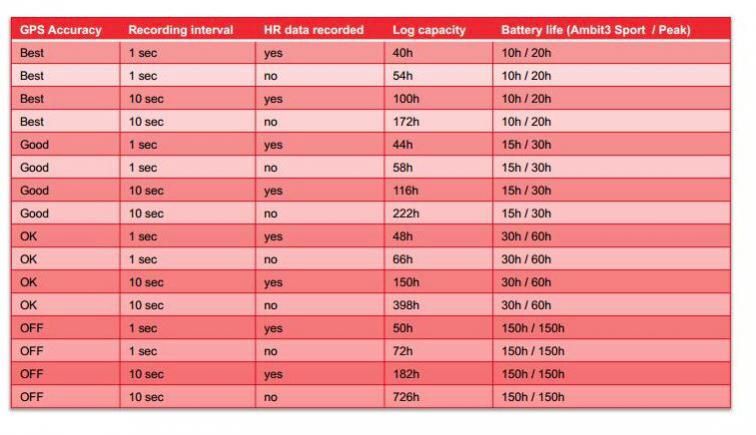
    @Brad_Olwin said in Suunto Ambit 2/3 battery/log capacity: @André-Faria I put that table on WatchUSeek:) And thanks a lot. I wanted to register a 300km bike with it and was unsure if battery/log capacity would do. Surprisingly enough in “good” gps setting my 2017 ambit 3 peak sapphire was spot on with that table
  • Look at and edit tracks and routes on PC for Ambit 3

    3
    0 Votes
    3 Posts
    493 Views
    ?
    If you own a Mac with Apple Silicon you can install Suunto App on it from the App Store or if you own a PC with Windows 11 you can use the Android version of Suunto App to. Search the forum for more details. For Ambit watches SuuntoLink is for syncing activity and routes only.
  • Training Exercises & Ambit3 Vertical

    Moved
    3
    0 Votes
    3 Posts
    487 Views
    ?
    As an ex. Ambit3 Vertical user, last time I used my watch the structured workouts and SuuntoPlus apps weren’t available for this model and I pretty confident it will never be. Your last resort for structured workouts are Suunto Apps, which were available with Movescount too, please take a look here on how to compile one and here on how to upload one to your watch. Good luck!
  • Interval timer settings mismatch

    29
    2
    0 Votes
    29 Posts
    6k Views
    amidasA
    Works just fine now. Thanks!
  • Missing Lap info from Suunto app for android

    9
    3 Votes
    9 Posts
    1k Views
    herlasH
    @isazi that’s great, thanks for your help
  • Elevation Gain Errors

    5
    1
    0 Votes
    5 Posts
    664 Views
    freeheelerF
    @sartoric I think it displays the integrals of the curve… I just need to derive and everything should be fine again
  • Ambit 3 connect problem with SuuntoApp iOS

    4
    0 Votes
    4 Posts
    1k Views
    ?
    @freeheeler yep, I forgot the “forget” from Suunto app if watch is still present in the list, by pressing the cogwheel then “Manage connection”.
  • Suunto app and Ambit 2 not synching

    4
    0 Votes
    4 Posts
    511 Views
    sartoricS
    @strutt I guess you should contact support again, just to double check, but in case let’s ping @pavel-samokha, maybe he can help Did you already try reinstalling SuuntoLink ?
  • Sync failed - optimizing gps

    2
    0 Votes
    2 Posts
    1k Views
    ?
    @André-Faria if I set MobileApp sync to auto in the watch I never had any sync failed message, but if I turn off (and manually sync) I occasionally get sync failed message on the watch with retry or cancel options. Sometimes when I hid retry it fails continuously, but activities get transfered. And even if I hit cancel the sync continues and activities get synced. Now I’ve set to auto sync again, but I wish I have an option to disable GPS optimization on sync just to be quicker as my watch is fine even with 3 days old data, plus syncing GPS data with SuuntoLink is faster for me and usually I connect to it twice a week to charge it anyways.
  • Ambit 3 unable to fully sync via Bluetooth

    sync issue suuntoapp ambit 3 download
    2
    0 Votes
    2 Posts
    911 Views
    S
    @kylatin The warning doesn’t imply the activities have not been synced: if you see them in Suunto app on the phone after having synced via Bluetooth, then the activities have been synced but, for some reason, this didn’t trigger the “mark as synced” feature in the watch’s logbook that prevents the warning from being triggered. Having said that the warning is just that - an annoyance - but doesn’t have any other consequence (because the watch’s memory is circular, so newer activities will always overwrite the old ones), it should still be avoided by sync via bluetooth. Is it possible by any chance that when syncing you had power saving on on the phone? I’ve had a friend with the same issue and apparently removing that before syncing on the phone solved it
  • Ambit 3 shows wrong text at destination

    ambit 3 peak navigation
    1
    0 Votes
    1 Posts
    397 Views
    No one has replied
  • Ambit 3 - Interval training

    3
    0 Votes
    3 Posts
    755 Views
    amidasA
    @thiago-barcellos is this still actual? This is how I do it for my Ambit 3 Peak by using SuuntoLink app for Windows. I guess the process it the same for your device. Select a sport mode (or create new one) Scroll down to “Show advanced settings”, click on it Select “Use interval timer” Set Low and High limits as distance or time, Note: that in version 4.1.6 these values are mixed up in place. Click “Save” and wait until sync completed During a training session press and hold right middle button and select “Activate” then select “Interval timer”. That’s it.
  • GPX import

    1
    0 Votes
    1 Posts
    270 Views
    No one has replied

Suunto Terms | Privacy Policy