Subcategories

  • 150 Topics
    442 Posts
    Steven HambletonS
    This is almost unreadable for me, tiny fonts (I see a pattern here) - I hope Suunto create a dedicated app or even a web app with dark mode.
  • This is the place for creating new feature suggestions for the Suunto app or up-voting existing ones. You can also add your thoughts and comment on other user’s suggestions. Please remember to up-vote or down-vote already posted feature suggestions.

    2k Topics
    14k Posts
    No new posts.
  • Share here your issues or the bugs you have found. Please remember to search just in case your issue is already reported.

    1k Topics
    9k Posts
    No new posts.
  • Community-driven solutions and feedback for key topics

    1k Topics
    15k Posts
    No new posts.
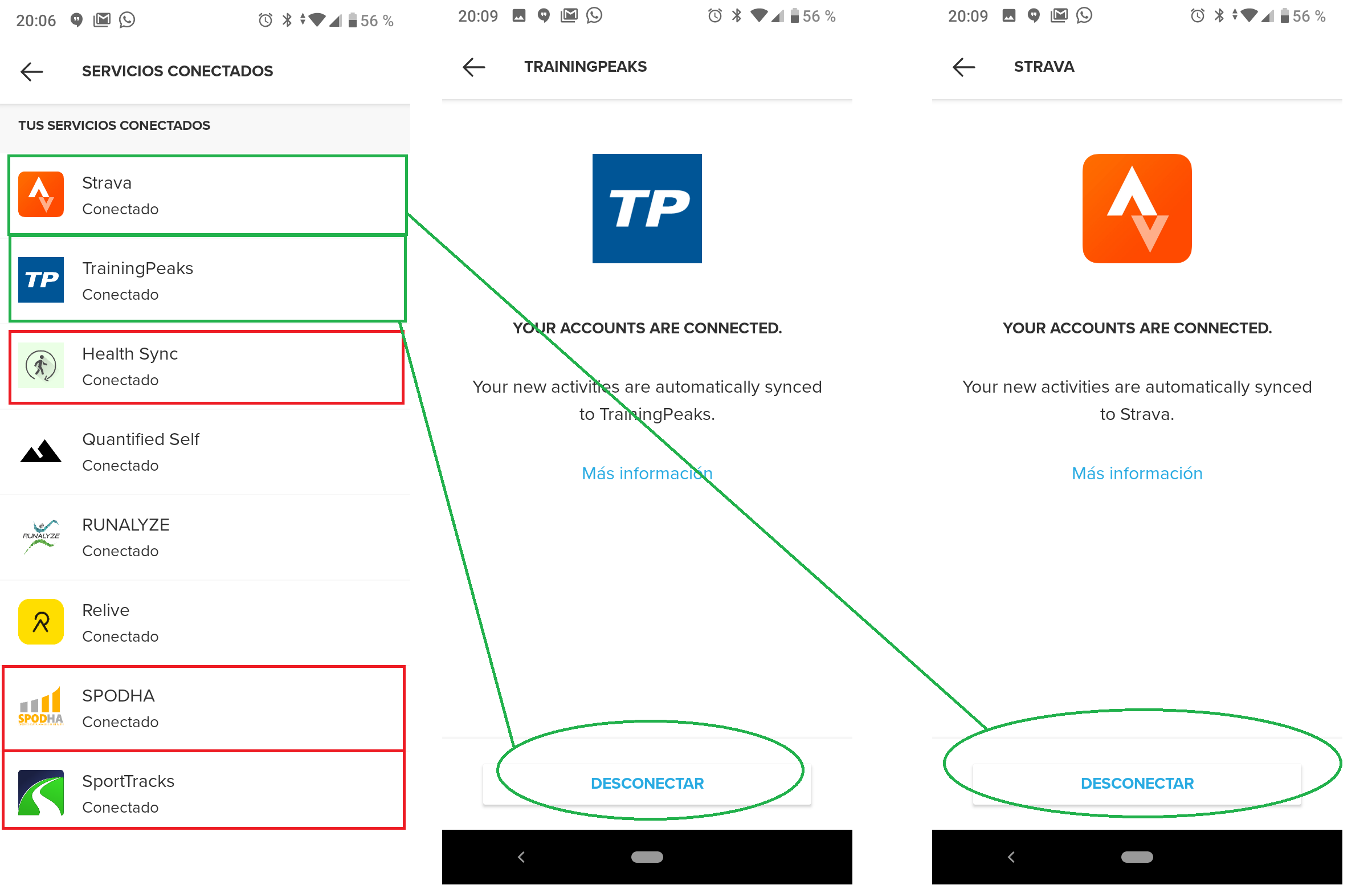
  • Anything related to issues with Partner Sync (Strava, Training Peaks, Endomondo, Runanalyze)

    267 Topics
    3k Posts
    No new posts.
  • This topic is deleted!

    1
    -1 Votes
    1 Posts
    10 Views
    No one has replied
  • This topic is deleted!

    1
    0 Votes
    1 Posts
    7 Views
    No one has replied
  • This topic is deleted!

    1
    -1 Votes
    1 Posts
    14 Views
    No one has replied
  • yearly summary shows swimming distanse wrong

    swimming distance summary
    2
    2 Votes
    2 Posts
    271 Views
    isaziI
    @Lotta-Leveelahti can you post a screenshot? I’ll send a bug report to Suunto of you do.
  • Suunto App rating in Google Play Store

    Moved
    8
    1
    3 Votes
    8 Posts
    558 Views
    Dimitrios KanellopoulosD
    Check also the reviews. We had an expected huge drop after MC closed down. So yeah of you guys wanna rate it go ahead.
  • This topic is deleted!

    1
    0 Votes
    1 Posts
    14 Views
    No one has replied
  • Trends - view summaries

    3
    2 Votes
    3 Posts
    218 Views
    freeheelerF
    @Ketoohs please mention this in surveys. I do that frequently
  • This topic is deleted!

    1
    1
    0 Votes
    1 Posts
    10 Views
    No one has replied
  • This topic is deleted!

    1
    0 Votes
    1 Posts
    3 Views
    No one has replied
  • 0 Votes
    2 Posts
    206 Views
    TheBatFreak777T
    As an update after some additional research, it does appear that the Suunto App is designed to show the Dive Profile. The following image is taken from Suunto’s website related to their D5 dive computer and shows the graph in the move details. Ultimately, it is odd as the FIT files are directly from the Suunto App, via import from Movescount, and they do contain the dive profile data. I’m not sure if I’m doing something stupid that is preventing the graph from showing up in the app or if it is something on Suunto’s end with importing from Movescount. [image: 1673068055586-suunto-app-diving-450x450px-01.png]
  • iPad and SA

    7
    0 Votes
    7 Posts
    380 Views
    herlasH
    @zhang965 Thx, so it’s OS prerequisite, not HW.
  • This topic is deleted!

    1
    -1 Votes
    1 Posts
    14 Views
    No one has replied
  • Crop activity

    Moved
    6
    9 Votes
    6 Posts
    2k Views
    MdzOttM
    @Panagiotis-Kritikakos a major plus
  • SA iOS 2.19

    14
    1
    8 Votes
    14 Posts
    1k Views
    wmichiW
    The colored HR graph is really useful. But it would be nice, if the app would persist the last used setting of this graph. I always want the HR graph first, but whenever I open an outdoor activity (with GPS), elevation (1st metric) and heart rate (2nd metric) are selected. So I always need to deselect heart rate and then select heart rate for the first metric to get the colors. And if I open this graph in full screen mode, my selected metrics are NOT displayed in fullscreen. Instead the selection is always reset to height/hr/speed (at least this is the case for cross country skiing) and I need to make my changes again. So if the user has selected HR as the first metric in non fullscreen mode, it should also be the first metric in fullscreen mode. That’s what I would expect as a user. Another nice addition would be, if the interval sections of a structured interval would be displayed inside this graph (at least in full screen mode). And even better: if those sections could be selected and some metrics about the selected section would be displayed. For example: min/max/avg HR or some info about how long I have spent in the targeted HR zone (maybe as percentage). But to be honest: I don’t know how all of this can be displayed on a smartphone screen. Maybe this is something for tablets
  • From Ambit3 to S9 Baro..cannot add gps coordinates manually?

    25
    2 Votes
    25 Posts
    3k Views
    isaziI
    @marco9999 I moved it.
  • How to use Stryd with SA

    Moved stryd
    26
    0 Votes
    26 Posts
    4k Views
    herlasH
    This well known 7 sec delay in getting power read from Stryd (wind version) at the start of the run in still present with S9PP. Interesting enough, while I was waiting for my S9PP to arrive, used A3P paired with Stryd and surprised to discover this delay is not present with A3P Look at the screenshots from the info in the Fit file from Intervals ICU for runs with S9PP and A3P. It’ll be interesting to see if S9PP own wrist power also has this delay? I bet it doesn’t but I haven’t tested yet. Also, wondering if the either the new Stryd Pod coming out mid November helps in this 7 secs power read delay and/or the new Stryd S+ app On side notes from the fit file , HR read from Suunto chest strap starts in 1 sec with A3P and 2 secs with S9PP, and cadence coming from Stryd on S9PP also sees same delay as power. S9PP [image: 1667668389140-screen-shot-2022-11-05-at-12.02.33.png] A3P [image: 1667668396453-screen-shot-2022-11-05-at-12.01.58.png]
  • This topic is deleted!

    1
    0 Votes
    1 Posts
    2 Views
    No one has replied
  • This topic is deleted!

    1
    0 Votes
    1 Posts
    5 Views
    No one has replied
  • This topic is deleted!

    1
    0 Votes
    1 Posts
    4 Views
    No one has replied
  • This topic is deleted!

    1
    0 Votes
    1 Posts
    3 Views
    No one has replied

Suunto Terms | Privacy Policy