suunto race s wifi problem after update 2.39.20
-
@danudyk thank you for reminder. I did not note for that release version 2.37.48, Actually I propose at very beginning suunto support as workaround to do that as they already done for suunto peak pro, to repack sw version 2.37.48 into higher version number to be able for watch to pool that as an update (check links below). They answered that is not an option. I tried to revert into version out of box 2.35.36 using hidden menu as shown in photos at top of this topic but, watch turn into safe mode and not succeeded.
-
Update suunto release ‘service announcement’ and confess issue with sw 2.39.20 and offer some workaround as a solution, while they are working on permanent fix.

-
@disadisa today i have successfully downgrade to 2.37.38
check this link below
https://www.suunto.com/Support/faq-articles/lifecycle/2.39.20-trouble-shooting/ -
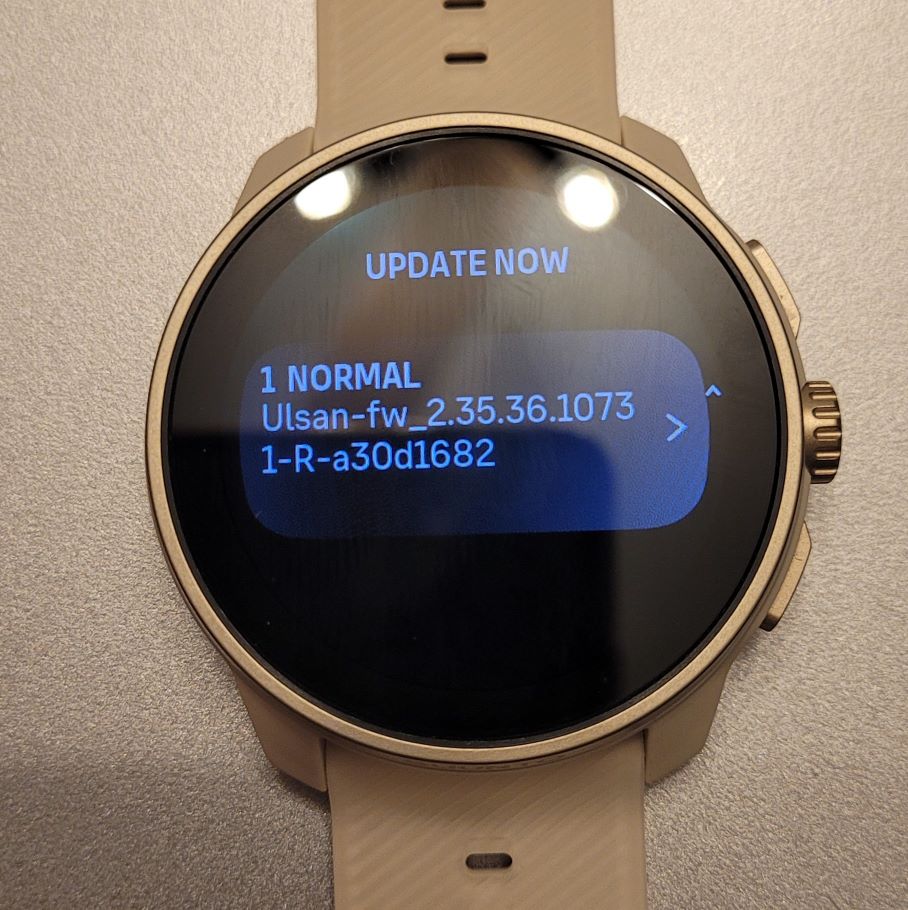
Update - I check suunto app on phone and saw notification about necessary steps to download downgrade sw version using firefox browser with enabled notification to be able current download open into suunto app. It worked, suunto app downloaded OTA 2.37.48 and transferred ono watch. I need help from you also, if someone has exact file name OTA package on watch started with Ulsan-fw_2.39.20… like on photo below? I need exact name of file Ulsan-fw_2.39.20 to be able to download that package also because I haven’t on my watch. In previous unsuccess attempt of downgrade sw version I had notification about safe restore and watch reverted to sw version 2.39.20. On that way I will have all necessary OTA package downgrade procedure to sw version 2.37.48 to be able for watch to revert itself to working sw version. Tahnk you.
-
@danudyk Thanks
-
@disadisa Is the wifi working now on your race S with the new software update?
-
Hello,
After Update to 2.40.38 I can’t enable Wi-Fi on my Race S, both from phone or watch, so I can’t download offline maps.
Is there anyone who has the same problem? -
@Dj_afrolexios yea, I have the same issue, cannot enable Wi-Fi in the watch and neither over the app.
-
Hi to all, sorry for late answer. We tested watch intensively. Did not done upgrade on version 2.40.38, still on version 2.39.44. Everything working on version 2.39.44. If you have issue try to downgrade to previous version software. BR
-
@Dj_afrolexios have the same issue here, just bought race s yesterday, immediately upgrade to 2.40 firmware because i don’t know there is an issue on this firmware, it only connect to wifi for 3 second, then disconnected, tried downgrade to 2.35, but stuck on safe state mode.
-
@Lukmanul-Hakim sadly no news from Suunto. I have a Race S. I was able to download maps before upgrading. Now not able to enable wifi connection.
-
@cenkturkinan have you tried to do a reset?
Settings -> General -> Reset settingsI had the same issue, was not able to toggle wifi on after the upgrade, but after the reset it went back to normal.
-
@aiv4r thanks. I will try.
-
@aiv4r It worked!!! Thank you.
-
after everything you already tested, this really does sound more like a firmware issue on the Suunto Race S after 2.39.20 than a router/network problem.
The interesting part is your router logs showing absolutely no connection attempt from the watch. That usually means the WiFi module itself is not initializing correctly after the update, not just failing authentication.
I d still try one last simple test: connect it to a very basic 2.4 GHz network without mesh/repeator features, WPA3, band steering, or hidden SSID. Some devices become weirdly picky after updates. But since you already tested multiple routers and hotspots, I honestly doubt your network is the real issue here.
Feels like the update broke WiFi handling for some units, especially since the problem started right after the firmware upgrade and before the maps could finish downloading.


Hello! It looks like you're interested in this conversation, but you don't have an account yet.
Getting fed up of having to scroll through the same posts each visit? When you register for an account, you'll always come back to exactly where you were before, and choose to be notified of new replies (either via email, or push notification). You'll also be able to save bookmarks and upvote posts to show your appreciation to other community members.
With your input, this post could be even better 💗
Register Login