Battery drain after update 2.44.46 (2025 Q3) on Vertical Watch
-
@jjpaz I actually have an iPhone… so after each activity, do you go to Settings → Connectivity → Paired devices and unpair everything that’s listed?
And do you also perform a soft reset, which in any case resets the daily energy levels to 70% and messes up all the stats? -
@jjpaz I find that a very interesting thought.

-
@jjpaz said in Battery drain after update 2.44.46 (2025 Q3) on Vertical Watch:
(I’m wearing Race S for sleep tracking).
I think this is pretty important, it seems that HRV tracking takes a toll on the battery, so if you don’t use the Vertical for sleep tracking that could explain why your battery drain is lower than what is obsreved on this thread
-
@fedequei No, I don’t unpair devices, I keep then paired. I power off the BT device (turn off Coospo armband or disconnect H10 sensor in my case) and then I soft reset Vertical watch. With this process SV doesn’t try to connect to BT devices until I start a new activity. If I don’t reset the watch it tries to connect to BT devices even in watchface mode and draining battery.
-
@Elipsus I was wearing SV for sleep tracking several weeks ago and battery drain was around 1-2% by night (5-6% daily) so there wasn’t a huge difference. The big difference is if I don’t reset the watch and keeps trying to connect to the BT devices. In that case my daily battery drain was around 17-20% (with same sw version)
-
@jjpaz I am on Android and I do have battery drain
-
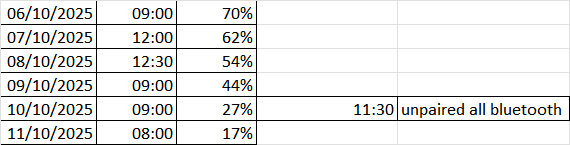
After unpairing all Bluetooth devices from the watch, including the Suunto app itself (I also forgot the Suunto watch from my iPhone’s Bluetooth list), yesterday at 11:30 a.m. — this morning at 8:00 a.m. I was already down to 17%. So I lost another 10% (a bit more) in 24 hours. There’s clearly another issue that’s not related to Bluetooth.
-
@fedequei Have you restarted your watch after unpairing all Bluetooth devices? (To make sure there is no more Bluetooth related process still running in background)
-
@sebchastang Yes, I did that at 14:00
-
Has anyone tried using a different watch face? I’m wondering if certain faces or complications can be causing the drain with newer firmware versions…
-
@inkognito yes, I’ve changed the watchface for the least-demanding: only time and date. First, it seemed to help a bit (instead of 10-12%/24h consumption was about 6-8%). Now, after the night with DND-on , watch used 8%

I was considering buying Vertical 2 but, to be honest, something wrong is going on with Suunto’s software development -
Has anyone tried standing on one leg screaming this sucks?
-
I think the sensitivity of the backlight has changed . I believe the watch has somehow become more sensitive in turning the backlight on
-
@thanasis What do you mean exactly? In what sense sensitive?
-
@Ars-Vitae it’s easier to be turned on . I believe (as far as I can tell with one device ) that the backlight is turning on more times that it used to
-
@Dimitrios-Kanellopoulos
Yesterday I used my polar h10 chest strap but the h10 was attached to the belt with at just one point, not at to. I do this usually to avoid that the watch and the belt try to connect via Bluetooth to avoid battery drain in my chest strap. But now my watch really often did a “beep” sound without showing something on the watch. After beeing very annoyed I set my watch into flight mode and there was no more beeping. So I think there’s an Bluetooth issue. Now I have disconnected the chest strap and set the watch in flight mode all the time. Will see if this affects battery drain. -
@Dimitrios-Kanellopoulos All right, I charged med watch sunday 12.10. 100 % at 19.00. Have 24/7 OHR and had the watch in flight mode all the time. Monday 13.10. 99 % left. That means 1 % battery drain in 16 hours vs. 12 % battery drain a day with blutooth connection on. See my previous post about the behaviour of the HR belt. I think the hotfix has to handle that in order to stopp the battery drain after tha last update.
Instagram: https://www.instagram.com/helgelandsbukken/
https://www.instagram.com/suunto_adventures/
IG: Helgelandsbukken, suunto_adventures
Vimeo: vimeo.com/helgelandsbukken
Blogg: https://turblogg.midnattsola.com -
@Stefan-Kersting I have something interesting

I’ve tried the same approach with Flight mode - watch is draining as before and syncing (or trying to sync to be more precise) despite flight mode on. I don’t know how this is even possible. -
@Belial how is this even possible?
Instagram: https://www.instagram.com/helgelandsbukken/
https://www.instagram.com/suunto_adventures/
IG: Helgelandsbukken, suunto_adventures
Vimeo: vimeo.com/helgelandsbukken
Blogg: https://turblogg.midnattsola.com -
@Stefan-Kersting @Belial I think it was discussed somewhere recently, but I cannot find it. But… if you turn off airplane mode via control panel, then all the connections remain on. But if you do it via Settings - Connectivity - Airplane mode, then it turns everything off. I don’t know if it’s a bug or working as designed.












Hello! It looks like you're interested in this conversation, but you don't have an account yet.
Getting fed up of having to scroll through the same posts each visit? When you register for an account, you'll always come back to exactly where you were before, and choose to be notified of new replies (either via email, or push notification). You'll also be able to save bookmarks and upvote posts to show your appreciation to other community members.
With your input, this post could be even better 💗
Register Login