Course planner feature suggestion
-
@DrSilverthorn
time predictions would be very useful - second thata propos notes for course points - this is already available, at least in Suunto mobile app. you can specify type of point, add name and custom description. it’s missing in web planner iirc
Race 2 titanium + Wing 2 | 9 Baro titanium | Ambit3 Peak
-
@DrSilverthorn There are some ways to experiment. What I do:
- I import the race gpx-file
- I add waypoints on the route where there is something important.
- in the title I say something like for an aid station “church - 1300 - Warm food”
- I make a custom sports mode where I designate one datafield for ETA of next route point.
That way I’ll see it during the race. I’m not sure how many characters the title may be to be shown on your watch. There are some effects you don’t want:
- If they change the route due to heavy weather, you have to work out aid stations again.
- the hill guide change when you zoom in. Instead of showing only one climb, it shows the route till the next waypoint.
- If you use the description, it won’t be shown on your watch.
I haven’t test this during a race yet, only in training. Hope to test this in may
-
@mich-heller yes, the problem is that the description isn’t visible on the watch.
Suunto Race Ti, Vertical Ti, Vertical 2 Ti, Garmin Enduro 1/2, Polar VV2
-
@Horizontal_2 I don’t see any characters for the title of the waypoint on my watch (Vertical 2). So maybe Suunto needs to expose this in a data field. And create another one with the predicted time. They would still need to add the time limit metadata for the waypoint though.
-
@DrSilverthorn weird. i used description field for detailed instructions for where the trail goes and i’m pretty sure i saw them during run

-
@mich-heller you did? Weird. Couldn’t get that right. I’ll try again.
Does is pop up or do you see the description elsewhere?
-
@Horizontal_2
AFAIR description was visible only on notification about approaching waypoint -
@DrSilverthorn I thought of an interesting way Suunto could show details of an upcoming waypoint without having drastic changes in the watch UI or having to have an additional data screen.
With Climb Guidance v2, the function of the elevation profile already includes showing upcoming waypoints. There are already multiple levels of zoom:
- the entire route
- up to 3 upcoming waypoints
- up to 2 upcoming waypoints
- up to the upcoming waypoint
For the reference here is the picture of what I am describing:
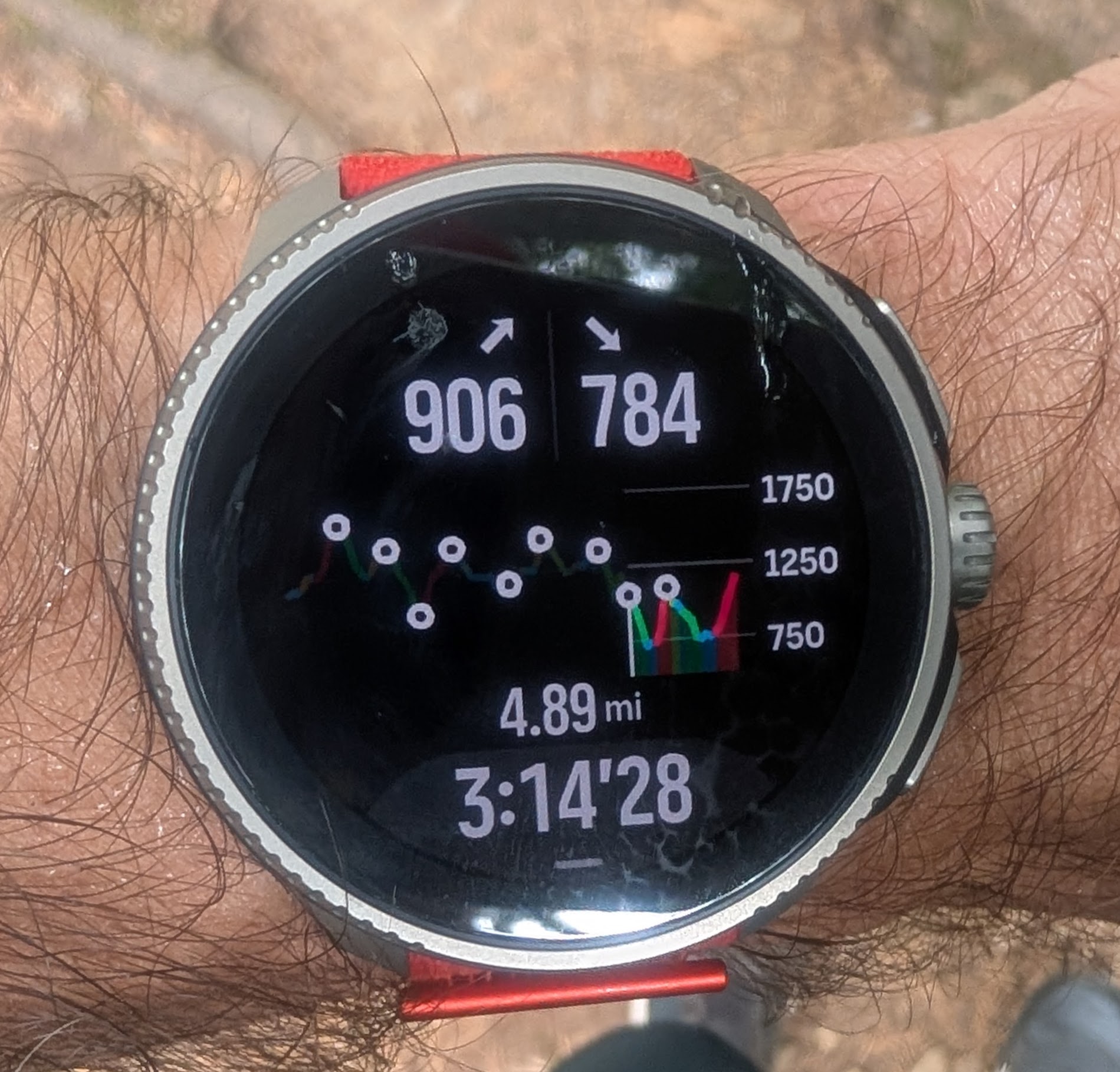
Imagine if there was an additional “zoom level” that “zooms” into the upcoming waypoint alone - without the profile but with all the details - the name, the description, remaining distance, and potentially ETA/ETE, etc
Also, speaking about the climb guidance v2 screen above, as was discussed in https://forum.suunto.com/topic/13601/climb-guidance-2.0-issue-not-all-zoom-levels-are-available-at-the-end-of-the-route-see-picture, it would be great to accompany the distance shown there with the waypoint name that corresponds to that distance. That way, by zooming in and out it would be easy to review multiple upcoming waypoints with distances to them.
-
@sky-runner this could work. Maybe the degree to which you prefer one solution vs another is tied to how obsessively you’re watching the info
 I think I’d prefer the configurability of a data field option, which would probably involve fewer button presses.
@mich-heller now that you mention this, I may have seen it flash up on the screen. But it was very quick and easy to miss.
-
@DrSilverthorn said in Course planner feature suggestion:
@sky-runner this could work. Maybe the degree to which you prefer one solution vs another is tied to how obsessively you’re watching the info I think I’d prefer the configurability of a data field option, which would probably involve fewer button presses
If there was a dedicated waypoint data screen and I could customize it, I’d definitely use that. But in general I don’t like Suunto’s approach of mixing navigation specific data fields with other data fields on regular data screens.
-
I don’t like having unused data fields when navigation isn’t used. I also don’t like an idea of having a special sport customization just for the case when I use navigation. In my opinion, navigation specific data should only be visible when I use navigation and otherwise be hidden. Garmin solved that by allowing users to customize navigation specific data screens that only show up during navigation.
-
My eyesight isn’t that great anymore so I don’t like having a lot of data fields on each data screen (4 or 5 at max), which means with only 3 data screens I can’t even afford to waste some of the space for navigation specific data fields like distance to next waypoint or ETA. I used that in the past with Suunto 9, but would definitely prefer a cleaner solution. When I used Garmin. I always enabled the “Up Next” feature, which is a dedicated data screen that shows up to 4 upcoming waypoints with their names, symbols, and remaining distances to them.
-




Hello! It looks like you're interested in this conversation, but you don't have an account yet.
Getting fed up of having to scroll through the same posts each visit? When you register for an account, you'll always come back to exactly where you were before, and choose to be notified of new replies (either via email, or push notification). You'll also be able to save bookmarks and upvote posts to show your appreciation to other community members.
With your input, this post could be even better 💗
Register Login