Suunto app Forum Suunto Community Forum
    • Recent
    • Tags
    • Popular
    • Users
    • Groups
    • Register
    • Login

    Suunto Run Track Mode Calibration

    Scheduled Pinned Locked Moved Suunto Run
    9 Posts 3 Posters 1.6k Views 5 Watching
    Loading More Posts
    • Oldest to Newest
    • Newest to Oldest
    • Most Votes
    Reply
    • Reply as topic
    Log in to reply
    This topic has been deleted. Only users with topic management privileges can see it.
    • TrailEyesT Offline
      TrailEyes Gold Members
      last edited by

      For those who have been using the Run for a bit, can you share if there is a need for “calibration” on a track, and if so, how to do that?

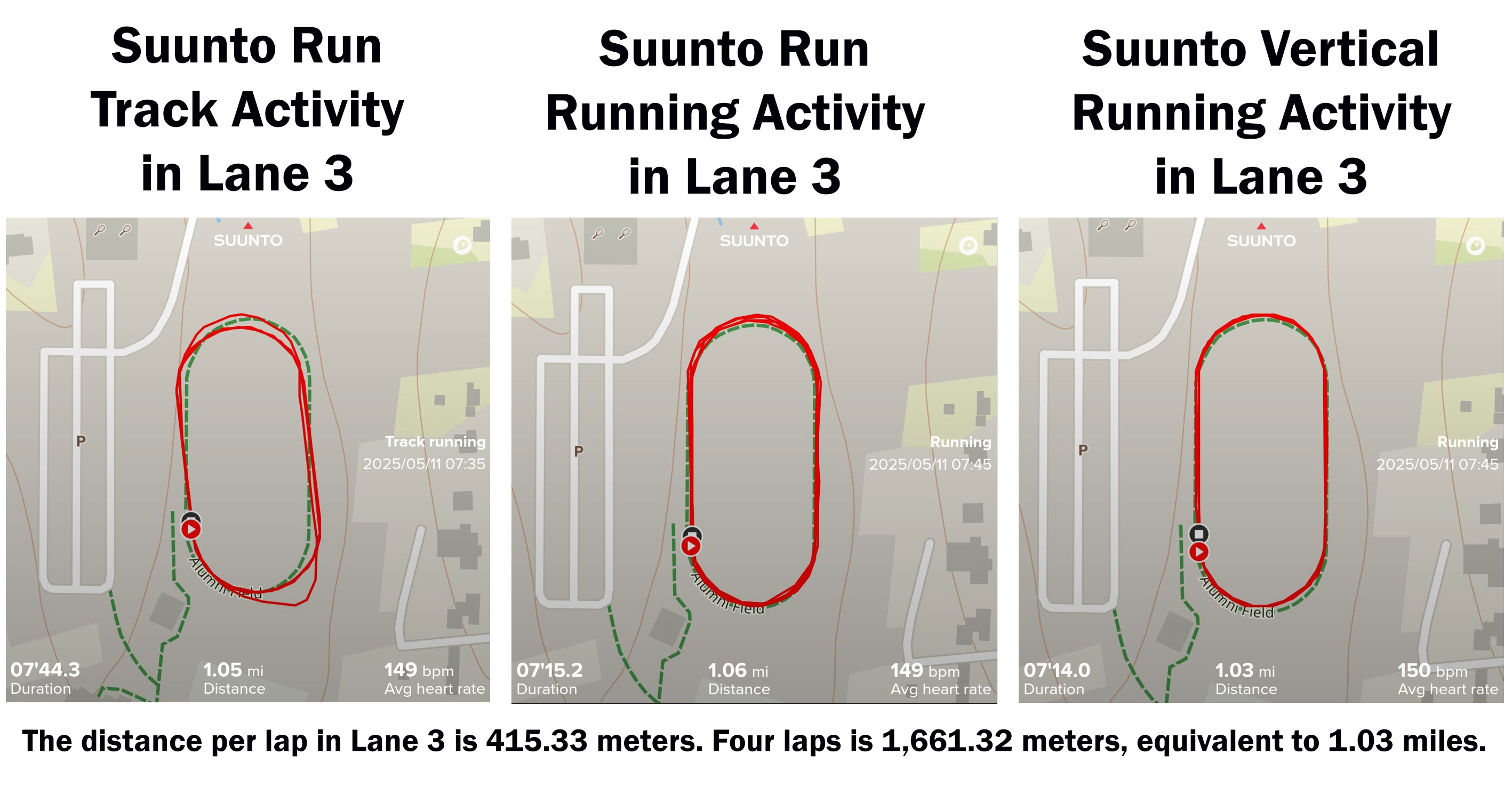
      I did a test of the Run before writing about it at launch, and these were the results.
      1000013242.jpg

      But I saw that DCRainmaker talked in his video review about calibrating the device. I didn’t see that mentioned in the user guide, and my Suunto contact didn’t say anything about needing to do that when he sent the Run to me. I assume DCR had some familiarity/expectation to calibrate the Run because of his experience with Garmin devices.

      I plan to do another Track test of the Run this coming week, so I want to make sure I don’t miss any steps! Thanks!

      Suunto Vertical 2 / Run / Race S (gifted away) / Vertical / 9 Peak Pro (gifted away) / 9 Baro / 5 Peak (lost on adventure) / Vector
      -----------‐-----------
      Trail Runner / Hiker / Kickboxer
      Instagram: @rytipps

      2 1 Reply Last reply Reply Quote 0
      • 2 Offline
        2b2bff Silver Members @TrailEyes
        last edited by

        @TrailEyes so you are saying, that the Vertical is closer to the actual distance albeit not having a specific track run mode? 😉

        Race S

        TrailEyesT 1 Reply Last reply Reply Quote 0
        • TrailEyesT Offline
          TrailEyes Gold Members @2b2bff
          last edited by

          @2b2bff Yep! The tracks both looked better and measured out more accurately on the Vertical’s standard Running setting.

          Suunto Vertical 2 / Run / Race S (gifted away) / Vertical / 9 Peak Pro (gifted away) / 9 Baro / 5 Peak (lost on adventure) / Vector
          -----------‐-----------
          Trail Runner / Hiker / Kickboxer
          Instagram: @rytipps

          EgikaE 1 Reply Last reply Reply Quote 1
          • EgikaE Offline
            Egika Platinum Member @TrailEyes
            last edited by

            @TrailEyes which FW version is in your watch (or was when you did this comparison)?

            There have been changes in the algorithm…

            t6, S6, Elementum Terra, Ambit 3 Sapphire, Spartan Ultra Copper, Traverse Alpha, S7 Graphite LE, S9B Ambassador, S9P Titanium, S9PP Titanium, Vertical All Black, Race Titanium Charcoal, Race S Titanium Courtney, Run Lime, Race 2, Vertical 2 Titanium

            TrailEyesT 1 Reply Last reply Reply Quote 0
            • TrailEyesT Offline
              TrailEyes Gold Members @Egika
              last edited by

              @Egika That was on .38, just two days before the Run launched. I updated to .40 this past Friday. So I’m curious if anything may have changed specific to Track mode (I haven’t seen update notes for it).

              Suunto Vertical 2 / Run / Race S (gifted away) / Vertical / 9 Peak Pro (gifted away) / 9 Baro / 5 Peak (lost on adventure) / Vector
              -----------‐-----------
              Trail Runner / Hiker / Kickboxer
              Instagram: @rytipps

              EgikaE 1 Reply Last reply Reply Quote 0
              • EgikaE Offline
                Egika Platinum Member @TrailEyes
                last edited by Egika

                @TrailEyes ok, this is the most recent one.

                But remember: the track running algorithm needs about 2-3 laps for calibration.
                The track will be saved in the watch after calibration.
                Just after a soft reset or an update, that calibrated running track will be erased and you will need to re-calibrate.
                I suggest you try like one activity for calibration and then in the next one you will see the perfect track 🙂

                t6, S6, Elementum Terra, Ambit 3 Sapphire, Spartan Ultra Copper, Traverse Alpha, S7 Graphite LE, S9B Ambassador, S9P Titanium, S9PP Titanium, Vertical All Black, Race Titanium Charcoal, Race S Titanium Courtney, Run Lime, Race 2, Vertical 2 Titanium

                TrailEyesT 1 Reply Last reply Reply Quote 0
                • TrailEyesT Offline
                  TrailEyes Gold Members @Egika
                  last edited by

                  @Egika Thank you, that is the approach I’ll try this week.

                  Suunto Vertical 2 / Run / Race S (gifted away) / Vertical / 9 Peak Pro (gifted away) / 9 Baro / 5 Peak (lost on adventure) / Vector
                  -----------‐-----------
                  Trail Runner / Hiker / Kickboxer
                  Instagram: @rytipps

                  EgikaE 1 Reply Last reply Reply Quote 1
                  • EgikaE Offline
                    Egika Platinum Member @TrailEyes
                    last edited by

                    @TrailEyes the process is the same for all watches, that have this mode.

                    Except Apple Watch. I think they have a data base of track in their firmware. No idea how complete this is though…

                    t6, S6, Elementum Terra, Ambit 3 Sapphire, Spartan Ultra Copper, Traverse Alpha, S7 Graphite LE, S9B Ambassador, S9P Titanium, S9PP Titanium, Vertical All Black, Race Titanium Charcoal, Race S Titanium Courtney, Run Lime, Race 2, Vertical 2 Titanium

                    TrailEyesT 1 Reply Last reply Reply Quote 0
                    • TrailEyesT Offline
                      TrailEyes Gold Members @Egika
                      last edited by

                      @Egika That’s why I surmised in my initial post that DCR must’ve had a foundation with it via his experience with Garmin. Unfortunately, Suunto didn’t detail how this feature works, and I couldn’t find a calibration explaination in the user manual (perhaps I missed it?).

                      I haven’t used a Garmin regualrly in about four years, and even when I was with that brand, I never ran on a track. So as I test it further, I want to be sure to explain any functionalities that don’t seem intuitive to the end users.

                      Suunto Vertical 2 / Run / Race S (gifted away) / Vertical / 9 Peak Pro (gifted away) / 9 Baro / 5 Peak (lost on adventure) / Vector
                      -----------‐-----------
                      Trail Runner / Hiker / Kickboxer
                      Instagram: @rytipps

                      1 Reply Last reply Reply Quote 1
                      • pavel.samokhaP pavel.samokha moved this topic from Watches on

                      Hello! It looks like you're interested in this conversation, but you don't have an account yet.

                      Getting fed up of having to scroll through the same posts each visit? When you register for an account, you'll always come back to exactly where you were before, and choose to be notified of new replies (either via email, or push notification). You'll also be able to save bookmarks and upvote posts to show your appreciation to other community members.

                      With your input, this post could be even better 💗

                      Register Login
                      • First post
                        Last post

                      Suunto Terms | Privacy Policy
