Gustin is now available in the Suunto app
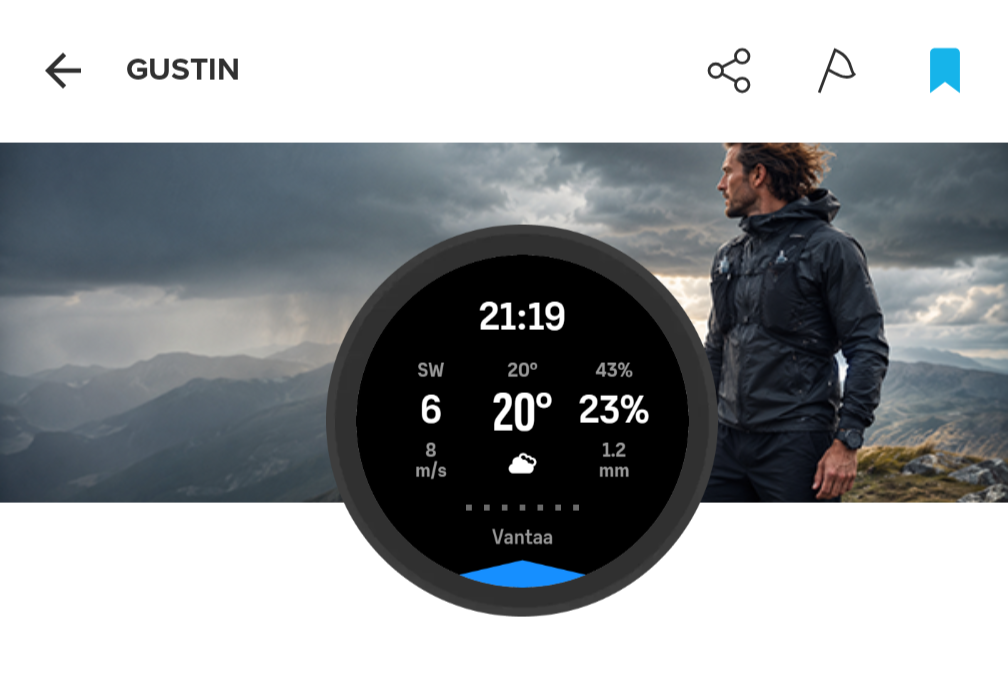
-
@Mads-Hintz-Madsen this is how fused direction works. If you’re moving, direction is taken from GPS heading, not from compass. Compass is used when stationary.
-
@Mads-Hintz-Madsen this is how fused direction works. If you’re moving, direction is taken from GPS heading, not from compass. Compass is used when stationary.
I don’t exactly understand how fused direction works or is supposed to work.
But I thought the idea of the blue arrow is to indicate the direction from where the wind comes.
If I’m on the bike and check the arrow then the direction of the arrow is fixed, i.e., if I rotate my hand 90 degrees then the arrow also rotates 90 degrees meaning that the arrow now indicates that the wind is coming from a completely different direction. Basically, the arrow doesn’t reflect the actual wind direction.
Maybe I’m missing something and that is the intended behavior when moving?! Only when I’m stationary, does the arrow reflect the actual wind direction no matter in what direction I rotate the watch.
-
Maybe I’m missing something and that is the intended behavior when moving?!
When you are moving, it is assumed that the top of the watch (the 12 o’clock position) is your direction of movement, so rotating the watch will not affect the position of the arrow.
This is the same way it works when viewing the map or breadcrumb trail. When stationary, rotating the watch aligns it with the compass direction. When moving, the watch aligns with the direction of travel and disregards any wrist rotation.
-
@Mads-Hintz-Madsen when you’re stationary, the direction comes from the compass, so moving your hand has effect on the arrow. When you’re moving past 2 km/h, the direction is locked to the GPS vector of your movement, so moving your hand has no effect on the arrow (but when you change direction of your travel, you’ll see it). It’s the same as in the map / navigation view.
-
@Łukasz-Szmigiel Haha! We were writing the same thing at the same time. Sorry I jumped in.
-
Thanks both of you for explaining!
The requirement that you need to keep the watch aligned with the direction of travel was unknown to me (I never use the maps)

On a road bike, I usually check the watch at a 30 degree angle to the direction I’m going so I either need to change that habit or make the correction in my head
 Either way I am happy that I now know how it works!
 -
Thank you for developing a really useful app - I’m sure a lot of developer/testing hours went into it. There was a note in your online notes that the units followed the watch settings. However, I am finding that the wind speed is showing as m/s rather than mph, as shown for the speed in an activity or the windspeed in the weather widget.
I probably have some unusual units settings:
General units = Metric
Distance = mi,ft,in
Elevation = ft
Weight = kg
Temp = deg C
Pressure = hPaSo it’s a mixture of metric and imperial. Is there a way to show the wind speed in mph? Thanks!
-
@RichardM thanks, I’ll take a look into it but I’m having a rather difficult time right now, so it’ll have to wait.
-
@Łukasz-Szmigiel Of course - no rush, and appreciate you are doing this voluntarily. I can always roughly convert speeds in my head - mph is roughly double m/s. By the way, it’s a Vertical 2 watch. And thanks again for the app!
-
I’ve uploaded Gustin v1.08 to Suunto Api Zone but I’m not sure when it’s going to be public as there are some issues in Api Zone related to app updates.
This is mainly performance and bugfix release.
Changelog
1.08 (2026-09-09)
- Widened the precipitation probability field to give the 100% value more room on one line while keeping the same text size and alignment.
- Start with Current weather and +1 h, then load just one hour ahead as you browse the forecast.
- Reuse cached hours and stop loading forecasts that are no longer needed after changing views.
- Avoid unnecessary refreshes at the half-hour mark. Refresh after 30 minutes, when the hour changes, or when the clock moves backwards.


Hello! It looks like you're interested in this conversation, but you don't have an account yet.
Getting fed up of having to scroll through the same posts each visit? When you register for an account, you'll always come back to exactly where you were before, and choose to be notified of new replies (either via email, or push notification). You'll also be able to save bookmarks and upvote posts to show your appreciation to other community members.
With your input, this post could be even better 💗
Register Login