Suunto 2.50.26 – Q4 2025 Release Notes
-
Thanks for the comment. I already wrote earlier that SuuntoPlus apps have also disappeared or are not accessible. Furthermore, this solution is at best only a partial workaround for interval training. The screens are already set up, and I don’t want to reconfigure them. Moreover, it doesn’t add up that this was supposedly the case before. My partner used these same screens earlier as well, yet there were no issues with interval training. If she wanted an interval workout, she simply selected her own small program; if not, then she didn’t. There was no need to reconfigure the screen layout, which they had customized for a reason.
Additionally, the Basic sport mode still doesn’t require this—only the personalized sport mode does. So this is really just a half-solution. A moderator has indicated that they are aware of the problem, and I hope they will fix it as soon as possible (along with the other reported issues). I also hope that when the Suunto Ocean is updated, such bugs will not occur—especially since we’ve been waiting so long for the update—and that the update will be meaningful, because there are currently many bugs and even more missing features.
Nevertheless, thank you for your help, as well as for your willingness to assist and for the suggestions. This will be acceptable as a temporary solution, and we hope that a proper fix will be available soon.
I wish the developers successful and good work! We are patiently waiting for the solutions.
-
@Tieutieu said in Suunto 2.50.26 – Q4 2025 Release Notes:
Guidance on route with way point still misses the « zoom on current segment with slope % ».
guidance behaviour with way points has been weakenedI am not sure how the slope% can be calculated considering that there may be multiple climbs and descents before the next waypoint. With that, showing slope% no longer makes sense. That’s probably why it was removed.
However, what is missing is an ability to still zoom on a single climb or descent when there are waypoints on route. For example, I have an upcoming 25K race with a single aid station. Now I have a dilemma - either I can see distance to aid station if I have a waypoint or I can track individual climbs in the climb guidance if I don’t have a waypoint, but I can’t have both at the same time.
Suunto: Ambit, Ambit 3 Peak, 9 Baro, Race S, Race Ti, Vertical 2 Ti
Garmin: Forerunner 210, Forerunner 610, Fenix 6X, Fenix 7X Ti -
Hi everyone, after last update 9PP beeps and vibrates randomly in intervals 12 - 15 minutes for no reason. Nothing appears on the display. Someone has same behavior? Thanks for reply
SUUNTO M2 - retired, SUUNTO M5 with bike pod - retired, SUUNTO Ambit3 Peak Sapphire customized, SUUNTO Spartan Trainer - retired, SUUNTO 5 Peak, SUUNTO 9 Peak Pro Titanium, SUUNTO Race S
-
@AntoniusGaius
The same here…I solved using DND in the hope the issue will be solved. -
@AntoniusGaius I updated my 9PP and I don’t have this issue, even without activating DND. maybe try a reset or check if you have any connected sensor. Anyway not even my paired HR strap is causing phantom vibrations as happened with the last firmware
-
@sky-runner we made nice changes for you
 I think I need a seperate post from you
Community Manager / Admin @Suunto
Creator of quantified-self.io - sync Garmin and COROS activities to Suunto, import Suunto routes, deliver Suunto routes to Garmin courses, and analyze training data in one private dashboard. -
@Dimitrios-Kanellopoulos said in Suunto 2.50.26 – Q4 2025 Release Notes:
@sky-runner we made nice changes for you I think I need a seperate post from you
I need to try to repeat some of the previous runs on rolling terrain to see what difference in ascent / descent it makes. I haven’t had a chance yet.
Suunto: Ambit, Ambit 3 Peak, 9 Baro, Race S, Race Ti, Vertical 2 Ti
Garmin: Forerunner 210, Forerunner 610, Fenix 6X, Fenix 7X Ti -
@Dimitrios-Kanellopoulos GNSS distance/speed calculation algorithm has changed in this update or is the same than in previous update (november)? This afternoon I’ll check if my Race 2 continues measuring less distance than V1 and RaceS.
Suunto Vertical Titanium Solar, Suunto Race 2 Ti & Suunto Wing.
-
@Francesco-Pagano
Thank you for your reply!
I did a soft reset and I am waiting for a full discharge of the watch. Do you suggest an hard reset instead? -
@jjpaz I’m also curious about this. After the November update, Race 2 measures less distance than others (Garmin FR970, Coros PacePro, Apple Watch Ultra 2), before that, Race 2 measured the same as others.
-
@sky-runner I had a similar issue last year and ended up with two routes loaded (one with and one without waypoints) swapping between them. Then I decided that for a race the use (abuse) of intervals was simpler: I set the distance to remind myself the location of the aid stations.
-
@Francesco-Pagano Hi, thanks for reply. I didn’t have this issue before and it seems to be very random thing. Actually it did not do anything nice 1,5 hour so I will see. DND in not an option for me as this is only “smart” function this watch has and I’m pretty used to use it since Ambit times. I have silent mode on phone all the time. Hard reset is for me no option as well. This update didn’t brought anything what can help me with using my watch so if problem persists I will downgrade and let the 9PP end its life with me running this last stable FW. I’m looking for some upgrade with AMOLED. This small MIP starts to be really problem for me without glasses, especially anywhere but direct sunlight or very strong artificial light.
-
@sky-runner with behaviour on previous fw, the maximum zoom level was displaying current “segment” of route either is there was waypoints or not. Not the case since previous fw when there is waypoint.
Average slope % is still displayed when there is no waypoint => max zoom on route profil shows current segment and average slope (for climbs/descents - not for flat segments). -
@daveathletic @Dimitrios-Kanellopoulos
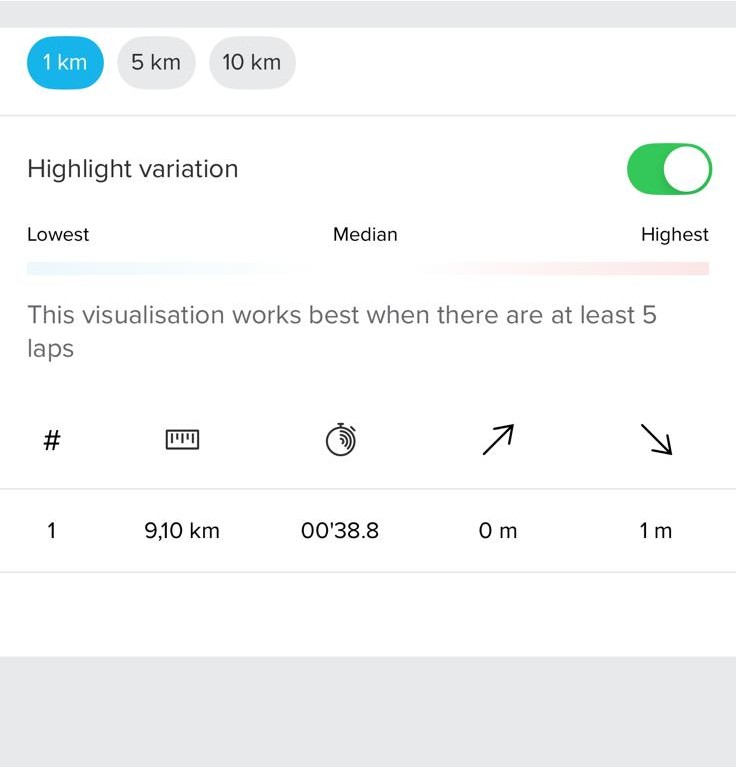
have the same with running. looks like auto-laps are not shown (1km) but other values are ok (5km)
screenshots for 9,1km trail run; no manual laps, default configuration of sport mode
1km, auto-laps - shown invalid:
5km - shown properly:
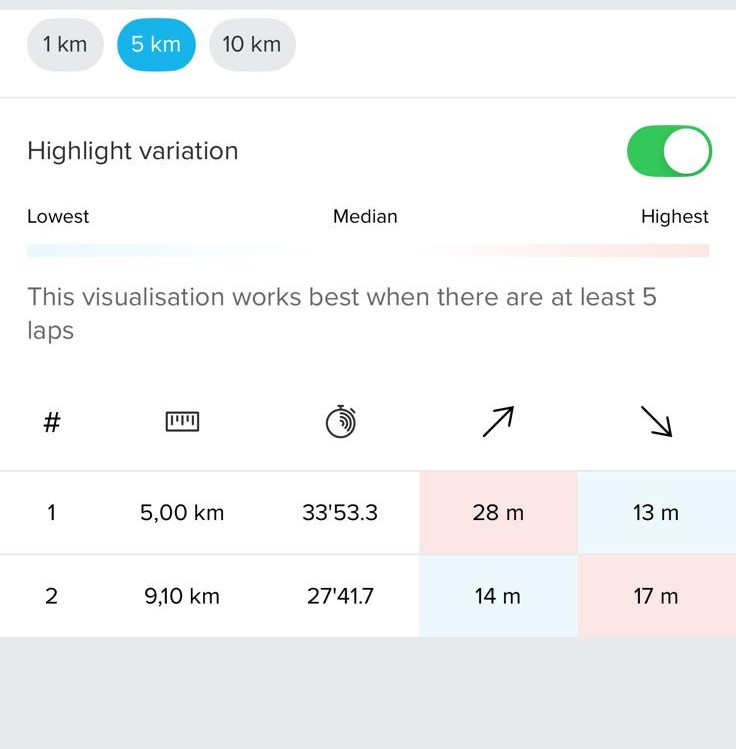
iOS 26.3, Suunto App 3.7.0, Race 2 FW v.2.50.26
-
@mich-heller check if you have an app update. Should be fixed app side
Community Manager / Admin @Suunto
Creator of quantified-self.io - sync Garmin and COROS activities to Suunto, import Suunto routes, deliver Suunto routes to Garmin courses, and analyze training data in one private dashboard. -
@Dimitrios-Kanellopoulos no updates available for me - still on 3.7.0
will wait for new version then. thanks!
-
After the update yesterday, it seems that the calculation of the sleep metrics has been changed. Before the update, I usually had a sleep quality of 80% (ranging from 78% to 82%). This morning, I suddenly see a value of 95%. The movements and HRV measured by the SR2 are not really different to the last two months. Did anyone else see that behavior as well?
-
No sleep tracking on the watch (“Not tracked”) while APP shows perfectly tracked sleep and HRV

-
@Belial I was suffering from this, days ago, on my Race S. But it was before this update. Look, at the moment it seems to have been resolved, although I don’t really know how. And I hope it lasts.

-
@Dimitrios-Kanellopoulos
No update available for me as well.
Is there one coming?







Hello! It looks like you're interested in this conversation, but you don't have an account yet.
Getting fed up of having to scroll through the same posts each visit? When you register for an account, you'll always come back to exactly where you were before, and choose to be notified of new replies (either via email, or push notification). You'll also be able to save bookmarks and upvote posts to show your appreciation to other community members.
With your input, this post could be even better 💗
Register Login