Suunto 2.50.26 – Q4 2025 Release Notes
-
@Stavrogin said in Suunto 2.50.26 – Q4 2025 Release Notes:
@Sportsfreund See the other posts. The addition of an Intervals screen is the fix.
It’s more of a temporary workaround,

for example, I can’t add the Strava guide anymore is i don’t use intervals -
The addition of an intervals screen is the fix also on my SV1. Nice catch, thanks!
Maybe it also helps for the swim activity problem?!
-
@Stavrogin as I said few posts ago
-
Hello,
So as I understand, if I want to use multiple apps, do I have to add an Intervals screen?
For example when using a stopwatch, a countdown timer, or a Ghost Runner app?
Is this really the case?The response I got is that Suunto is aware of the issue. I would also prefer to treat this as a bug and hope it won’t stay this way.
That said, thanks for the tip so mutch— as a temporary workaround, this will do.
-
Not that it is very important, but the demo mode is not available on my SV1 after installing the update. I can see it on my wife’s SRS though.
-
Hi everyone again!
I’ve gone through the comments here and checked the settings on both the watch and the app, and here’s what I found.
In the default basic sport mode, the Intervals screen setting is available. However, if the sport mode has been customized, this option is no longer present. So here lies the bug: in customized sport modes, you cannot select the Intervals display.
Several people asked where this setting is located. Just to clarify: after selecting a sport mode on the watch, before starting the exercise, you can still configure the exercise. If you scroll down, you reach the Exercise Options menu, where this could be set. In the basic sport mode, this option is available, but in a customized mode, it disappears.
I also checked whether t toggle in the basic mode needs to be turned on. I found that even if it is off, the programmed intervl workouts still appear — the watch brings over the interval workouts set in the app into the basic sport mode regardless of the toggle setting.
So, at least from what I can see, whether the programmed interval workouts are visible does not depend on the toggle, but rather on whether we are using the basic/default sport mode or a customized sport mode. In the customized version, something gets messed up.
As others have mentioned before, I’m repeating it here so everything is in one place. Re-customizing the sport mode does not help, and in my experience, neither does unpairing the device, removing and re-adding SuuntoPlus apps, or deleting and re-writing the intervals and synchronizing them.
So, for now, we’re just waiting for a bug fix.
Ambit3Peak
Run
Race2
Ocean -
@ISztárek if you read above, you just need to add an interval screen to your customised sportmode and the guides are back. Just tried myself and worked - a bit weird though, but not that bad
Currently Race I
-
@ISztárek Suunto is aware of this issue
-
Maybe I’m misunderstanding something, and if that’s the case, sorry. Could you show me where and how I can do what you’re saying?
Ambit3Peak
Run
Race2
Ocean -
Hello,
First of all great update.
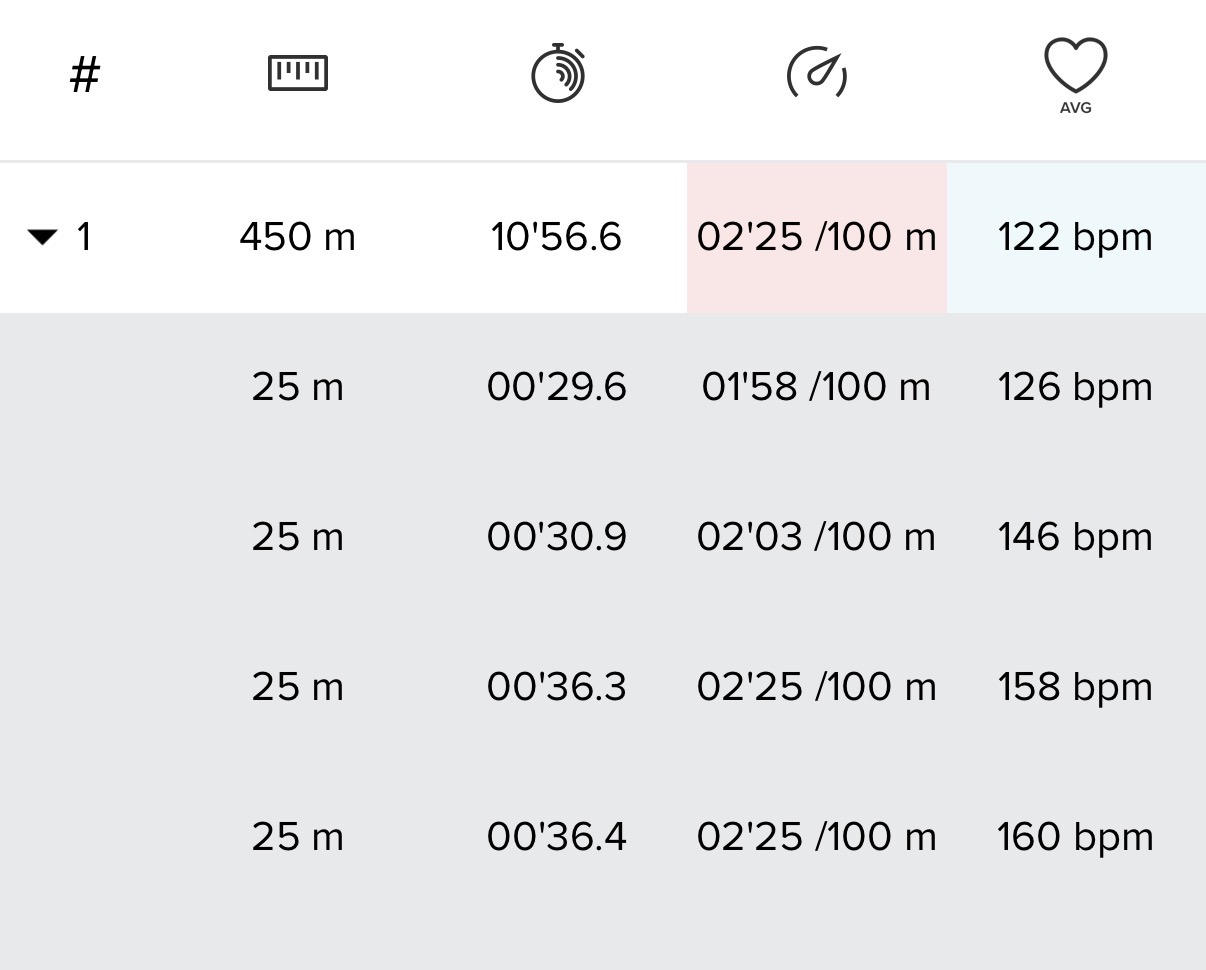
One thing I noticed today with pool swimming is that now my laps are not shown in the app anymore.
Before every 25m (or whatever pool length you set) was shown in the app. Now it only displays 1000m, 2000m, …. and so on. It worked correctly before, just happened today with the new update. Anybody can help?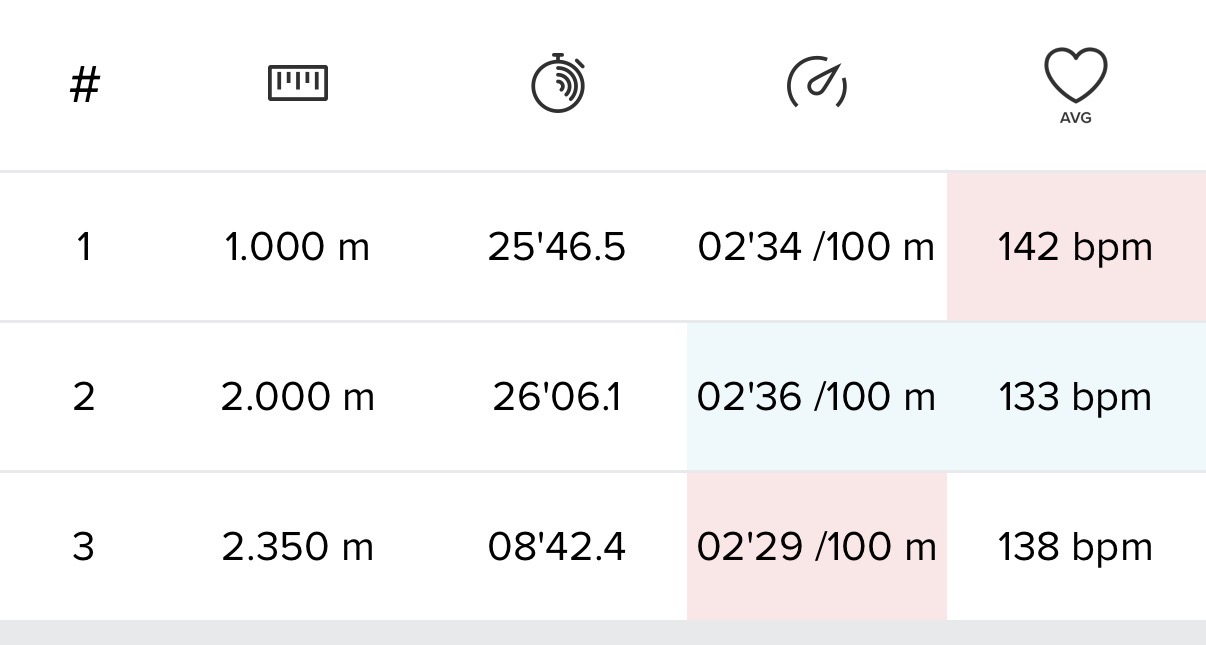
Suunto Race S Titanium
-
@ISztárek said in Suunto 2.50.26 – Q4 2025 Release Notes:
Maybe I’m misunderstanding something, and if that’s the case, sorry. Could you show me where and how I can do what you’re saying?
Android app…
Screen_Recording_Suunto.mp4 -
Thx, I will try tomorrow. In that case, I had to delete one of my screens.
-
So every change possible except probably the most important one no battery drain issue resolved?
Epic fail
-
@gone-troppo said in Suunto 2.50.26 – Q4 2025 Release Notes:
So every change possible except probably the most important one no battery drain issue resolved?
Epic fail
Perhaps before you post as negatively as possible you should read the thread!
https://forum.suunto.com/post/182495 -
@ChrisA said in Suunto 2.50.26 – Q4 2025 Release Notes:
@ISztárek if you read above, you just need to add an interval screen to your customised sportmode and the guides are back. Just tried myself and worked - a bit weird though, but not that bad
and it has always been so, even before update.
No interval screen, no inbuilt intervals workoutsSuunto’s devices at home :
Vertical titanium solar
Suunto Race S
S9pp titanium sand
Suunto Wing & Spark
S9B titanium Ambassador edition, A3P, X6 -
@Ecki-D. said in Suunto 2.50.26 – Q4 2025 Release Notes:
for the first time the individual settings like autolap or autostopp have not been reseted
Well, I agree with reference to the autolap and autostop settings, however, after the update, I found the breadcrumb setting “ON” as well as a unusual raise to wake setting “ON”.
Why unusual? While the setting was “OFF”, it still activates the display; in order to really turn it “OFF”, I’ve switched the setting “ON” and then “OFF”.
-
@Anton-Zhedik It’s an old issue. That’s because you can’t create a custom battery mode (on all AMOLED Watches) where you can define a touch exception for music controls, similar to how it works for maps.
Garmin Vivoactive 5 | Garmin Epix | Garmin Fenix 8 | Suunto Race S | Suunto Race 2 | Suunto Vertical 2 | Coros Pace Pro
-
@Egika said in Suunto 2.50.26 – Q4 2025 Release Notes:
@duffman19 the threshold is reduced and the algo is now counting 0.5m increments instead of 1m after the threshold
Nice! Now I can stop rising my arm at the top of every small climb for the smaller elevation changes to count.
Suunto: Ambit, Ambit 3 Peak, 9 Baro, Race S, Race Ti, Vertical 2 Ti
Garmin: Forerunner 210, Forerunner 610, Fenix 6X, Fenix 7X Ti -
@Tieutieu said in Suunto 2.50.26 – Q4 2025 Release Notes:
@ChrisA said in Suunto 2.50.26 – Q4 2025 Release Notes:
@ISztárek if you read above, you just need to add an interval screen to your customised sportmode and the guides are back. Just tried myself and worked - a bit weird though, but not that bad
and it has always been so, even before update.
No interval screen, no inbuilt intervals workouts“Strava segment guide” is not linked to interval workout . Now i can’t add this guide in my current custom mode without removing an existing screen and replace it by a interval screen.
The current workaround is good only if interval are really used. -
@tuxbuster Oh, it’s sad… For me, it seems so strange. Suunto watches don’t have media options, and I can accept this, but the lack of an option to comfortably control my phone’s music while I’m working out is really painful for me… It’s obvious that if Suunto has a music controls toggle in training settings, it should be comfortable to use during training
Anyway, best wishes and patience to developers and us. I hope they will stabilize the quality of the firmware in the future.













Hello! It looks like you're interested in this conversation, but you don't have an account yet.
Getting fed up of having to scroll through the same posts each visit? When you register for an account, you'll always come back to exactly where you were before, and choose to be notified of new replies (either via email, or push notification). You'll also be able to save bookmarks and upvote posts to show your appreciation to other community members.
With your input, this post could be even better 💗
Register Login