-
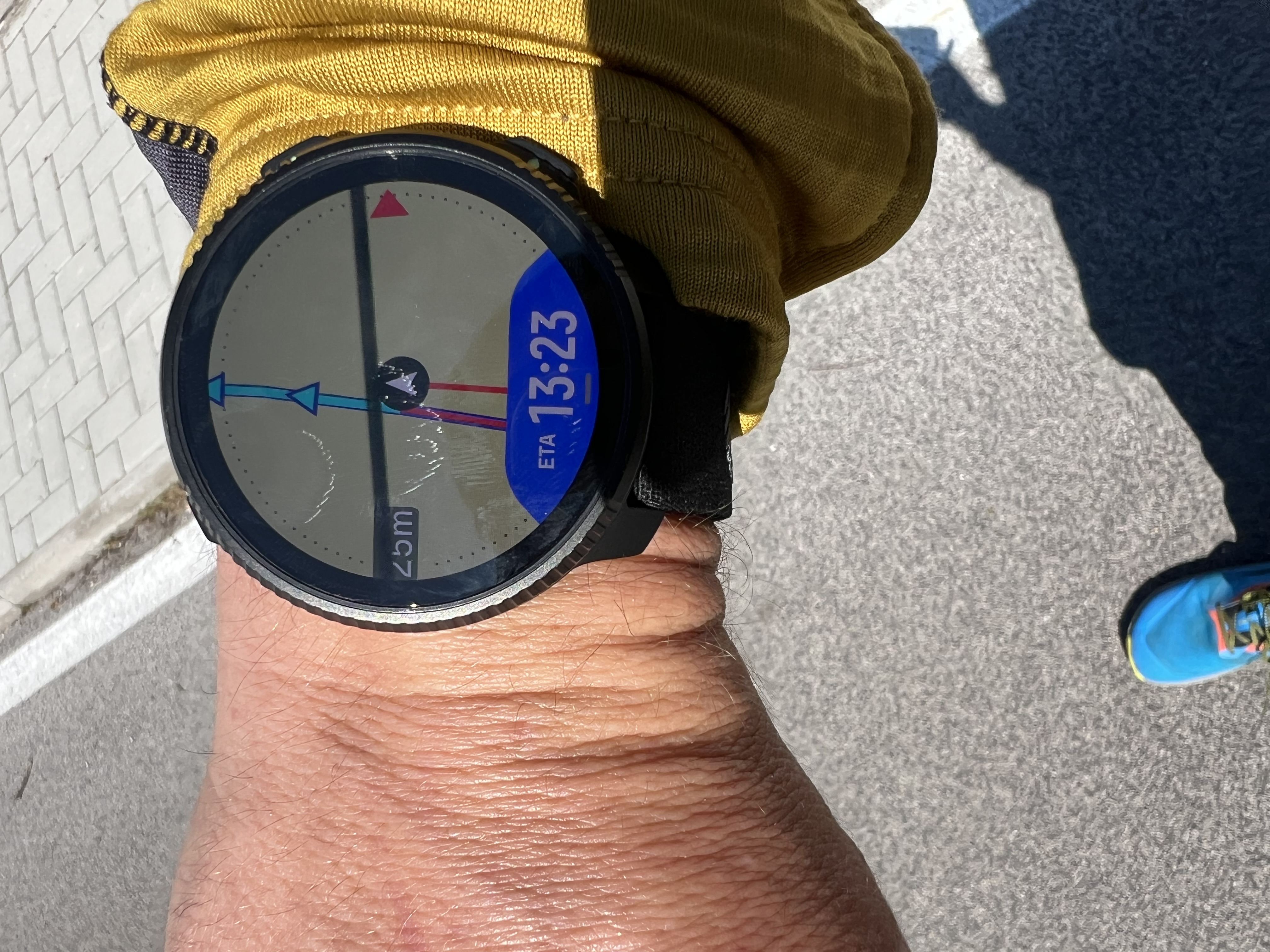
A route-metrics screen should automatically activate when following a track.
Key fields are ETE, ETA, remaining distance, and optionally viewpoints.
If, during a trail session, we load a saved route and haven’t previously created a custom sport mode, these data aren’t visible. It would make more sense to automatically enable a screen with this information as soon as a route is activated for navigation.Vertical 2 v2.56.18
-
@Manuel-Extreme I certainly wouldn’t want an additional screen automatically loading. I’m happy with the current custom sports modes.
Suunto Vertical
Suunto 9 BARO
Garmin Fenix 3, 5
Suunto Vector -
@Manuel-Extreme
I think it would be ideal to add a certain amount of data fields on the map screen according to users definition -
@Audaxjoe It can be best of both, similar to how Garmin did it in the past (although I don’t know how it works in latest Garmin software).
Imagine that there is an ability to customize navigation screens separately from sport activity screens and that those navigation data screens are added to sport data screens only when navigation is used, regardless of whether it is a custom sport mode or one of pre-built modes. In Garmin case these navigation screens are shared between all activities and they are added after the map screen. The advantage of this approach is that navigation data fields won’t pollute regular sport activities and won’t be completely unused when there is no navigation, and there won’t be a need to have two sport modes - with navigation and without - for every sport. I certainly dislike the current Suunto solution especially considering that there is no way to simply clone an already existing sport mode with all its data screens.
Also, Garmin does have next waypoint name datafield while Suunto doesn’t. That is a serious omission. There is absolutely no way to see next waypoint name in the current Suunto watch software.
-
@Audaxjoe It’s a very useful screen for those who race, especially ultra trail .
It may be less useful for those who only need basic navigation.It could be useful to offer the option to enable the screen if desired.
-
@Manuel-Extreme By the way, some of this information can now be seen on the elevation profile (climb guidance) screen. In particular, you can see waypoints and distance remaining to the next waypoint or second next waypoint, or third next waypoint.
I think Suunto could further improve that, as discussed in other discussion treads, by adding waypoint name to the climb guidance screen. That, in my opinion, would make custom navigation specific fields mostly unnecessary. ETE and ETA fields could be useful if they were accurate and considered the elevation profile. But for trail running on a variable terrain they are, as currently implemented, are not useful.
-
@sky-runner ETA and ETE do not remain static statistical values but are recalculated over time based on average speed.
I use them often (trail only) and they provide a fairly accurate prediction.This is because in races you tend to maintain a fairly constant speed with small variations.
But in case of unexpected events and a reduction in average speed, it’s useful to see the estimates recalculated without having to do the math in your head. -
@Manuel-Extreme I used ETA and ETE with Suunto Ambit 3 and Suunto 9 in the past. At the time I thought that these were based on the average pace in last 30 minutes or so. In some cases these estimates were OK but in other cases quite wrong. It all depended on what the terrain was like in the last 30 minutes vs what is ahead. I don’t know about you but when I run on trails my pace can vary 2x or perhaps even 3x depending on terrain - I tend to be quite a bit faster on downhills. Because of that I pretty much stopped using ETA and ETE.
A more intelligent implementation of ETA and ETE should consider grade adjusted pace as well as the elevation profile ahead, but I highly doubt that Suunto does that or will ever do.
-
@Manuel-Extreme The funny thing is that the majority of these metrics were easily accessible on previous watch generations, like the S9 and S9P. In the ‘Navigation options’ (accessible by pressing the lower button from the map), there is now only the text ‘NAVIGATION OPTIONS’ at the top. With those previous watches, info like the next waypoint name, ETE and ETA cycled there instead. I have tried to remind Suunto umpteen times, without luck…
-
Mission accomplished! Thanks Suunto
 ️️️
️️️
-
I isazi moved this topic from Feature Suggestions on





Hello! It looks like you're interested in this conversation, but you don't have an account yet.
Getting fed up of having to scroll through the same posts each visit? When you register for an account, you'll always come back to exactly where you were before, and choose to be notified of new replies (either via email, or push notification). You'll also be able to save bookmarks and upvote posts to show your appreciation to other community members.
With your input, this post could be even better 💗
Register Login