Software update 2.55.46 (17th. August 2026)
-
@gorhabb Good work Suunto to make the Nautic even better and provide more features to technical divers. Way back in November 2025, CCR was announced as a future feature so it is good to see it is catching up its promise.
Still missing as these were not promised;
- Improved flexibility configurable field options
- Both pressure and compass in one screen
- 1/2 Field compass widget
- Stop clear compass bearing after power save screen jumps in
- Solve Mandatory Gas Time Alarm at start of dive
- Clear and improve SAC calculation algorithm
- Improve ascent alarm to allow deflator function without alarm.
- Fix screensaver with time and %. Only uses top left screen area
- Others will follow
-
D Dimitrios Kanellopoulos pinned this topic
-
@hhouter
hello. I can’t wait to test the ccr mode in 10 days!
taking a quick look, the dive profiles seem to have disappeared… -
@hhouter I would resume:
P1 — High Priority- Safety / ascent-rate alarms
Improve the ascent-rate detection algorithm to eliminate false ascent-rate alerts caused by normal wrist/arm movements, particularly when raising an arm to operate or vent a drysuit. - Ergonomics / full screen customization
Provide much greater flexibility in configurable fields and screen layouts, including:
the ability to display Compass + Tank Pressure + Depth + TTS simultaneously;
a ½-screen compass widget;
greater freedom to select and position essential dive information. - Compass / bearing persistence
Do not automatically clear the compass bearing when the power-save screen activates or when switching between screens. A manually selected bearing should remain active until the diver explicitly clears or changes it. - Technical diving — Runtime / Dive Plan
Provide a true Runtime / Dive Plan that can be prepared before the dive and then executed and followed underwater, including:
planned depth/time segments;
ascent schedule;
decompression stops;
planned gas switches;
comparison between planned and actual runtime.
P2 — Medium Priority - Numerical ascent rate
Provide a configurable numerical ascent-rate display in m/min or ft/min, making it much more useful for precise and controlled ascents. - Gas Time alarm
Resolve the mandatory Gas Time alarm at the start of a dive and provide greater user control over whether and how this alarm is displayed. - SAC / RMV and gas-consumption analysis
Clarify and improve the SAC calculation algorithm and provide much more advanced SAC/RMV monitoring and gas-consumption statistics, both during the dive and in post-dive analysis. - App / dive data
Provide one or more of the following:
significantly improved diving functionality within Suunto App;
development of a dedicated Suunto Dive app;
or open access/integration with Subsurface or other third-party diving software;
with full access to the detailed dive data recorded by the Nautic.
- Safety / ascent-rate alarms
-
-
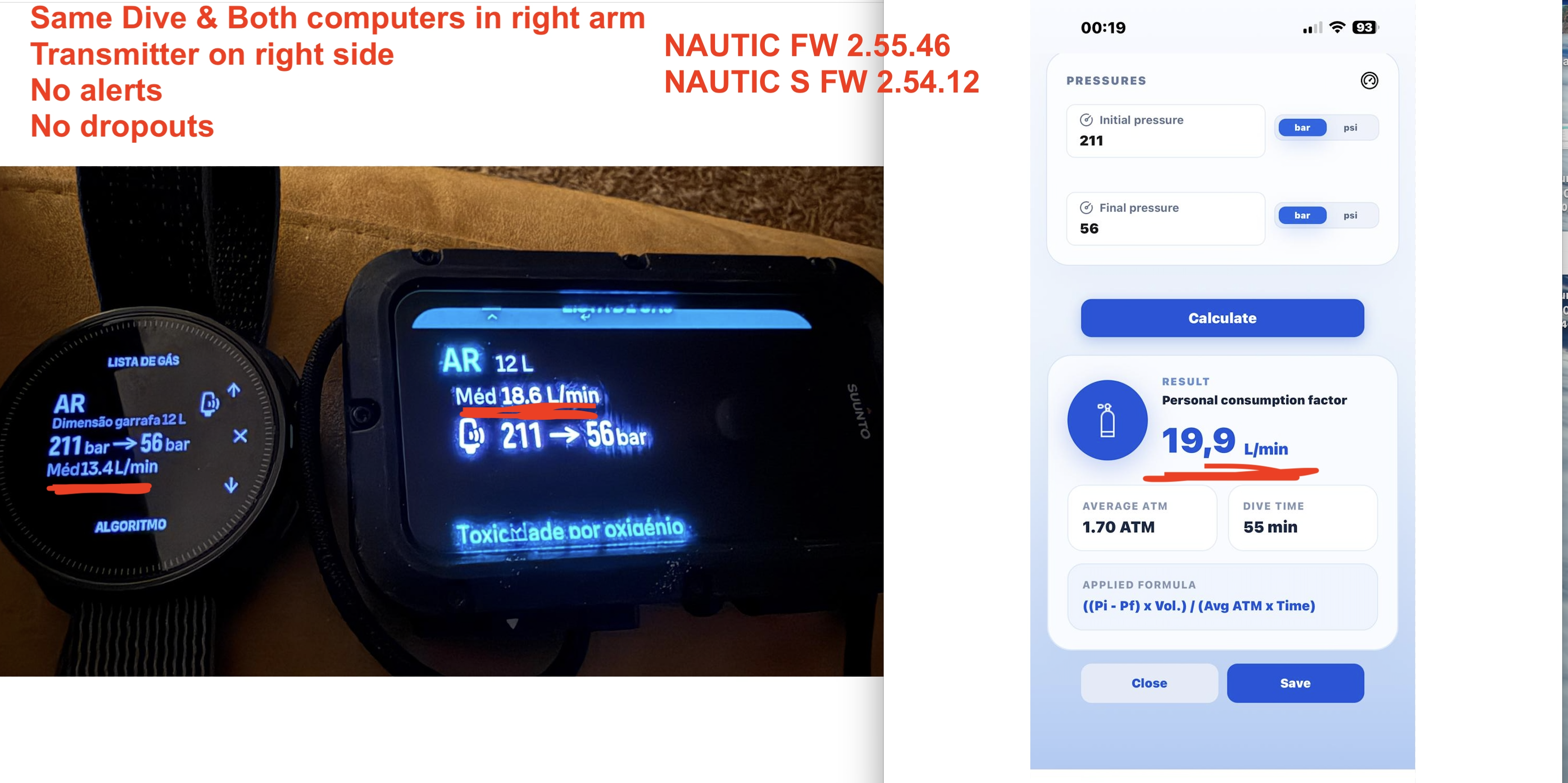
Keeping both computers on same side of the dive transmitter seems to improve the dropouts and alerts
The issue/bug is why 2 x computers connect to the same transmitter give us different air consumption
Even more weird the log of Nautic S dive dont show up in the suunto app/Mac, even after new pairing
-
@Nandodiver For the SAC Calculation Suunto uses a very complex formula which includes a Compressibility / Temperature factor. See here: https://www.suunto.com/Support/Product-support/suunto_nautic/suunto_nautic/wireless-tank-pressure-support-/gas-consumption/. So it might be different from a calculations which does not take these variables into account.
I agree it is strange that the Nautic S and Nautic have different outcomes of SAC by using the same Tank / POD.
This weekend I will take my EON Core with me and do the same. I will report back…
-
How do you switch setpoint from low to high and vice versa? No shortcut och quick commando?
Why is there only two setpoints? No alternative or bailout setpoints.
-
@hhouter Can one pod broadcast info to more than one computer at any given time?
-
@Migsey Yes, the POD transmits a signal that is individually picked up by each computer which registered the POD and is within 1.5 m. I have done multiple dives with one POD and my 2 Computers Nautic and EON Core.
-
@hhouter Excellent!
Shame I just sold my EON Core!

Today, during the first dive I did with the brand-new software, the SAC rate was nowhere to be seen — just dashes on the computer display and no data in the iOS app.
The POD was definitely sending data, as I could see the cylinder pressure being displayed correctly.
Looking through the documentation, I think I’ve found a way of downgrading to the previous software version, where at least everything related to diving was working reasonably well!

Hello! It looks like you're interested in this conversation, but you don't have an account yet.
Getting fed up of having to scroll through the same posts each visit? When you register for an account, you'll always come back to exactly where you were before, and choose to be notified of new replies (either via email, or push notification). You'll also be able to save bookmarks and upvote posts to show your appreciation to other community members.
With your input, this post could be even better 💗
Register Login