Need help doing Interval Training with my Suunto with current software
-
I have been using my Vertical 2 with TrainingPeaks for some time now. I get the workouts downloaded to the watch and everything has been working pretty well. I have however found the interface for intervals with the stock sw interface a little lackluster and was reaching out to see what other people use for running intervals. Any tips would be great.
Currently I let the planned workouts download onto my watch and let the program run while out on my run. I have looked at the stock Intervals screen/card/app that is available and added it to my run sport profile. At first I thought that that screen would automatically appear/start during intervals. That is not the case. It has to be started and set up in the options menu before the start of the run and turned on when I want to start intervals. (at least this is how I understand it and have seen it on my watch). Ideally I would not have to hit a start button and I could let the TP session run as it normally does, but that seems to not be the case.
Basically I would like to download TP workouts and not have to hit buttons mid workout. Is there another workflow to make intervals more clear and see what step I am on? Is there a scenario where I can see my intervals more clearly (ie I can see what interval I am on in terms of numbers and zones and all the script fits in the watch). I am going to try it with the start button, but my Garmin and Coros experiences have been much more seamless than this and I am looking to edge closer to those type screens during my workout.
Also related, but not related, there is no delete or undo of a lap during training is there? While playing with this I have really messed up the cadence of my workout by accidentally hitting the lap button hoping to get a different result.
Thanks for any help. Sorry for the Garmin/Coros comparison. I know it is a bit cringe, but I think this is my last learning curve before I feel like my V2 can do anything I throw at it.
-
If you have a TP workout and have connected Training Peaks to your Suunto service, the workout will be available as SuuntoPlus Guide. You have to select the Guide while starting your activity tracking. If it is scheduled for today, you will be asked whether you wanna use it.
This adds another screen at the end of you already configured screen, what will guide you through that workout. This is like the workout screen on a Garmin watch, but can be tweaked quite heavily from the workout creator (in this case Training Peaks).
-
@2b2bff That is what I do now and I get it, I just think it is missing information like steps and targets so I was looking for a way to get additional info into my workouts. Thanks though
-
@Stavrogin at least with TrainAsOne I get targets for each step directly on the watch.
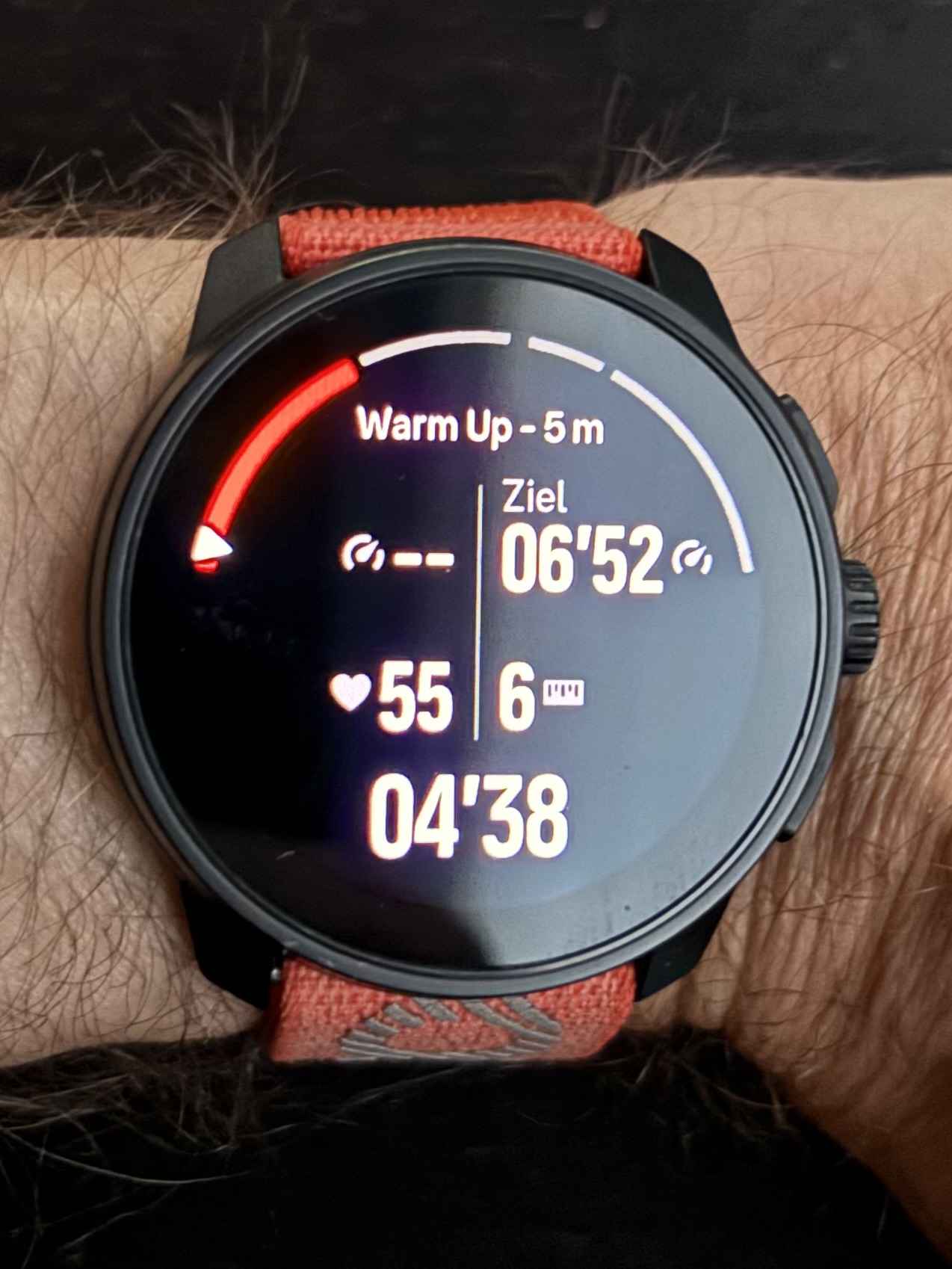
But I cannot look at the planned workout steps before starting the workout if this is what you meant…
-
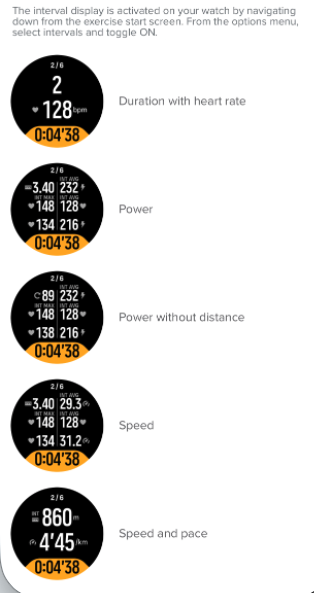
@2b2bff it is what I meant. I get that as well. Some of my issue with it is that when you are doing intervals it is really hard to see your heart rate on this screen. (I know I know it’s a first world problem). I should have attached a photo of what I have been using and it is great, but you have to set it up for each workout and hit start when you want them to begin. If you do not do this they do not work and they also are not changed or programed by the incoming workout so if I am doing pyramid intervals, I cannot use them. I was hoping that there was a way to make TP or other imported workouts use one of these screens instead of the one that you use.
Suunto Vertical, Race, Race 2, Race S and Run. Rocking the Vertical 2 Titanium at the moment.
Garmin: Fenix 7X, Epix Pro 51mm, Forerunner 265.
Coros: Pace Pro, Apex 4 -
@Stavrogin you can use Suunto app to customize the data you’d like to see during the structured workout, just disable the auto lap so the manual laps can from the structured workout can be used.
TP workouts do not show the step you’re on, on the contrary, it’s the workout was created using Suunto app you’d see that, steps like 1/5 etc, other third party platform that does display step counter is intervals ICU.
SRS Ti
SRun (primarily road runner so testing SRun is a must ;)) -
@Stavrogin
Personally I find this to be one of the big issues with Suunto, a watch that I am otherwise quite happy with.My understanding is that ”guides” are developed by partners from templates provided by Suunto. So if you want a change to the guide you have to talk to TP.
Further the interval structure is embedded in the guide and downloaded as a package to the watch, but this structure is not available to other apps or data screens.
Suunto has an API for upload of guides and FIT files, you can find documentation online. But this API is only open to partners like TP.
Technically I think there are a number of things that should be done…
- Decouple the training structure from the guides
- Make the structure available through the Suunto os to othet apps and data screens
- Allow upload of FIT workout files directly via the Suunto app
Wether Suunto will ever do this is probably more of a business decision.
-
@stavrogin - Third party own the data that is displayed on their imported workouts on Suunto, for TP there’s this ER idea to add the step counter, feel free to vote for it.
Adding to my previous post, after disabling the auto lap, you can setup your own screens to see avg numbers for whatever metric you want and it’ll be for that step of the workout. But definitely you cannot see what step you’re on with TP workouts, until TP implements above idea.
On your question about undoing a manual lap, it’s not possible, and when doing a manual lap while executing a workout from TP or any other place, it’ll skip the current step. This is by design and cannot be altered.
With that said, Training Peaks has the best screen for executing structured works, the only missing piece is the step count in my opinion


Hello! It looks like you're interested in this conversation, but you don't have an account yet.
Getting fed up of having to scroll through the same posts each visit? When you register for an account, you'll always come back to exactly where you were before, and choose to be notified of new replies (either via email, or push notification). You'll also be able to save bookmarks and upvote posts to show your appreciation to other community members.
With your input, this post could be even better 💗
Register Login