Race Surgeon
-
Being a road-runner with some sort of ambition to optimize races I have been missing a race pacer that allows for defining pace segments. The races I have participated in (Gothenburg area, Sweden) are quite often pretty hilly and I have found that I waste energy in the wrong places and therefore needed an app that could provide some guidance; sort of a smart pace band with some extra bells and whistles. The requirements were pretty close to “RaceWarden Pacer” - but I was missing the possibility to define the distance for the various segments of the race. And. With age comes poor eyesight, so I needed BIG (and clear) numbers to control the pace.
The logic/thinking:
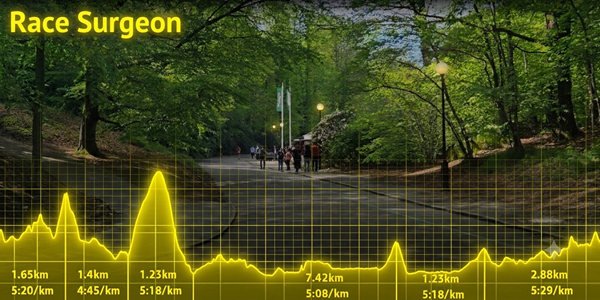
You define your pacing strategy based on the elevation profile of the race and potentially other factors - this is all done outside of the app. Example from “Göteborgsvarvet” where I decided to try Jack Daniels’ Running Formula which roughly translates to -8s/km/%-gradient (uphill) and +5s/km/%-gradient (downhill). But that is outside the app, just the background to the pacing strategy.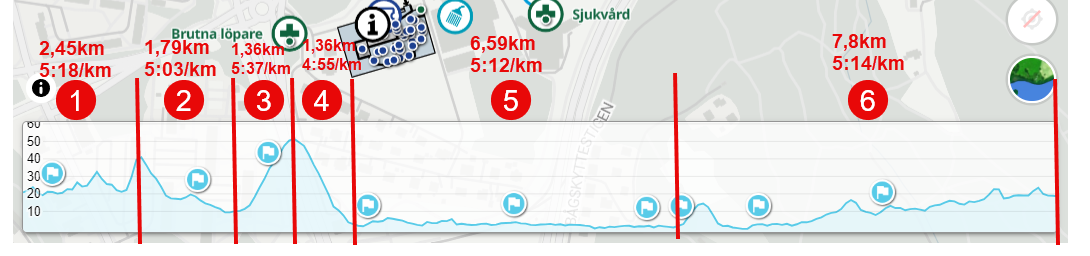
The pacing strategy is pushed to the app through user defined app settings:
Segment Distances (km or mile): 2.45 1.79 1.36 1.36 6.59 7.8
Segment paces (min/km or min/mile): 5:18 5:03 5:37 4:55 5:12 5:14The number of segments need to match the number of paces, no fallback implemented (yet)
With the user input the total race length is calculated by summation of the Segment Distances (21,35km) - overall race target time (1:51:26), as well as target pace (overall) is calculated based on defined segments/paces.
After some testing I came to the conclusion that the following information would be useful during a race - again trying to eliminate non-essentials and focus on visibility:
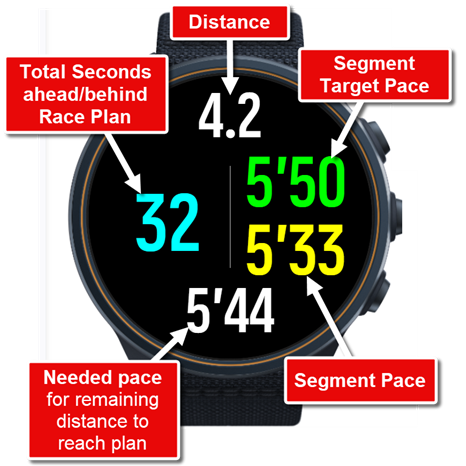
- Segment Target Pace: Derived from user input and displayed once a segment is recognized/completed. In essence this is a pretty static value, that only changes when a segment is completed. Consider this the equivalent to a pace band that updates as segments are completed.
- Segment Pace: Calculated. Similar to Lap Pace but utilizes the user defined Segment Distances/Segment paces, so it’s dynamic and updates as you run.
- Total Seconds ahead/behind Race Plan: Defined as the deviation between overall race plan and completed distance/time; naturally dynamic.
- Needed Pace: Based on initial user input finishing time and total race length are calculated. This is the pace needed for the remaining part of the race to reach the target
So - in essence - you have the segment based race strategy on the right side of the display, everything else focuses on the overall race strategy. I removed all descriptive texts by purpose on the display, as I would either way not be able to see/read them.
All inputs and ideas for further improvements are most welcome!
The app is available in the Suunto+ Store since some days ago - but unfortunately there seem to be a problem beyond my control with entering paces/segments (confirmed on Android - not sure about iOS-devices). This might affect also other apps with similar needs. Workarounds (until problem is sorted) would be to use c/p from clipboard and/or set the phone keyboard to floating, allowing room for entering the paces/segments. Please note: this has nothing to do with the Race Surgeon-app itself
-
Hi - this sounds like just the app I was looking for.
We’re planning a Grand Canyon R2R2R trip and I’ve been looking for an app that would allow me to break the day into four or six segments (may separate the flatter riverbed section from the climbs and descents).
I haven’t downloaded the app yet but there are two things I might want:
-
Can the total time ahead/behind race plan show in minutes (or even hours)? For an all-day type effort we might have a Plan A and miss it by 2+ hours - if that seconds ahead/behind really only does seconds will it show us 7,200 seconds off pace?
-
Along that same line, it’s nice to see the Needed Pace to hit the goal - but it’d also be nice to see a continually updated expected finish time if we’re falling behind. Like if we target 12 hours it might say “oh no, you have to do 10:00/mile pace to hit your goal and right now you’re on 13:30 pace”
But I’ll download it tonight and play around with it so I can give some real feedback. Thanks for making this!
-
-
this is pretty cool, well done!
@eric-0 - I might suggest “UltraPacer” as well which is an online tool that helps build out race plans but can be used for longer stuff in general. You can create A, B, C goals etc and it will show you the splits required for each
-
@Eric-0 Interesting use case that I had not contemplated in design… ahead/behind in current setup is built on a “Count_Threedigits”-format - which would mean that it allows three digits (also negative). So it will count to -999/999. In simulator it will then display 000 until values goes back in range - assuming the same will be displayed on watch. Reason being that a “normal” display of time would steal to much space and force the use of a smaller font. I also do believe that I had to go with the “Count_Threedigits”-format as all time based formats (duration) seemed not willing to display negative numbers (time).
As for your second bullet - I am trying to keep the displayed data to a minimum, prioritizing large fonts in clear contrasts; hence a bit reluctant to add more data fields. But out of curiosity - would you base the expected finish time on the extrapolation of the pace so far OR the planned overall pace?
-
V2 uploaded. Some improvements:
- Segment Ahead/Behind (s) introduced (top left in picture below)
- Descriptive text (minimalistic) introduced
- Failsafe in place to match number of segments / number of paces
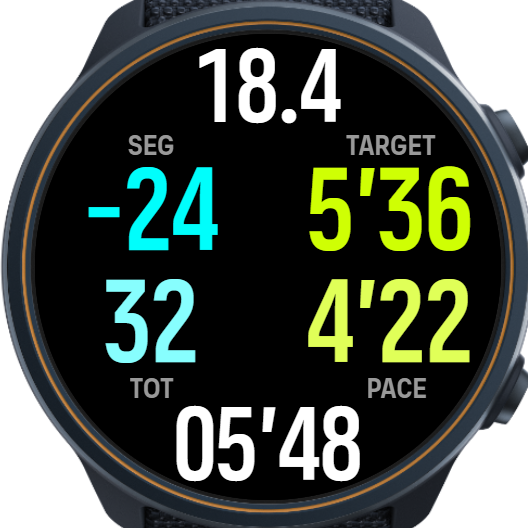
Unfortunately it seems impossible to update the banner and watch screenshots in the SuuntoPlus Store.
-
An app like this would be super useful for planning longer ultramarathons on trails where the terrain is always variable.
I did a similar plan many times where I try to come up with a target time for each aid station on the race course and then during the race see how I perform against that - whether I am ahead or behind the plan.
The main problem is that as long as segments are based on distances, they aren’t going to be accurate and often deviate towards the end of the race. Perhaps for officially measured road races distances are accurate, but for trail races they are usually not. Towards the end of a race, distance that you have on your watch can easy be up to 5% off from the official distance, depending how accurately the official race distance was measured. Often, tace officials just use distance from CalTopo or other online mapping tool, and that is often way too short.
It would be super nice if segments were defined by waypoints on the navigation route and if Suunto supported an extension of navigation route that allows including timestamps. That would allow building on the estimated pacing plan right into the navigation route. Garmin does actually have that and the Pace Pro feature utilizes that, and some 3rd part tools like Ultrapacer can generate a plan that can be loaded on a Garmin watch.
I think a feature like this should be built-in, or at least have some built-in support - like an ability to load a timed GPX (GPX with relative timestamps) and tell you how much you are ahead of behind when following the route. Then more advanced apps could be built on top of that.




Hello! It looks like you're interested in this conversation, but you don't have an account yet.
Getting fed up of having to scroll through the same posts each visit? When you register for an account, you'll always come back to exactly where you were before, and choose to be notified of new replies (either via email, or push notification). You'll also be able to save bookmarks and upvote posts to show your appreciation to other community members.
With your input, this post could be even better 💗
Register Login