A BIG BIG BIG THANKS and APLAUSE to SUUNTO Team both watch and IT designer ...
-
#5 is already possible with the Climb Guidance screen if there a route and a waypoint on the route. It will display the following information on the climb guidance screen - the remaining ascent to the waypoint, the remaining descent, and the remaining distance.
Example:
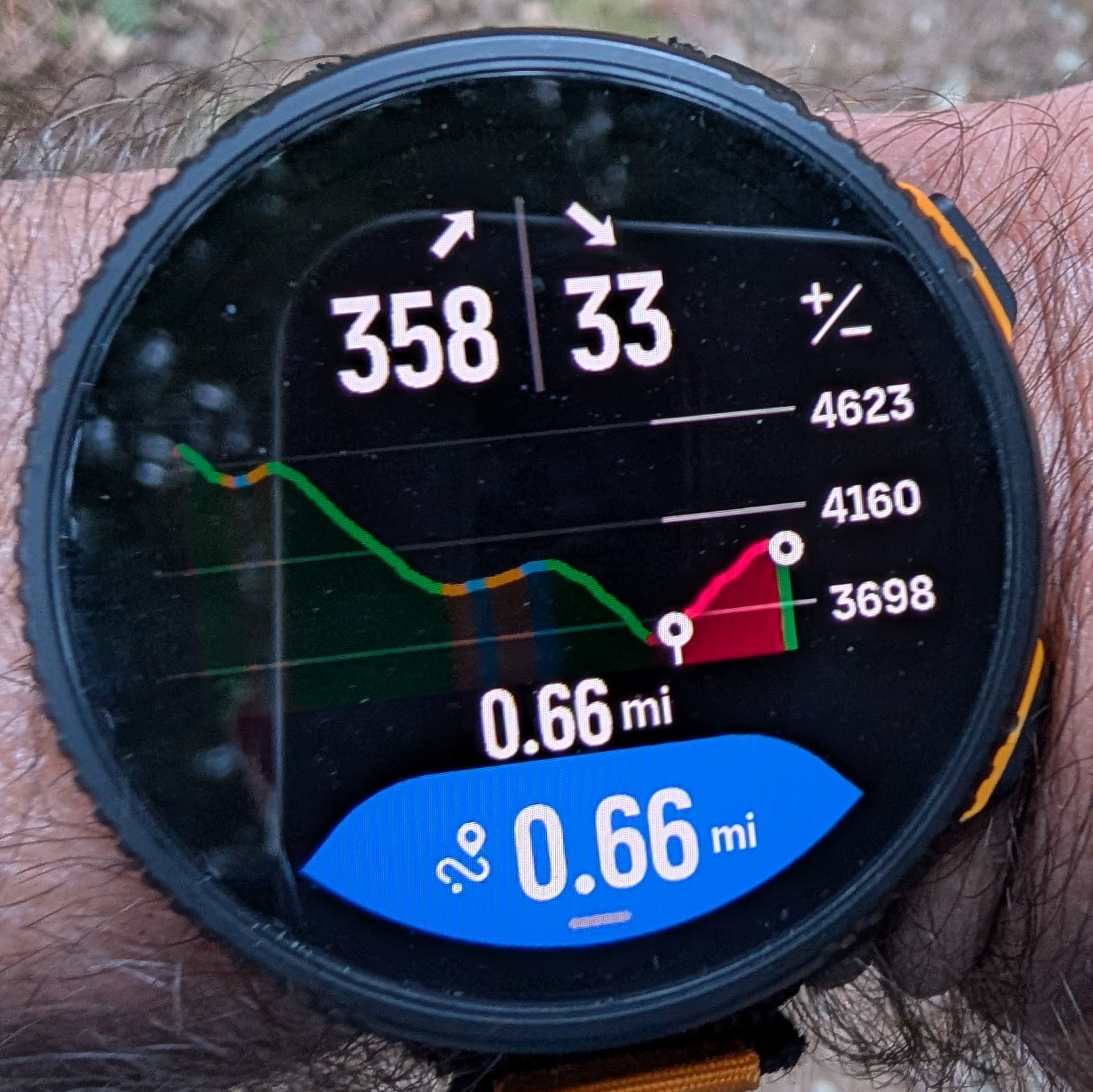
Also, the field at the bottom is customizable and can rotate up to 4 different fields. So this Climb Guidance screen has quickly become one of my most used data screens.
#6 - 3 data screens are already possible in custom sport modes.
Suunto: Ambit, Ambit 3 Peak, 9 Baro, Race S, Race Ti, Vertical 2 Ti
Garmin: Forerunner 210, Forerunner 610, Fenix 6X, Fenix 7X Ti -
@sky-runner said in A BIG BIG BIG THANKS and APLAUSE to SUUNTO Team both watch and IT designer ...:
#5 is already possible with the Climb Guidance screen if there a route and a waypoint on the route. It will display the following information on the climb guidance screen - the remaining ascent to the waypoint, the remaining descent, and the remaining distance.
Oh Oh !!! super happy to know that I could have 3 screens in OTHER SPORT mode , I will test this ASAP.
For vertical distance to POI, the issue is preciselly when you do not have an itineray, but juste a POI, in this case there is no measure available
-
@sky-runner Hello again I juste tested the Ohter sport mode, effectivelly you can have 3 screens …
BUT BUT BUT …
you do not have all the measures available … for example here is no more available in this mode the delta altitude since your departure point.
so you cannot set the SCREEN 1 to represent all what you have already accomplished eiter in “~ horizontal” distance or vertical one … this is important when you are guiding a group to tell them, look at the watch we already climbed 850 meters so there are still juste 400 to climb to our current target (which will be given by the second screen).Knowing very well when I guide a group I do not even need a watch as I know my itinery by heart, but the advantage of a watch is that it is undisputable, and you can show it to the group especially the people who start to be tired … and they will trust more the watch than you

-
@Mister-PYC Not the Other sport mode. In the Suunto app you can create a completely custom sport mode with the exact configuration of data screens and data fields that you want.
For example I have a custom sport mode derived from Trail Run.
-
Also, the field at the bottom is customizable and can rotate up to 4 different fields. So this Climb Guidance screen has quickly become one of my most used data screens.
I feel very stupid, but: How do you change the data in that field? I haven’t had time to play around much, and haven’t found the way to do that…
-
@zhangschmidt said in A BIG BIG BIG THANKS and APLAUSE to SUUNTO Team both watch and IT designer ...:
How do you change the data in that field?
It isn’t very intuitive. You have to tap it with touch.
And to make it even less intuitive, when a new custom sport mode is created, touch is disabled by default. “Map only” touch mode would be far more appropriate default.
I find it time and time again that field testing isn’t adequate and doesn’t find some pretty obvious issues. Or perhaps field testing finds the issues but then the dev team ignores them and releases anyway.
Suunto: Ambit, Ambit 3 Peak, 9 Baro, Race S, Race Ti, Vertical 2 Ti
Garmin: Forerunner 210, Forerunner 610, Fenix 6X, Fenix 7X Ti -
@sky-runner said in A BIG BIG BIG THANKS and APLAUSE to SUUNTO Team both watch and IT designer ...:
@zhangschmidt said in A BIG BIG BIG THANKS and APLAUSE to SUUNTO Team both watch and IT designer ...:
How do you change the data in that field?
It isn’t very intuitive. You have to tap it with touch.
And to make it even less intuitive, when a new custom sport mode is created, touch is disabled by default. “Map only” touch mode would be far more appropriate default.
I find it time and time again that field testing isn’t adequate and doesn’t find some pretty obvious issues. Or perhaps field testing finds the issues but then the dev team ignores them and releases anyway.
Hmm. I tried tapping, touch was active… and it didn’t do anything. So, I wasn’t too stupid for it, but I was - or something.
There’s a reason - well, actually, there are reasons, plural - I’m not among the fieldtesters anymore…
-
@sky-runner to be honest … i removed them all because I was unable to find how to change the 6 ones I set at beginning
-
@zhangschmidt said in A BIG BIG BIG THANKS and APLAUSE to SUUNTO Team both watch and IT designer ...:
Hmm. I tried tapping, touch was active… and it didn’t do anything.
And how many data field have you configured for the map screen?
-
@Squirrel Hello Squirrel the question was not to me, but just to tell you, If I’m correct we can put up to 6, I tried with 6, because I was thinking it could be interresting to have a single screen with te compass and some informations that show me valuable details just staying here…
but jonestly I was unable easily to catch how to move from the first choice to the next ones … I try tapping on the screen many times nothing happened … so finally I prefered to remove even all so that I see the compass fully.
BTW also as soon as you put even a first field you never see anymore the full compass … which made me sad … it is nice when fully displayed


