Constantin: monitor effort drift against your session average
-
Constantin
Constantin helps you compare how you are moving right now against your workout average. It shows three focused workout views: drift, pace, and heart rate.
Compatible with UI2 Suunto devices, including Suunto 9 Peak Pro and newer.
Press the watch’s upper button to move to the next view. Hold the upper button to move back to the previous view.
Drift View
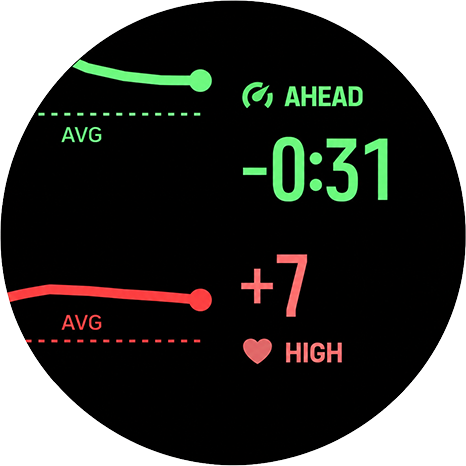
The drift screen shows both metrics side by side on a single combined chart.
The left panel plots two series:
- pace deviation from your session average (top)
- heart rate deviation from your session average (bottom)
Each series stays centred on its own baseline. Moving above the baseline means ahead of average for pace, or above average for heart rate.
The right panel shows a status word and the current delta value for each metric. Pace shows AHEAD (faster), STABLE, or FADE (slower). Heart rate shows HIGH, STABLE, or LOW. Values are coloured green or red when outside the stable range, and white when stable.
Pace View
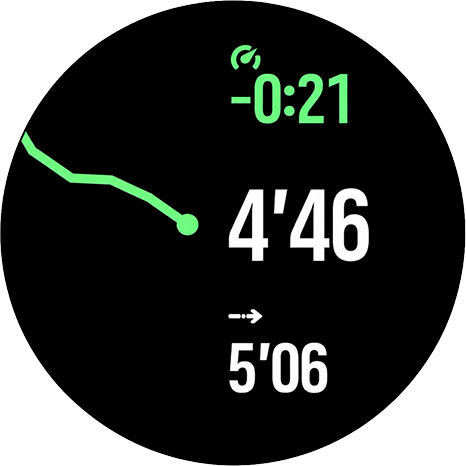
The pace screen shows:
- current pace (mid)
- average pace (bottom)
- the difference between current and average pace (top)
A green difference means you are faster than your average pace.
A red difference means you are slower.
Small differences within 10 seconds per kilometre stay white.The graph shows the recent trend of your pace difference over roughly the last 60 seconds. It is designed to show whether you are moving closer to or further away from your workout average, without overreacting to brief stops or missing pace samples.
Heart Rate View
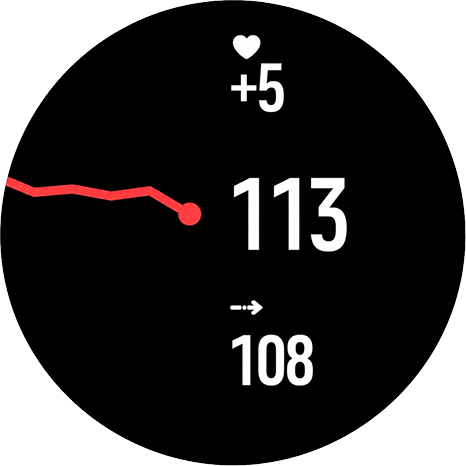
This view shows:
- current heart rate (mid)
- average heart rate (bottom)
- the difference between current and average heart rate (top)
Heart rate values are shown in beats per minute.
A green difference means your current heart rate is below your average.
A red difference means it is above average.
Small differences within 5 bpm stay white.The graph shows the recent trend of your heart-rate difference over roughly the last 60 seconds, so you can see whether your effort is drifting above or below your workout average.
Graph Behavior
The graph scale adjusts dynamically.
On the pace and heart-rate views, the dot marks the latest chart point. The line shows recent changes in the difference between your current value and your workout average.
On the drift view, the dotted AVG lines represent the reference baseline for each metric. The pace and heart-rate lines show recent deviation from those baselines in one combined view.
Numbers update every second. The graph adds a new point every 10 seconds, based on the recent valid data collected during that period.
At the beginning of a workout, graphs may take a short moment to appear while the watch collects enough valid pace and heart-rate data.
Workout Summary
After the workout, Constantin can add these values to the exercise summary:
- Pace AVG: your average pace for the workout
- HR AVG: your average heart rate for the workout
- Pace VAR: the average percentage variation between your current pace and average pace during the workout
- HR VAR: the average percentage variation between your current heart rate and average heart rate during the workout
The VAR values are unsigned percentages. A lower VAR means your pace or heart rate stayed closer to the workout average. A higher VAR means it fluctuated more.
How To Use
Start your workout as usual, add Constantin as a SuuntoPlus app, and use it during the activity to quickly check whether your current effort is above or below your session average.
Values may show
--until the watch has enough valid speed or heart rate data.Contact
For questions or feedback, contact: constantin@szmigiel.design
Changelog
1.39 (2026-05-06)
- Improved stability when using Constantin during a workout, especially when switching screens or running it alongside other SuuntoPlus apps.
- Pace and heart-rate charts now focus on the most recent minute, making short-term changes easier to read at a glance.
- Charts handle stops and missing pace samples more gracefully, avoiding misleading spikes during run-stop-run sessions.
- Refined chart appearance with clearer trend lines and less visual clutter.
1.25 (2026-05-04)
- Fixed a crash when opening the Constantin screen during an active workout.
- Reduced UI memory pressure when running alongside other SuuntoPlus apps; replaced multiple chart canvases with a single shared canvas.
-
I’ve been using it every day lately, and I really like it. It helps me control my effort, pace, and HR variability extremely well.
-
@Speed-Man it’s great that it works for you! What watch are you using? Are you using it alongside other S+ apps or guides?
-
@Łukasz-Szmigiel I’m using the Race 2, and right now I only use the SuuntoPlus Constantin app. Earlier this month, I had an experience where the watch shut down while running three applications at the same time.
As for ZoneSense, I use it directly from the watch without opening the app. Using it this way, I feel the watch performs much better and runs more smoothly.
-
@Speed-Man thanks for the details! I’m getting reports that Constantin is either shutting down itself or other s+ apps if used alongside, like zonesense + constantin + aerobic decoupling.
I’ve made some redesign efforts to make the app lighter and I no longer see anything related to watch being overloaded, but I only have access to S9PP and Race S.
It’s kind of hard to debug the issues if one doesn’t have access to hardware

S9PP 2.50.28
-
@Łukasz-Szmigiel Today my Race S crushed. Only Constantin and Fat &Carbs counter were running.
-
@Lazyjones I’m working on a new version with split templates. Three templates instead of one. Let’s see if hardware will like it more.
-
The new version is in - 1.42 which should be easier on the UI processing. Happy testing!
-
@Łukasz-Szmigiel Your application is truly useful. I hope Suunto will support you on the hardware side as well — your work deserves to be integrated into the ecosystem.
-
Today my V2 crashed. Only running Constanin and a workout. When I tried to go through the pages the watch was fun until I hit the button again to go to Constanin. Rather than go to the page it froze for about 20 seconds followed by a restart.
Sorry I would love to use this, but crashing makes me sad. Nothing worse than crashing watches mid-workout.
Suunto Vertical, Race, Race 2, Race S and Run. Rocking the Vertical 2 Titanium at the moment.
Garmin: Fenix 7X, Epix Pro 51mm, Forerunner 265.
Coros: Pace Pro, Apex 4 -
@Stavrogin I’m sorry to hear that. The real issue is that I’m unable to debug this app on V2 as the only way to do so would be to have access to real hardware and logs and I only have S9PP and Race S. I suspect there’s something wrong in current V2 firmware as it doesn’t crash on older watches - or I haven’t experienced it yet.
What activity did you try it on? Did you have other features turned on like guides or routes.
-
@Łukasz-Szmigiel Thanks for reaching out.
I was doing a Trail Run with a workout Guide on. Nothing else. No Routes. I had a Polar HRM attached.To your point the HexHunter much the same thing. It was a crasher for me.
-
@Stavrogin thanks for extra info. A guide is de facto an S+ app. So you had Constantin + Guide (2 apps). But it shouldn’t crash the watch nevertheless. Suunto watches are pretty clever and if they see that there are no resources left, they will kill non essential apps, it’s hard to crash the watch and the latest version is simplified.
I’ll do some more digging into optimising the issue but the problem is that on S9PP when I’m using navigation and 2 S+ apps, current version doesn’t hit the limit. I’m surprised that the issues happen on V2 which is newer hardware.
Perhaps @suuntopartnerteam can shed some light on it?
But just to clarify - it didn’t crash at the beginning of the run but later, when you were cycling the screens, right?
-
@Łukasz-Szmigiel That is correct. The freeze and reboot was triggered by cycling through screens. I feel like that was what happened with the HexHunter app as well.
Suunto Vertical, Race, Race 2, Race S and Run. Rocking the Vertical 2 Titanium at the moment.
Garmin: Fenix 7X, Epix Pro 51mm, Forerunner 265.
Coros: Pace Pro, Apex 4 -
@Stavrogin it seems to me that the UI is still too heavy and, perhaps, tries to do all the painting at once after the screen cycle. I’ll let you know after I release a new version with delayed rendering and we’ll see if it helps.
-
@Stavrogin new version should be available now in SA, you may want to give it a try. The code is ~25% smaller in general and there are some additional optimizations added to how the UI drawing is being handled. If that still crashes - I’m afraid I can’t do much without the support from Suunto or logs from V2 running the app

-
@Łukasz-Szmigiel thanks and I will give it a try
-
@Stavrogin Did you enable or disable Always-On Display during activities?
-
Hi everyone, I’ve also been testing Constantin because I’m interested in its setup. I have a V2 and initially started with 3 Suunto Guides (too many, several were faulty), then I switched to 2 Constantin guides and a 3rd grade training guide… also… the watch would freeze or the Constantin screen option would remain BLACK.
If you also use it in conjunction with ZoneSense, it also fails. I don’t think there’s compatibility yet with multiple systems (3 guides + activity and data watch) working outdoors… Suunto could refine these guide options, which are, in my opinion, quite interesting. Thanks, Luckas ️
️ -
@Elmiuel thanks for your report. If you haven’t - check the current version (updated yesterday in the evening) - I’m getting reports that it’s more stable on V2.
When the particular SuuntoPlus app goes dark it means the watch unloaded it. You can confirm it by going to workout settings during the workout and checking active apps - the uploaded apps should be off.




Hello! It looks like you're interested in this conversation, but you don't have an account yet.
Getting fed up of having to scroll through the same posts each visit? When you register for an account, you'll always come back to exactly where you were before, and choose to be notified of new replies (either via email, or push notification). You'll also be able to save bookmarks and upvote posts to show your appreciation to other community members.
With your input, this post could be even better 💗
Register Login