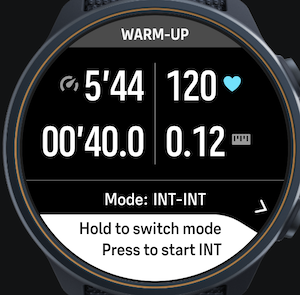
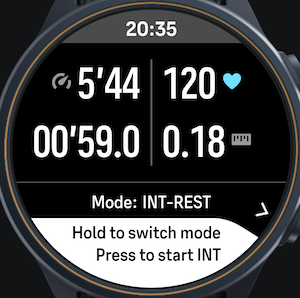
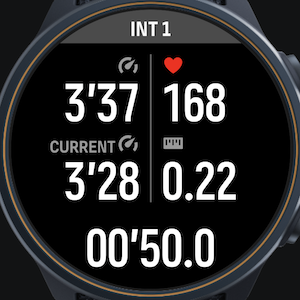
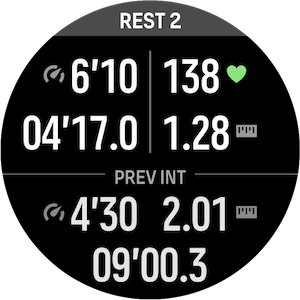
Manual Interval+ / Manual interval SuuntoPlus App with previous interval insights
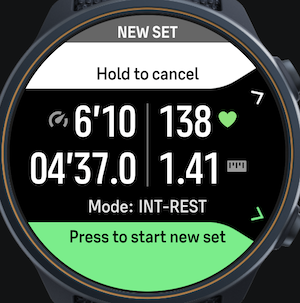
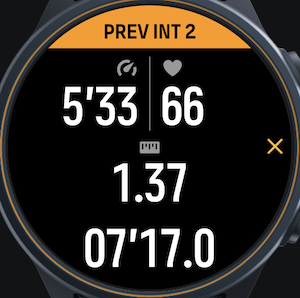
-
Thank you for this new app — it’s really useful.
I have one suggestion: the ability to reset the interval counter.
In my case, I’d like to do a specific workout with manual intervals based on two sets of 5/3/1 reps. Without being able to reset the counter, it becomes quite difficult to keep track of which rep I’m on, especially when fatigued.
Maybe a long press on the top button could be used to reset the counter?
This way, I can choose to reset the counter either after each sub-block or after each set, making it easier to keep track. -
I’ve just released a new version (v1.3b), which adds support for ZoneSense and HR zones. The original post has been updated accordingly.
Thanks everyone for the kind feedback—here, on Reddit, and via email. It’s great to see the app being used!
@pe-ter I’ve been thinking about the idea of a temporary recap screen, and I’m a bit unsure. I try to keep the number of screens to a minimum so it’s easier to remember where everything is—especially when fatigued during intervals. Instead, I’ve been exploring increasing the font size of the previous interval data, but haven’t managed to implement that yet.
That said, if a temporary screen is something that matters to you and others, I’m open to reconsidering it. Making it configurable could also be a good compromise - but I do not want to use Smartphone configuration panel because of this bug: https://forum.suunto.com/topic/14940/bug-maximum-suuntoplus-apps-reached -.@anthony-guillemette I started thinking about other things requiring the long press on top button, but your suggestion is interesting (actually, I would be interested to use it myself ahah). I’ll look into how it could be implemented.
-
@Thibault-B. A bigger font would already help. And a recap display even better - maybe the bug you refer to gets fixed soo . But probably I can also create a custom sport mode and add a readable screen with relevant information about the last lap. Thanks again for the great app!
-
@Pe-Ter Thanks for the feedback!
A couple of questions to better understand your use case:
- Would you still use the PREV INT panel, or is it not really useful to you in this scenario?
- How long would you expect the temporary screen to be displayed? Would it be acceptable if it disappears after a short time and you then rely on the PREV INT panel?
What I like about PREV INT is that it’s always accessible. For example, I often check it once I’ve caught my breath a bit after an interval, rather than immediately.
-
@Thibault-B. The PREV INT panel does not bother me and is probably very useful to most runners. My problem, and probably simalar for other older runners, is that I have troubles to read the small numbers. Thus, a temporary screen after an INT would be perfect (maybe 3 sec). I guess most runners would like that in INT REST mode but maybe in INT INT mode it might disturbs some.
One other idea, of which I do not know if it possible: Is it possible to show a blow-up screen with the information about the previous lap for a short time after tapping on the PREV INT panel? -
v1.4 is out and introduces the reset of interval counter suggested by @anthony-guillemette,
Let me know what you think! -
I really like your idea and the app. I created for my intervalls an individual sport mode and the most important value for me is the mean pace of the lap (more important than heart rate especially at short intervalls).
I know it’s hard to add one more number but maybe you can try.
-
@Mitch9 Just to clarify, in both INT‑INT and INT‑REST modes, the main pace shown is already the mean (average) pace of the current interval, and the Previous Interval panel also shows the average pace of the last lap. If you were referring to something different, feel free to explain.
Note that INT-REST mode also displays the current pace in INT panel.
-
@Thibault-B. Thank you so much for this quick update. But, unfortunately, when I long press the top button it activates the multisport mode. So, it doesn’t work
-
@Anthony-Guillemette works correctly on Suunto Race S.
Note that you need to start an INT first (does not work in warm-up - since there is nothing to reset -). What watch model do you own? Do you run latest version of the app? -
@Thibault-B. I didn’t say nothing… I tried again this morning and it works fine. The app update may not have synced to the watch yesterday. Can’t wait to test it during my next training

-
I finally reached a solution I’m happy with for the PREV INT panel: bigger text, three values shown at the same time, and rotation between distance and average HR. Check out version 1.5!
I’d love to get feedback on how this feels, especially on older watches like the Vertical 1, 9 Peak Pro, or older, and using light theme.
-
@Thibault-B. Amazing - thanks a lot for the improvements of the readability! At the moment I can’t think of anything else to improve. But probably you or other users will come up with something
-
@thibault-b. Good job !!! I test the last version today. It seems perfect all information I need size … thanks !
-
Check out v1.6, introducing INT‑FOCUS mode — designed for consecutive intervals where you want to stay fully focused on the current effort, and only review the previous interval briefly after each lap or on demand with a tap.
Let me know what you think!
-
@Thibault-B. I’m really excited to use this watchface, as a new Suunto user. Can you please explain this like I’m 5? Lol I have the watchface on my watch now (I think). What are the steps to starting to use it? Warm up on my own, and then start an interval? Or is it all one workout? Sorry for the elementary question here, but I’m so frustrated with the current interval screens on Suunto and I’m so excited to try this!



Hello! It looks like you're interested in this conversation, but you don't have an account yet.
Getting fed up of having to scroll through the same posts each visit? When you register for an account, you'll always come back to exactly where you were before, and choose to be notified of new replies (either via email, or push notification). You'll also be able to save bookmarks and upvote posts to show your appreciation to other community members.
With your input, this post could be even better 💗
Register Login