[Question] No stupid questions - ask anything here
-
@DonTomGot
This may be too complex as a first project. But let me start with giving you the overall structure of the code as that seems to be the problem at this point.Manifest.json declares what input you need from the watch firmware, what data you intend to output from main.js to t.html and settings you use in the watch. This is parts of manifest.json
"in": [
    {
      "name": "Power",
      "source": "/Activity/Move/-1/Power/Current",
      "type": "subscribe"
    },
    {
      "name": "HeartRate",
      "source": "/Activity/Move/-1/HeartRate/Current",
      "type": "subscribe"
    },
    {
      "name": "Speed",
      "source": "/Activity/Move/-1/Speed/Current",
      "type": "subscribe"
    },
    {
      "name": "SpeedAvg",
      "source": "/Activity/Lap/-1/Speed/Avg",
      "type": "subscribe"
    }
  ],
  "out": [
    {
      "name": "PaceTarget"
    },
    {
      "name": "TimeRemaining"
    },
    {
      "name": "Debug"
    }
  ],
  "template": [
    {
      "name": "t.html"
    }
  ],
  "settings": [
    {"shownName": "Repeat count", "path": "appSettings.repeatCount", "type": "int", "min": 1, "max": 19},

    {"shownName": "Target pace for WarmUp (m/s)", "path": "appSettings.targetPaceWarm", "type": "float", "min": 1, "max": 6},
    {"shownName": "Target pace for Interval (m/s)", "path": "appSettings.targetPaceInterval", "type": "float", "min": 1, "max": 6},
    {"shownName": "Target pace for Recovery (m/s)", "path": "appSettings.targetPaceRecovery", "type": "float", "min": 1, "max": 6},
    {"shownName": "Target pace for CoolDown (m/s)", "path": "appSettings.targetPaceCool", "type": "float", "min": 1, "max": 6},

    {"shownName": "Duration for WarmUp (s)", "path": "appSettings.durationWarm", "type": "int", "min": 1, "max": 14400},
    {"shownName": "Duration for Interval (s)", "path": "appSettings.durationInterval", "type": "int", "min": 1, "max": 14400},
    {"shownName": "Duration for Recovery (s)", "path": "appSettings.durationRecovery", "type": "int", "min": 1, "max": 14400},
    {"shownName": "Duration for CoolDown (s)", "path": "appSettings.durationCool", "type": "int", "min": 1, "max": 14400}
  ]
The main.js contains declarations for some variables
// App settings, see also manifest and data.json
var settings;
var isPaused;

// State machine
var currentState = 'WarmUp';
var currentRepition = 1;
var repeatCount = 3;
var timeRemainingInStep = 10;
var currentPaceTarget = 2.326;

// Average pace and max HR for last lap
var lastLapAvgPace;
var lastLapPeakHR;
There is also a number methods that deal with the state machine needed for interval training. I give only their declarations and purpose for now.
// Function to translate speed to a pace string
var speedToPace = function(speed)

// Training session State Machine
// Get next step, set remaining time
// And increment interval counter
var setNextState = function()

// Function to get target pace for current state
var getTargetPace = function()

// Function to set text for the top right text block
var setTextBlock = function()

// Update last lap data, avg pace and peak HR
var updateLastLap = function(input, output)
The evaluate method may be of interest. Here it comes
// System starts calling this about once per second after the sports app is selected
// i.e. before the exercise is actually started.
// input: contains resources specified in "in" section of the manifest.
// output: resources passed to the device (specified in "out" section of the manifest).
function evaluate(input, output) {

  // If we are in an Interval step remember average pace and max HR from this step
  updateLastLap(input, output)

  // Count down time remaining in current step
  if (!isPaused) {
    timeRemainingInStep -= 1;

    // Handle the state transition if time remaining is zero
    if (timeRemainingInStep === 0) {

      // Trigger a silent lap
      // $.put('Activity/Trigger', 24);

      // Set the next state
      setNextState();

    } // End of if time remaining is 0

    // Output remaining time to HTML after the new durations is set
    // If we are done and countdown is negative display positive value
    output.TimeRemaining = (timeRemainingInStep < 0) ? -timeRemainingInStep : timeRemainingInStep;
  } // End of if not paused

  // Get target pace for current step
  getTargetPace();

  // Output target to HTML
  output.PaceTarget = currentPaceTarget;

  // Update the top right text block
  setTextBlock();
}
Settings are loaded in onLoad and defaults provided, like this
// main.js loaded and system starts calling evaluate()
function onLoad(input, output) {
  // Load app settings
  settings = localStorage.getObject("appSettings");

  // Create default settings if none found
  if (settings == null) {
    settings = {
     targetPaceWarm: 2.326,
      targetPaceInterval: 2.857,
      targetPaceRecovery: 2.083,
      targetPaceCool: 2.083,

      durationWarm: 10,
      durationInterval: 12,
      durationRecovery: 5,
      durationCool: 20,

      repeatCount: 2
    }
  }
  isPaused = true;
}
The bulk of this code deals with interval training and not the gauges, so if you are only interested in the gauges, you do not need most of the things above.
In t.html the code should go inside quotes in the onLoad and onActivate methods, the beginning looks like this.
<uiView
onActivate = "
  $.subscribe('/Dev/Time/Tick10hz', function(){ control('#cnv', 'REFRESH'); })

  // Subscribe to HR, pace and targets to use in drawing gauges in the canvas
  $.subscribe('/Activity/Move/-1/HeartRate/Current', function(v) { currentHR = parseFloat(v) * 60; })
  $.subscribe('/Activity/Move/-1/Speed/Current', function(v) { currentPace = parseFloat(v); })
  $.subscribe('/Zapp/{zapp_index}/Output/PaceTarget', function(v) { paceTarget = parseFloat(v); })
  "
onLoad="
  // Subscribed values
  var currentHR;
  var currentPace;
  var paceTarget;

  // Target zones
  var hrZones = [0, 133, 144, 155, 165, 185];
  var paceZones = [0, 2.299, 2.5, 2.703, 2.857, 5.556];

  // Radius of the display in pixels
  var radius = 233;

  // Zone colors (muted, suitable as gauge backgrounds)
  var z1Color = '#5B8FA8';    // Zone 1 - blue
  var z2Color = '#6AA87A';    // Zone 2 - green
  var z3Color = '#C4B050';    // Zone 3 - yellow
  var z4Color = '#C87D45';    // Zone 4 - orange
  var z5Color = '#B85555';    // Zone 5 - red
  var zoneColors = [z1Color, z2Color, z3Color, z4Color, z5Color];

  // Other colors
  var outColor = '#B85555';   // Out of target range (low and high sectors)
  var inColor = '#6AA87A';    // Target range (mid sector)
  var inactiveColor = '#999999'  // Inactive sector
  var ptrColor = '#CCCCCC'    // Gauge pointer
  var bkgColor = '#000000'    // Black background

  // For debugging
  var temp1 = '-';
  var temp2 = '-';

  // Functions to draw gauges on canvas ----------------------------------

  // Draw an arc for a gauge
  // from   from angle in degrees
  // to     to angle in degrees
  // color  arc color
  // width  width of the arc
  function arcSegment(ctx, from, to, color, width) {
    ctx.beginPath();
    ctx.arc(
      radius, radius,          // center of display
      radius - 2 - width / 2,  // radius - leave a small margin outside arc
      Math.PI * from / 180,    // Angles from - to in degrees converted to radians
      Math.PI * to / 180
    );
    ctx.strokeStyle = color;
    ctx.lineWidth = width;
    ctx.stroke();
  }
--- snip ---
Apart from the code for rendering the gauge background and pointer which you already have above, you also need methods to identify the current zone to highlight.
// Get the index of the the active zone for a 3 zone target gauge
  // value      current value
  // targetLow  low end of target range
  // targetHigh high end of target range
  function getActiveTarget(v, targetLow, targetHigh) {
    if (!isFinite(v)) return 0;
    if (v > targetHigh) {
      return 2;
    } else if (v > targetLow) {
      return 1;
    } else {
      return 0;
    }
  }

  // Get the index of the the active zone for a 5 zone HR gauge
  // v          current value
  // zones      an array of 4-values defining the 5 zones
  function getActiveZone(v, zones) {
    if (!isFinite(v)) return 0;
    for (var i = 1; i < zones.length; i++) {
      if (v < zones[i]) return i - 1;
    }
    return zones.length - 1;
  }
The environment is very challenging to work in, you get very little support. Often the app just silently fails. A few tips.
- build up in small steps and commit frequently
- check thoroughly for typos and other mistakes that would be caught by other IDE
- in the simulator toggle on “developer tools” , that will reveal some mistakes
- insert systemEvent statements where you can put information in the event log
-
@matram Many thanks for your extensive explanations. I believe (unfortunately) that you might be pretty accurate in your assumption on complexity. But I am not giving up just yet…
-
I developed the “PumpFoil” app and I have a problem to solve with the GPS.
Actualy, in the app, when the speed is up to 10 Km/H, we consider that we are foiling,.but sometimes, the speed rise above 10Km/H while we are stationary.
The only way I found to avoid this problem is not to record any start of foiling in the 20 seconds folowing the immertion of the device.
I would like to find another way because this one is not usable for SurfFoiling.
Is it possible to know when the GPS precision is poor (not enought satellites for example) ?
I tried the “/Fusion/Location/Readiness” but it seems that it remains at 100.
another idea ? -
After doing some optimizations to my code I consulted Gemini - and got the recommendation to address the below, motivation being that all other functions/values in my app were relying on 1s update intervals (current HR-values etc):
$.subscribe(‘/Dev/Time/Tick10hz’, function(){ control(‘#cnv’, ‘REFRESH’); })
to
$.subscribe(‘/Dev/Time/Tick1hz’, function(){ control(‘#cnv’, ‘REFRESH’); })
It seems to work in simulator - but are available Tick-values documented somewhere?
-
@DonTomGot
You can grep the extension directory tree for resource strings (or ask Gemini to do it for you), there are about 20 resources that that are not in the reference manual, but no Tick1Hz:~/.vscode/extensions/suunto.suuntoplus-editor-1.42.0/node_modules/@suunto-internal/suuntoplus-tools/lib/project/You can still lower the refresh / processing frequency by not executing on every 10Hz tick, like this:
// Subscribe to 10 Hz tick, used to refresh canvases // Refresh is staggered $.subscribe('/Dev/Time/Tick10hz', function(){ control('#cnv_gauge', 'REFRESH'); if (tenHzTickCounter % 10 === 0 && cnv1Dirty) { control('#cnv_chart1', 'REFRESH'); } else if (tenHzTickCounter % 10 === 4 && cnv2Dirty) { control('#cnv_chart2', 'REFRESH'); } else if (tenHzTickCounter % 10 === 8) { control('#cnv_dec', 'REFRESH'); } tenHzTickCounter++; }) -
Tick1Hz is just time as it ticks once per second

-
@SuuntoPartnerTeam Would it be possible for suunto to open a github group with example applications that compile and show some specific details.
I’m mainly thinking about reading data from bluetooth devices.
-
How possible is it to extend existing settings? I want to add the Airplane Mode toggle to the Sleep Settings.
-
Hi,
I am thinking about developing a SuuntoPlus Sports App for Suunto Race and I would like to create an advanced route navigation screen.
After reading the SuuntoPlus App Reference, I found navigation resources such as:
- /Navigation/Poi/Active/Distance
- /Navigation/Routes/NavigatedRoute/DistanceToDestination
- /Navigation/Routes/NavigatedRoute/RemainAscent
- /Navigation/Routes/NavigatedRoute/ETA
- /Navigation/Routes/NavigatedRoute/ClosestPoint
These are very useful, but I could not find any API related to route waypoints.
My goal is to create a screen like this:
Waypoint List
Mountain Hut 1.2 km +120 m
Water Source 2.8 km +240 m
Summit 5.4 km +620 mwith crown/button navigation between waypoints.
Therefore I would like to know:
-
Can a SuuntoPlus Sports App access the list of waypoints from the currently active route?
-
Is there any API to retrieve:
- waypoint count
- waypoint index
- waypoint name
- waypoint coordinates
-
Is there any API that exposes route geometry or route points?
-
Is it possible to determine the distance and remaining ascent to a specific waypoint (not only to the route destination)?
-
Are there undocumented or upcoming Navigation/Poi resources that support waypoint-related functionality?
If this is currently not possible, are there any plans to expose route waypoint data to SuuntoPlus Sports Apps in future releases?
I believe this would enable highly useful hiking, trail running and MTB navigation apps on Suunto devices.
Thanks in advance.
-
Waypoint List
Mountain Hut 1.2 km +120 m
Water Source 2.8 km +240 m
Summit 5.4 km +620 mSo basically you want to replicate Garmin’s Up Ahead feature.
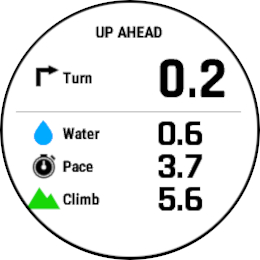
That would be very useful if that was possible. Do you want to make that work for standalone waypoints or on-route waypoints? I’d be very interested to have a feature like that for on-route waypoints.
Is there any API that exposes route geometry or route points?
I don’t think so. I looked at that myself and didn’t find anything. The ony route navigation support exists in S+ Guides API. But then the watch handles the route navigation of the route provided by the guide instead of giving access to the currently loaded route.
Speaking about this feature in general, I think a functionality like this should be built-in rather than an S+ app. In fact the Climb Guidance screen is already very close to providing all this data - it just needs a bit more work to make it more usable.
On the Climb Guidance screen you can already see:
- 1-3 next waypoints, or all waypoints.
- Remaining distance to the last shown waypoint.
- Remaining ascent and the descent to the last shown waypoint.
Using the crown, you can choose how many waypoints are visible on the Climb Guidance by zooming the profile in or out, and therefore see the remaining distance, ascent, and descent to either next waypoint, or second next waypoint, or third next waypoint, or the end of the route. This matches the information you want to show in your app. The only missing information is the waypoint name. If the Climb Guidance included that, it would become even more usable.





Hello! It looks like you're interested in this conversation, but you don't have an account yet.
Getting fed up of having to scroll through the same posts each visit? When you register for an account, you'll always come back to exactly where you were before, and choose to be notified of new replies (either via email, or push notification). You'll also be able to save bookmarks and upvote posts to show your appreciation to other community members.
With your input, this post could be even better 💗
Register Login