Considerations on simple underwater navigation
-
Of cause there are golden solution with maps, contours etc…
BUT… under most diving a simple extended Suunto Compass (like a planetary location wheel) we be more than enough.
Offend we just roughly need to know:
-
GPS Location of the actual Starting Point (S - blue).
-
1-3 POIs from a pre-dive defined location table (1-3 Orange)
-
End Point POI or same as Starting Point (E - green)
-
A POI selector indicator
-
An estimated distance from the current position to the POI
The sensor fusion of this nice device should make this possible.
Even without a gps-update from the satellites.AND everything can then be inside the current area of the compass….
… and navigation can be done with all other important info on the screen simultaneously.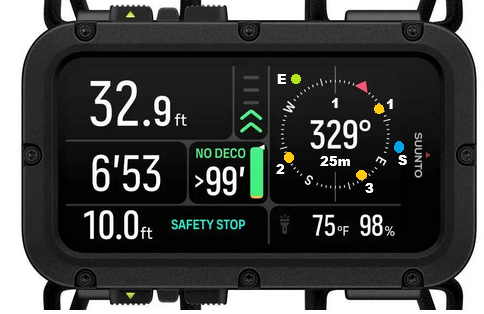
-
-
A Aquario referenced this topic on
-
@Niels-Søren-Bøgh Good idea
-
Yup, that’s a great suggestion!
To be colorblind proof and limit visual noise on the compass, probably better to place the 1, 2, 3 waypoint numbers within the yellow dots, and use a start/end icon instead of a S/E letter close to the blue and green dots (and reserve them for South and East).
A bit like what is proposed with the dive planner icons (see user guide §10.2 p. 60, for instance the surface icon to represent the end).


Hello! It looks like you're interested in this conversation, but you don't have an account yet.
Getting fed up of having to scroll through the same posts each visit? When you register for an account, you'll always come back to exactly where you were before, and choose to be notified of new replies (either via email, or push notification). You'll also be able to save bookmarks and upvote posts to show your appreciation to other community members.
With your input, this post could be even better 💗
Register Login