Suunto 2.50.26 – Q4 2025 Release Notes
-
@atoponce before update :
- intervals set in the directely in the watch were only available in sport modes that had a interval screen
- guides (structured workouts) created in app and sync to watch were available in any sport mode (native or not, having interval screen or no)
Since update interval screen is needed in sport mode in both case
Suunto’s devices at home :
Vertical titanium solar
Suunto Race S
S9pp titanium sand
Suunto Wing & Spark
S9B titanium Ambassador edition, A3P, X6 -
@enriqueescoms said in Suunto 2.50.26 – Q4 2025 Release Notes:
@Egika What do you mean by “this will change again in the future”? That Suunto doesn’t consider it a bug? Or that it is understood that is a bug and it could be fixed (soon)?

full quoting myself: “I think this will change again”.
This is currently discussed internally at Suunto. I have no information about the classification, but my impression is, that it it might not stay the way it is (it is not logical to have guides available for default sport modes but not for custom ones, both w/o interval screen). -
@smedberg But this solution does not work for sport mode pool swimming. There is no possibility to choose an interval screen, only: fields, columns – lap table, intensity zones are available…
-
@AntoniusGaius
Just in case…My 9PP doesn’t bip anymore without a reason.
That is what I did: soft reset- DND ON yesterday afternoon -DND OFF this morning. I hope it works for you as well. -
@Mads-Hintz-Madsen no issue on my R2. Your problem might be very specific
-
@Inge-Nallsson it is very likely that the trail visibility is specific to the map of a specific region. I don’t know how Suunto maps are built, but in the past, I did some detail diving into Garmin maps and there each object had defined visibility for each of the “layers” (zoom levels). I suspect that Suunto maps are built in a similar way.
Btw. I don’t think Suunto has its own, in-house maps; rather, it uses maps supplied by a provider (MapBox?). So, in order to change this map behaviour, the supplied maps will have to change.R2
S9 Baro
SA on Android
Ambit 3 Peak
Ambit 2 Sapphire -
@ISztárek It is not working for Pool swimming, there is no otion to choose an interval screen for this sport mode…
-
@MdzOtt Openstreet Maps
-
@MdzOtt Suunto has maps from MapBox, but I assume these are only raster maps. It is possible that MapBox also pre-processes vector maps, but these are from the Openstreetmap database, which is public and free.
The visibility of objects is defined based on the type of individual objects. For example, forest paths are defined as visible for zoom X-Y and have a certain appearance, forest roads for zoom X-Z have a different appearance, shelters have an icon and are visible for zoom X-XX, etc.
It is unrealistic for each object to have a defined zoom level at which it should be displayed. -
@segi_pn allready discussed in december. Vector maps.
-
@MdzOtt said in Suunto 2.50.26 – Q4 2025 Release Notes:
I don’t think Suunto has its own, in-house maps; rather, it uses maps supplied by a provider (MapBox?). So, in order to change this map behaviour, the supplied maps will have to change.
As stated above, all of the data originates from OpenStreetMap. Almost all app mapping services outside of Google (and Apple, kinda) use OSM as their base. All of the routable lines (called highways on OSM) are divided into two main groups: roads and paths. Then there are tags that can be applied to each to further designate these features.
On Suunto’s maps (on the watch), all paths designated for foot traffic are depicted as thin dotted lines. Although a “width” tag can be applied to OSM ways, it is rarely used and I’m quite certain ignored by Suunto’s maps. When I view the map, all footpaths disappear above the 200m zoom level. This includes trails, sidewalks, and informal paths. Paths designated as cycleways last another zoom level, disappearing after 500m.
Roads have a hierarchy that determines their visibility (motorway, primary, secondary, tertiary, residential, etc.).
Vertical Ti / S9PP Ti / S9P Ti
-
@Tieutieu said in Suunto 2.50.26 – Q4 2025 Release Notes:
@ChrisA said in Suunto 2.50.26 – Q4 2025 Release Notes:
@ISztárek if you read above, you just need to add an interval screen to your customised sportmode and the guides are back. Just tried myself and worked - a bit weird though, but not that bad
and it has always been so, even before update.
No interval screen, no inbuilt intervals workoutsThis is incorrect as Guides were available without an interval screen. For example, A Guide could be a Recovery Run, where you want defined HR zones. I can imagine countless other examples. One should not need the internal interval screen to enable a Guide.
-
It looks like this bug has finally been fixed as well.
-
@AntoniusGaius Not yet. Had something like that on the last updates but only with trunpoints
-
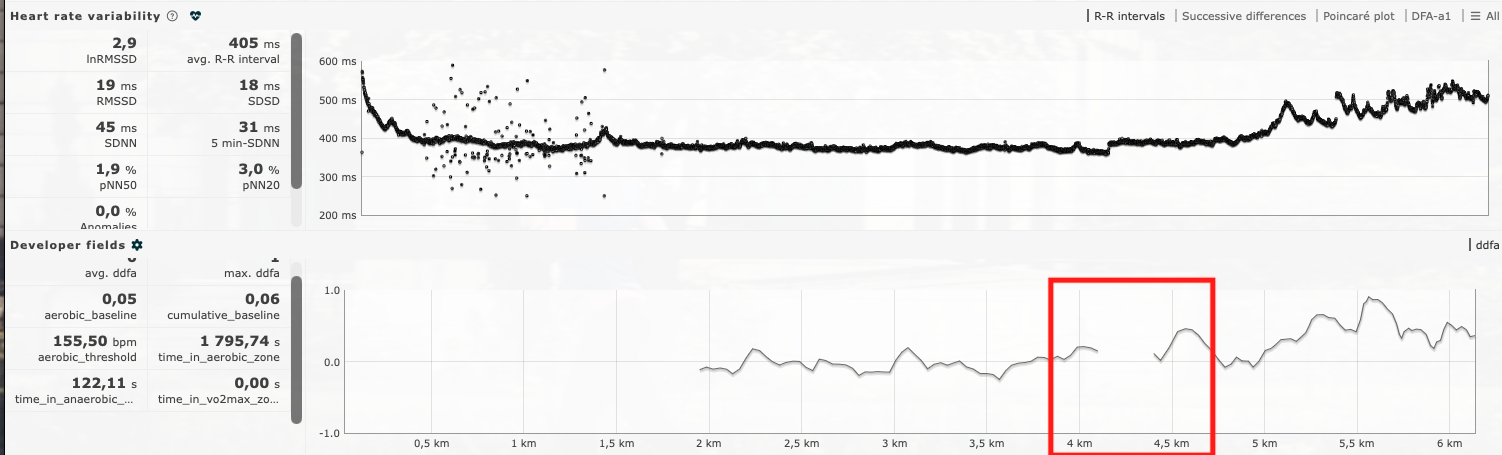
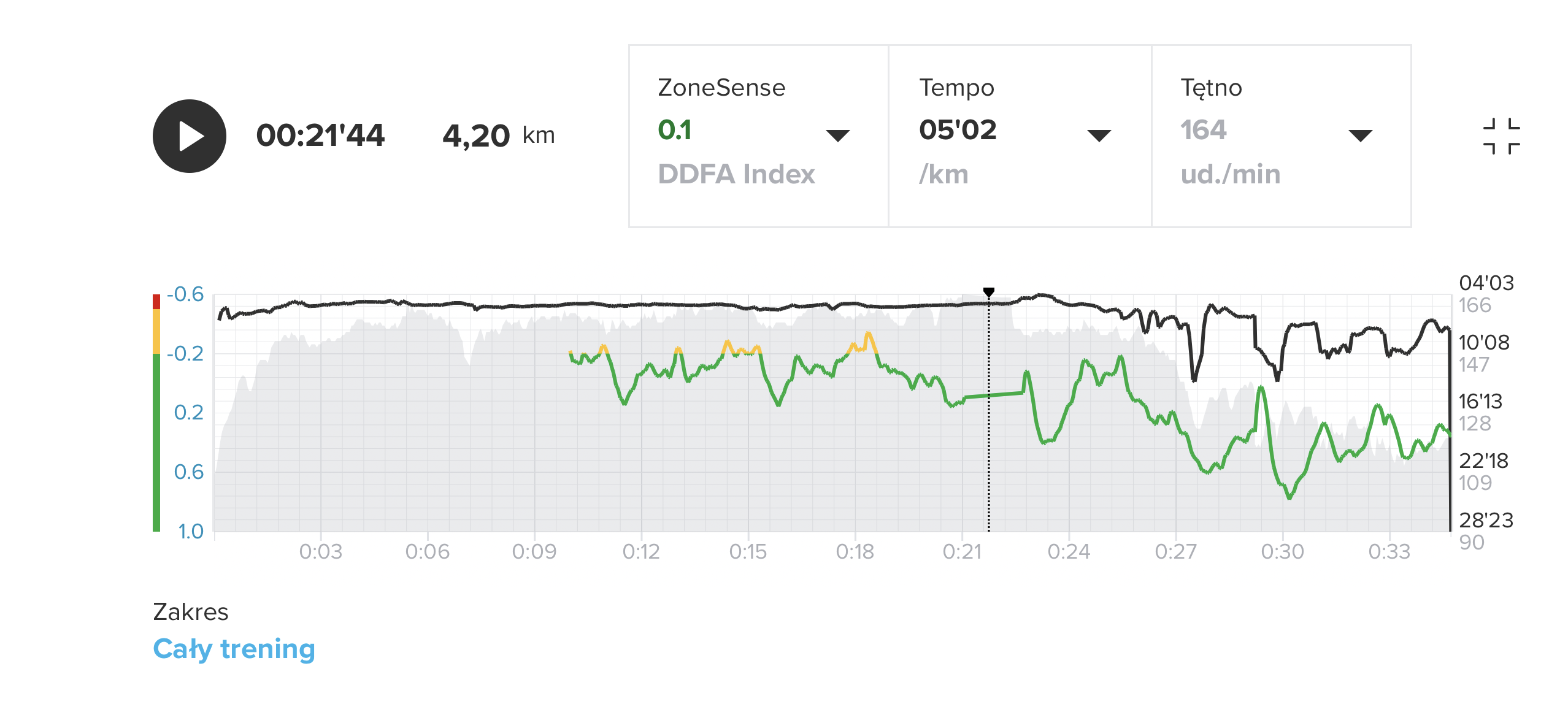
Unfortunately, with the latest firmware 2.50.26 on the Vertical 2, there is still a problem with disconnections (loss of heart rate visibility) during activity. I am using a Suunto Smart Belt. The current battery level of the belt is 70%.
Around 4.3 km, I noticed that the heart rate was no longer displayed while running; a moment later it came back, and I also felt a vibration on my wrist.
I think the Runalyze graph in the Developer Fields may indicate this issue after 4 km.
-
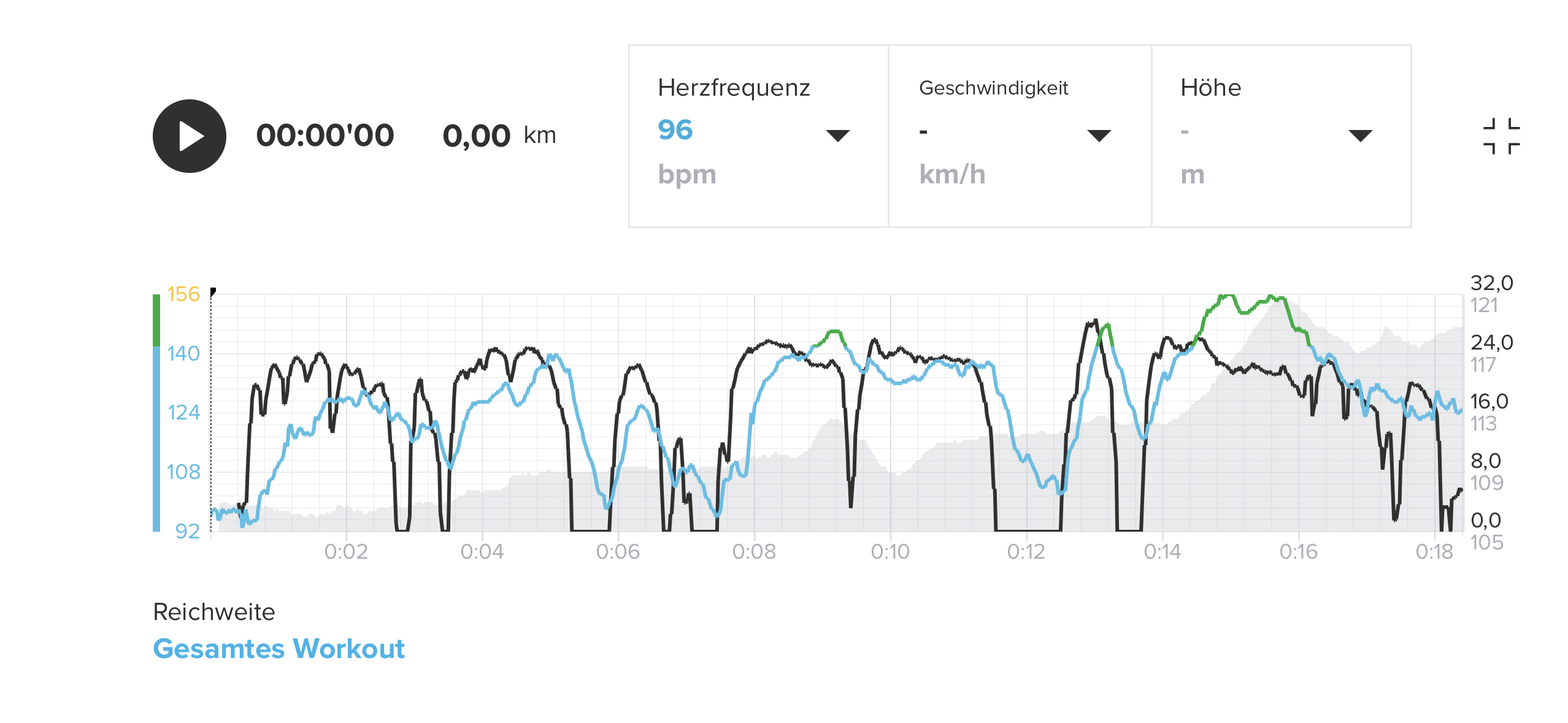
Regarding new OHR algorithm on the Race S, I’m honestly impressed about my ride to work today. You can argue about the absolute values of the HR, but the general direction of HR changes are very plausible do not feel as random as before the update.
Today:
Same ride before the update:
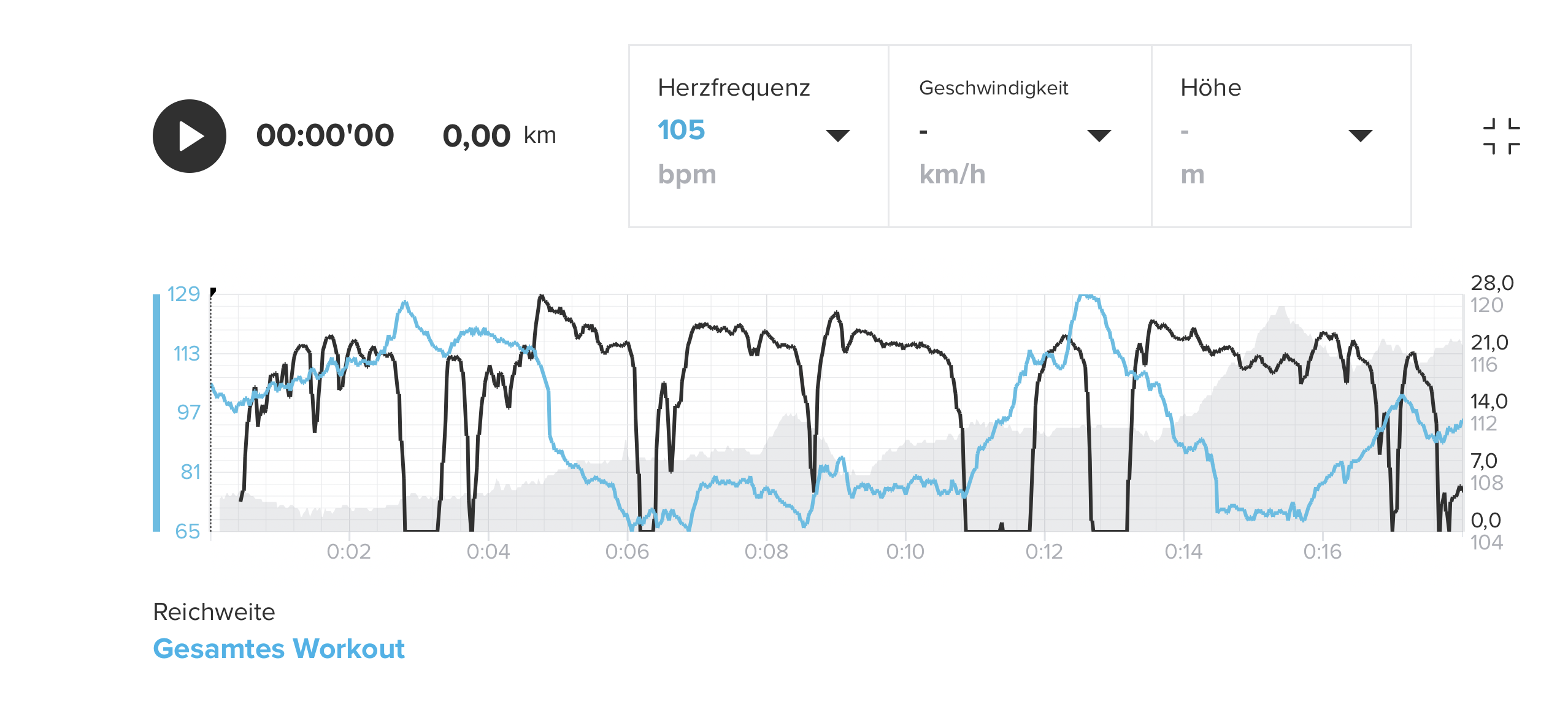
So, overall an improvement, but still could be better…
-
My structured workouts I created dissapeared from my peak pro too, even app say that they are in my watch.
-
@Tieutieu I already wondered when you replied that it was always that way
 - I really doubted my own memory
 -
@MdzOtt said in Suunto 2.50.26 – Q4 2025 Release Notes:
So, in order to change this map behaviour, the supplied maps will have to change.
I don’t think so. Trail visibility has been changed to the worse as a result of 2025 Q3 update without new maps being downloaded. Before that I update I could see trails at 0.5 mi zoom level (800m). After the update I immediately noticed that trails now were visible at up to 500 ft (150m) zoom level. So for anyone in the US trail visibility radius was suddenly over 5x worse.
Furthermore, in October 2025 at a race expo I looked at Suunto Ocean watch and it did still show trails at 0.5 mi zoom level unlike all other Suunto models available at the Suunto tent at that race expo.
-
During my first run after this update I had 2 issues:
- black screen instead of suuntoplus wing2 screen
- not possible anymore to command media from media screen (play, pause, volume). Only title of the song is diplayed on the watch. Time of song stay to 0 but title is displayed
Note: i am in a custom sport (trail).











Hello! It looks like you're interested in this conversation, but you don't have an account yet.
Getting fed up of having to scroll through the same posts each visit? When you register for an account, you'll always come back to exactly where you were before, and choose to be notified of new replies (either via email, or push notification). You'll also be able to save bookmarks and upvote posts to show your appreciation to other community members.
With your input, this post could be even better 💗
Register Login