I have zero confidence in Suunto route navigation!
-
@sky-runner I see what you mean and take your point from above about having certain “checkpoints” to cross. Even if there are checkpoints added in the background, wouldn’t that just be for the purpose of determining the direction of travel and therefore part of the auto reverse feature? Whatever it is exactly, it’s all just too complicated for its own good.
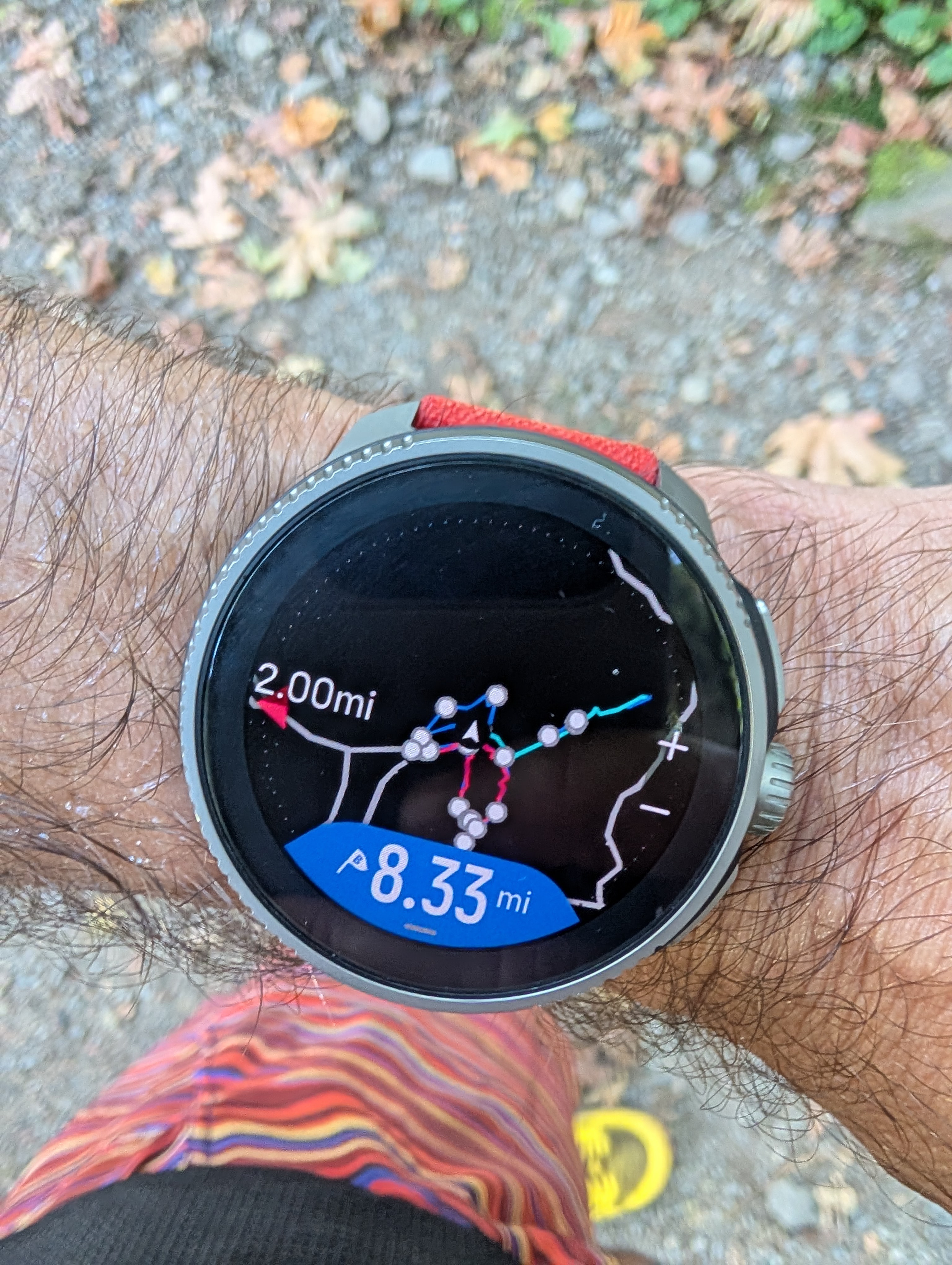
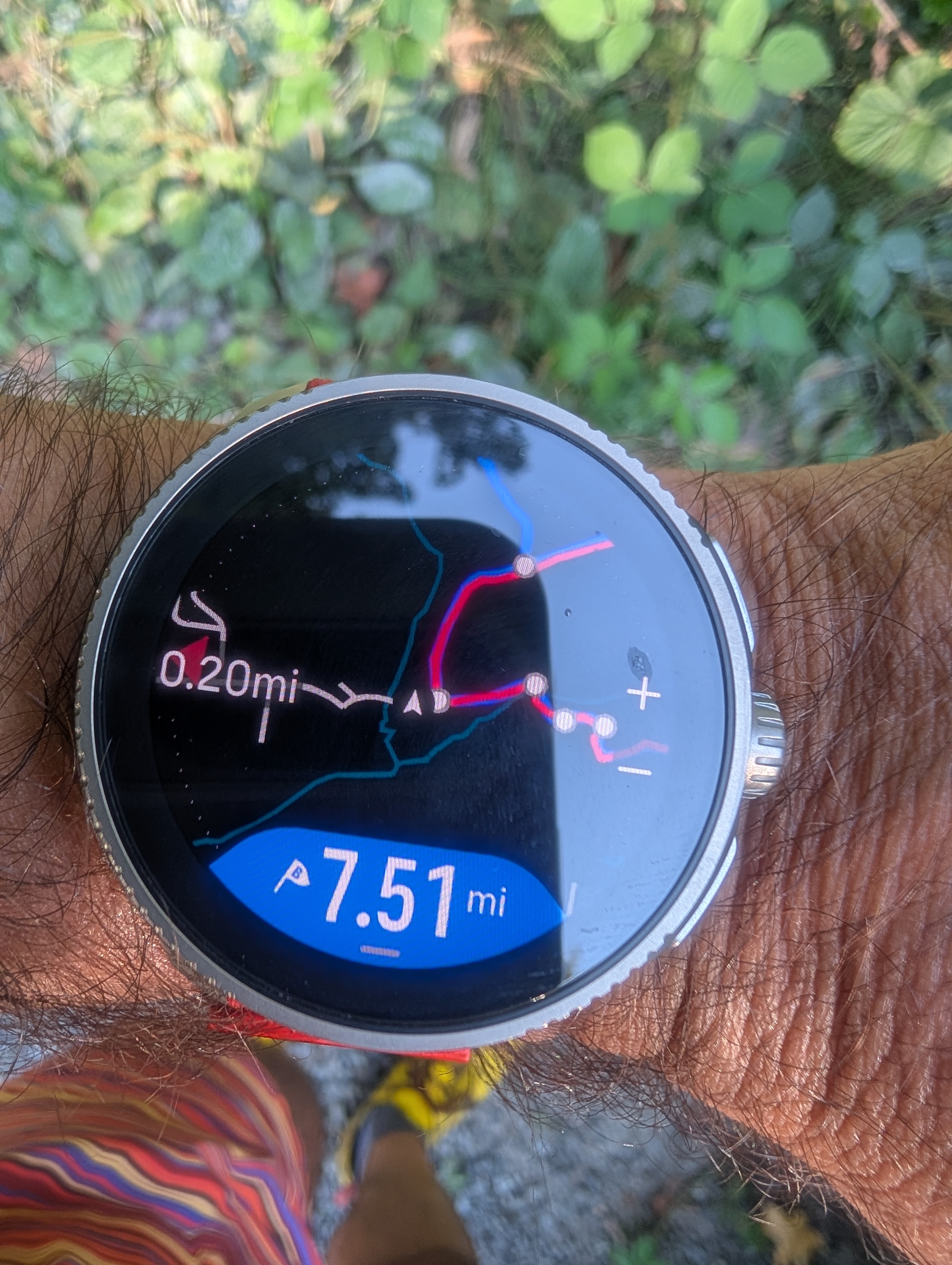
Like @Mff73 above, I’ve also tested following a route with two Suunto watches at the same time (Vertical and 9PP). At one point leading into a loop, the Vertical showed the correct way (left) while the 9PP showed the wrong way (right). Both watches somehow showed the same end-of-route distance, like in your original example above. How is this possible?
What I’ve observed is that the the auto reverse (and navigation in general) consists of three separate calculations that seem to occur independently of each other: the light blue direction-of-travel arrow on the map, the distance remaining (and ETAs and ETEs to waypoints, etc.), and an “off route” notification that occurs when a change in direction is detected.
It seems that the blue directional arrow is the most sensitive and will change within 50-100 meters after reversing directions. The distance remaining is much slower to adjust, sometimes taking up to 200 meters to correct after a change in direction. The notification (which I haven’t observed lately, so perhaps doesn’t happen anymore) occurs sometime between these two.
Now why wouldn’t all of these things happen at the same time when a reverse of direction is detected? I think this is just further evidence that the backend is just too complicated. This might also explain what you experienced, that you were somehow between these calculations where the arrow had “updated” incorrectly to showed the wrong way, but the distance remaining hadn’t recalculated yet and was still correct.
-
@duffman19 said in I have zero confidence in Suunto route navigation!:
It seems that the blue directional arrow is the most sensitive and will change within 50-100 meters after reversing directions.
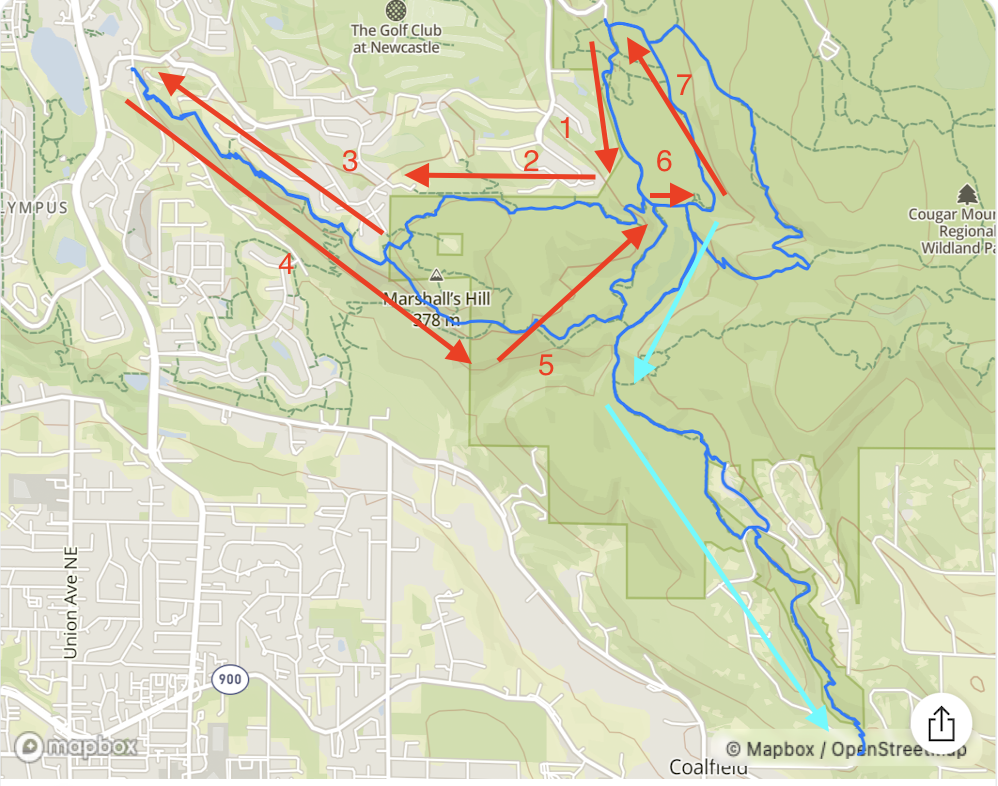
From looking at the map screenshot in my original post, I can confidently tell that the direction was not reversed. I can tell that because of a unintentional routing mistake on my part which resulted in the “out” part of the route where the light blue direction arrow is pointing to slightly diverge from the “back” part. According to the original direction, the “out” part is below on the screenshot and it is light blue. The “back” part is above on the screenshot and it is dark blue. Therefore the directional arrow is consistent with the original direction.
-
@sky-runner Ok, I think I see where you mean - that small section between the two dots (waypoints or turns)? So you think it just skipped ahead while you were somewhere on section 6? (Sorry, I’m trying to follow along.)
Perhaps in addition to the watch always trying to figure out which direction you’re traveling, it’s also always trying to figure out where you are along the route, rather than just assuming you are strictly moving from one point to the next. So maybe somewhere along section 6, it incorrectly guessed you were farther along in your route (since the paths cross at 6/7) and updated the directional arrow accordingly, but hadn’t yet updated the distance remaining since that lags behind. I’d bet if you had followed the light blue path, away from your car, the remaining distance would have also skipped ahead soon after. But since you followed the route as planned, it didn’t have time to adjust to this mistake.
Whatever is going on, you are correct that it’s screwy and inconsistent.
-
D duffman19 referenced this topic on
-
Yet another example of the watch, now Vertical 2 not following the route as planned. I plan complex routes not because I want to get from point A to point B but because I have a specific training goal in mind with specific distance and ascend, and with specific terrain and steepness for ascent and descent. That’s why it is not OK to randomly change what I have deliberately planned.
Here’s an example of the watch just skipping a part of the route and jumping to a later part of the route - not OK at all. And if something like this happened in a race that would make me disqualified.
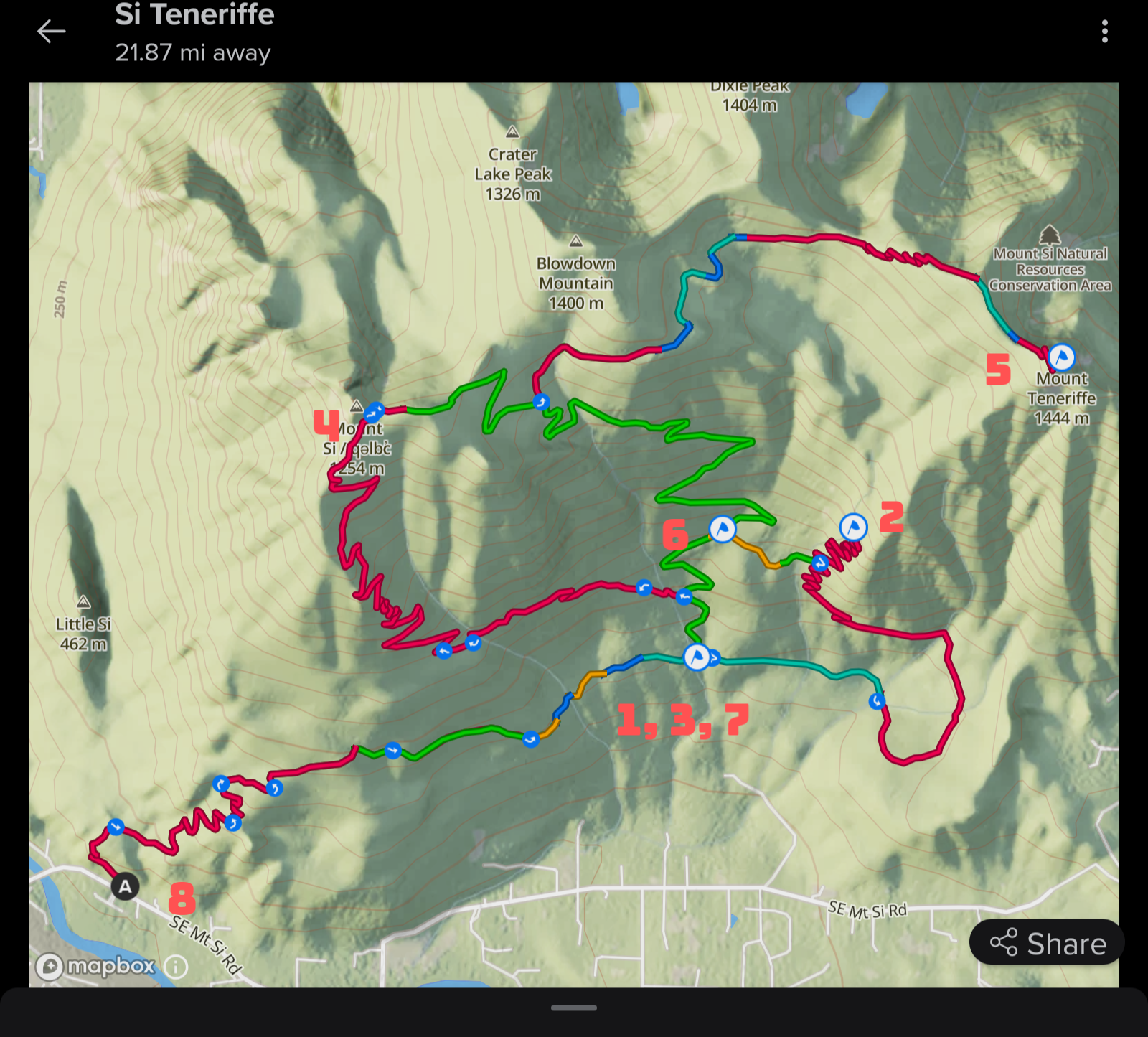
The plan was to continue from point #1 to point #2, them circle back counterclockwise to point back to point #1 (marked as #3). The reason circling back there because that was the only reliable source of water. Then continue on the high route via #4 to number 5, them return via #6 to #7 (the same as #1 and #3) and refill water again.
What the watch decided during the run at the junction after #1 is to point me towards #4 and therefore skip #2 and the entire small loop. In my opinion that is absolutely unacceptable!
.
Suunto: Ambit, Ambit 3 Peak, 9 Baro, Race S, Race Ti, Vertical 2 Ti
Garmin: Forerunner 210, Forerunner 610, Fenix 6X, Fenix 7X Ti -
@sky-runner This is exactly the type of route where navigation fails. When I have a route like this, I have to stop and restart the navigation several times during the workout to make it usable.
And one more thing. I don’t know why they can’t use simple logic here: for example, if I don’t pass point 2, don’t navigate me to point 4. Only do that if I continue towards point 4 for a longer distance—like 200 meters—or after a warning like “You missed points X and Y. Do you really want to skip ahead?”
Reading about these problems here makes me worry if it will ever be fixed at all.
Also, Garmin handles routes where Suunto fails much better.
-
@sky-runner
from manual for your watch:
“If you are navigating a route that crosses itself, such as a figure-8, and you make a wrong turn at the crossing, your watch assumes you are intentionally going in a different direction on the route. The watch shows the next waypoint based on the current, new direction of travel. So, keep an eye on your breadcrumb trail to ensure you are going the right way when you are navigating a complicated route.”
https://www.suunto.com/en-gb/Support/Product-support/suunto_vertical-2/suunto_vertical-2/navigation/routes/I guess you need to know more or less where are you going.
-
@mich-heller Yes, I know about this, but the problem is that even if I mostly know the route and Suunto sends me the wrong way, once I keep running the right way, the whole navigation—including climb guidance—gets messed up. Then I have to turn it off and on again.
-
@runyx17 Highlighting a part of the track immediately coming up in front of you in the map would help a bit… (next 50 meters or so? depending on the zoom level)
-
@sky-runner
Could share the gpx of that route? I could ask about this behaviour.
mp if preferred. -
@sky-runner that’s a heck of a route!
Curious what zoom level you use while you’re navigating during the run and if you happened to look at the navigation while you were approach 1, 3, 7.
I would certainly hope that while you were still moving towards the first way point, the blue arrowed line ahead of your exact current position correctly showed you the path to way point 2.
Absolutely a problem if even while moving, prior to waypoint 1s first arrival, it was navigating you to 4 immediately



Hello! It looks like you're interested in this conversation, but you don't have an account yet.
Getting fed up of having to scroll through the same posts each visit? When you register for an account, you'll always come back to exactly where you were before, and choose to be notified of new replies (either via email, or push notification). You'll also be able to save bookmarks and upvote posts to show your appreciation to other community members.
With your input, this post could be even better 💗
Register Login