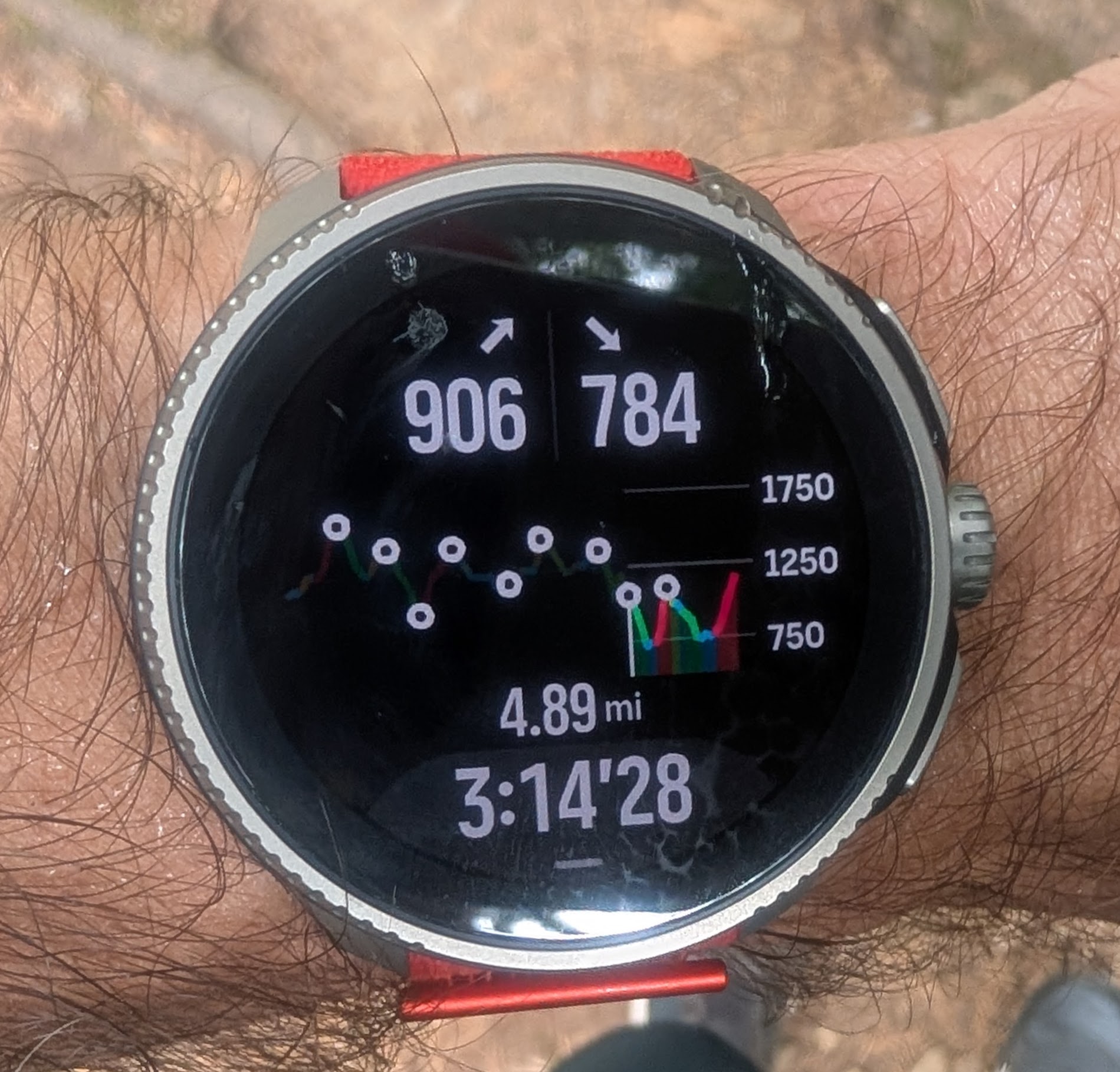
Climb guidance 2.0 issue - not all zoom levels are available at the end of the route (see picture)
-
I really like v2. Well done Suunto team.
It works very well when used properly with Waypoints.There’s only one thing missing (mentioned earlier on the forum) – when using Waypoints, there’s still a one zoom level missing that would show the current ascent regardless of the next Waypoint.
-
@sky-runner said in Climb guidance 2.0 issue - not all zoom levels are available at the end of the route (see picture):
Climb guidance 2.0 becomes super confusing when the route is reversed. For example in the photo below I am actually climbing and the graph moves right to left. This isn’t an acceptable user experience by any means:
exactly, the graph should be flipped horizontally when the route is reversed, the current implementation is a bit raw
-
yes, this is under construction and will very likely be changed with the next Firmware
-
I used it on a hike several times and this is how I understood it worked:
zoomed out: entire elevation profile
zoom in: elevation profile up to the next waypoint
zoom in more: elevation profile to the next climb peak point -
@Bartek-W said in Climb guidance 2.0 issue - not all zoom levels are available at the end of the route (see picture):
I used it on a hike several times and this is how I understood it worked:
zoomed out: entire elevation profile
zoom in: elevation profile up to the next waypoint
zoom in more: elevation profile to the next climb peak pointNo, that isn’t how it works. Once climb guidance 2.0 mode is activated, if you have at least one waypoint on the route, there is no longer a way to zoom to the next climb peak point. Besides, that isn’t really how the original Climb guidance work either. I can explain that. Also, your next climb peak point can be further than your next waypoint if the waypoint is in the middle of the climb. So this becomes complicated and that is probably why Suunto didn’t implement it the way you suggested.
I used it enough times with multiple waypoints to understand exactly how it works. There are 4 zoom levels that are based on “segments” between waypoints:
- One segment, i.e. showing the profile to the next waypoint
- Two segments, i.e. showing two waypoints on the elevation profile
- Three segments, i.e. showing three waypoints
- The entire profile
The problem that I described in this post is that at the end of the route, when you are close to the end, it can no longer display zoom levels 2 or 3. Even if you still have ahead of you one waypoint before the end of the route, which means there are two “segments”, it can no longer switch to zoom level 2 or 3, and can only switch between zoom level 1 and 4. However the problem with the zoom level 4, even though technically it shows everything, is that it is horribly compressed if the route is long, so all details are lost and the profile becomes useless. In other words, if you look at the screenshot above, at that point the zoom level 2 can no longer be used even though it should still be possible.
I don’t even understand how this very obvious issue was allowed to go though and be released? Anyone who actually used this feature on a long route would see it right away. I noticed it the very first time I used this feature. To me, that means that either Suunto doesn’t have beta testers who are target users for this feature or perhaps that the development team has ignored their feedback.
Suunto: Ambit, Ambit 3 Peak, 9 Baro, Race S, Race Ti, Vertical 2 Ti
Garmin: Forerunner 210, Forerunner 610, Fenix 6X, Fenix 7X Ti -
@maszop fully agree on this one! One extra zoom level should be possible.
-
Also, if anyone from Suunto sees this, the way the profile is rendered makes it harder to use the feature. In my opinion, when the already covered part of the profile is rendered, the already visited waypoints should be less bright or not rendered at all because they no longer matter, but the profile line should be more visible to give a better sense of scale of where you are on the overall profile. As it is currently rendered, the already visited part of the profile is practically invisible.
Also, if possible the font for the remaining distance should be a bit larger - that is a very important data point. At the same time, the font used for the remaining climb and descent could be a bit smaller to give the profile a bit more vertical space.
-
@sky-runner I agree with the suggested changes, but they should put waypoint name where distance is. And put distance where time is (why is time there?)
-
@fritzbt2013 agree, data fields in climb guidance screen could be improved, both in terms of which data to display and also in terms of front sizes (some are too big and others too tiny in my opinion)
-
@fritzbt2013 said in Climb guidance 2.0 issue - not all zoom levels are available at the end of the route (see picture):
I agree with the suggested changes, but they should put waypoint name where distance is
Great idea about the waypoint name! The time is completely redundant on this screen!
-
 S sky-runner referenced this topic on
-
I really wish to see a fix for this soon. A new season is coming with a lot of races, and having this working properly would be great!
-
I also wish that the missing extra zoom level on current climb/descent will be back when using waypoints.
It was available before update, it’s a huge regression to me. -
@Tieutieu I’d like to still have an option of zooming into an individual climb too even when there are waypoints. I wonder how that could be done considering that a upcoming waypoint can be either before or after the end of a climb? In other words, if this is implemented as zooming the experience may end up being inconsistent and confusing because a single climb view may not be the most zoomed in level if there is a waypoint in the middle of that climb.
Perhaps this could work as if there was a waypoint at the top of every major climb and every major descent - this might still be tricky and confusing. Or perhaps the last zoom level would be a special one and work like Climb Guidance v1 and hide waypoints. I didn’t know.
In fact, I don’t really like the old Climb Guidance v1 focusing into short ascents and descents that often end within 0.3 nile (500m), but I like using it for major climbs. -
@sky-runner the only missing thing ihmo is this extra zoom level when there is waypoints . In other cases climb guidance is perfect . It has been reported here many times, I guess testers among forum users have also reported it. I hope this will change in the future.
-
@Tieutieu said in Climb guidance 2.0 issue - not all zoom levels are available at the end of the route (see picture):
@sky-runner the only missing thing ihmo is this extra zoom level when there is waypoints . In other cases climb guidance is perfect
No, it is not perfect when doing a really long distance with a lot of waypoints, and that is what the above report is about. The zooming doesn’t work correctly when at the end of the route as it may not be possible to zoom in to the desired zoom level.
Imagine that you run a 100 km race and let’s say there is an aid station at 5 km before the finish and another aid station at 10 km before the finish. And let’s say there are waypoints for all aid stations. And let’s say you are just past the second from the end aid station, so basically you have 10 km to go and one more waypoint before the finish. Please see the picture at the top of the post for the illustration of what I am trying to explain.
At that point it is possible to see the entire profile for the entire 100km, but the elevation profile is so compressed horizontally that it is unusable. Also it is possible to zoom just at the 2nd from the end segment of the profile - from 10km before the finish to 5km before the finish. That is good. But it is impossible to zoom into the segment that shows the last 10 km - from 10km before the finish to the finish. Instead it goes straight into the entire 100km profile. That’s what the above report is about. A similar zoom level is available at the beginning of the route but not at the end. The logic is flawed!
-
Unfortunately, this feature is still not fixed in 2.53.42.
Here is an example:
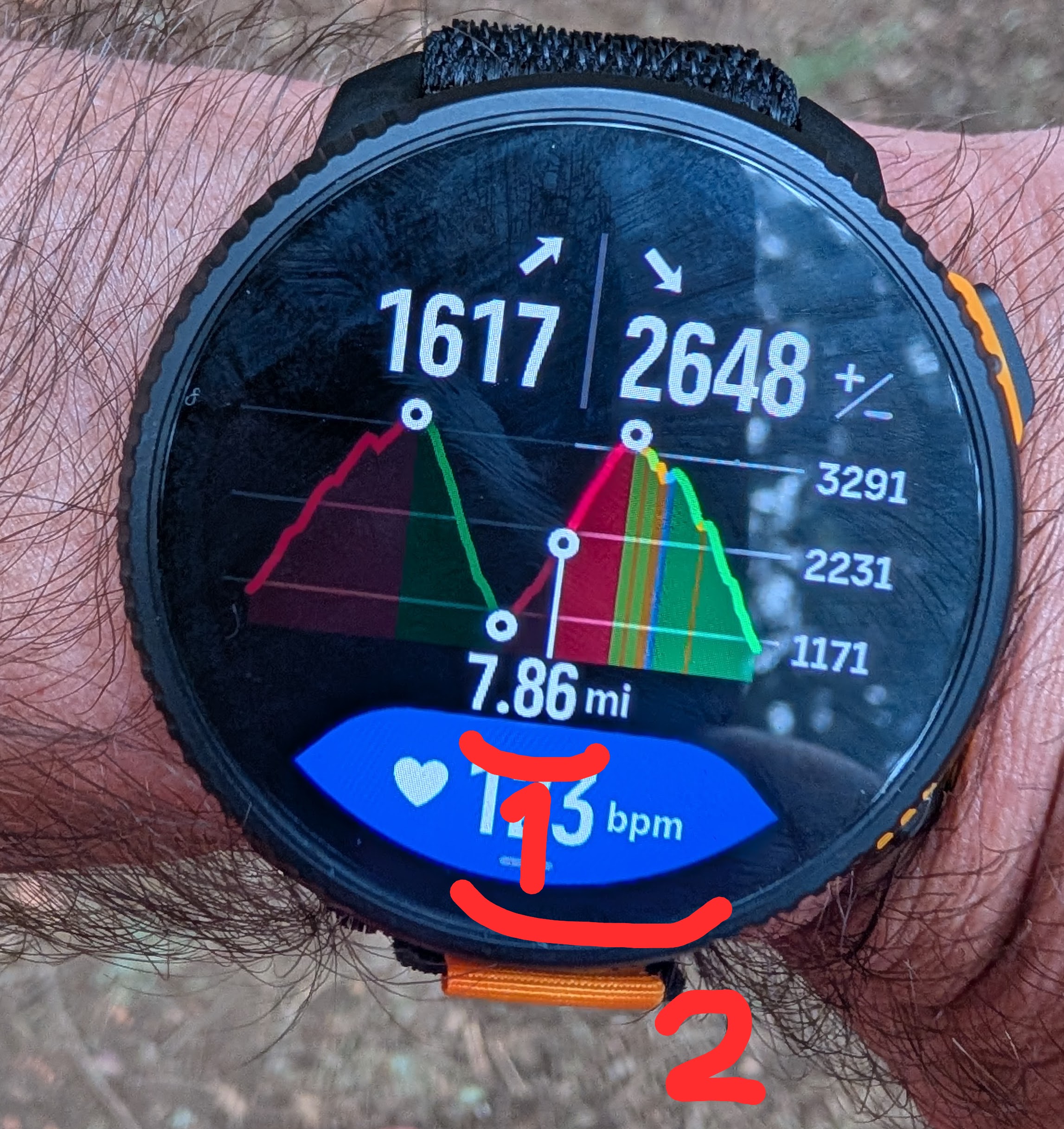
To be clear, the small white circles are waypoints.
From where I am I can switch to the zoom level 1 shown in the picture, but the zoom level 2 is not available. It was available in the first part of the run, for example showing the first climb and descent together or showing the first descent and the second run together. But it is impossible to zoom into the second climb and the second descent together - it either the entire elevation profile or just the segment to the nearest waypoint.
Imagine these waypoints to be aid stations during a 100 mile ultramarathon. At the end of the race, we loose an ability to use middle zoom levels. So it is either a single segment or the entire profile, but the entire profile showing 100 miles isn’t usable because all climbs and descents are super compressed horizontally.
Please give this fix a priority!
-
But it is impossible to zoom into the second climb and the second descent together - it either the entire elevation profile or just the segment to the first waypoint.
And what happens when you add a way point to the of the route?
-
S sky-runner referenced this topic on
-
@Squirrel said in Climb guidance 2.0 issue - not all zoom levels are available at the end of the route (see picture):
And what happens when you add a way point to the of the route?
I had that idea and tried that once - didn’t make any difference.
-
I experienced the same with distance based zooming.
Did report it.






Hello! It looks like you're interested in this conversation, but you don't have an account yet.
Getting fed up of having to scroll through the same posts each visit? When you register for an account, you'll always come back to exactly where you were before, and choose to be notified of new replies (either via email, or push notification). You'll also be able to save bookmarks and upvote posts to show your appreciation to other community members.
With your input, this post could be even better 💗
Register Login