-
The original Suunto Core had a dedicated weather trend indicator right on the main screen. I really can’t understand why this feature was removed in the second generation—it’s a massive downgrade. Looking at various reviews and Reddit threads, it seems I’m definitely not alone in missing it.
This is clearly a software feature that was hugely popular among users. Since the barometric pressure is already being logged in the background anyway, there’s no hardware or technical limitation preventing it. The indicator was incredibly useful for getting a quick, glanceable sense of incoming weather changes at a single glance.
Please consider bringing this feature back in a future update.

-
I isazi moved this topic from The Lounge
-
The original Suunto Core had a dedicated weather trend indicator right on the main screen. I really can’t understand why this feature was removed in the second generation
Maybe because it wasn’t?
Trend is there. There is no massive downgrade.
Sometimes it helps to ask first, before drawing conclusions from wrong assumptions.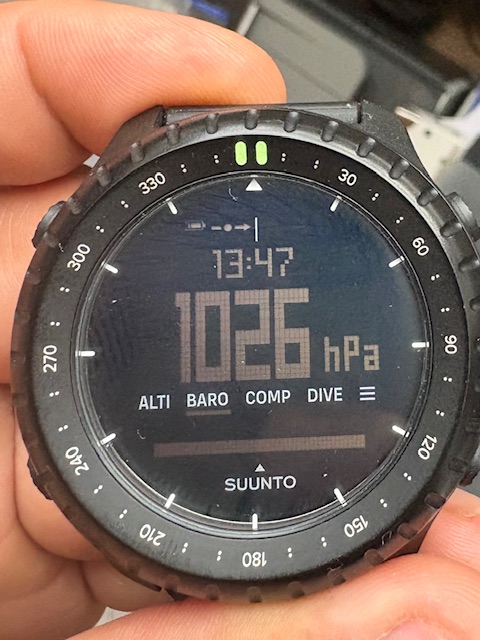
-
@Egika Yes, the indicator is displayed, but only after you switch to the “BARO” page. You obviously don’t stay on that screen 24/7 (if only because button lock and additional views don’t work on that view).
On the original first-generation Suunto Core, that indicator in the top-left was visible right on the main locked screen. The huge advantage was that when you were at a camp, for example, a quick glance at the watch told you how the weather was developing without having to switch over to the barometer— but this feature has disappeared.
Don’t worry, I’m not jumping to conclusions; I’ve gone through the whole watch and read plenty of reviews, also I’m owner of first generation for years.
The feature I’m talking about simply isn’t there. Besides, on the BARO screen itself, that trend indicator is practically useless anyway since you already have a detailed graph right below it.

Hello! It looks like you're interested in this conversation, but you don't have an account yet.
Getting fed up of having to scroll through the same posts each visit? When you register for an account, you'll always come back to exactly where you were before, and choose to be notified of new replies (either via email, or push notification). You'll also be able to save bookmarks and upvote posts to show your appreciation to other community members.
With your input, this post could be even better 💗
Register Login