Suunto Software update Q2 (2.56.18) - July 14th, 2026 - Vertical 2 and Race 2
-
@SuperFlo75 I think I solved my own problem. But indeed the solution seems to be keeping up. And watch is still operational after a 2,5h ‘move’.
@makoc ; seems to be the same error as yours, so give it a try. good luck. For me it took two days to have the bootloop drain all the power from the watch.
-
@mich-heller Sorry but this is an incredibly out of touch response. I don’t need contact lenses, I only wear glasses to read smaller text which is why I always complain about tiny fonts on the watch.
I know Apple is Apple but their watch offers accessibility options which make everything very legible, even while on the run. I’d just like to see a bump in font size which would benefit people like me, but disadvantage no-one else.
It can be done because the menu list is very legible, I just want to see system messages and complications using a similar font size and weight.
Watch: Suunto Race S
-
As I said above, the problem isn’t necessary with the font size. The problem is with an poor choice of colors, but probably also insufficient outlines and spacing between letters.
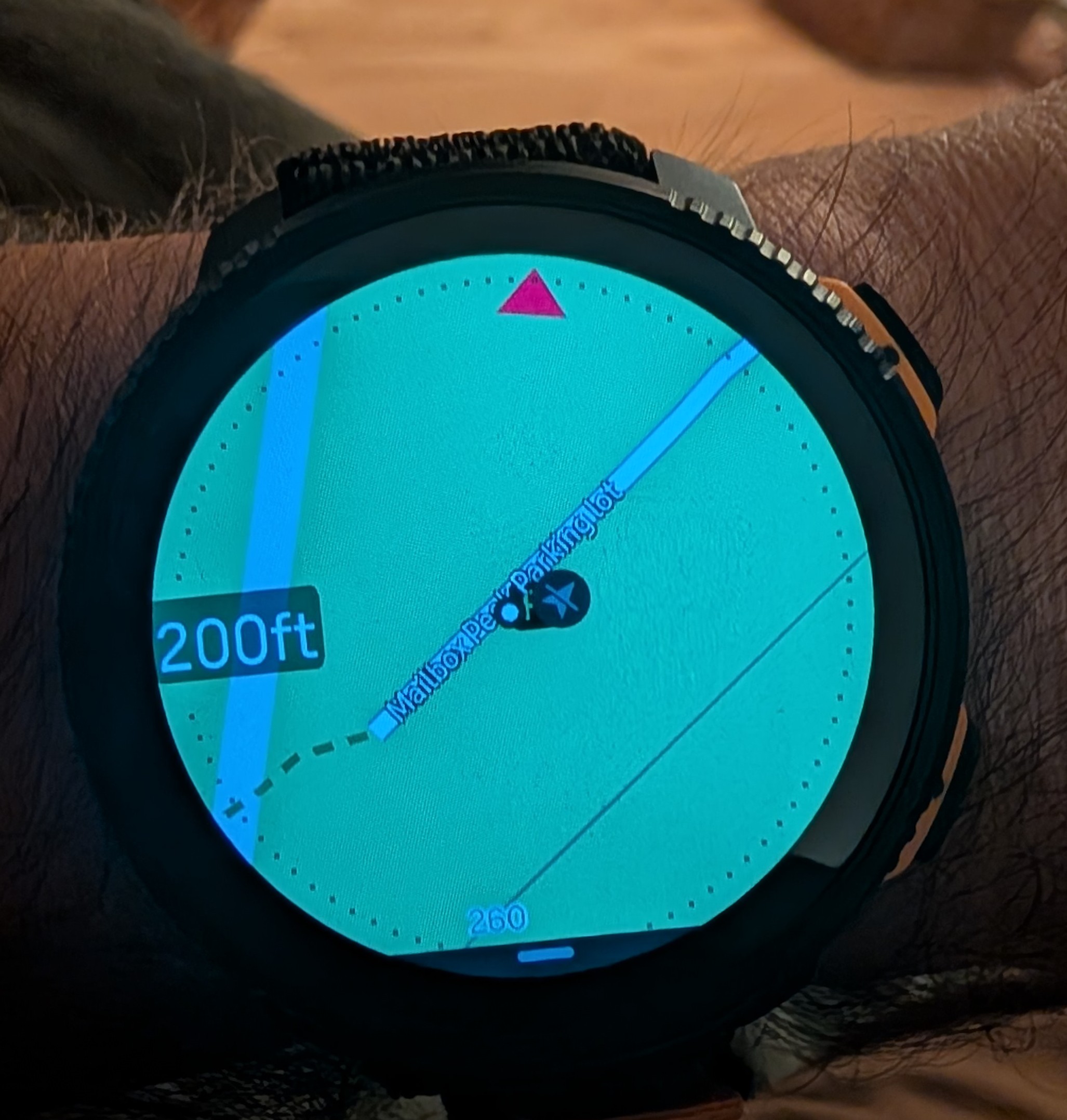
Let’s compare. Here is a screenshot of my Vertical 2 map on the Light map - can’t read this at all unless I enlarge the image a lot:
Now for comparison a couple of pictures of Fenix 8 map that I downloaded from Garmin Forum:
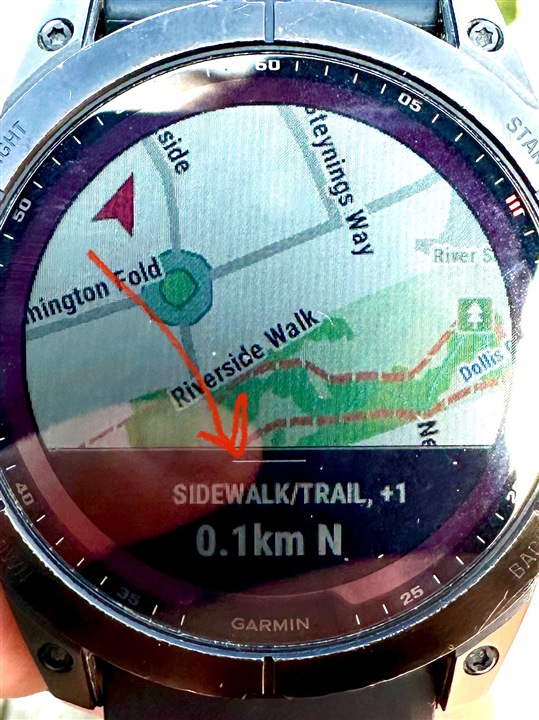
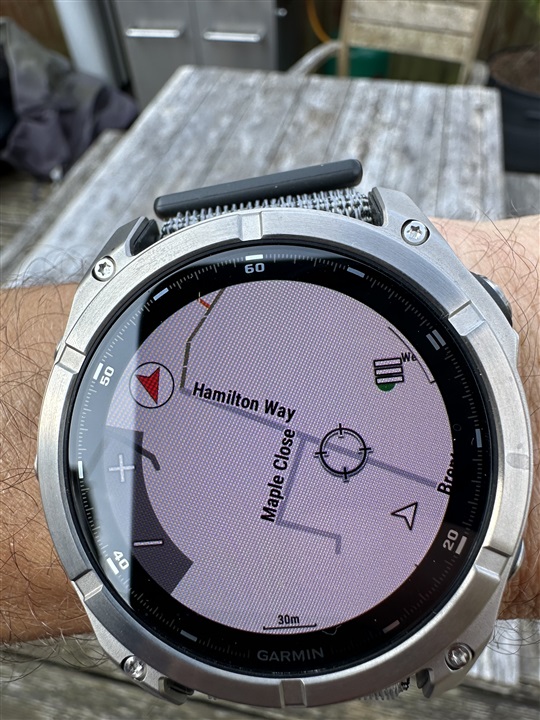
Garmin fonts aren’t necessarily much larger, but look how crisp the letters are compared to what we see on a Suunto map.
The differences that I.can see are the following:
- Garmin renders letters as black on white with a relatively thick outlines so letters stand out.
- The font is bolder, which makes better contrast
- The spacing between letters seems to be a bit wider so that letters are more distinct.
- Labels are offset from roads which makes it easier for them to stand out against the solid background.
It seems that Garmin labels have been specifically optimized for the best possible readability. Now look at the Suunto screenshot.
- Letters are rendered as white with thin black outlines - the worst possible contrast!
- Letters are very close to each other which makes them sort of blend into each other. Even spacing between words is too tight. The legibility is just horrible in my opinion.
- Labels are rendered directly on top of roads or trails, which makes the contrast even worse.
It seems like someone developed this on a computer looking at a large computer screen and called it done without trying to use it on a real watch. Was there a usability study or feedback collected from multiple field testers before this was released? I highly doubt it!
The worst thing is that now it will take forever to get this improved.
Suunto: Ambit, Ambit 3 Peak, 9 Baro, Race S, Race Ti, Vertical 2 Ti
Garmin: Forerunner 210, Forerunner 610, Fenix 6X, Fenix 7X Ti -
@Steven-Hambleton No offense intended, this is a serious suggestion as I’ve been using something similar for a while now: Amazon
Maybe sports glasses with built-in reading zones/bifocals could be a helpful workaround for you in the meantime.
Suunto Race 2 (from Garmin FR255, short stint with Suunto RUN)
Suunto Wing 2 + Spark
Suunto smart HRM
OnePlus 13 -
@sky-runner
Huge difference here. Well probably Suunto will work with font in next update/future.
So far I find out Dark Mode good enough. In normal bright map mode sadly for me it’s unreadable. -
@sky-runner Try switching the offline map to Dark Mode if you’re having trouble seeing it.
For me, city names aren’t really necessary—I actually turn them off because I already know where I am. What I want from my watch is a smooth, real-time map that shows my route without lag.
That’s one thing I really like about Suunto. The map rendering is fluid, even while moving, unlike Garmin, which can sometimes feel choppy. The color scheme is also well designed, especially in the forest, making trails much easier to distinguish and read at a glance.
Sometimes the issue isn’t the map itself—it might just come down to how it’s being used. A few small adjustments to the map settings can make a surprisingly big difference.
-
@sky-runner Try switching the offline map to Dark Mode if you’re having trouble seeing it.
Both Dark and Light maps are quite poor at rendering trails at 500 ft and 0.2 mi zoom levels - the contrast is just too poor due to choice of colors. The only acceptable option for me is High Contrast maps.
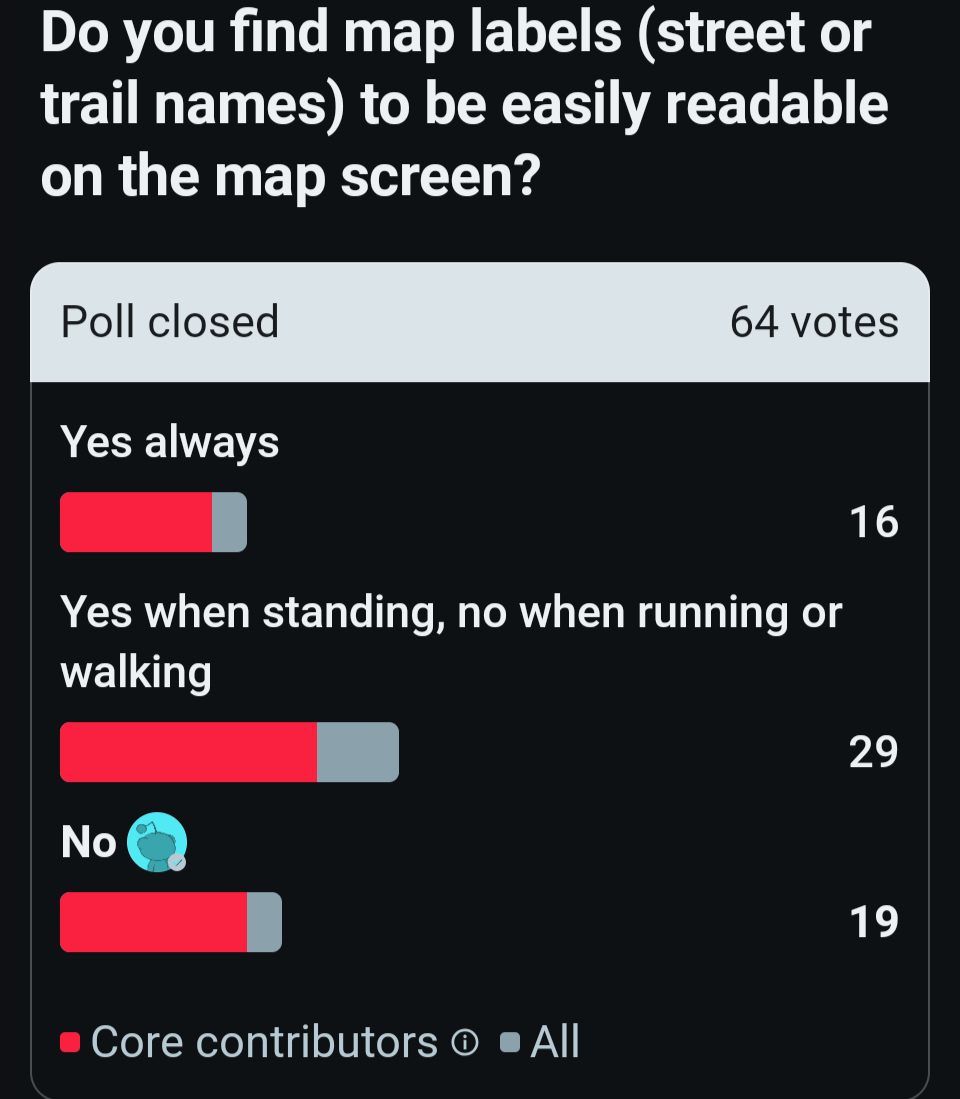
I shouldn’t have to use a workaround just to see labels. I think Suunto developers should improve this for everyone in all map styles. And I am not alone - here is a screenshot of a poll I did on Reddit:
Suunto: Ambit, Ambit 3 Peak, 9 Baro, Race S, Race Ti, Vertical 2 Ti
Garmin: Forerunner 210, Forerunner 610, Fenix 6X, Fenix 7X Ti -
@sky-runner I understand your point, but the reality is that everyone sees and uses maps differently. That’s exactly why Suunto offers multiple map styles, including High Contrast, Dark, and Light.
I don’t think the goal should be to make every map style look the same. If Suunto changed everything to match one group’s preferences, another group of users might end up unhappy. Personally, if Suunto maps looked like Garmin’s, I probably wouldn’t buy their products either.
Different preferences are exactly why having choices is better than forcing a single design on everyone.
-
@sky-runner pass me the poll so I can tranfer it to PM
Community Manager / Admin @Suunto
Creator of quantified-self.io — a next gen training dashboard with MCP access, cross-service activity and route sync
-
@sky-runner The text on the Garmin’s screen is easier to read – hard to argue with that. But Garmin’s maps look more like graphics than actual maps.
Suunto’s maps, despite sometimes poor colour choices, are often much more readable in the field.
Note that even on professional paper maps – the Holy Grail of maps – the text isn’t the most important thing; it’s the landscape features. -
@Egika for others, of course, but this is avery tiny user base being addressed.
-
@Dimitrios-Kanellopoulos said:
@sky-runner pass me the poll so I can tranfer it to PM
https://www.reddit.com/r/Suunto/comments/1uz9eni/do_you_find_map_labels_street_or_trail_names_to/
-
@Svenning I have the same issue with ages and loosing close up eyesight and use sunglasses with built in ready lens. It works well.
Even if Sunnto changed all the fonts increase size on map etc sooner or later glasses will be needed.
-
I do not need to wear glasses but I do struggle to read the labels on the maps purely due to a lack of contrast between the text and the background. It is also hard to pick out trails which are green on background of lighter green sometimes when outside so a different colour or a thicker line would be useful. I appreciate what everyone else has said and that my needs are not necessarily the same as most other people.
Suunto Ambit3 peak
Suunto 9
Suunto Vertical 2
Suunto Wing 2
COROS HR monitor -
@Svenning So I have to buy more hardware in order to use my current hardware? I’m not doing that!
Just make the fonts more legible, user test it with people that need reading glasses, test it with people that don’t. Find out what works.
Watch: Suunto Race S
-
It is also hard to pick out trails which are green on background of lighter green sometimes when outside so a different colour or a thicker line would be useful
Yes, that is exactly what I have complained about many times. Trails are too thin and the contrast between similar colors isn’t good enough. That is less of a problem when having a navigation route, but using the map without a navigation route is problematic due to poor contrast of “green on green” trail rendering. This applies to both Light and Dark maps. Also this partially applies even to High Contrast maps because trails are too thin and still not high contrast enough.
-
If font outline on streets was choosen better. It would be easyli readable for most people. Currently choosen outline make that font harder to read than necessary. I don’t have problem to read it with my eyes but i agree clarity is really bad on street names. With other fonts and text on suunto map i don’t have much problem. Maybe just green paths on green background could be more wide to be better seen too.
-
@Svenning I have the same issue with ages and loosing close up eyesight and use sunglasses with built in ready lens. It works well.
Even if Sunnto changed all the fonts increase size on map etc sooner or later glasses will be needed.
Same for me, I’m using Oakley glasses with +2 lens built in, that works very well, but I still need to use dark mode to be able to reed it easily. So there is room for improvement.
-
Maybe Suunto could make some examples of few new variants and we could vote for what we want :-).
-
@Steven-Hambleton that is a very strange argument. I had perfect vision up to 50. Now I need 2.5 readers at approaching 60.
They would never have a font big enough to read on a map crammed into a watch without readers for me now.
And I guess for you also as you age









Hello! It looks like you're interested in this conversation, but you don't have an account yet.
Getting fed up of having to scroll through the same posts each visit? When you register for an account, you'll always come back to exactly where you were before, and choose to be notified of new replies (either via email, or push notification). You'll also be able to save bookmarks and upvote posts to show your appreciation to other community members.
With your input, this post could be even better 💗
Register Login