Crash reports collection Q1 2026
-
R2 booted up after I woke up and pressed a button. For some reason it stopped recording sleep at 2:30 in the night and turned itself off or crashed, I am not sure.
-
@dimitrios-kanellopoulos can this be related to the crashes. https://forum.suunto.com/topic/15193/activities-end-by-itself-when-the-destination-reached-message-appears
-
Suunto Race 1 rebooted after I woke up, prior to show morning report. After rebooting, morning report appeared, telling me that my sleep ended roughly 2 hours before.
Logs sent on 07/06/2026 at 07:50 CET
-
and another crash/restart today - no HR strap or ZoneSense fields this time
*yep have had 4 or 5 of these glitches on 7 week old Vertical 2 so far - on only some runs, after a long while it seems to get slow to respond, then freezes, then restarts the watch (except for 1 time when it just exited the activity). Generally most of the run GPS/HR data is still there, except maybe the last 400-500m when the slowness started. What’s missing is the total ascent/descent calculation and some other calculated data. have submitted support ticket & logs thru app each time. no response so far. I first thought it was something to do with ZoneSense, because they only happened when I was using an HR strap & ZoneSense fields in custom Running mode, but today’s glitch/restart was without the HR strap & ZoneSense fields… so that leaves… touch screen, media controls, or 2 other basic S+ apps (HR Zone Duration and Last km/mile)… or it’s just the whole watch OS
 … maybe it needs a more regular reboot than just at recharge time
Trying a more basic Custom Run Mod with none of the above (touch screen, media, S+ apps) to see if it still eventually fails
Getting less happy with my purchase :/*
-
@PhilBee During a race (IronMan), I got a reboot with my V1 yesterday (https://forum.suunto.com/topic/15356/watch-shut-down-and-re-started-during-activity?_=1781556120294)
Basic triathlon mode, no guide or Suunto plus. Not to mention I have the latest watch update, SA also. Even worse, I did a soft reset the day before the race, to make sure the memory leak risk would be minimized…
Seriously, who wants to wear a watch which is not able to record an activity from its start to its very end ? This FW version is a shame. I have shared my logs to the Suunto as recommended by the CM. If I don’t have answers to this bug, I will change for a reliable brand (despite I am a 10 years users and fan of Suunto, with Ambit 3 peak + 9 Baro before). -
Ah…I see there are several similar threads…perhaps the admin can link them together or at least reference each other?
3 crashes on Vertical2 in 3 weeks. Posted the details in one of the other threads (in the Vertical 2 section). Logs uploaded and info sent. Hope this gets sorted soon.
-
@dimitrios-kanellopoulos, here are reproducible crash steps. I crashed my V2 twice today by following these steps - first time by accident and second time intentionally by trying to reproduce it.
-
Start an activity with navigation and S+ guide. In my case it was Trail Run activity with a simple Training Peaks S+ guide with one field - remaining time
-
Make sure that the navigation is on route - without that I didn’t succeed reproducing the crash
-
Realize that the originally selected guide was wrong. Go to the menu by pressing and holding the lower button, go S+ sub-menu, unselect the previous guide and select another guide.
-
Exit the menu - the watch promptly crashes, then reboots
Even though the steps are quite specific, my intuition tells me that there is a deeper underlying issue, perhaps a race condition of some sort which depends on timing. The fact that it crashes while being on route but doesn’t crash without that specific condition tells me that perhaps the reason for the crash isn’t straightforward. I suspect that the root cause can be common with crashes reported by others.
Other specific details:
- I used a custom Train Run mode - not sure if that is relevant.
- HR sensor doesn’t seem to matter - the first time I crashed with an external HR sensor, the second time with the built-in sensor
- I tried multiple times without having navigation and couldn’t reproduce the crash
- I also tried starting navigation but not being on-route, and couldn’t reproduce the crash
- Climb guidance was enabled
- At the time of the crash the watch showed a black screen with a single white down arrow shown next to the lower button. I also see the same black screen with white arrow flashing briefly when trying to reproduce the crash without navigation
Suunto: Ambit, Ambit 3 Peak, 9 Baro, Race S, Race Ti, Vertical 2 Ti
Garmin: Forerunner 210, Forerunner 610, Fenix 6X, Fenix 7X Ti -
-
@sky-runner you might be on something here. I too was starting activity with wrong S+ (due to the fact it resets everytime you do a guide) and had a crash. now that I leave only one s+ (2 including the guide) I haven’t had restart.
There were a couple of times though that my watch crashed without going to the menu but I always had on route navigation! -
@sky-runner Interesting that your crashes (if I read it correctly) happen before you even start the activity? I would like to ask this group how much of their watch memory is filled up with maps? I recently downloaded a lot of map areas and then the crashes began to happen a few days later….thoughts?
-
Hello @skifast12 , where do you check the % of used memory? Watch? SA?
-
On SA :
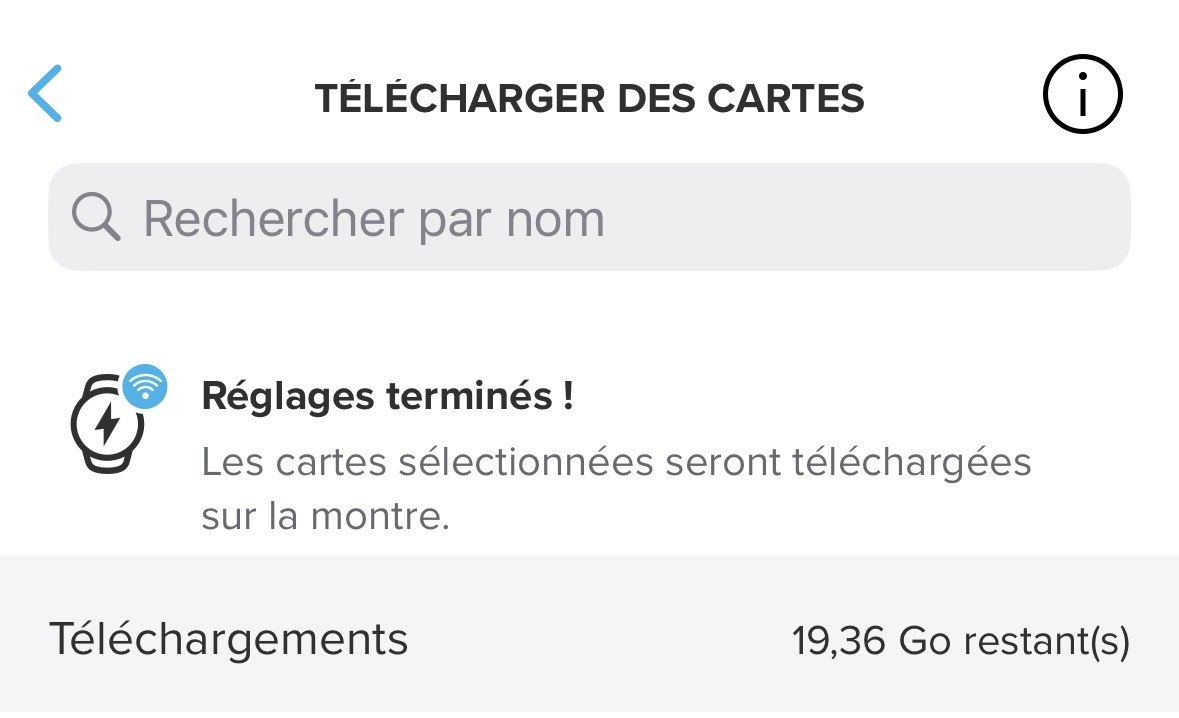
But with almost 20 GB left on my Watch, it does not gives credit to your assumption
-
@sky-runner Interesting that your crashes (if I read it correctly) happen before you even start the activity?
No, what I described is a crash during activity. I first start activity, then change the S+ guide while the activity is ongoing. That is supported. And, as I said, changing S+ app or guide doesn’t crash the watch on its own unless there is also on-route navigation in progress.
-
@Gilles-D. said:
But with almost 20 GB left on my Watch, it does not gives credit to your assumption
You confuse storage and memory - these are two distinctly different things. The watch has 32 GiB of storage but only 32 MiB of memory plus a few more MiB on the SoC. But anyway, I don’t think this is a memory issue. This to me seems like a race condition - software developers will understand what I mean. A race condition is when two concurrent CPU threads race each other when one is trying to mutate or delete some resources in a conflicting way, which may lead to an unexpected result. This is more likely in a multi-core CPU. These issues are notoriously difficult to reproduce and debug. They may be happening only one time out of thousand or one time out of million.
-
@sky-runner I second this. In my case it happend 3 times over 18 months or so.
Problem with those race conditions is that there is seldom something you can do to avoid them - on the user side.
-
My suunto vertical 1 crashed last weekend while manipulating suunto plus app.
Today crashed again while zooming out during my stand paddle activity (no Suunto app enabled) I sent the logs today.
-
I’ve had the same issue with my Suunto 9 Peak Pro - happening mid workout and at the START screen.
I’ve contacted support but heard nothing back yet.
I suspect the 9PP shares a similar code base to the Vertical 1.
Let me know how I can send over diagnostics - I’m a developer so familiar with application support diagnostics.
Martin
-
-
Offline
2b2bff
SILVER MEMBERS
about 17 hours ago@Woodster said:
Let me know how I can send over diagnostics
It is explained in the opening post of the thread?Race S
Yes it’s in there ta buddy - sent Suunto account details via chat.
For me the freezing issue is very likely a faulty garbage-collection issue with a SuuntoPlus app I wrote leading to RAM pressure, can easily reproduce and send logs over so that a firmware update can isolate any app issues from the actual watch.
-
Had a crash during my run today, using a Race 2. It crashed at just after 2Km into the run.
I had 3 S+ apps enabled (Cadence coach, ZoneSense and Running Economy) and was using a Polar H10 belt. Everything else were standard (no nav, battery on performance, feeling on, no music controls, etc).When I realise the watch had crashed and restarted, I’ve started a new activity to continue my run. However, this time I unselected the ZoneSense app, while keeping the other 2 S+ apps and the HR belt. The remaining 10.4Km went well, no problems.
Hope this gets sorted soon by the team.
-
@jjorgemoura try to disable ZoneSense from your S+ apps. It seems it helps me with my Race S.
-
 G Gilles D. referenced this topic



Hello! It looks like you're interested in this conversation, but you don't have an account yet.
Getting fed up of having to scroll through the same posts each visit? When you register for an account, you'll always come back to exactly where you were before, and choose to be notified of new replies (either via email, or push notification). You'll also be able to save bookmarks and upvote posts to show your appreciation to other community members.
With your input, this post could be even better 💗
Register Login