Suunto app Forum Suunto Community Forum
    • Recent
    • Tags
    • Popular
    • Users
    • Groups
    • Register
    • Login

    Suunto Software update Q1 (2.53.42)

    Scheduled Pinned Locked Moved Watches
    173 Posts 69 Posters 5.7k Views 74 Watching
    Loading More Posts
    • Oldest to Newest
    • Newest to Oldest
    • Most Votes
    Reply
    • Reply as topic
    Log in to reply
    This topic has been deleted. Only users with topic management privileges can see it.
    • RayfoxR Offline
      Rayfox @Squirrel
      last edited by

      @Squirrel
      I’ve now watched the video. It only briefly explains the background of HRR, but not how I actually use it in practice on my “Race” watch.

      I’ve done a test using the running sport mode, where I enabled “Recovery HR” under the exercise options, but I can’t see anything—neither during nor after the training.

      isaziI R 2 Replies Last reply Reply Quote 0
      • P Offline
        peringmar Silver Members @UjcoCZ
        last edited by

        @UjcoCZ

        Thanks:)

        Suunto Spartan Sport WHR
        Suunto Race

        1 Reply Last reply Reply Quote 0
        • isaziI Offline
          isazi Moderator @Rayfox
          last edited by

          @Rayfox the test measures how fast your HR drops after being high, and it is disabled if when you press “End” you are already in Z1, because the rate does not mean much if your HR is already (relatively) low. If you end the activity in Z2 or higher, you can see the HRR in the summary (just scroll down) and then also in the app.

          Watch: Suunto Vertical 2 Titanium Black

          Blog: isazi's home

          S 1 Reply Last reply Reply Quote 1
          • EgikaE Offline
            Egika Platinum Member @UjcoCZ
            last edited by

            @UjcoCZ you need to enable “Auto zoom” in the navigation settings. Have you done this?
            For me it works as designed.

            t6, S6, Elementum Terra, Ambit 3 Sapphire, Spartan Ultra Copper, Traverse Alpha, S7 Graphite LE, S9B Ambassador, S9P Titanium, S9PP Titanium, Vertical All Black, Race Titanium Charcoal, Race S Titanium Courtney, Run Lime, Race 2, Vertical 2 Titanium

            S UjcoCZU 2 Replies Last reply Reply Quote 2
            • S Offline
              snow* @Egika
              last edited by

              @Egika do you mean Map > Navigation Options > Navigation settings > Auto zoom?

              EgikaE 1 Reply Last reply Reply Quote 0
              • EgikaE Offline
                Egika Platinum Member @snow*
                last edited by

                @snow said in Suunto Software update Q1 (2.53.42):

                @Egika do you mean Map > Navigation Options > Navigation settings > Auto zoom?

                exactly

                t6, S6, Elementum Terra, Ambit 3 Sapphire, Spartan Ultra Copper, Traverse Alpha, S7 Graphite LE, S9B Ambassador, S9P Titanium, S9PP Titanium, Vertical All Black, Race Titanium Charcoal, Race S Titanium Courtney, Run Lime, Race 2, Vertical 2 Titanium

                S 2 Replies Last reply Reply Quote 1
                • S Offline
                  snow* @Egika
                  last edited by

                  @Egika I’ve figured it out now. It did not work for me as well… Thanks!

                  1 Reply Last reply Reply Quote 0
                  • UjcoCZU Offline
                    UjcoCZ @Egika
                    last edited by

                    @Egika of course I did …

                    Vertical 2 Ti, Elementum Terra N

                    1 Reply Last reply Reply Quote 0
                    • S Offline
                      shamilt1 @isazi
                      last edited by

                      @isazi This worked fine for me after my run last night- it’s a great feature which I’ve also used in other watches. In the app I see my recovery heart rate was -39 bpm and rated ‘Normal’. Just wondered if there were other ratings ie excellent or poor etc…and if age is taken into consideration for the ratings?

                      Race 2, Forerunner 265, Huawei GT6 Pro.

                      A 1 Reply Last reply Reply Quote 0
                      • TieutieuT Offline
                        Tieutieu Platinum Member
                        last edited by

                        About auto zoom unless I’m wrong but Joaquin Perez explains in his video that it depends on speed. On bike it’s likely that zoom stays at 100/200m. Maybe if original zoom is 500m or more it would auto zoom to 100 or 200 and then come back to 500

                        Suunto’s devices at home :
                        Vertical titanium solar
                        Suunto Race S
                        S9pp titanium sand
                        Suunto Wing
                        S9B titanium Ambassador edition, A3P, X6

                        1 Reply Last reply Reply Quote 0
                        • A Offline
                          aiv4r Silver Members @shamilt1
                          last edited by aiv4r

                          @shamilt1 It was mentioned in the video that it takes your previous numbers into consideration, so I guess after few times you will start seeing other types of comments 🙂

                          Suunto Race 2 (Titanium Trail)
                          Suunto Vertical (Titanium Solar Forest)

                          1 Reply Last reply Reply Quote 0
                          • Dimitrios KanellopoulosD Offline
                            Dimitrios Kanellopoulos Community Manager @sky-runner
                            last edited by

                            @sky-runner could you make a post about this and tag me and Pavel ?

                            Community Manager / Admin @Suunto
                            Creator of quantified-self.io a portal that allows you to analyze your data from various providers, upload fit activity files to Suunto app, gpx routes and more…

                            1 Reply Last reply Reply Quote 1
                            • S Offline
                              snow* @Egika
                              last edited by

                              @Egika said in Suunto Software update Q1 (2.53.42):

                              @snow said in Suunto Software update Q1 (2.53.42):

                              @Egika do you mean Map > Navigation Options > Navigation settings > Auto zoom?

                              exactly

                              I ran it at midday and it’s now working as expected, so I think @UjcoCZ’s problem was down to the speed, as @tieutieu pointed out a few posts ago

                              UjcoCZU 1 Reply Last reply Reply Quote 1
                              • UjcoCZU Offline
                                UjcoCZ @snow*
                                last edited by

                                @snow I thought to myself then that the sensitivity of this feature probably wasn’t optimized for cycling because of the speed… and I was just riding to work, so not very fast 🙂

                                Vertical 2 Ti, Elementum Terra N

                                S 1 Reply Last reply Reply Quote 0
                                • S Offline
                                  snow* @UjcoCZ
                                  last edited by snow*

                                  @UjcoCZ If I’ve understood correctly what’s being said:

                                  • Walking (slow pace): The zoom is usually set to 50 metres.
                                  • Running (high speed): To compensate for the faster pace and give you time to react, the system increases the zoom to 100 metres.
                                  • Steep climbs or technical trails (very low speed): In situations where movement is very slow due to the gradient or difficult terrain, the zoom can be reduced to as little as 25 metres to show the finest details of the trail
                                  1 Reply Last reply Reply Quote 1
                                  • R Offline
                                    Ries22 @Rayfox
                                    last edited by

                                    @Rayfox . HR- recovery, started when I stoped my running activity today. A new watch screen was opened with HR and 1min count down showing. I’m wondering, pretty sure it was a countdown.

                                    1 Reply Last reply Reply Quote 0
                                    • Brad_OlwinB Offline
                                      Brad_Olwin Moderator @maszop
                                      last edited by

                                      @maszop Then use waypoints. I could argue drawing route you don’t intend to follow defeats the purpose of the route. I do a lot of off trail travel.

                                      Vector/T6c/Vertical 2 Ti

                                      1 Reply Last reply Reply Quote 0
                                      • Brad_OlwinB Offline
                                        Brad_Olwin Moderator @mich heller
                                        last edited by

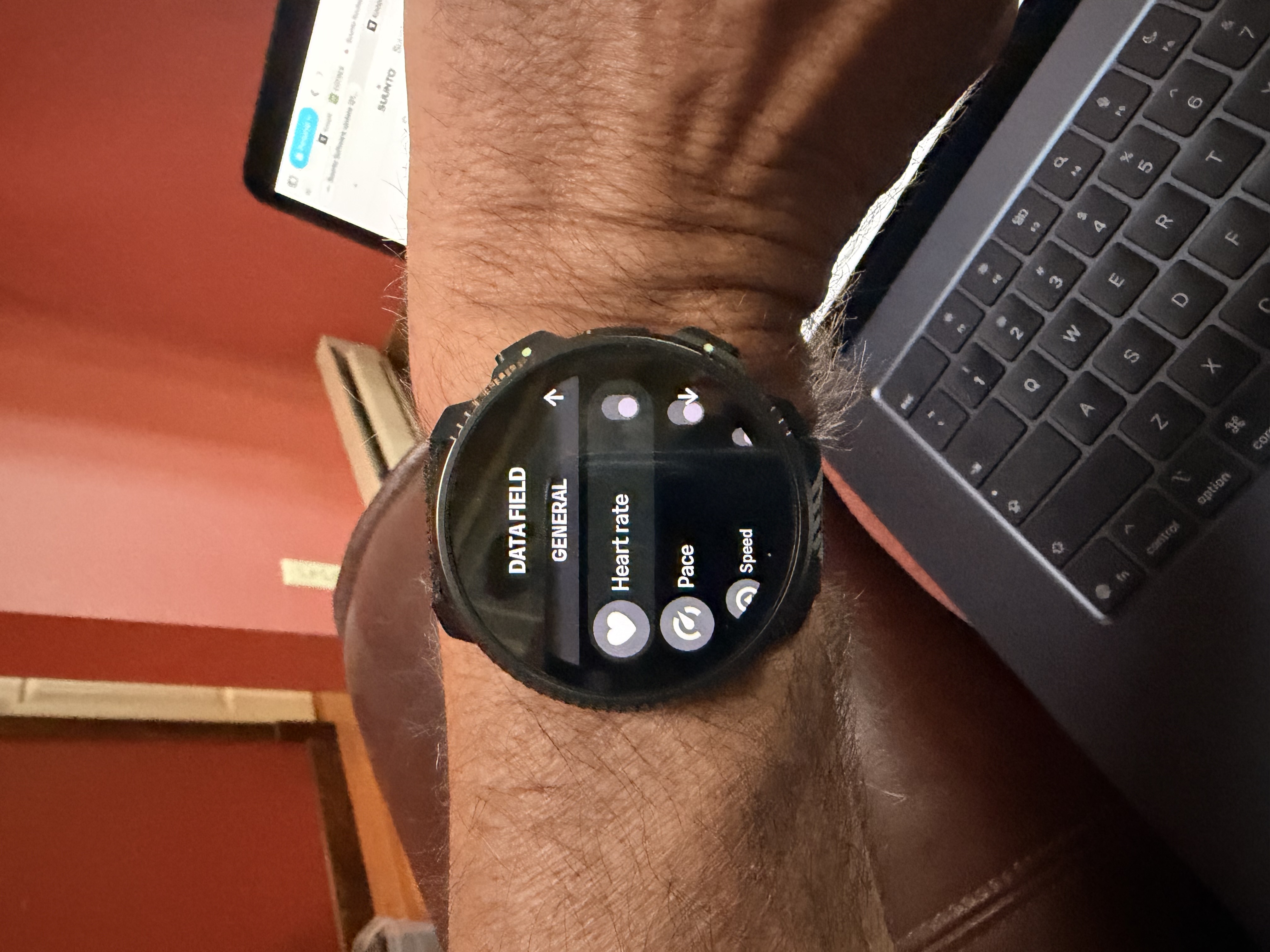
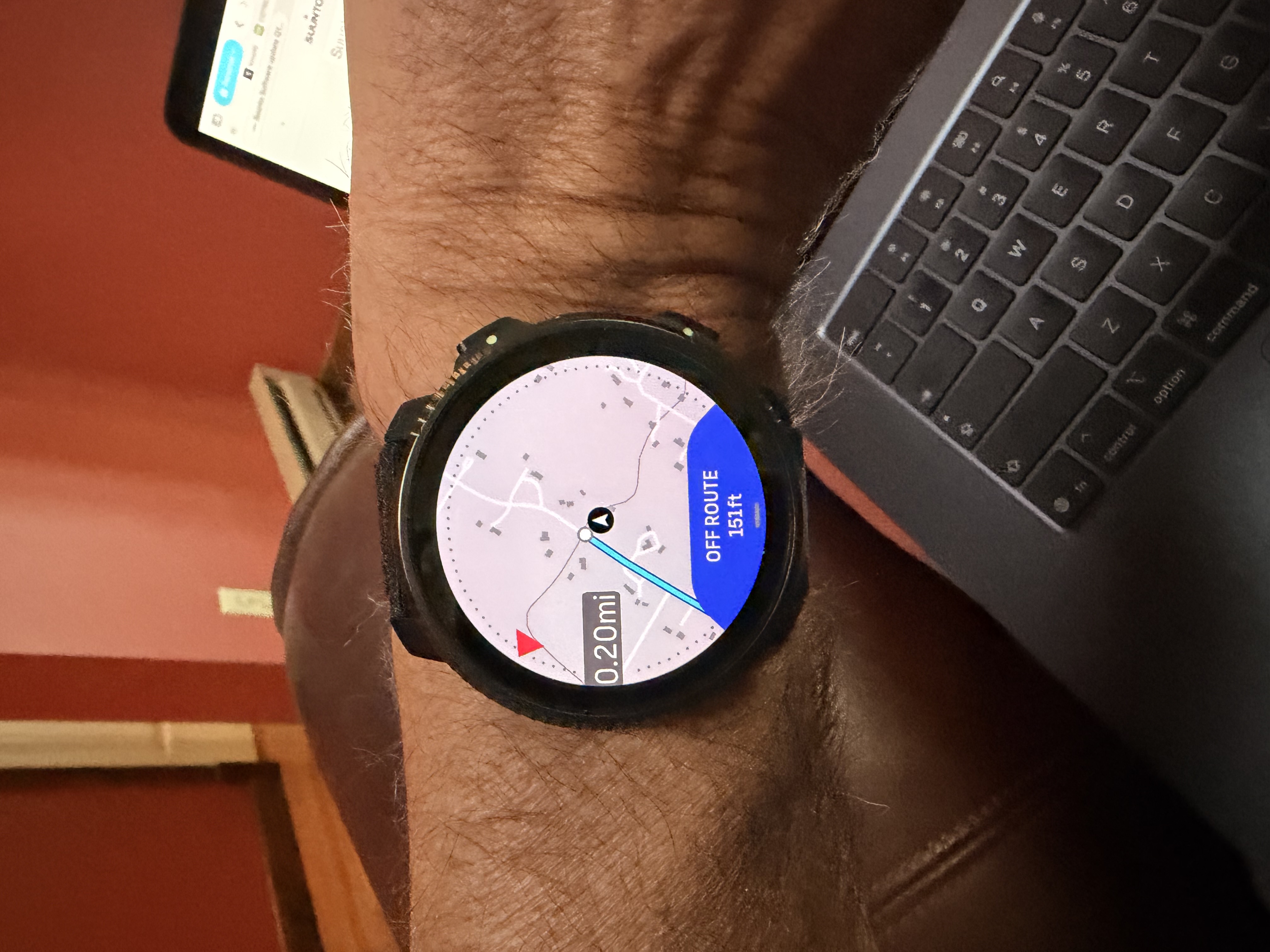
                                        @mich-heller It is in the Navigation screen afteryou select a sport mode and route.

                                        Vector/T6c/Vertical 2 Ti

                                        Inge NallssonI Stefano M64S 2 Replies Last reply Reply Quote 0
                                        • Inge NallssonI Offline
                                          Inge Nallsson @Brad_Olwin
                                          last edited by Inge Nallsson

                                          @Brad_Olwin said in Suunto Software update Q1 (2.53.42):

                                          afteryou select a sport mode and route.

                                          So we absolutely have to use a route for this option to show up? I used a default Walking activity today and the map screen had HR in the bottom wedge. Looking at different sports modes like my own versions of Running and Trail Running there are no option to set any Data on the map screen - while not using a route. This on a Race S.

                                          Edit: And I’m sorry to say that even when choosing a route in the Trail Running activity (custom sports mode) there are no Data choosing option in any menu option…

                                          Suunto Race S

                                          Brad_OlwinB EgikaE 2 Replies Last reply Reply Quote 0
                                          • Brad_OlwinB Offline
                                            Brad_Olwin Moderator @Inge Nallsson
                                            last edited by Brad_Olwin

                                            @Inge-Nallsson Scroll down from Nav screen to options!
                                            IMG_0091.jpeg IMG_0094.jpeg

                                            Vector/T6c/Vertical 2 Ti

                                            Inge NallssonI 1 Reply Last reply Reply Quote 0
                                            • First post
                                              Last post

                                            Suunto Terms | Privacy Policy