Live location S+ app
-
Hey everyone!
Lately, I’ve been working on a group walkie-talkie feature for Live.τ! (I believe someone asking about this.)
What is the feature?
It’s the ability to exchange voice messages within a group. You can use your headphones (which is probably the most convenient way) or your smartphone like a traditional walkie-talkie. You will also be able to initiate PTT via your watch (this is currently in the works).
How does it work?
-
You need to have or be in a group. There is no minimum size, it can be just 1 person.
-
To create a group, you must have a verified email address. You can verify your email and create the group in your profile.
-
Go to
Settings->Lab->PTT in group sessionset to [on]. -
After that, you can use the walkie-talkie during any workout.
(Note: At the moment, if you are in a group, any workout is broadcast to all the groups you are a part of).
You can start speaking into the walkie-talkie in three ways:
-
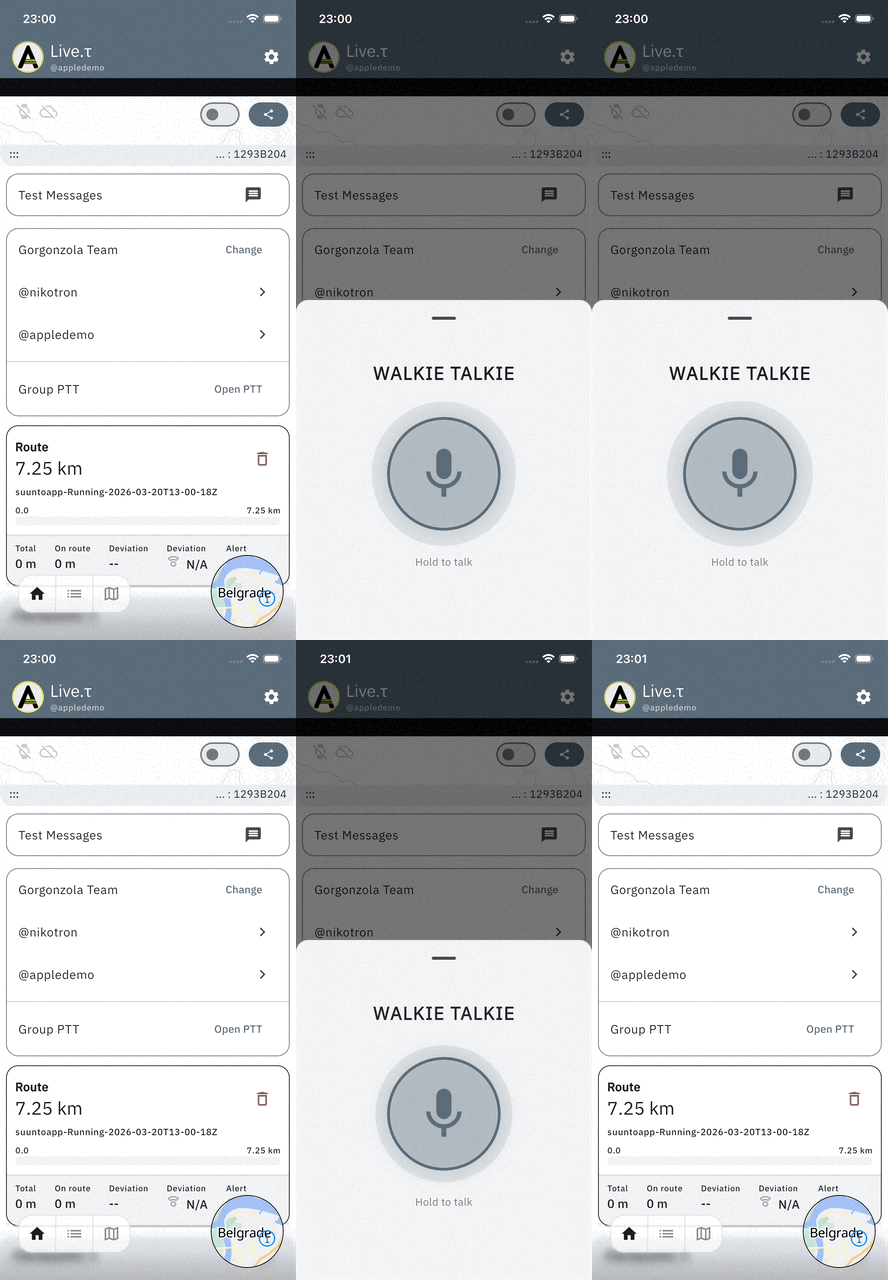
App: Open the panel with the PTT (Push-To-Talk) button on your group card
-
Headphones: Use the play/pause button. Since we can’t capture a “press and release” action on headphones, the button acts as a toggle. One press gives you 15 seconds to speak. If you want to end the transmission early, just press it again.
-
Watch: Using a button on your watch, similar to the headphones. This isn’t implemented yet, but it will be available in the next watch update.
Your messages will be broadcast to everyone in your group, plus anyone watching your group via the web.
Where is it available?
It’s available starting from version1.0.16 (87):-
iOS: via TestFlight
-
Android: as an .apk file
This is an experimental and relatively complex feature, so there might be a few quirks. So and because of this, I’m really looking forward to feedback from anyone who wants to try it out!
-
-
Can you help explain how to broadcast watch sensors to Zwift?
-
Hey @Speed-Man!
I don’t use Zwift myself, but I believe it’s pretty much the same as MyWhoosh.
So, basically:
- Pair your trainer to the watch.
- Enable Sensor Forwarding in the Lab settings.
- Choose a run or cycling activity.
- Enable the service and pair your watch as usual.
- Once the connection between the app and the watch is established, open the sensor search screen in MyWhoosh/Zwift/your other device.
- Search for the sensor. The naming might vary, it could show up as
SF-ATHL-...,Device-XXX, or maybe your phone’s name. The main thing is that the app recognizes it as a trainer or HR monitor.
-Connect to it.
Note: Data will only be broadcasted once you press the Start button on your watch, so your power, HR, and cadence will show as 0 until then.
It’s still in a really early stage. It needs more testing and stabilization, and the UX definitely should be improved. But you can try it as-is, and any feedback would be really appreciated!
Suunto Race 2 Ti
Suunto Race
Suunto 9 BaroSuunto Aqua
Suunto Wings -
@Nikolai-Simonov Thank you very much, sir.
-
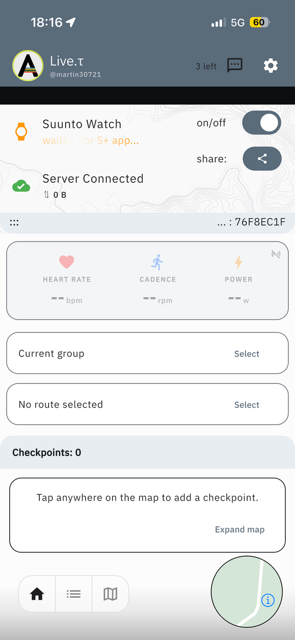
@Nikolai-Simonov yesterday I wanted to switch on Live location mid-activity.
I failed.
Thule the watch showed connected, the ios app (latest beta of today) always had an orange “waiting for S+” in the status and did not get a position from the watch.
It looked like this (ios):
Is this supposed to work?
t6, S6, Elementum Terra, Ambit 3 Sapphire, Spartan Ultra Copper, Traverse Alpha, S7 Graphite LE, S9B Ambassador, S9P Titanium, S9PP Titanium, Vertical All Black, Race Titanium Charcoal, Race S Titanium Courtney, Run Lime, Race 2, Vertical 2 Titanium
-
@Egika
I already did that in the past, and in such case (with Android though), I switch off the app service, and switch on again, and it is fixing.
Maybe worth trying, as initial workaround. -
@Mff73 I switched everything multiple times. Switch in app on/off, force closed and restarted app, switched S+ on/off etc.
-
@Egika I had the same issue today trying to start a run - latest iOS app and latest Firmware Race 2.
-
@Egika thanx for report, if it possible could you check on previous versions e.g. 1.0.16 (83)
the behaviour is pretty odd,
basically mid-activity flow shouldn’t have any difference with regular flow.
I’ll try to figure out what could happen, there was an update in btle stack on iOS version, maybe it broke smth. however unfortunately i’ll be without my iPhone this week, will be able to check only next weekend.@larrybbaker could you also check on previous version if it possible.
Thanx for point out
Suunto Race 2 Ti
Suunto Race
Suunto 9 BaroSuunto Aqua
Suunto Wings -
@Egika I had the exact same issue 2 days ago. With the latest beta version, the watch connected but kept waiting for the Suunto Plus app – just like in your screenshots. It didn’t matter if I started the activity with tracking already enabled or if I started tracking during the activity; neither way worked. I then downgraded to the current stable version from the App Store, and everything worked perfectly again.
-
@tuxbuster thanx for confirmation of the issue, i’ve disconted the latest testflight. build for a while.

-
@Nikolai-Simonov Let us know if you need more info or anything else. Thanks for looking into this!

-
@Nikolai-Simonov said in Live location S+ app:
@Egika thanx for report, if it possible could you check on previous versions e.g. 1.0.16 (83)
the behaviour is pretty odd,
basically mid-activity flow shouldn’t have any difference with regular flow.
I’ll try to figure out what could happen, there was an update in btle stack on iOS version, maybe it broke smth. however unfortunately i’ll be without my iPhone this week, will be able to check only next weekend.@larrybbaker could you also check on previous version if it possible.
Thanx for point out
I installed 1.0.16 (83).
Unfortunately this version crashes repeatedly when trying to start the app. No way to start it.
iPhone 16, iOS 26.5 betaEdit: (85) is working.
-
@Nikolai-Simonov I tried again today on my run and could not successfully enable live tracking.
iOS (latest beta)
Race 2 with latest firmware
Suunto App latest version
Live.t app - latest versionHave tried uninstalling and reinstalling app on phone and the Suunto + app. Toggled off and on in watch. Live.t app just constantly shows searching for watch but never shows connected. If I toggle the watch app off/on it will sometimes say connected but the live.t app never does.
Let me know what else I can do to assist with troubleshooting.
I thought maybe it was my custom sport mode but same issue with a standard one. I also switch between 2 watches - could that be an issue? Race 2 and Vertical 1. I have not tried the Vertical this week but probably can tomorrow or this weekend.
Vertical Ti Solar
Vertical 2
Race 2
iPhone 17 Pro -
@larrybbaker yes, sadly it’s a known issue, could you please, downgrade app to previous version. @egika said 1.0.16 (85) works, or even download appstore version instead testflight.
also you could try disabling sensor forwarding if you’ve enabled it, i suspect it could break the connection. but not sure yet.
Unfortunately I’m able to publish a fix not earlier than monday.
-
@larrybbaker @egika @tuxbuster
I’ve prepared a blind fix. unable to test it all, but, if you have time let me know if it works now.
to test this build you need to enter to another tester group - https://testflight.apple.com/join/ZGZeRASB
there’s also updated android build to verify if everything still works
https://artifact.fra1.cdn.digitaloceanspaces.com/live-t/apk/btle/live-t.apkSuunto Race 2 Ti
Suunto Race
Suunto 9 BaroSuunto Aqua
Suunto Wings -
Was trying last version : when live app is open on my iPhone I have a small vibration every sec. It disappears if app is in background. But entering the app and vibration is back. Any idea ?
Suunto’s devices at home :
Vertical titanium solar
Suunto Race S
S9pp titanium sand
Suunto Wing & Spark
S9B titanium Ambassador edition, A3P, X6 -
@Nikolai-Simonov said in Live location S+ app:
@larrybbaker @egika @tuxbuster
I’ve prepared a blind fix. unable to test it all, but, if you have time let me know if it works now.
to test this build you need to enter to another tester group - https://testflight.apple.com/join/ZGZeRASB
there’s also updated android build to verify if everything still works
https://artifact.fra1.cdn.digitaloceanspaces.com/live-t/apk/btle/live-t.apkThe Testflight link is leading me to (84).
Which works well and as designed for me.
Thx! -
@Tieutieu said in Live location S+ app:
Was trying last version : when live app is open on my iPhone I have a small vibration every sec. It disappears if app is in background. But entering the app and vibration is back. Any idea ?
yep, I guess, it could be, unsynced ui and btle state. the ui can produce small haptic feedback during scanning for watch. is watch able to connect in the latest version? I’ll fix it in a few days when come back to iPhone to check.
The Testflight link is leading me to (84).
i kept only latest (90) build in this group https://testflight.apple.com/join/ZGZeRASB
could you recheck
Suunto Race 2 Ti
Suunto Race
Suunto 9 BaroSuunto Aqua
Suunto Wings -
Used stable version this morning with no issues. Just updated to (90) and will test on tomorrow morning run.






Hello! It looks like you're interested in this conversation, but you don't have an account yet.
Getting fed up of having to scroll through the same posts each visit? When you register for an account, you'll always come back to exactly where you were before, and choose to be notified of new replies (either via email, or push notification). You'll also be able to save bookmarks and upvote posts to show your appreciation to other community members.
With your input, this post could be even better 💗
Register Login