Raise to wake light during activity
-
I have noticed for some reason my suunto vertical is lighting up the screen when doing an excercise whenever I do a wrist gesture despite having all such things turned off in the settings etc. I tried a soft reset and it still happens. Is this a known issue if so how do I resolve it ?
-
@gone-troppo, hi, are you running the latest firmware? If so, some users have already posted about this issue on different watches, but from Suunto “side” there was nothing.
I don’t remember if someone found some workaround, personally, I’ve simply downgraded the firmware.
-
@gone-troppo I do have some similar issues, not during activity but on normal mode. I have raise-to-wake turned off, but after battery drops bellow some % (around 40 or less), it is like raise-to-wake is on again. When checking the settings is still turned off. What I do is to enable/disable again through settings and it seems to stop doing it, until next charge and battery drop to that %.
-
Thanks guys how weird, I haven’t noticed mine doing it in normal mode only when I’m in an activity. I have the latest soft ware. Strange though it’s only started happening in the last week, the last software update was a while back now
-
Hi
I still have the samen problem after the latest update. Nothing helps to dactivate the option. The battery is draining so fast.
Kristof
-
@Kristof
did you try to enable it and then disable it again. ? -
Hello
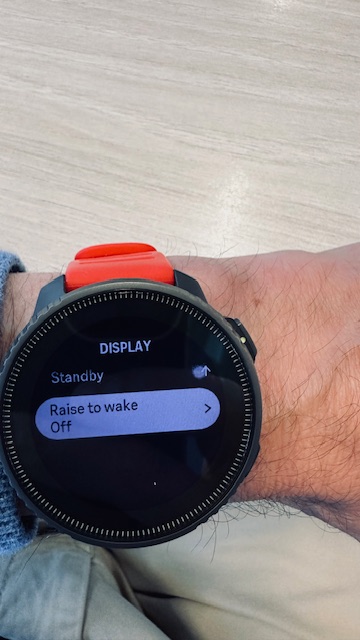
Yes i tried everything. Soft/hard reset. Nothing seems to work. Very embarrassing.
Kristof
-
Yes, i tried everything. Even soft/hard reset. To be clear, it only activates by doing an activity (running).
Kristof
-
@Kristof @sartoric I did my best to describe the issue on a thread here - https://forum.suunto.com/topic/14502/backlight-bug-2.50.26
The problem starts after entering an activity start menu (don’t have to actually start the activity). This activates the raise-to-wake feature even if the setting is turned off. The odd part is that it doesn’t happen every time (maybe 2 out of 3?), but, at some point during an activity, it is almost guaranteed to activate.
A dangerous side effect is that if you go into an activity start menu, but then back out to the watch face without starting, the backlight will remain permanently on. @kristof this may be what is causing your unexpected battery drain. The only way to turn it off is to toggle the backlight setting either in the control panel or display settings.
This issue has been mentioned multiple times since the latest update and affects both MIP and AMOLED watches (in slightly different ways), but has yet to be acknowledged by anyone from Suunto. I’m hoping this is a bug resulting from an upcoming feature allowing for per-activity display settings.

-
Thanks @duffman19
I checked the settings several times and they are both disabled. I think it’s a software issue. I already contacted Suunto bud it always takes sooooo long to get an answer.
So the problem still exists.Kristof



Hello! It looks like you're interested in this conversation, but you don't have an account yet.
Getting fed up of having to scroll through the same posts each visit? When you register for an account, you'll always come back to exactly where you were before, and choose to be notified of new replies (either via email, or push notification). You'll also be able to save bookmarks and upvote posts to show your appreciation to other community members.
With your input, this post could be even better 💗
Register Login