Software Update 2.48.16 (2025 November Rain release)
-
@Dareo not for 9PP, a few of our sleep stats on the app have been taken from us recently unfortunately (HR graph, total deep sleep and time awake all gone).
Suunto Spartan Trainer Wrist HR / 9PP Refurb
-
@Mads-Hintz-Madsen Thanks. I already have Sleep Tracking and all the associated options activated. Just had a look and still not there. According to @The_77 it’s not available for the 9PP.
-
@The_77 Well shiiiiiiiiiiiiiiiiit.
-
in case anyone is still interested in the battery drain issue
- Suunto Verical TI Solar with the November rain FW
- depleted already 2 times (just for those who might claim is a calibration issue(
- using it mainly for activities and leaving it aside the rest of the day, within the reach of the Wifi network (in case this is of only help considering that there was an update that made the watch automatically download the gnss data)
- HR measurements on
- notifications on - but since it is left at home there isn’t any notifications to the watch from my mobile
- exercising like 1 hour a day with suunto’s smart belt
after doing meticulous testing
it consumes on average 10% a day . That’s definitely not in line with the specs or what was happening some (many) months ago.So despite the claim of the battery drain being FIXED, it’s definitely not the case with me. The only other possible explanation would be that battery has degraded significantly over the last 2 years.
In any case, the whole situation is far from ideal
-
@v.sacre said in Software Update 2.48.16 (2025 November Rain release):
I still don’ t understand how to see new running metrics (ground contact etc).
I use Vertical 2 with latest firmware, with or without Stryd, with or without custom mode and in all cases I don’t see those metrics…I have this data with all others available after the run:
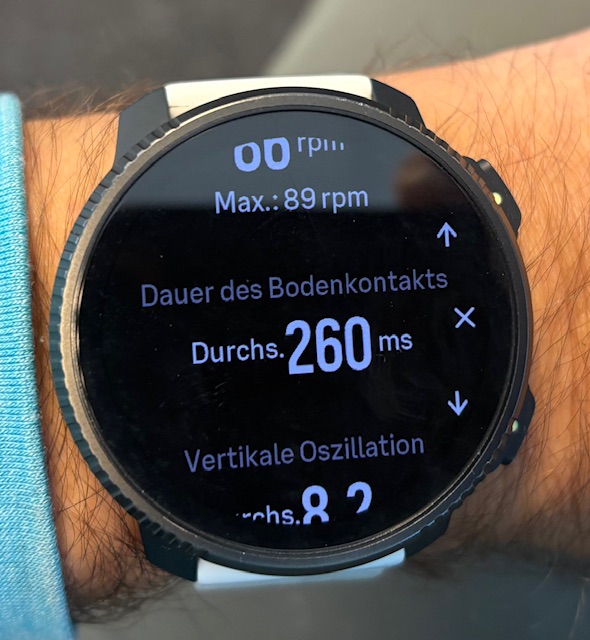
t6, S6, Elementum Terra, Ambit 3 Sapphire, Spartan Ultra Copper, Traverse Alpha, S7 Graphite LE, S9B Ambassador, S9P Titanium, S9PP Titanium, Vertical All Black, Race Titanium Charcoal, Race S Titanium Courtney, Run Lime, Race 2, Vertical 2 Titanium
-
@thanasis I’ve seen multiple reports linking battery drain with HR belts (I noticed that you use a belt too). Apparently the BT connection doesn’t get shut off after a workout. Maybe that’s your case too.
My recent experience with Vertical 2 wrt battery life is quite good since I switched off the AOD in both day to day and activities (I don’t normally navigate with my watch so only check the screen occasionally).
After a full charge (with some extra time to make sure I am at a real 100%) I can report that I’m at 50% after 9 full days (216 hours) including 6:30 hours of GPS activities (running, biking). In fact, it seems that GPS usage with AOD off is better than the 65 hours in the specs. I consume less than 1% per GPS hour! Without activities I get 5% per day and sometimes even less, possibly depending on the number of notifications I receive.
These are my current settings:
AOD OFF
Raise to wake DISPLAY ONLY
247 HR ON
Sleep tracking ON with HRV without spo2
Wireless OFF
BT discovery OFF
Notifications ONFor reference, with AOD ON and the rest of the settings as above, I got about 7% per day without activities and about 2% per GPS hour. For me, that’s a huge difference.
-
I am new to Suunto (Race 2) and have a question about BT Discovery. Does it always have to be active for the watch to connect to the smartphone/app? Or is it only needed for connecting, i.e. so that the watch is visible to Bluetooth devices, and can be deactivated after a successful connection?
-
@pgrob you need it on only for pairing. After that you can turn it off. App syncs fine when off.
-
@Gideon-Kaempfer
Great, thank you for your quick reply. I’ll disable that then. -
Today in the morning all watch faces were gone, only the default one was shown on the Vertical. No choice in individual settings, there was only the default one.
After 2 hours and several syncs with the app the watch faces were back, but I have to configure it. The watch faces were in the standard configuration (colour and complications). I never had this on my Vertical.
Running the actual firmware.

-
I turned off my watch yesterday and turned it on today again. Watch was set to 01:01 on January 1st and told me to sync with the app before starting new adventures. It took a few attempts until the watch connected correctly to the App and has been back to normal after syncing again…
Never had this before… -
I think it makes sense to open separate topics for the various issues one may encounter.
Posting them under the update information will maybe lead to others not finding them… -
@Egika however it can be dealt with the best. It used to be tha way to report bugs in the firmware version thread, me thinks…
-
If it is FW related, it makes sense.
If it is general watch behavior, maybe better open a separate thread
Now there are questions that ask how to set the BT visibility… -
@Egika
Actually, I asked whether the BT Discovery setting must always be active, not where the setting needs to be made. The question arose because many people are posting their settings in this thread. That’s why I asked here. If the question was wrong, I wasn’t aware of it. -
@thanasis said in Software Update 2.48.16 (2025 November Rain release):
The only other possible explanation would be that battery has degraded significantly over the last 2 years
I recently found something interesting looking at a JSON file downloaded from Suunto App for Mac: there are two fields named “BatteryDesignCapacity” and “BatteryFullCapacity” that suggest the current health state of the watch battery. In my case, the full capacity is over 88% of the design capacity, which seems fair after more than 2 years of use.

-
@Egika I think the problem is that when you have paired a footpod, even if you don’t use it, it is still reported in the file (I see in json file that a footpod is paired even if I was not wearing it).
Somebody else using stryd can test to run without stryd to see if he got those metrics ?? -
@Elmiuel I tried to deactivate the live tracking app, but the problem with the smart belt which is connecting and disconnecting all the time is the same

-
@SuperFlo75 Hi SuperFlo75, in my post I referred to using 3 Bluetooth connections (tracking app, Suunto band and bike power meter). After that, I had to discard one of them because during the activity both the band and the bike power meter kept disconnecting…
Regarding what you mentioned about the band, my Suunto band, which is about a year old, also started disconnecting continuously during every activity… after examining it closely, I noticed that one of the plastic parts had a strange crease. After contacting Suunto’s warranty service, it was quickly replaced.

-
@Elmiuel ok, I only use smart belt, tracking app… the smart belt is a new one… I bought a new one for my wife not long ago… but she didn’t use it. The new belt has the same crazy behavior like my belt which is about one year old… it‘s not the belt. As this behavior started the first workout after last update, I think or hope it’s due to the firmware, and not due to the hardware.
Suunto Vertical 2 Titanium Sage
Suunto Vertical Titanium Forest/Dark Ruby/UTMB/Courtney_Edition
Suunto Wing
Suunto 9 Peak Pro Titanium (owns my wife now)
Suunto Spartan Ultra
SA iOS 3.12.0 (22937)
Instagram @superflo75









Hello! It looks like you're interested in this conversation, but you don't have an account yet.
Getting fed up of having to scroll through the same posts each visit? When you register for an account, you'll always come back to exactly where you were before, and choose to be notified of new replies (either via email, or push notification). You'll also be able to save bookmarks and upvote posts to show your appreciation to other community members.
With your input, this post could be even better 💗
Register Login