Software Update 2.44.46 (2025 Q3)
-
Is it about reloading a route when this happens during navigation? Didyou doing anything special to get HRM to connect continually
-
@Stavrogin Once HRM has connected it stays connected. I have never experienced flaky connections. But a few times I experienced HRM refusing to auto-connect in the beginning of an activity - the last time that was this morning. After a while I figured out there is a way to select a HRM in activity start screen options and connect to it manually.
-
@sky-runner thsnk you for this! I see it but it is really annoying - I do not want to have to select my HRM everytime I do an activiy when it used to just autoconnect.
-
@loopylou72 the watch automatically connects to the last sensor you used, exactly as before
-
@isazi Correct, but it will also connect randomly outside of activities.
Suunto Vertical, Race, Race 2, Race S and Run. Rocking the Vertical 2 Titanium at the moment.
Garmin: Fenix 7X, Epix Pro 51mm, Forerunner 265.
Coros: Pace Pro, Apex 4 -
Bug on my Vertical Ti; after the latest FW update the “Intensity zones” under “Exercise options” does not save the last selected option (e.g. Power zones or ZoneSense) but always reverts to “HR zones”.
-
@Stavrogin correct, I am checking it this has been reported already
Watch: Suunto Vertical 2 Titanium Black
Blog: isazi's home
-
@isazi answering myself, already fixed in next firmware
Watch: Suunto Vertical 2 Titanium Black
Blog: isazi's home
-
@isazi Is there any ‘next firmware’ available?
-
@isazi thanks,
-
@kriskus it’ll be available when released, I just tested it and this bug is solved
-
@Jan-Suchánek said in Software Update 2.44.46 (2025 Q3):
@isazi Also the option for wheel circumference Is missing for speed sensors. How does it work now? Only automatic calculating after some distance?
I hope you’re wrong because I use the Bike Sensor indoor so no GPS signal to determine the distance.
-
@fondueaufromage said in Software Update 2.44.46 (2025 Q3):
@Jan-Suchánek said in Software Update 2.44.46 (2025 Q3):
@isazi Also the option for wheel circumference Is missing for speed sensors. How does it work now? Only automatic calculating after some distance?
I hope you’re wrong because I use the Bike Sensor indoor so no GPS signal to determine the distance.
This support for multiple sensors of the same type seems to have created quite many issues.
Also when pairing a smart trainer-based power meter, the watch asks you to configure the crank length which makes no sense. Crank length is only relevant for pedal-based power meters.
-
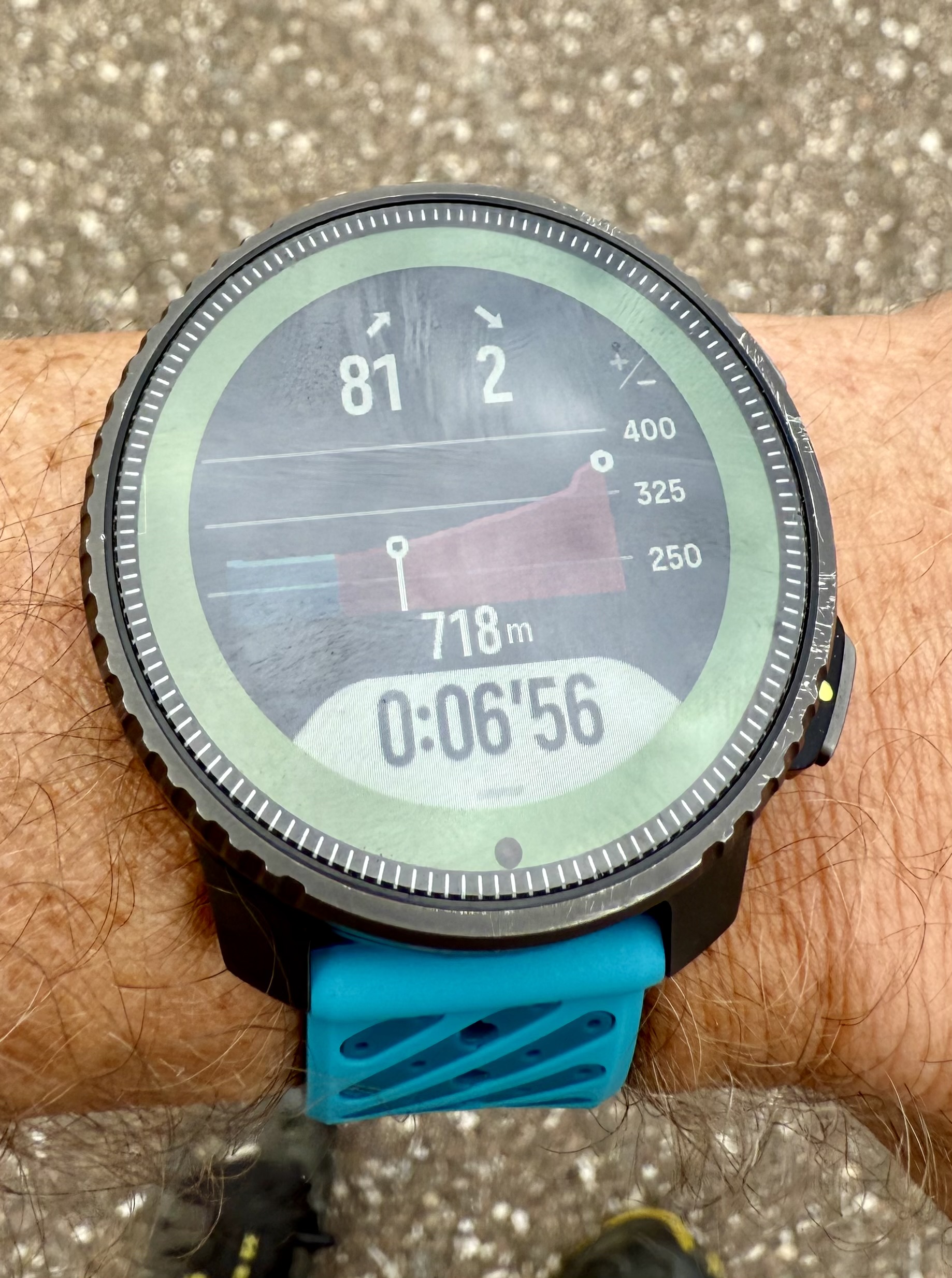
I had not deeply tested yet new climb guidance.
Love the zoom feature from waypoints
But ihmo there is some misses :- zoom level on current section is not available if there are waypoints
- data screen when waypoints doesn’t show grade of climb
It would be perfect if zoom level on actual section could be added when there is waypoints on the routes.IMHO actual behaviour is a big limitation. I use waypoints a lot on my races but love to see current section and how steep it is. With current update I will have to make a choice.
@isazi @Brad_Olwin does it has been asked already ?Perfect for me would be :
- no waypoints => ok like it is, zoom on whole route, or zoom on actual section with grade
- waypoints : ok like it is, but just add as deepest zoom level the zoom on actual section with same data than on screen when no waypoint
Pictures on same route, the first with waypoints, maximum zoom. The second with no waypoints on route (my wish would be that to be the max zoom level screen when there is waypoints)

Suunto’s devices at home :
Vertical titanium solar
Suunto Race S
S9pp titanium sand
Suunto Wing & Spark
S9B titanium Ambassador edition, A3P, X6 -
@Tieutieu I’d like to have both modes too. I used Garmin ClimbPro extensively when I owned a Garmin watch. But I can see that it may be difficult to make a consistent user experience because end of a climb may be either before or after a nearest waypoint.
Perhaps if a single climb mode looks distinctly different, it would be an OK experience to have that as an extra zoom level.
One other thing that I wanted to mention is that I don’t like how Suunto breaks the elevation profile into climb segments. It doesn’t actually break it into climbs and descents but segments based on category so you may end up, for example with a red segment followed by an orange segment, followed by another red segment, followed by a blue segment - all while the same climb continues uninterrupted and the actual grade is nearly the same. That unnecessary creates a lot of segments many of which are tiny, which makes the experience less than acceptable. It works OK for long and steep climbs and descents, but is frustrating on a rolling terrain.
For example I have just tried importing a route for UTMB Kodiak 100K race and that generated over 100 segments on the profile, many of which are tiny in length. Some may be so tiny that the watch skips them completely during an actual run. I wish it worked more like Garmin Climb Pro, which tracks complete end-to-end climbs or descents, but on on single climb you may see multiple colored segments that show you the grade. Another issue with Suunto’s implementation is that the color indicates cycling climb category rather than the grade, so it is quite possible for an orange segment to be steeper (e.g. 12%) than a red segment (e.g. 5%) if the orange segment is short but the red segment is long. For the same reason you can never see a long orange segment.
-
The problem with changing the GPX route during an activity while ascending or descending is still not fixed.
https://forum.suunto.com/topic/13165/serious-problems-with-navigation-with-gpx-routes/
-
@soisan You are correct.
The watch (or Suunto App) may refer all the zones for running; heart rate, pace and power (if a power meter used).
In my case, pace zones ware far out of range; 6’34/km went into VO2max, whereas my Z2 upper limit may be between 5’10~5’15 on flat. Changing it made my Z2 running “aerobic” as expected.
I am not sure if the software update made the change to “all zones referring mode”, or just the pace zones collapsed for some reason. -
Continuing from the above.
I noticed “unexpected VO2max” specific thread; https://forum.suunto.com/topic/13517/how-comes-this-run-is-classified-in-suunto-app-as-anaerobicIt seems that all the zones are not referred but the one specified for TSS may be.
Before the software update, it was TSS (hr). After the update it seems to be changed to TSS (pace) for running automatically. Many people (including me) didn’t touch/look at the pace zones which ware far off in fact. That makes easy run classified “VO2max”.It may be better to discuss (if necessary further) in the above thread about this one.
-
I was not able to navigate between my screendata when I am on the map screen. One press mid button didn’t work. I had to hold the button to navigate to my different pages…
Here a video
https://photos.app.goo.gl/EhgwJvERG5E1CRxq9 -
Not sure if it’s a bug but I don’t like how I have to choose my hrm even if it’s the only paired device.
If my HRM is on then I’d like the watch to default to it for all activities.





Hello! It looks like you're interested in this conversation, but you don't have an account yet.
Getting fed up of having to scroll through the same posts each visit? When you register for an account, you'll always come back to exactly where you were before, and choose to be notified of new replies (either via email, or push notification). You'll also be able to save bookmarks and upvote posts to show your appreciation to other community members.
With your input, this post could be even better 💗
Register Login