Suunto Vertical does not turn off the backlight and drains battery
-
Hi everyone!
Since a few days, probably since the last update, my watch (Suunto Vertical) does not turn off the backlight. I have tried soft reset and changing the display settings in all possible ways, but this does not solved the problem. Even if I do not move the watch for a long time, it still shows a backlight (which was not normally the case). When I switch to Do Not Disturb mode, it is a little dimmer, but still not as dark as it used to be. This also drains the battery very much (e.g. today from 80 to 56% in just 12 hours with a short training session, but that would normally take many days).
Has anyone experienced this problem? Is it linked to the new update? What is a possible solution?
Thanks in advance
-
@neuro_ce said in Suunto Vertical does not turn off the backlight and drains battery:
Hi everyone!
Since a few days, probably since the last update, my watch (Suunto Vertical) does not turn off the backlight. I have tried soft reset and changing the display settings in all possible ways, but this does not solved the problem. Even if I do not move the watch for a long time, it still shows a backlight (which was not normally the case). When I switch to Do Not Disturb mode, it is a little dimmer, but still not as dark as it used to be. This also drains the battery very much (e.g. today from 80 to 56% in just 12 hours with a short training session, but that would normally take many days).
Has anyone experienced this problem? Is it linked to the new update? What is a possible solution?
Thanks in advance
Happened to me few times (5-10) after last update, but not as strong as Yours. All I had to do was go menu (or press any button) go back to watchface and that’s all. Like always on display freezed.
-
@Tami999 Unfortunately, it didn’t help. Do you think a hard reset will solve the problem? BR
-
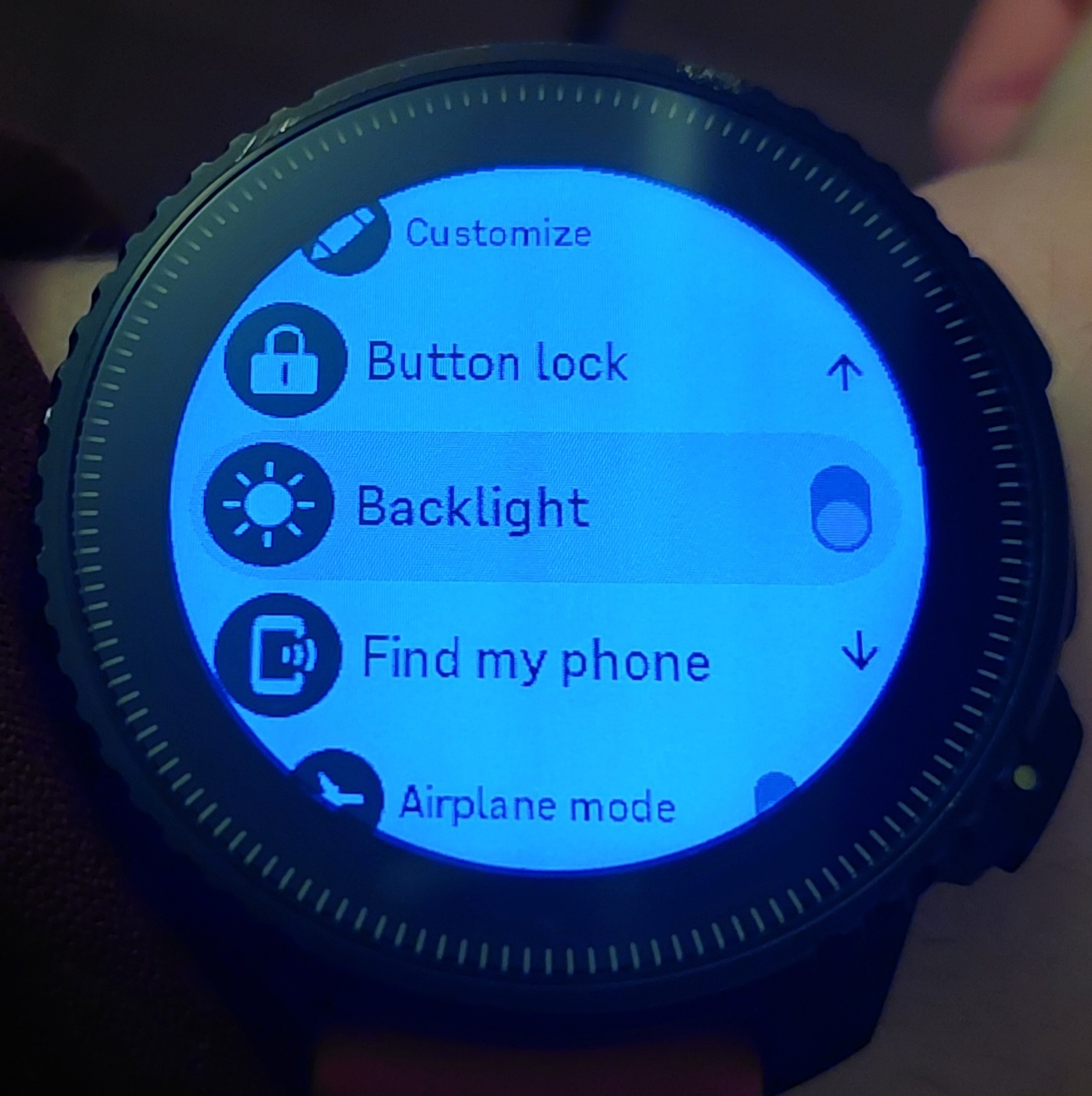
@neuro_ce Can you double check that Backlight is off in Control panel (not in Settings)?
-
@inkognito Thank you

That was it! But I don’t normally use the control panel and the backlight is not in the settings, so I didn’t come up with the idea to check it in the control panel.
BR

Hello! It looks like you're interested in this conversation, but you don't have an account yet.
Getting fed up of having to scroll through the same posts each visit? When you register for an account, you'll always come back to exactly where you were before, and choose to be notified of new replies (either via email, or push notification). You'll also be able to save bookmarks and upvote posts to show your appreciation to other community members.
With your input, this post could be even better 💗
Register Login