Suunto app Forum Suunto Community Forum
    • Recent
    • Tags
    • Popular
    • Users
    • Groups
    • Register
    • Login

    suunto climb

    Scheduled Pinned Locked Moved Suunto Vertical
    11 Posts 5 Posters 1.0k Views 7 Watching
    Loading More Posts
    • Oldest to Newest
    • Newest to Oldest
    • Most Votes
    Reply
    • Reply as topic
    Log in to reply
    This topic has been deleted. Only users with topic management privileges can see it.
    • Danny polegD Offline
      Danny poleg Silver Members
      last edited by

      I need help
      I was asked to open a new topic
      In Suunto climb there is an option to click on the +/- sign
      In the vertical watch for some reason pressing this button brings me to multisport
      The tracks uploaded to the watch were created after the last update
      There is a nice guy who made a movie in Spanish but I don’t speak Spanish I would appreciate assistance in English

      1 Reply Last reply Reply Quote 3
      • EgikaE Offline
        Egika Platinum Member
        last edited by

        multisport should be activated by a long press on the top button (you see a circular animation before the multisport selection comes up). Do you have this animation?

        Pressing the top button for a short time only should do the zoom…

        t6, S6, Elementum Terra, Ambit 3 Sapphire, Spartan Ultra Copper, Traverse Alpha, S7 Graphite LE, S9B Ambassador, S9P Titanium, S9PP Titanium, Vertical All Black, Race Titanium Charcoal, Race S Titanium Courtney, Run Lime, Race 2, Vertical 2 Titanium

        Danny polegD 1 Reply Last reply Reply Quote 0
        • Danny polegD Offline
          Danny poleg Silver Members @Egika
          last edited by

          @Egika Here the problem is that a short press does not zoom to anything

          EgikaE babychaiB 2 Replies Last reply Reply Quote 0
          • EgikaE Offline
            Egika Platinum Member @Danny poleg
            last edited by

            @Danny-poleg just to check the basics:
            the route loaded to the watch has climbs? (can be checked in the app before syncing)

            t6, S6, Elementum Terra, Ambit 3 Sapphire, Spartan Ultra Copper, Traverse Alpha, S7 Graphite LE, S9B Ambassador, S9P Titanium, S9PP Titanium, Vertical All Black, Race Titanium Charcoal, Race S Titanium Courtney, Run Lime, Race 2, Vertical 2 Titanium

            Danny polegD 1 Reply Last reply Reply Quote 0
            • Danny polegD Offline
              Danny poleg Silver Members @Egika
              last edited by

              @Egika Surely the guy who raised the issue to me built a track on Mount Carmel
              For some strange reason, another trainer I spoke with has RACE and it works for him, of course a different route
              The question is whether there are basic requirements for the route apart from the fact that it will have climbs

              1 Reply Last reply Reply Quote 1
              • babychaiB Online
                babychai Silver Members @Danny poleg
                last edited by

                @Danny-poleg
                your watch need connected to GPS then only able to zoom in. otherwise single press won’t zoom in/out

                Suunto Vertical Titanium Solar Black
                S̶u̶u̶n̶t̶o̶ ̶V̶e̶r̶t̶i̶c̶a̶l̶ ̶B̶l̶a̶c̶k̶ ̶R̶u̶b̶y̶ ̶(̶S̶/̶S̶)̶
                S̶u̶u̶n̶t̶o̶ ̶V̶e̶r̶t̶i̶c̶a̶l̶ ̶A̶l̶l̶ ̶B̶l̶a̶c̶k̶
                Suunto 9 Peak All Black
                Suunto Spartan Trainer Wrist HR (Black)

                Danny polegD 1 Reply Last reply Reply Quote 0
                • Danny polegD Offline
                  Danny poleg Silver Members @babychai
                  last edited by

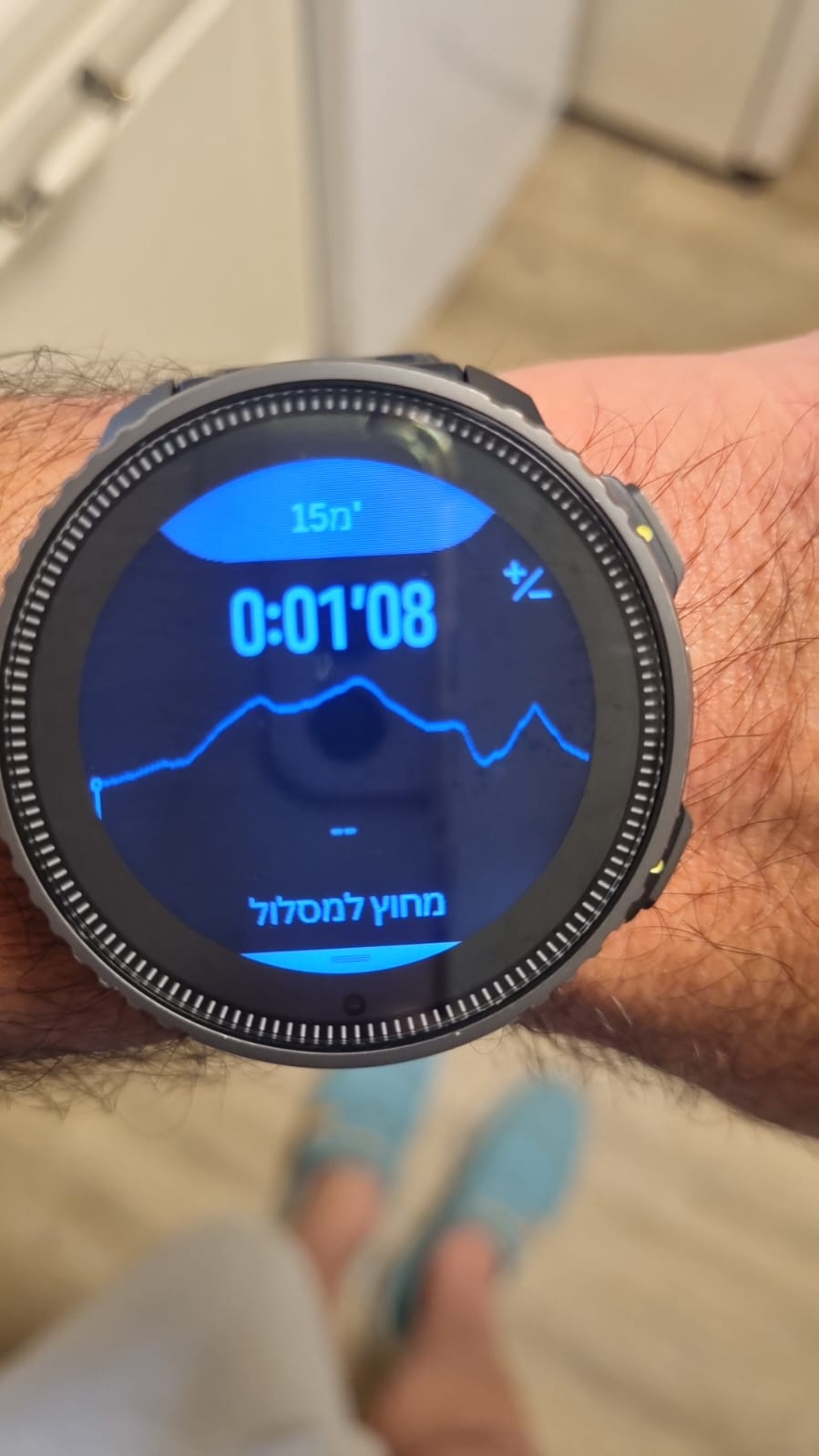
                  @babychai The GPS is active and all the other track data is fine - only the issue of the zoom on the screen that appears right after the mouth screen
                  I am attaching a picture of the screen where the +/- should work
                  Ignore the fact that I’m off trackWhatsApp Image 2024-07-09 at 13.42.55_3917c8d7.jpg
                  Mitch9M babychaiB 2 Replies Last reply Reply Quote 0
                  • Mitch9M Offline
                    Mitch9 Silver Members @Danny poleg
                    last edited by

                    @Danny-poleg said in suunto climb:

                    @babychai The GPS is active and all the other track data is fine - only the issue of the zoom on the screen that appears right after the mouth screen
                    I am attaching a picture of the screen where the +/- should work
                    Ignore the fact that I’m off trackWhatsApp Image 2024-07-09 at 13.42.55_3917c8d7.jpg

                    No, we can’t ignore your last sentence because it is essential for the function.

                    Watch: Suunto Vertical Titanium Solar (Sand)
                    SA: Android (beta)
                    HRS: Polar H10

                    1 Reply Last reply Reply Quote 3
                    • babychaiB Online
                      babychai Silver Members @Danny poleg
                      last edited by

                      @Danny-poleg then i guess it’s not working if we’re off track. because i can zoom in/out when i doing trail run (on track) but can’t zoom in when i indoor to do testing.

                      Suunto Vertical Titanium Solar Black
                      S̶u̶u̶n̶t̶o̶ ̶V̶e̶r̶t̶i̶c̶a̶l̶ ̶B̶l̶a̶c̶k̶ ̶R̶u̶b̶y̶ ̶(̶S̶/̶S̶)̶
                      S̶u̶u̶n̶t̶o̶ ̶V̶e̶r̶t̶i̶c̶a̶l̶ ̶A̶l̶l̶ ̶B̶l̶a̶c̶k̶
                      Suunto 9 Peak All Black
                      Suunto Spartan Trainer Wrist HR (Black)

                      Danny polegD 1 Reply Last reply Reply Quote 1
                      • Danny polegD Offline
                        Danny poleg Silver Members @babychai
                        last edited by

                        @babychai There is no doubt that GPS is required; The picture is for illustration to show which screen we encounter the problem

                        N 1 Reply Last reply Reply Quote 0
                        • N Offline
                          nomison @Danny poleg
                          last edited by

                          I had the same issue with ± button not working. Being on track with GPS being running. A restart of the watch solved it for me.


                          1 Reply Last reply Reply Quote 1

                          Hello! It looks like you're interested in this conversation, but you don't have an account yet.

                          Getting fed up of having to scroll through the same posts each visit? When you register for an account, you'll always come back to exactly where you were before, and choose to be notified of new replies (either via email, or push notification). You'll also be able to save bookmarks and upvote posts to show your appreciation to other community members.

                          With your input, this post could be even better 💗

                          Register Login
                          • First post
                            Last post

                          Suunto Terms | Privacy Policy