Suunto 5 update available but unable to update
-
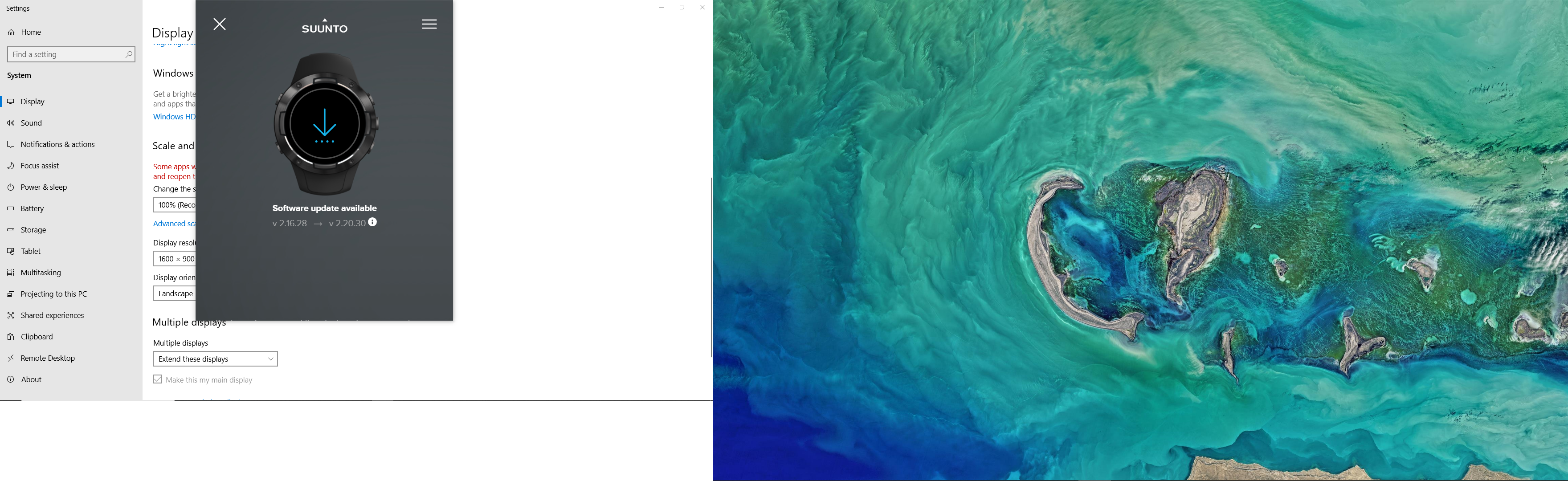
I’ve been trying to update my Suunto 5 and my wife’s Suunto 3 to the latest updates over the past weekend to no avail. The watches were bought Christmas 2020 and we’ve updated them at least a few times. This time however the SuuntoLink screen doesn’t have the update now button, instead it just tells me that an update is indeed available. I have reinstalled SuuntoLink as well as tried various ports on my laptop. Please see picture for more info (sorry about getting both screens on the image).
Anyone able to help?
-
Anybody know what is the issue, I have a Mac and cannot help, usually SuuntoLink needs an update when this happens to me.
Vector/T6c/Vertical 2 Ti
-
@markus-rukkila This might be some scaling issue. I use the same resolution (1600x900) without any problem.
In that Display settings screen, try “Advanced scaling settings” -> Turn off “Fix scaling for apps” and set Custom scaling to 100%. Sign out, sign back in and check if that helped. If 100% doesn’t work, try to play with that value, I normally use 115% and that also works…
You might also try to play with Compatibility settings for Suuntolink. Locate Suuntolink.exe (usually its somewhere like C:\Users*YOUR_USERNAME*\AppData\Local\Suuntolink), right-click on Suuntolink.exe -> Properties -> Compatiblity -> and play with high DPI settings there.
-
@brad_olwin Thanks! And I forgot to add. I’m using a PC.



Hello! It looks like you're interested in this conversation, but you don't have an account yet.
Getting fed up of having to scroll through the same posts each visit? When you register for an account, you'll always come back to exactly where you were before, and choose to be notified of new replies (either via email, or push notification). You'll also be able to save bookmarks and upvote posts to show your appreciation to other community members.
With your input, this post could be even better 💗
Register Login