VeloClimb - Cycling Climbing App
-
Started a new app, VeloClimb, to provide cycling oriented climbing info, mainly for climb categorization. Still under development, given time and mood.
Most of the metrics are already out there somehow. Wanted to have some specific info in an app.
Github repo: https://github.com/panoskrt/SuuntoPlusClimbApp
Current features
- Smoothed live gradient based on vertical speed and ground speed.
- Rolling 30-second VAM (vertical ascent rate).
- Maximum smoothed gradient for the current session.
- Total ascent from Suunto altitude data.
- Running average gradient from valid moving samples.
- Six climb categories from Flat through HC+.
- Two watch screens that can be switched with the watch buttons.
- Workout summary outputs for VAM, average gradient, and maximum gradient.
Calculations
Gradient
When ground speed is greater than
0.3 m/s, the instantaneous gradient is calculated as:gradient = (vertical speed / ground speed) * 100The raw value is limited to
-60%through+60%, then smoothed with an exponential moving average usingalpha = 0.2. When the speed threshold is not met, the previous smoothed value is retained.The app tracks the maximum smoothed gradient and calculates average gradient as the mean of smoothed-gradient samples collected while the speed threshold is met. State is initialized when the app loads and is held for the current app session.
VAM (sort of - based on current meters per second)
evaluate()is expected to run approximately once per second. The app stores up to 31 ascent samples and calculates the current ascent rate from the oldest and newest values in that rolling window:VAM = (latest ascent - oldest ascent) / elapsed sample intervalsThe output uses Suunto’s
VerticalSpeedMountain_Fourdigitsformat. Despite the summary labelAvg VAM, the value is the current rolling-window VAM rather than a whole-session average.Climb categories
Categories are based on the smoothed gradient. Negative gradients are currently included in
Flat; there is no separate descent category.Output value Gradient Label Color 0< 2%Flat Default 12%to< 5%Cat4 Green 25%to< 7%Cat3 Blue 37%to< 8%Cat2 Yellow 48%to< 10%Cat1 Orange 510%to< 12%HC Red 6>= 12%HC+ Dark red Watch screens
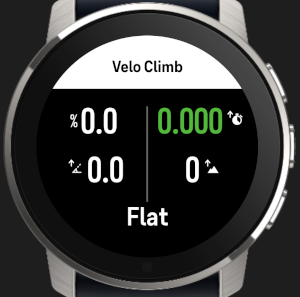
Screen 1 - Climb screen
- Current gradient, formatted as a percentage.
- Current rolling VAM.
- Maximum gradient.
- Total ascent.
- Current category label with its category color.
Pressing the watch’s lower/down button sends an app event and switches to the second screen.
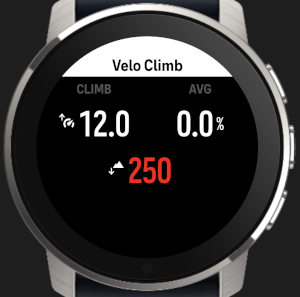
Screen 2 - Profile screen
- Climb duration from
Fusion/Altitude/AscentTime. - Average gradient for the current app session.
- Remaining route ascent when navigation data is available.
-
@Panagiotis-Kritikakos nice one, I’ll be happy to test it. I was thinking about something similar.
-
@Łukasz-Szmigiel Would be happy for feedback. I’ve done some field testing myself, kinda works. There’s one more branch I’m working on with gauge-like display based on the current climb category and added current hr reading, but still needs some refinement.


Hello! It looks like you're interested in this conversation, but you don't have an account yet.
Getting fed up of having to scroll through the same posts each visit? When you register for an account, you'll always come back to exactly where you were before, and choose to be notified of new replies (either via email, or push notification). You'll also be able to save bookmarks and upvote posts to show your appreciation to other community members.
With your input, this post could be even better 💗
Register Login