Constantin: monitor effort drift against your session average
-
Hi everyone,
I’ve uploaded a new Constantin version: 2.08.
This update is mainly about stability. Some users, especially on newer watches when using route navigation and other SuuntoPlus apps like ZoneSense at the same time, could see Constantin or another SuuntoPlus app get unloaded during an activity. The watch logs pointed to the screen/UI side being overloaded, not to the sport calculations themselves.
So this version makes the workout screen much lighter.
What changed
- The app now uses fewer internal data channels between the app logic and the watch screen.
- The old separate chart-history outputs were removed.
- The chart drawing was simplified.
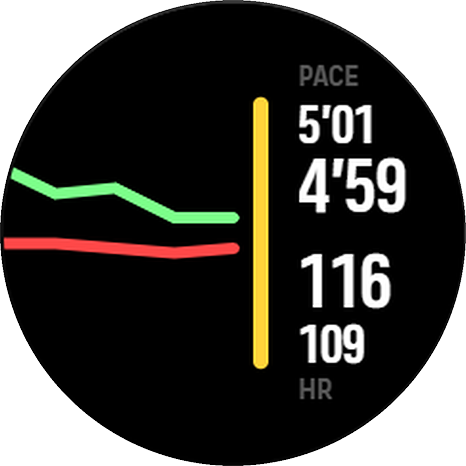
- The heart-rate zone arc was replaced with a simple colored vertical bar on the right edge of the chart.
- The “now” dot was removed.
- The trend chart now builds toward a broader view of effort over roughly the last 10 minutes. Early in the workout, or shortly after opening the Constantin screen, the chart may show a shorter trend until enough data has been collected.
- The app keeps one focused screen with movement speed, heart rate, trend, and HR zone context.
This should reduce the UI memory/load pressure that was causing crashes or SuuntoPlus apps being unloaded, especially when Constantin is used together with navigation or ZoneSense. I tested this version yesterday on a watch and it worked as expected.
Sport-specific display
The main workout value now adapts to the sport:
- Road, track, treadmill, and track-and-field running show pace.
- Trail, vertical, orienteering, obstacle, and adventure running show NGP.
- Other sports show speed.
So the screen should now better match the type of activity, while staying simpler and lighter for the watch.
What’s next
I’m planning more UI work in future versions, but the focus will stay on readability, stability, and simplicity rather than adding new features or more metrics.
Feedback is very welcome, especially reports about crashes or SuuntoPlus apps being unloaded. If you see a problem, please share the watch model, activity type, other SuuntoPlus apps used, and whether route navigation was active.
-
@Łukasz-Szmigiel Cool, thanks. How can I check which version is on the watch?
-
I really liked the first version. Having the data separated made it much easier to monitor and control each metric. The layout was cleaner, easier to read at a glance, and more practical during a workout.
The new version looks good too, but I would love to keep the +/- values for both heart rate and pace. Being able to see exactly how much HR and pace have increased or decreased made it much easier to understand the drift and make adjustments during the activity.
-
@Speed-Man thanks for your review! Noted. I’ve reduced the app to one screen because of stability issues but since I’ve found a new, stable method - perhaps it’ll be possible to get back to different screens too and the visible delta.
-
@Speed-Man you can go to watch settings in the Suunto App, then view the apps that are synced to the watch, select Constantin and scroll to the bottom of the page to see when it was updated.
-
@Łukasz-Szmigiel Now it’s on the latest version. Thank you very much for the support and continuous improvements

-
Constantin 2.12
Steadier drift view, new detail screens, and a website
Hi everyone,
I’ve just published Constantin 2.12, a new version of my SuuntoPlus app for monitoring movement-speed and heart-rate drift during workouts.
What’s new in 2.12
This release focuses on making the app clearer, smoother, and more stable during real workouts.
Three switchable views
Three views are back, but this time without the need of reloading the template:
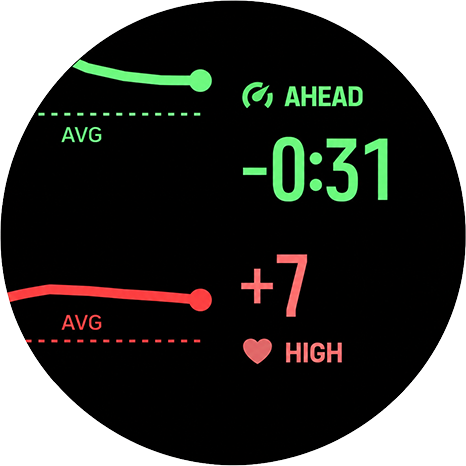
- Drift — combined movement-speed and heart-rate trend
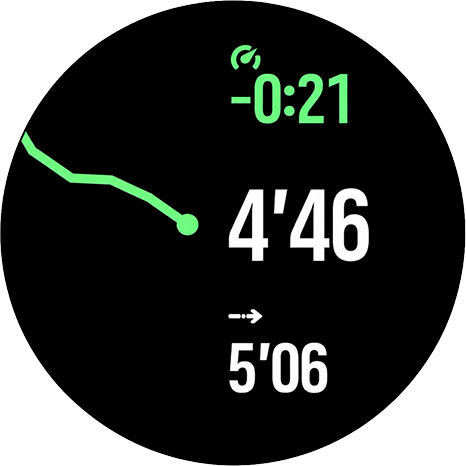
- Pace / Speed / NGP — movement-speed detail view
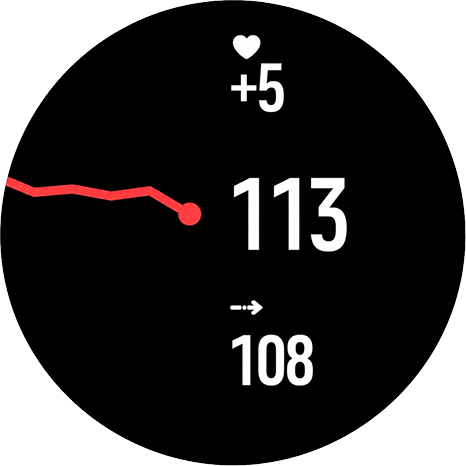
- Heart Rate — HR detail view
The upper button switches between them:
- short press: next view
- long press: previous view
All views share the same collected trend data, so switching views does not reset the chart.
Smoother and more representative trend chart
Trend values are now averaged over each recording interval during up to 10 minutes (four bucket, each 2:30 min average + “now” refreshed every 3 seconds). The chart now reaches further back and gives a broader view of how effort is changing over time.
Better behavior when data briefly drops
If GPS/speed data drops briefly, the chart should hold its history instead of clearing. When you stop moving without pausing the activity, the movement-speed trend holds the last valid sample while heart rate can continue updating.
Shared scale for pace and heart rate drift
In the combined drift view, both lines now share one visual scale and meet at the same point on the right. This should make it easier to see whether movement speed and heart rate are drifting together or diverging.
HR zone bar appears immediately
The heart-rate zone bar now appears as soon as an HR zone is active, without waiting for the trend chart to fill.
More stable alongside navigation and other SuuntoPlus apps
A lot of work in this release went into making the app behave more calmly under load, especially when used together with route navigation or other SuuntoPlus apps.
Website with details
I also published a small website with more details, screenshots, and explanation of how the app works:
https://constantin.szmigiel.design/
Feedback is very welcome, especially from people testing it during longer workouts, route navigation, or together with other SuuntoPlus apps.
-
Thank you so much. You did an amazing job designing everything—it all looks great.
-
2.13 (2026-06-27) is live with a small bugfix:
- Each trend line now scales to its own movement, so a chart looks the same whether you view it in the combined drift view or in its own dedicated view.
- Fixed the effort direction for speed-based sports (such as hiking): moving faster than your average now correctly reads AHEAD instead of FADE (and correct green/red colors).
-
Hi guys!
I’ve received a report from Suunto App from someone using Suunto Race S saying that Constantin is still crashing and rebooting the watch when used with manual laps without any other apps or GPS routes loaded.
I’m unable to reproduce such behaviour on my S9PP. Can somebody with Race S see if the app triggers the crash with manual laps triggered?


Hello! It looks like you're interested in this conversation, but you don't have an account yet.
Getting fed up of having to scroll through the same posts each visit? When you register for an account, you'll always come back to exactly where you were before, and choose to be notified of new replies (either via email, or push notification). You'll also be able to save bookmarks and upvote posts to show your appreciation to other community members.
With your input, this post could be even better 💗
Register Login