Suunto app Forum Suunto Community Forum
    • Recent
    • Tags
    • Popular
    • Users
    • Groups
    • Register
    • Login

    Hiking Sport Mode Screen

    Scheduled Pinned Locked Moved Suunto Vertical 2
    16 Posts 7 Posters 983 Views 5 Watching
    Loading More Posts
    • Oldest to Newest
    • Newest to Oldest
    • Most Votes
    Reply
    • Reply as topic
    Log in to reply
    This topic has been deleted. Only users with topic management privileges can see it.
    • cpinkyC Offline
      cpinky
      last edited by

      Really enjoying the watch, but struggling to figure out what the best combo of data screens are for a hiking sport mode. Since I can’t modify it mid-hike, I’d love to get everyone’s opinions and examples so I can set it up before a 17 mile hike on Saturday.

      L EgikaE S HighlandsH 4 Replies Last reply Reply Quote 0
      • L Online
        larrybbaker @cpinky
        last edited by

        @cpinky I’d start with the data points you want to see on the first screen… and go from that. More fields = smaller font. For me I like HR and ascent/elevation gain along with duration.

        Vertical Ti Solar
        Vertical 2
        Race 2
        iPhone 17 Pro

        cpinkyC 1 Reply Last reply Reply Quote 1
        • EgikaE Offline
          Egika Platinum Member @cpinky
          last edited by Egika

          @cpinky for hiking, my heart rate is of no interest to me at all.
          So my data screen for hiking has:

          • distance
          • elapsed time
          • sunset time (or sometimes I use the Sun S+ feature)
          • distance to next waypoint of end of route
          • ETA (next waypoint or end of route)
          • average speed

          t6, S6, Elementum Terra, Ambit 3 Sapphire, Spartan Ultra Copper, Traverse Alpha, S7 Graphite LE, S9B Ambassador, S9P Titanium, S9PP Titanium, Vertical All Black, Race Titanium Charcoal, Race S Titanium Courtney, Run Lime, Race 2, Vertical 2 Titanium

          M 1 Reply Last reply Reply Quote 1
          • S Offline
            snow* @cpinky
            last edited by snow*

            @cpinky distance, elapsed time, ETA, Climb S+, map

            Race S Ti.

            1 Reply Last reply Reply Quote 1
            • Stefano M64S Offline
              Stefano M64 Silver Members
              last edited by

              I find very useful to have the vertical speed, I started using that parameter with my old Suunto Vector, it helps me to keep the right pace on long climbs. Once you learn what’s your good reference value (for example 8 / 9 m/min, that is 480 / 540 m/h) you can manage your effort along the route depending on its length and elevation gain. With the last update you can also select that parameter as one of the 5 data field that can be shown directly on the map tooth.
              Here is my hiking customization (completed with S+ Climb):
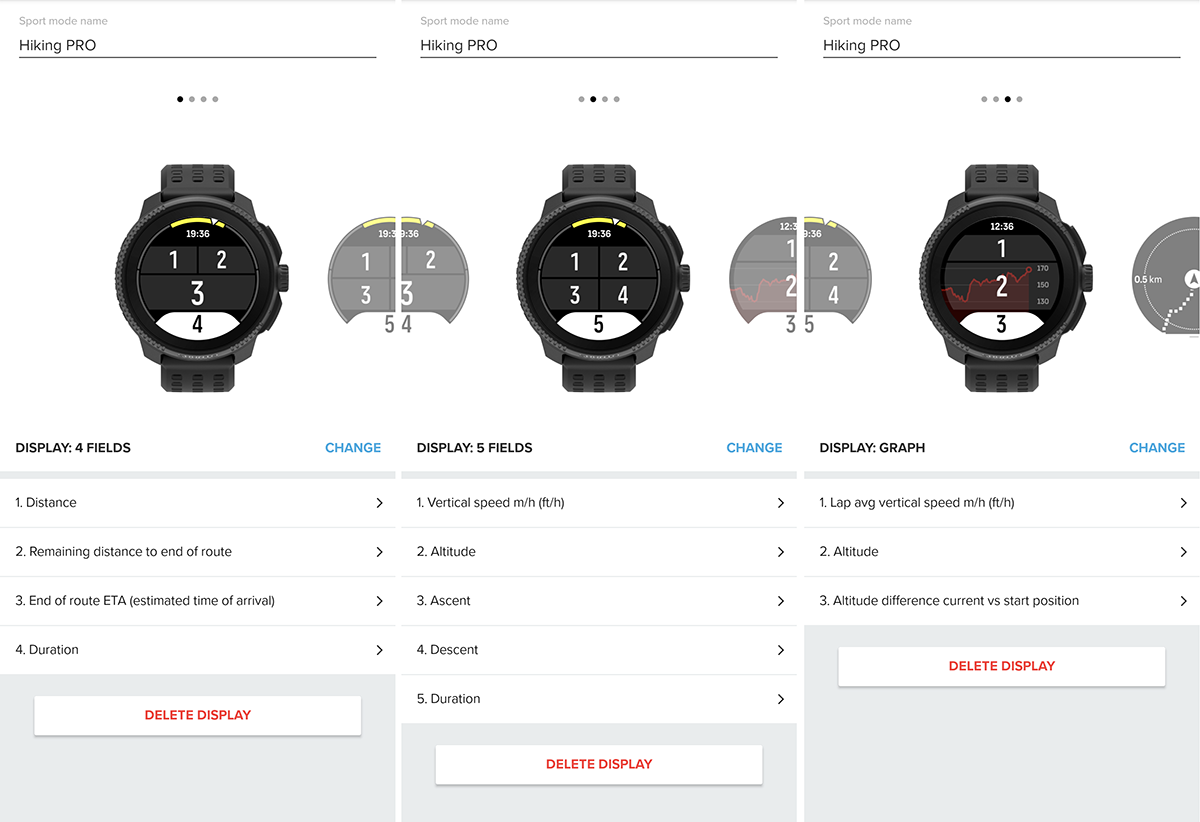
              Hiking PRO.png

              Suunto Vector . Vector HR . Core . Race & Race S

              cpinkyC 1 Reply Last reply Reply Quote 3
              • M Offline
                maszop Bronze Member @Egika
                last edited by

                @Egika For me, HR is very helpful. I hike fast, and on climbs, I know if the effort is too much or not.

                Distance, Altitude, Average Speed/Vertical Speed, HR, Ascent, Duration, ETA, Sunset, + Map and all the ascent stats.

                1 Reply Last reply Reply Quote 2
                • cpinkyC Offline
                  cpinky @larrybbaker
                  last edited by

                  Thanks! What is the Sun S+ feature? Do you using sunset time to determine how much time left you have to hike or whats the purpose? I feel like I generally know the sunset time enough / don’t think about it. Not arguing, just trying to understand if I’m missing something lol

                  EgikaE M 2 Replies Last reply Reply Quote 0
                  • cpinkyC Offline
                    cpinky @Stefano M64
                    last edited by

                    @Stefano-M64 This is great! Thanks for sharing the images too!

                    1 Reply Last reply Reply Quote 0
                    • EgikaE Offline
                      Egika Platinum Member @cpinky
                      last edited by

                      @cpinky S+ you can check out in the app.
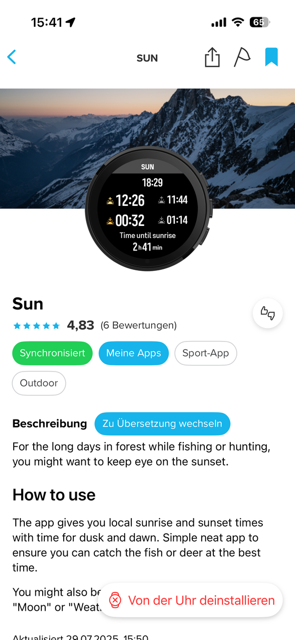
                      IMG_4569.png

                      t6, S6, Elementum Terra, Ambit 3 Sapphire, Spartan Ultra Copper, Traverse Alpha, S7 Graphite LE, S9B Ambassador, S9P Titanium, S9PP Titanium, Vertical All Black, Race Titanium Charcoal, Race S Titanium Courtney, Run Lime, Race 2, Vertical 2 Titanium

                      1 Reply Last reply Reply Quote 1
                      • M Offline
                        maszop Bronze Member @cpinky
                        last edited by maszop

                        @cpinky You don’t need SuuntoPlus to check sunset. Just set it up normally in custom hiking profile – it won’t take up one of your 2 or 3 app slots during an activity.

                        Combined with ETA, average speed, and the terrain profile, it’s fairly easy to estimate whether you’ll make it before sunset.

                        cpinkyC 1 Reply Last reply Reply Quote 2
                        • cpinkyC Offline
                          cpinky @maszop
                          last edited by

                          @maszop I do like the idea of the app since that can be enabled/disabled mid hike as opposed to always taking up a data field

                          EgikaE M 2 Replies Last reply Reply Quote 2
                          • HighlandsH Offline
                            Highlands @cpinky
                            last edited by Highlands

                            @cpinky IMG_8282.jpeg

                            That’s my first custom screen, I have two more.
                            In the first field I have vertical speed m/h, not the average one. And in the 7-th field I always have the HR. Previous day during fw update my V1 factory reset and I had to set it up quickly for the next day custom hiking mode (I never use stock sport modes), so field 1 on first screen and field 7 on second custom screen are set wrongly.

                            1 Reply Last reply Reply Quote 1
                            • HighlandsH Offline
                              Highlands
                              last edited by

                              IMG_8232.jpeg
                              Second one

                              cpinkyC 1 Reply Last reply Reply Quote 1
                              • EgikaE Offline
                                Egika Platinum Member @cpinky
                                last edited by

                                @cpinky said in Hiking Sport Mode Screen:

                                @maszop I do like the idea of the app since that can be enabled/disabled mid hike as opposed to always taking up a data field

                                this is what I do, when I forgot to have that data field 🙂

                                t6, S6, Elementum Terra, Ambit 3 Sapphire, Spartan Ultra Copper, Traverse Alpha, S7 Graphite LE, S9B Ambassador, S9P Titanium, S9PP Titanium, Vertical All Black, Race Titanium Charcoal, Race S Titanium Courtney, Run Lime, Race 2, Vertical 2 Titanium

                                1 Reply Last reply Reply Quote 1
                                • M Offline
                                  maszop Bronze Member @cpinky
                                  last edited by

                                  @cpinky said in Hiking Sport Mode Screen:

                                  @maszop I do like the idea of the app since that can be enabled/disabled mid hike as opposed to always taking up a data field

                                  That’s a good solution too. I don’t like messing around with settings during an activity. Time is money 😁

                                  1 Reply Last reply Reply Quote 1
                                  • cpinkyC Offline
                                    cpinky @Highlands
                                    last edited by

                                    @Highlands These are great! Thanks
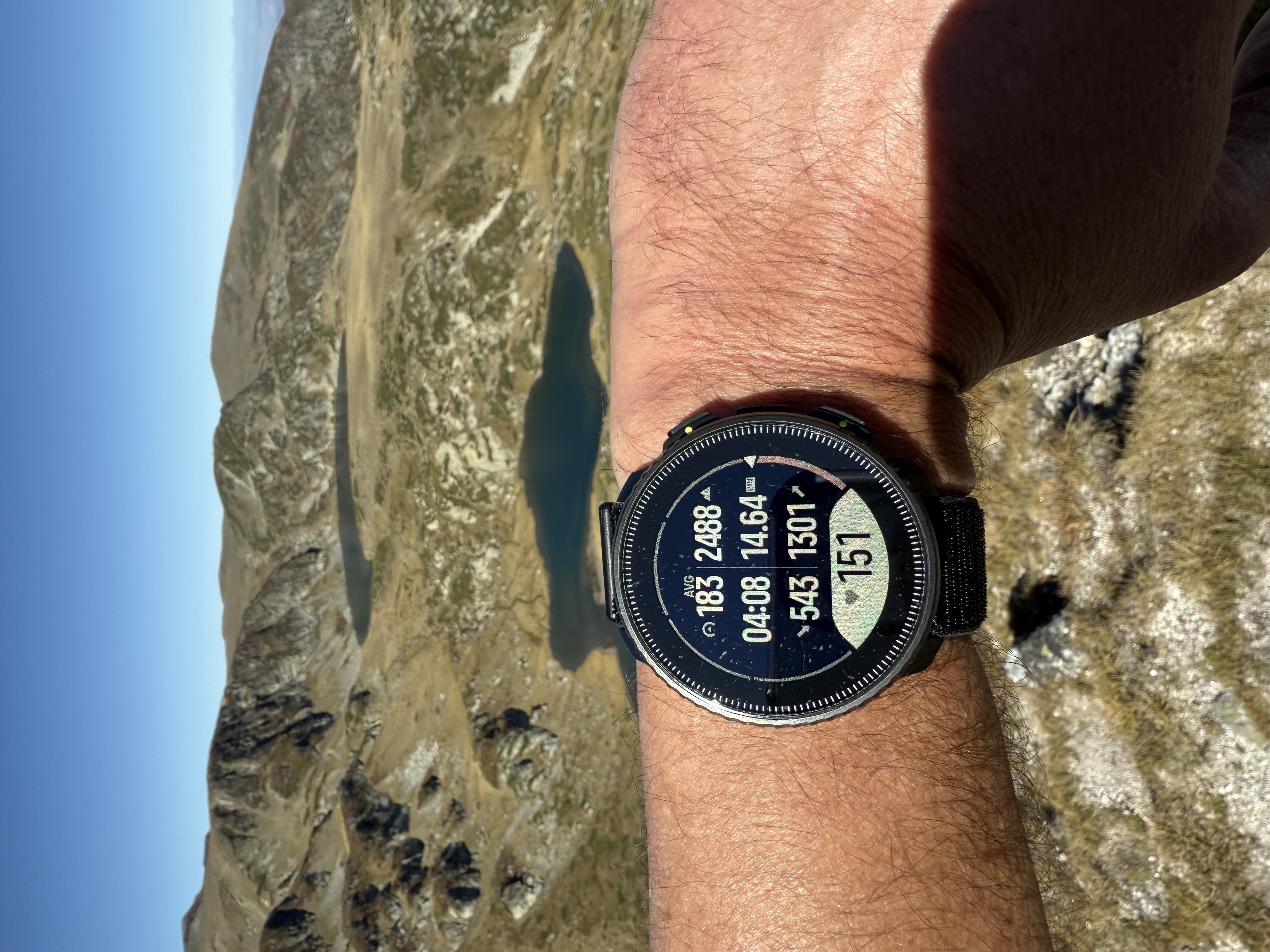
                                    1 Reply Last reply Reply Quote 0

                                    Hello! It looks like you're interested in this conversation, but you don't have an account yet.

                                    Getting fed up of having to scroll through the same posts each visit? When you register for an account, you'll always come back to exactly where you were before, and choose to be notified of new replies (either via email, or push notification). You'll also be able to save bookmarks and upvote posts to show your appreciation to other community members.

                                    With your input, this post could be even better 💗

                                    Register Login
                                    • First post
                                      Last post

                                    Suunto Terms | Privacy Policy