Suunto Spark
-
@dreamer_ succesfully updated to 1.0.4.3 fw, but no release notes. Can’t tell so far what’s been updated.
-
@dreamer_ succesfully updated to 1.0.4.3 fw, but no release notes. Can’t tell so far what’s been updated.
Thanks for the answer!!
-
There is nothing about the firmware update notes yet. I’d be interesting if someone could keep us updated with the changes or testings.
I’m pretty sure I’m not the only one that wants to know how this product grows with firmware updates @egika
-
@dreamer_ i would like to know myself

Sorry, have no notes on this one… -
Same here. I updated to firmware 1.0.4.3, but I can’t find any release notes. Looks like it might just be a bug fix and stability update.
-
I finally received mine and use them on a run yesterday for the first time. I noticed a bug: at first I could adjust the volume with the touch I had set up (triple tap), but after some time this stopped working; I had media controls on my watch, too, and when I chose the volume option nothing happened.
-
Hi,
I bought them yesterday. I come form a very cheap sport headphone (in ear) and the first impression is that the case weight a lot! But it’s just the case, for sure more solid than my cheap one.
Second impression, the sound: great, it’s my first time with open ear headphone and I’m happy not to choose the bone trasmission: with spark there are no vibration, even with hi volume and boostered bass. But about the volume, the maxim it’s in my opinion a bit low. My cheap hadphone in this case are much better, probably dipending form they are in-ear, and Suunto Spark open ear.
So my suggestion for Suunto for nextfirmware upgrade:- pomp up a little bit maximum volume (15-20% maybe): I would like to suggest adding an optional Extended Maximum Volume mode.
The app could offer two settings:
Standard Maximum Volume (current default)
Extended Maximum Volume (+3 to +5 dB), which users can enable voluntarily after maybe acknowledging a warning about the potential risks to hearing. - add in tap personalization Previous Track as an assignable touch control. (so you can use double tap on the left to go back and on the right to go to the next)
3)provide more flexibility in touch gesture customization, allowing users to assign Volume Up, Volume Down, to the press-and-hold gesture. So you can press and hold on the left to go up, and on the right to go down, for example.
- pomp up a little bit maximum volume (15-20% maybe): I would like to suggest adding an optional Extended Maximum Volume mode.
-
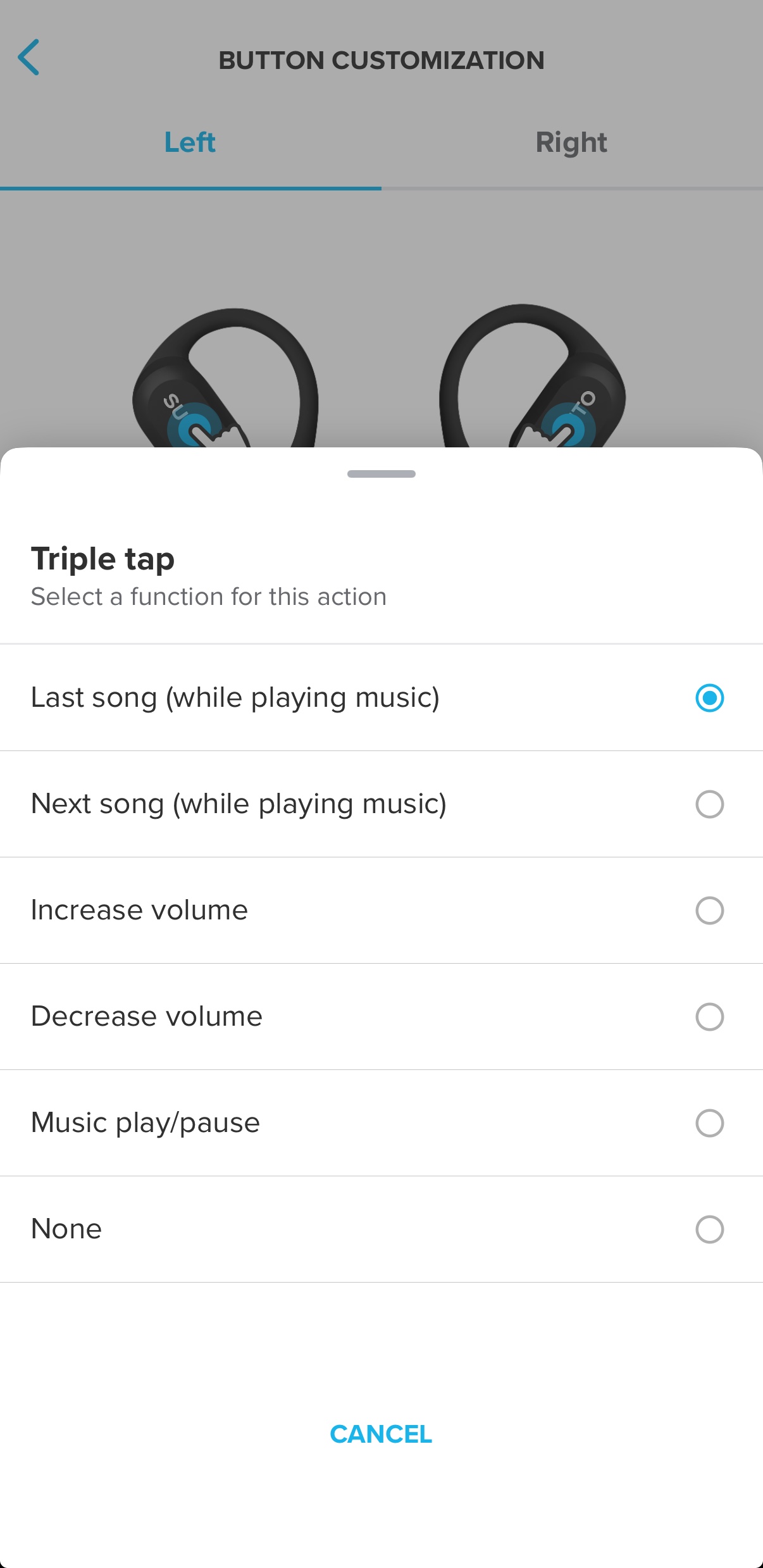
@franky23 you can tap to go to previous track. I set it as triple tap on the left earphone. What I would like is the option to use nodding to go to previous track, currently it only goes forward, and it’s very sensitive: I often turn my head back when I run on the street and this skips to the next song.
I’m in general very happy with this product, even for work when I have back-to-back calls for hours and I don’t get tired of wearing them. What I find great, too, is how the sound remains clear in windy conditions. -
@Francesco-Pagano Thank you, but, in my IOS app, there’s no previous track possibility. How do you set the triple tap to go back instead of forward?
-
@franky23 here are my settings. I first created them on Android, and I just recently moved to iOS but I can see the same settings there (this image is from my iphone). There’s a “button customization” option in the list of settings.





Hello! It looks like you're interested in this conversation, but you don't have an account yet.
Getting fed up of having to scroll through the same posts each visit? When you register for an account, you'll always come back to exactly where you were before, and choose to be notified of new replies (either via email, or push notification). You'll also be able to save bookmarks and upvote posts to show your appreciation to other community members.
With your input, this post could be even better 💗
Register Login