Offline Maps and Routing in Suunto App
-
I was talking more about the cases like this:
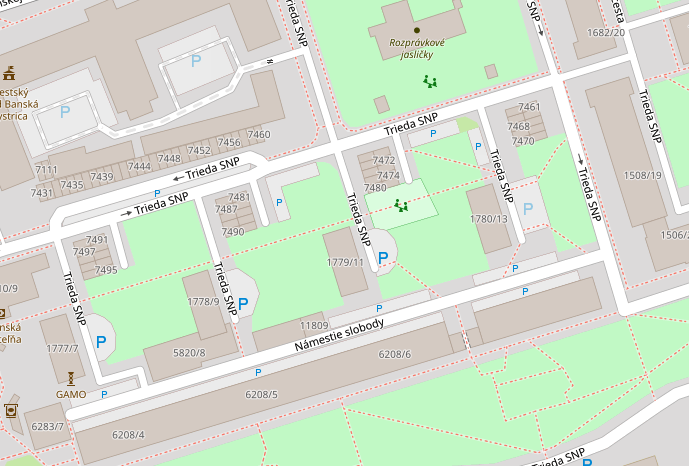
Out of central large P rightmost is marked as private, but three others are not. Hard to believe it’s public - I rather think it’s not tagged properly.
Opinions expressed are solely my own and do not express the views or opinions of my employer
-
@Tomas5 Offline maps are more useful in areas without coverage, so it’s better to have more information on the map outdoors.
In more populated areas, it’s still more convenient to use online maps. Except in places requiring roaming, but that’s definitely rarer. -
@pavel.samokha said in Offline Maps and Routing in Suunto App:
I was talking more about the cases like this:
Out of central large P rightmost is marked as private, but three others are not. Hard to believe it’s public - I rather think it’s not tagged properly.
Most of them is for residents only now. City converted it from public recently i believe.
-
@maszop yes in suunto app it is true. But if this labels will get into watch in some point, there is no such thing like online version. And rendering so much parking lots will make map in city harder to use. Maybe allow to display/hide this interest points. So i can for example keep restaurants but hide parking or vice versa. For example on Bike trip i am interested in restaurants and cafeteria but i will not look for parking lot when on bike.
-
@pavel.samokha said in Offline Maps and Routing in Suunto App:
@Tomas5 the reverse case is:
I’m somewhere in mountainous not very populated area and I’m searching where to park before going on a hike.
Quite likely there will be also a parking without any explicit tags. Putting it on highest zoom levels will be inconvenient - hard to find, as I will need to scroll a lot.
I’m not arguing it looking overcrowded in the city, but explaining the tradeoffs here. I will think what else we can do
Possibly yes. But if you plan trip by car to mountains. Usually you start in city so you can set navigation directly to parking spot you need. And i believe no one will ever use suunto app as car navigation. And for doing sport activity, parking is not important that much if you are not doing motosports.
Either way it is still better than blind map like currently in watch. So take this just as feedback for possible improvement.
Suunto Ambit 2 > Suunto 5 > Suunto Race 2
-
@Tomas5 said in Offline Maps and Routing in Suunto App:
@maszop And rendering so much parking lots will make map in city harder to use.
I always thought that people buy Suunto watches with maps to use them mainly outdoors, not to find the nearest café in city. But hey, I could be wrong

-
@maszop Absolutely. I especially need the contour lines of the terrain.

-
@Tomas5 said in Offline Maps and Routing in Suunto App:
So take this just as feedback for possible improvement.
Ofc. Thanks for feedback, always appreciated.
Maps is a particular area where feedback is important. Countries can vary a lot in the way they planned and mapped, no way for me to check everything.
And as I said earlier I know the style and data is far from perfect. When comparing our offline maps to an app which is being developed for 20 years by Czech company — it will obviously be better in Slovakia. At this time the goal was to make the technology, I hope we polish the looks down the road.
-
@maszop said in Offline Maps and Routing in Suunto App:
I always thought that people buy Suunto watches with maps to use them mainly outdoors, not to find the nearest café in city.
I know you’re just kidding, but I’d argue that it’s important that the maps function equally well in both remote and urban areas. For instance, when I visit a new city, if possible, I begin my trail runs in town to avoid having to drive to a faraway trailhead. Often I’ll need to re-route my course through the city because the streets I initially routed are either too busy or inconvenient to run down. Having a simple, easy-to-read map is preferable in this situation.
@pavel.samokha said in Offline Maps and Routing in Suunto App:
Maps is a particular area where feedback is important.
I’d vote for the elimination of both private driveways (tag service=driveway) and all building outlines. In the US, most driveways are just to people’s private homes. Suunto includes them on both the watch and app maps and gives them the same priority as residential roads (same color and line width). The result is streets that look like crazy tree branches.
As for building outlines, I’d argue they are unnecessary, causing too much visual clutter and (I’d assume) processing bloat, especially on watches. Locations and POIs (bars, banks, service stations, shelters, toilets, etc.) can still be shown as points, but the actual size and shape of the buildings, I think, is overkill. This is one area where Garmin’s TopoActive maps are actually better and simpler since the do not include building outlines, only POIs.
Vertical Ti / S9PP Ti / S9P Ti
-
@duffman19 said in Offline Maps and Routing in Suunto App:
I’d vote for the elimination of both private driveways (tag service=driveway) and all building outlines. In the US, most driveways are just to people’s private homes. Suunto includes them on both the watch and app maps and gives them the same priority as residential roads (same color and line width). The result is streets that look like crazy tree branches.
Noted
-
@pavel.samokha I think it might be country/city specific. In my city there are very few parking like distractions on my maps in large city centers or otherwise.
I sympathize with the folks trying to put together maps for an entire community. There are so many different expectations on what “should” and “shouldn’t” be in each small detail of a watch.
Thank you Pavel for your hard work and answering all of our questions. Suunto is truly a rising star.
-
@duffman19 said in Offline Maps and Routing in Suunto App:
@maszop said in Offline Maps and Routing in Suunto App:
I always thought that people buy Suunto watches with maps to use them mainly outdoors, not to find the nearest café in city.
For instance, when I visit a new city, if possible, I begin my trail runs in town to avoid having to drive to a faraway trailhead. Often I’ll need to re-route my course through the city because the streets I initially routed are either too busy or inconvenient to run down. Having a simple, easy-to-read map is preferable in this situation.
There is no routing in Suunto watches (at least not yet), so what you are writing about does not apply to maps in the watch or offline maps in the Suunto App.
As for building outlines, I’d argue they are unnecessary, causing too much visual clutter and (I’d assume) processing bloat, especially on watches. Locations and POIs (bars, banks, service stations, shelters, toilets, etc.) can still be shown as points, but the actual size and shape of the buildings, I think, is overkill. This is one area where Garmin’s TopoActive maps are actually better and simpler since the do not include building outlines, only POIs. And
Building outlines are very important in more remote places. They can provide shelter from wind and other weather conditions, enable wild camping, provide a clue about the presence of water, or indicate that someone might be there with food to sell (e.g., during multi-day hikes), and so on.
Besides, the presence of a building on the map in a remote area is always a valuable landmark.Yes, you can look at everything from different perspectives – it’s more complicated than it seems at first glance. There’s always some kind of compromise.
I’ve seen envy in the eyes of Garmin users when they looked at the presence of buildings, paths, and cliff symbols in places where all they had was a grey background on their map.
-
@maszop if you use watch only for trail running than yes. But suunto watch supports bike too and not just MTB. And if you are on bike trip and you use watch to navigate on your trip. It is usefull to see that you have nerby of your road some place to buy some food, drink or other refrehment. I don’t talk about bike race or any competition, just trip with friends or family. I believe bike trips counts as sport activity too

-
@maszop said in Offline Maps and Routing in Suunto App:
There is no routing in Suunto watches
Yes, I know. I was just referring to using the map to change my path (go down a parallel street, for instance), not actually changing the planned route on the watch.
@maszop said in Offline Maps and Routing in Suunto App:
Building outlines are very important in more remote places. They can provide shelter from wind and other weather conditions
Buildings can still be marked as single point POIs. This is how lots of other outdoor mapping services handle them. In your example of a weather shelter in a remote area, I’d argue this would be better served by showing a shelter symbol POI rather than a generic building outline.
If the downloadable watch and app maps are not going to include POI symbols, then yes, building outlines would be important. But, I would prefer POI symbols as they provide more information than outlines alone.
-
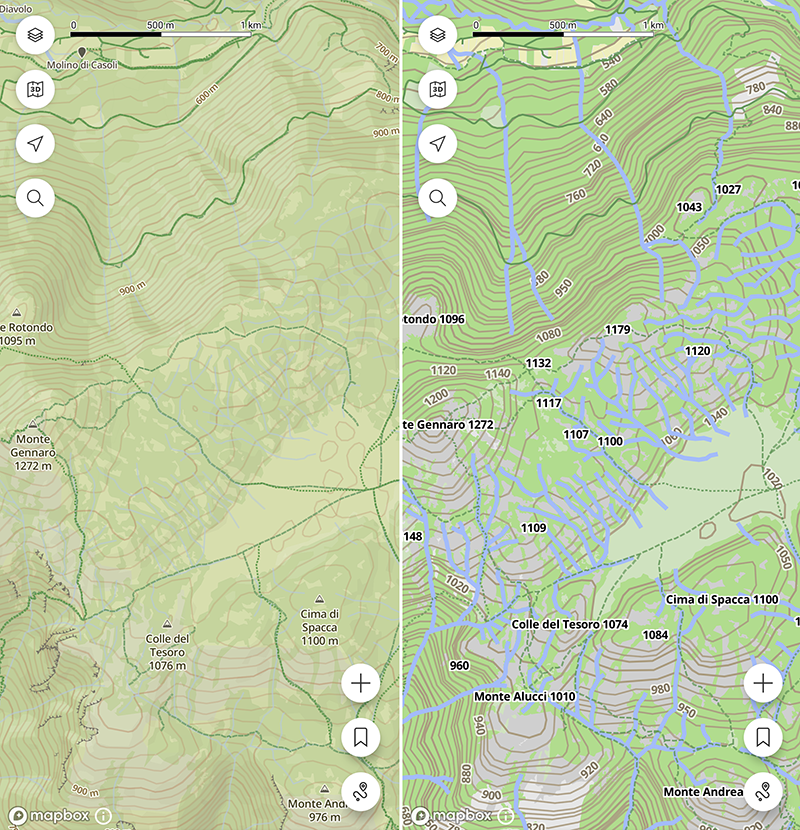
The offline map styles looks a bit too “cartoonish” to me, the lines thickness is larger than the online ones, resulting in a less clear graphic. Here, for example, small water flows (torrents) that are nearly invisible in the online maps are plotted so wide to nearly hide the hiking paths in the area
Suunto Vector . Vector HR . Core . Race & Race S
-
@Tomas5 Well, I’m just not saying we should remove things from the map entirely just because they cause some inconvenience in densely populated areas – because in remote terrain, every element on the map can be extremely useful.
We need a compromise – keep as much information on the map as possible without sacrificing readability.
-
@duffman19 said in Offline Maps and Routing in Suunto App:
@maszop said in Offline Maps and Routing in Suunto App:
Buildings can still be marked as single point POIs. This is how lots of other outdoor mapping services handle them. In your example of a weather shelter in a remote area, I’d argue this would be better served by showing a shelter symbol POI rather than a generic building outline.If the downloadable watch and app maps are not going to include POI symbols, then yes, building outlines would be important. But, I would prefer POI symbols as they provide more information than outlines alone.
I’m referring to very remote places that are poorly marked in OSM – missing proper tags and so on. All you have is the outline of a building on the Suunto watch map. But that alone is crucial information – even without any extra details.
Garmin did not display it because there is no additional information about this place. -
@maszop yes totaly agree with you because of it i suggested above that some type of interest points could be configurable. So if you are in remote location you can show everything. But if you navigate trough populated area you can hide what you don’t need. It could be just list of poi types with on / off trigger in map settings.
-
@pavel.samokha btw is there technical reason why offline and online maps differ? For example offline maps in google maps or in mapy.com are identical to online version if i am not mistaken.
And are this POI/features like parking lots, restaurants, street names, peaks etc baked into map (like hardcoded) or is it layer loaded on top of map layer? Because from behavior it looks like it is rendered as separated layer. If so it should be easy to allow users filter by type.
Suunto Ambit 2 > Suunto 5 > Suunto Race 2
-
@maszop said in Offline Maps and Routing in Suunto App:
I’m referring to very remote places that are poorly marked in OSM
I understand what you are saying. However, in my experience, most locations begin their OSM journey as single points. There are only three types of features in OSM: points, lines, and areas. Streets, trails, fences, cliffs, etc. are obviously lines. Buildings, however, can be marked as both points and areas. Usually, a less-mapped area (like a remote mountain space) will have locations marked as single points because this is the fastest, easiest way to start. At some point in the future, a mapper may revisit the area and add the actual building shapes using the area feature. This can be very time consuming, so it is often not done upon initial mapping.
So, given the above, there could be a scenario where, if only building areas are shown on the map, a storm shelter, having been marked as a point, would not be visible. I see this all around my area. All of the houses in my neighborhood are mapped as areas and are visible on the watch maps, but storm shelters, restrooms, and water fountains marked as points are not.




Hello! It looks like you're interested in this conversation, but you don't have an account yet.
Getting fed up of having to scroll through the same posts each visit? When you register for an account, you'll always come back to exactly where you were before, and choose to be notified of new replies (either via email, or push notification). You'll also be able to save bookmarks and upvote posts to show your appreciation to other community members.
With your input, this post could be even better 💗
Register Login