[Question] No stupid questions - ask anything here
-
@Thibault-B.
I think the issue is that I override the onClick action, so I should keep it empty if in pause. But I do not know how to do it.
One possible way is to use the uiViewSet in combination with userInput. Simple example:
<uiView>

  <div>
    <!-- The set allows toggling the capture of 'down' -->
    <uiViewSet id="test">
      <!-- First set element -->
      <div>
        <userInput>
          <!-- systemEvent prints into OUTPUT when running in the simulator -->
          <pushButton name="down" onClick="systemEvent('Hello world')"/>
        </userInput>
      </div>
      <!-- Second set element -->
      <div>
        <!-- Here nothing gets printed -->
      </div>
    </uiViewSet>

    <!-- Press 'up' to enable/disable the capture of 'down' -->
    <userInput>
      <pushButton name="up" onClick="next('#test')"/>
    </userInput>

  </div>

</uiView>
Edit. Just to add, you would probably then want onExercisePause() to do the toggling of the set
-
@SuuntoPartnerTeam Nice! Thank you.
I toggle the capture in the onExercisePause, onExerciseStart, etc as you recommended in your edit. -
@SuuntoPartnerTeam Thanks for the reply on a Sunday.
I am testing with a
Race Sif that makes a difference. The firmware is the most recent one according to the watch menu (v2.50.28). Also I ran themountaineeringactivity (or what it is called in english language setting) with no GPS fix (ignore and continue when prompted). -
This might have been overseen.
Any chance to get the proper resources for the baro trend?Thank you!
said in [Question] No stupid questions - ask anything here:
@SuuntoPartnerTeam I am trying to display the baro trend in my S+ like the litte arrow that shows how the barometer is changing:

I used to have the icons for the 9 diffeent symbols like this:
{ "name": "trend", "source": "Fusion/Altitude/PressureTrend", "type": "subscribe" }, <eval input="{zapp_bottom_input}" outputFormat="keyValue 1=|2=|3=|4=|5=|6=|7=|8=|9=" />Now something must have changed in the background and the icons don’t work anymore. Can you tell me the current output for this?
Thx!
-
@SuuntoPartnerTeam Hello, one question regarding the UI.
I am using templates but would like to have small portions of the UI visible depending on logic.
Is this possible?
My current approach: Having different templates. But with this approach I have a lot duplicate html code.Thanks
-
Hello, I’m a the new one

Are there any plans or ways to listen music on my Vertical 2 without the phone?
I saw, that there where some watches where you could put offline music directly on the watch.Garmin supports Spotify, will come something like this in the future? I’m not a big fan to carry my phone all the time with me, so it would be nice if there is a feature like that.
Greetings and thanks!
-
Hello guys I having trouble when I trying to screenshot my app on the simulator,when I press the camera icon, it show up the error.
[23:29:31] [error] Error loading HTML template 't.html': _0x26deff is not definedBefore I pressed it the app is running fine without any error .I even trying to create a new app with the default code and take a screenshot too ,but it come out the same error.
Is anyone else having trouble taking screenshots? -
said in [Question] No stupid questions - ask anything here:
Hello, can anyone help, I am trying to display Graph for HearthRate.
I am using this code for displaying graph, it is taken from one of examples just modified input path for current hearth rate:
<graph style="position:absolute;
              left:0px; top:0px; width:100%; height:100%;
              box-sizing: border-box;
              padding-right:90px; padding-top:60px; padding-bottom:60px;
              font-size:21px;"
       valueFormat="HeartRate_Fourdigits"
       type="line"
       grid="three lines"
       inputType="subscribe"
       input="/Activity/Move/-1/HeartRate/Current"
       min="0.6666666667"
       max="3"
       slack="0.1"
/>
and it works fine in simulator and I see this:
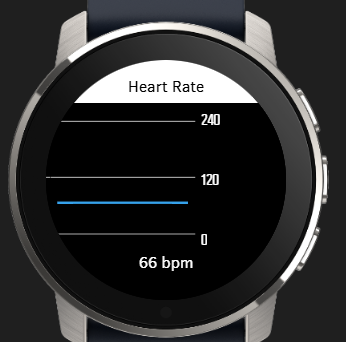
but when I upload app to watch (Suunto 5 or Race 2), than there is no graph line for Heart Rate:
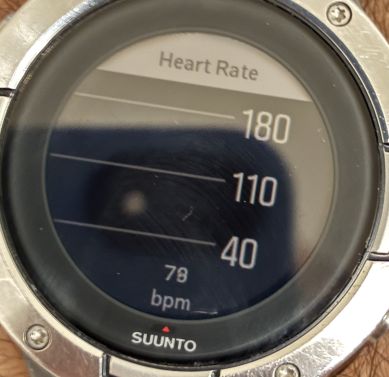
@suuntopartnerteam do you have any hint what can be wrong ? It works in simulator but not in watch, when i see system events i see only this error and not sure if it is related:
#1998533 25.03.2026 06:10:01 : ERR WBMAIN : *0: app 1248 Event 3 80523203
#1998534 25.03.2026 06:10:01 : ERR WBMAIN : 1: mea 16 Wait 0 00000000
#1998535 25.03.2026 06:10:01 : ERR WBMAIN : 2: ui 16 Wait 0 00000000 -
@ook
Hi, I have the same problem.
Running on a MacBook Air with newest OS. -
@Strulian Hello
i was hoping to implement this myself, but the public available api from spotify does not allow to download anything - for obvious reasons.
I don’t think suunto today allows to store large data on the watch itself (although a race s already has 32gb free storage).
For Garmin, spotify made the app themselves. Perhaps Suunto can persuade spotify to make the app themselves.
But, another thing is lacking: we cannot link wireless earbuds with the Race S/2.
-
Hello @harry08 .
would like to have small portions of the UI visible depending on logic.
The uiViewSet element is exactly what you are looking for. It allows you to programmatically switch portions of a template without duplicating everything
-
Is anyone else having trouble taking screenshots?
This is an unfortunate bug in the latest release (as mentioned in our simulator post). No ETA on the fix, but the dev team is aware of this issue

-
Is there any way to restrict installation to certain devices via the manifest or somewhere else?
For example, my app is designed only for watches that support entering user settings, and I want to prevent it from being installed via the SuuntoPlus Store on devices that don’t support them (like the Suunto 9 Baro or non-PRO Peak models).
-
@Egika Honestly, this is the first time our forum team has seen icons used in that way and we don’t know what could have changed to make your formatting (with an added
<div class="f-ico"></div>around) only work in the simulator. You might just have to implement additionalsetText()logic in your code. The Dynamic Icons example may be of use. -
I hope it’s not too stupid: where can I find the documentation?
-
@Manuel-Extreme
cmd+shift+P-> suuntoPlus: open documentation -
@Nikolai-Simonov I knew it… I knew it was stupid
 I’m not familiar with VS Code…
 -
@SuuntoPartnerTeam Why wouldn’t it work, @egika is doing basically the same as this example in documentation:
<eval input="/Settings/Unit/UnitsMode" outputFormat="keyValue 0=Metric!|1=Imperial!" />. Just with icon font and different texts inkeyValueformatter. This for example works fine in my Vertical:<div class="f-ico" style="top:calc(50% - 50%e);left:calc(50% - 50%e);"> <eval input="/Fusion/Altitude/PressureTrend" outputFormat="keyValue 1=|2=|3=|4=|5=|6=|7=|8=|9=" /> </div>If input value is not one of the expected values for some reason, changing formatting method doesn’t help.
Pragmatic Programmer
-
I built an app that measures all my swim drills (when arms aren’t used), but I discovered that the distance measured by the app cannot be added to the distance tracked by the device… so it’s not possible to save the swim workout with the combined distance of the automatically recorded data and the drills tracked by the app.
Is that correct? -
@suuntopartnerteam In the examples I noticed that I could pass parameters to the html file from the getUserInterface() function.
I’m trying to pass the default index of a uiViewSet like this:
main.js
function getUserInterface(input) {
  return {
    template: "t",
    uiViewSet:{index: input}
   };
}
t.html
<uiView onLoad="navigate('#uiViewSet1', {zapp_uiViewSet_index});">This works fine in the simulator, but the watch crashes immediately when I select the app, The logs show a syntax error 5 as well.
If I add{zapp_uiViewSet_index}to a textfield, I noticed that te simulator resolves it to a value like 1, 2 etc, while the watch resolves it as the string “{zapp_uiViewSet_index}”Is there any way to achieve this by passing parameters to the html file?
Suunto Vertical Titanium Solar
OnePlus Nord 4









Hello! It looks like you're interested in this conversation, but you don't have an account yet.
Getting fed up of having to scroll through the same posts each visit? When you register for an account, you'll always come back to exactly where you were before, and choose to be notified of new replies (either via email, or push notification). You'll also be able to save bookmarks and upvote posts to show your appreciation to other community members.
With your input, this post could be even better 💗
Register Login