[Question] No stupid questions - ask anything here
-
guys I need help, anyone know how to use the crown/middle button to scroll to the next ui?
-
@ook i would try “onEvent(input, output, eventId)” and display value of eventId on screen and than see if crown produce some events.
-
@Tomas5 thanks Tomas I tried your method, it just return 0 to me, but i find out if ur ui is big enough it will able to scroll down,dont have to do anything.
-
Hello,
What I want to do is quite simple but I do lack experience with JS, and it has been a long time since I developed in HTML.
I would appreciate your help :). I want to override down button press to make a lap type 24, but only if activity is ongoing. If it is paused I want the default behavior (stop activity).
In my html:
<userInput>
      <pushButton name="down" onClick="$.put('/Zapp/{zapp_index}/Event', 123, null, 'int32');" />
</userInput>
In my js:
function onEvent(input, output, eventId) {
  if (eventId == 123) {
    // Down button was pressed
    $.put('Activity/Trigger', 24);
  }
}
I was thinking of conditioning the HTML onClick but do not really know how to access necessary variables, etc. I have tried a few things but I am lost.
-
@Thibault-B. There is an example in the examples collection. Essentially have a global variable that is set in the start-handler and unset in the stop-handler and then handle the condition in you event
-
@Unpaired8373 Not sure to get what you mean.
function onEvent(input, output, eventId) {
  if (eventId == 123 && output.isPaused == 0) {
    // Down button was pressed
    $.put('Activity/Trigger', 24);
  }
}
It is not triggering the lap but it is not doing anything else and I wanted to default to initial behavior (so I didn’t want an explicit call to stop, which seems anyway not available?).
-
I think the issue is that I override the onClick action, so I should keep it empty if in pause. But I do not know how to do it.
-
I’m working on an app for speedsurfers :
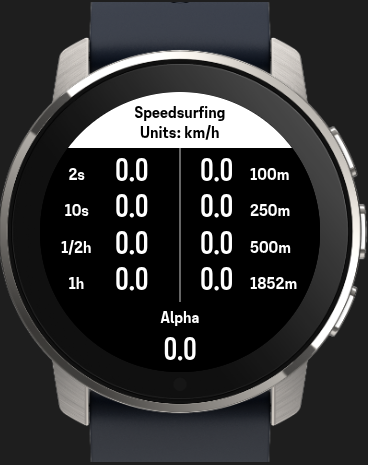
I struggle a little bit with the Alpha category.
According to the gps-speedsurfing rules the Alpha category is the speed over 500m, including a gybe (180 degree turn), and the start and endpoint needs to be within 50m of eachother.To determine if there was a gybe, I thought about recording the direction for each second, but I noticed that isn’t available as parameter.
So the only other option I see is derive the direction from the coordinates, but that includes some calculations.Any other ideas?
-
Is it expected that even an example app crashes the watch with a
Syntax Error?After having my own app crash - and almost brick the watch or at least having it perform a fault recovery for a couple of minutes - I thought I reduce the app to a bare minimum and work from there but even that crashes the watch. I then copied the
Dynamic Iconsexample but still get the crash log below:#2670816 22.03.2026 18:43:43 : ERR UI_FRAMEWORK : JS:0x8258be29:SyntaxError: 5 #2670817 22.03.2026 18:43:43 : ERR APPLICATION : Thread state: name:ui #2670818 22.03.2026 18:43:43 : ERR APPLICATION : CtxDog n:ui s:0 pc:0 lr:0 #2670819 22.03.2026 18:43:43 : ERR APPLICATION : CtxDog n:UI s:1 pc:78e9c lr:81ab1 #2670820 22.03.2026 18:43:43 : ERR APPLICATION : CtxDog n:ID s:1 pc:9b6d6 lr:84a15 #2670821 22.03.2026 18:43:43 : ERR APPLICATION : CtxDog n:BL s:2 pc:6c324 lr:6c15b #2670822 22.03.2026 18:43:43 : ERR APPLICATION : CtxDog n:nV s:2 pc:6c324 lr:6c15b #2670823 22.03.2026 18:43:43 : ERR APPLICATION : CtxDog n:Nt s:2 pc:6c324 lr:6c15b #2670824 22.03.2026 18:43:43 : ERR APPLICATION : CtxDog n:WI s:2 pc:6c324 lr:6c15b #2670825 22.03.2026 18:43:43 : ERR APPLICATION : CtxDog n:lo s:2 pc:84020 lr:84051 #2670826 22.03.2026 18:43:43 : ERR APPLICATION : CtxDog n:Po s:2 pc:6c324 lr:6c15b #2670827 22.03.2026 18:43:43 : ERR APPLICATION : CtxDog n:WB s:2 pc:9b6d6 lr:84a5b #2670828 22.03.2026 18:43:43 : ERR APPLICATION : CtxDog n:Ap s:2 pc:9b6d6 lr:84a5b #2670829 22.03.2026 18:43:43 : ERR APPLICATION : CtxDog n:me s:2 pc:9b6d6 lr:84a5b #2670830 22.03.2026 18:43:43 : ERR APPLICATION : CtxDog n:Tm s:2 pc:b6aca lr:84a15 #2670831 22.03.2026 18:43:43 : ERR APPLICATION : CtxDog n:Se s:2 pc:6c324 lr:6c15b #2670832 22.03.2026 18:43:43 : ERR APPLICATION : CtxDog n:hc s:2 pc:6c324 lr:6c051 #2670833 22.03.2026 18:43:43 : ERR APPLICATION : CtxDog n:DS s:2 pc:6c324 lr:6c051 #2670834 22.03.2026 18:43:43 : ERR APPLICATION : CtxDog n:us s:2 pc:6c320 lr:6c051 #2670835 22.03.2026 18:43:43 : TRC UI_FRAMEWORK : wuiDump Assert peFunctionCombiner.cpp:302 #2670836 22.03.2026 18:43:43 : EVT MAPS : Tile sz=29840, x17435, y11374, z15 #2670837 22.03.2026 18:43:43 : TRC MAPS : Req[0] result: Code=OK #2670838 22.03.2026 18:43:43 : TRC MAPS : Req[0] handle: clientID=1, handle=1153598804039951724, r #2670839 22.03.2026 18:43:43 : EVT TRAININGLAB : TLab: Input source 0 timeout #2670840 22.03.2026 18:43:43 : EVT TRAININGLAB : TLab: Active input source 3 #2670841 22.03.2026 18:43:45 : EVT EXT_FLASH : ExtFID 0xc2,0x25,0x39 #2670842 22.03.2026 18:43:45 : ERR FAULT : A302:duktapeFunctionCombiner.cpp #2670843 22.03.2026 18:43:45 : EVT BOOTLOOP : Faultcom c:fa017c01 ts:1774201322 n:1774201425As a side-note: I really like the naming of the internal code files

-
Hi @Unpaired8373 ,
Does the watches JS-runtime support WASM by any chance?
Wasm is not available!
Is it expected that even an example app crashes the watch with a Syntax Error ? … I then copied the Dynamic Icons example but still get the crash log below
That is not expected behaviour
 I just now checked the
 Dynamic Iconsexample on both a Race 1 and a 9 Peak Pro. Neither crashed during an exercise. Best advice that comes to mind is to first make sure the watch is running the latest firmware.Running JS inside an HTML template can be a bit finicky and seems to have the highest potential for crashes at present.
-
guys I need help, anyone know how to use the crown/middle button to scroll to the next ui?
We do not presently have a way to capture scrolling events, but as you found…
i find out if ur ui is big enough it will able to scroll down,dont have to do anything.
… the watch will automatically attempt to scroll elements with the crown
-
@Thibault-B.
I think the issue is that I override the onClick action, so I should keep it empty if in pause. But I do not know how to do it.
One possible way is to use the uiViewSet in combination with userInput. Simple example:
<uiView>

  <div>
    <!-- The set allows toggling the capture of 'down' -->
    <uiViewSet id="test">
      <!-- First set element -->
      <div>
        <userInput>
          <!-- systemEvent prints into OUTPUT when running in the simulator -->
          <pushButton name="down" onClick="systemEvent('Hello world')"/>
        </userInput>
      </div>
      <!-- Second set element -->
      <div>
        <!-- Here nothing gets printed -->
      </div>
    </uiViewSet>

    <!-- Press 'up' to enable/disable the capture of 'down' -->
    <userInput>
      <pushButton name="up" onClick="next('#test')"/>
    </userInput>

  </div>

</uiView>
Edit. Just to add, you would probably then want onExercisePause() to do the toggling of the set
-
@SuuntoPartnerTeam Nice! Thank you.
I toggle the capture in the onExercisePause, onExerciseStart, etc as you recommended in your edit. -
@SuuntoPartnerTeam Thanks for the reply on a Sunday.
I am testing with a
Race Sif that makes a difference. The firmware is the most recent one according to the watch menu (v2.50.28). Also I ran themountaineeringactivity (or what it is called in english language setting) with no GPS fix (ignore and continue when prompted). -
This might have been overseen.
Any chance to get the proper resources for the baro trend?Thank you!
said in [Question] No stupid questions - ask anything here:
@SuuntoPartnerTeam I am trying to display the baro trend in my S+ like the litte arrow that shows how the barometer is changing:

I used to have the icons for the 9 diffeent symbols like this:
{ "name": "trend", "source": "Fusion/Altitude/PressureTrend", "type": "subscribe" }, <eval input="{zapp_bottom_input}" outputFormat="keyValue 1=|2=|3=|4=|5=|6=|7=|8=|9=" />Now something must have changed in the background and the icons don’t work anymore. Can you tell me the current output for this?
Thx!
-
@SuuntoPartnerTeam Hello, one question regarding the UI.
I am using templates but would like to have small portions of the UI visible depending on logic.
Is this possible?
My current approach: Having different templates. But with this approach I have a lot duplicate html code.Thanks
-
Hello, I’m a the new one

Are there any plans or ways to listen music on my Vertical 2 without the phone?
I saw, that there where some watches where you could put offline music directly on the watch.Garmin supports Spotify, will come something like this in the future? I’m not a big fan to carry my phone all the time with me, so it would be nice if there is a feature like that.
Greetings and thanks!
-
Hello guys I having trouble when I trying to screenshot my app on the simulator,when I press the camera icon, it show up the error.
[23:29:31] [error] Error loading HTML template 't.html': _0x26deff is not definedBefore I pressed it the app is running fine without any error .I even trying to create a new app with the default code and take a screenshot too ,but it come out the same error.
Is anyone else having trouble taking screenshots? -
said in [Question] No stupid questions - ask anything here:
Hello, can anyone help, I am trying to display Graph for HearthRate.
I am using this code for displaying graph, it is taken from one of examples just modified input path for current hearth rate:
<graph style="position:absolute;
              left:0px; top:0px; width:100%; height:100%;
              box-sizing: border-box;
              padding-right:90px; padding-top:60px; padding-bottom:60px;
              font-size:21px;"
       valueFormat="HeartRate_Fourdigits"
       type="line"
       grid="three lines"
       inputType="subscribe"
       input="/Activity/Move/-1/HeartRate/Current"
       min="0.6666666667"
       max="3"
       slack="0.1"
/>
and it works fine in simulator and I see this:
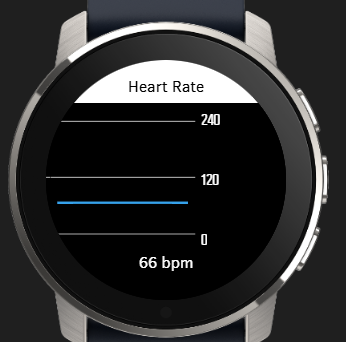
but when I upload app to watch (Suunto 5 or Race 2), than there is no graph line for Heart Rate:
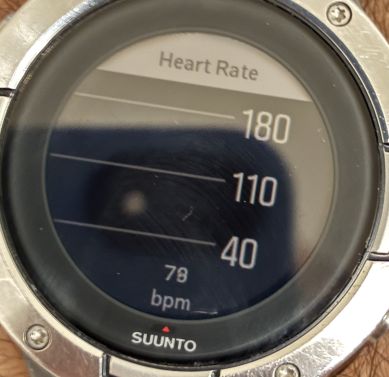
@suuntopartnerteam do you have any hint what can be wrong ? It works in simulator but not in watch, when i see system events i see only this error and not sure if it is related:
#1998533 25.03.2026 06:10:01 : ERR WBMAIN : *0: app 1248 Event 3 80523203
#1998534 25.03.2026 06:10:01 : ERR WBMAIN : 1: mea 16 Wait 0 00000000
#1998535 25.03.2026 06:10:01 : ERR WBMAIN : 2: ui 16 Wait 0 00000000 -
@ook
Hi, I have the same problem.
Running on a MacBook Air with newest OS.





Hello! It looks like you're interested in this conversation, but you don't have an account yet.
Getting fed up of having to scroll through the same posts each visit? When you register for an account, you'll always come back to exactly where you were before, and choose to be notified of new replies (either via email, or push notification). You'll also be able to save bookmarks and upvote posts to show your appreciation to other community members.
With your input, this post could be even better 💗
Register Login