[Question] No stupid questions - ask anything here
-
@SuuntoPartnerTeam is someone using the Accelerometer data?
the onAccelerometer function is not being called, evaluate(…) is correctly called.
This is in the manifest.json
"in": [ { "name": "HeartRate", "source": "Activity/Move/-1/HeartRate/Current", "type": "subscribe" }, { "name": "Acceleration", "source": "Fusion/Zapp/Accelerometer", "type": "subscribe" } ], -
Hello,
problem solved.
the acceleration information (if in manifest.js declared), is available in the onEvaluate call, there is no need for onAcceleration(…) implementation.
I believe the documentation is outdated.
-
@SuuntoPartnerTeam I am trying to display the baro trend in my S+ like the litte arrow that shows how the barometer is changing:

I used to have the icons for the 9 diffeent symbols like this:
{ "name": "trend", "source": "Fusion/Altitude/PressureTrend", "type": "subscribe" }, <eval input="{zapp_bottom_input}" outputFormat="keyValue 1=|2=|3=|4=|5=|6=|7=|8=|9=" />Now something must have changed in the background and the icons don’t work anymore. Can you tell me the current output for this?
Thx!
t6, S6, Elementum Terra, Ambit 3 Sapphire, Spartan Ultra Copper, Traverse Alpha, S7 Graphite LE, S9B Ambassador, S9P Titanium, S9PP Titanium, Vertical All Black, Race Titanium Charcoal, Race S Titanium Courtney, Run Lime, Race 2, Vertical 2 Titanium
-
@Tomas5
Log refers to saved data, which is why the graph only works after at least one activity with HR data has been recorded while using the app. Currently this isn’t available in the simulator. In g1.html of the graph example, the average HR data for the previous exercise is displayed.You can use a path like:
/Activity/Log/{logIndex}/{Window}/{WindowIndex}/{Parameter}
which works both with and without a leading /.Thanks for pointing this out, it definitely needs to be added to the documentation.
-
@assaf1007 hrv is available only via belt afaik
-
The “Watch displays” docs say
Note: SuuntoPlus is no longer maintained for UI1(s、m、l).
Does this mean that the Vertical 1, which has UI1 l, is not supported? Or, just that no updates to this first public release of s+ will be coming for these watch models?
-
@SuuntoPartnerTeam thanks for explaining, i was mistaken that logIndex -1 is reading log forcurrently recorded excercise.
-
@SuuntoPartnerTeam
Hi, one question regarding date calculations. I saw in the Suunto Reference that Date is not supported in the standard built in objects.
So I need to do all date calculations based on seconds? Is this true?Thanks
-
@suuntopartnerteam I’m still a little bit confused about the
setText()behavior.For example
I create two template files, both with a<div id="testid" ....>section.
In the main.jsevaluate()function I set the textsetText('#testid', 'testvalue');This put’s the text in th div-section. If the text is changed, the div-section updates accordingly.
However, when I change the template to the second tempate (and call
unload('_cm');) the div-section on the new template, which has the same id, isn’t updated at all.Do you have any advise on how to handle this?
-
-
As with web development, ids are meant to uniquely determine an element. You shouldn’t use the same id for different elements. This is true even when those elements are inside different HTML templates, if both templates may be active at some point during the runtime of the app
-
You cannot change a template that is not active. The uiViewSet might be something worth looking at, depending on what you’re trying to achieve
-
-
Hey @hitriy .
You can fetch data from any device which supports being in peripheral mode – even a laptop. In your case, you would need to write an application for your phone which communicates with the watch using Bluetooth Low Energy.
-
Hi @harry08 .
That is right, you can only get precise current time or the day of the week. The rest needs to be calculated manually
-
Is it possible to get the Suunto Plus Guide a user has selected for the current workout? The goal would to the show a graphic representation (for example bar chart) to show all intervals of the workout and vertical ruler showing the current point in the workout.
-
@SuuntoPartnerTeam said in [Question] No stupid questions - ask anything here:
The uiViewSet might be something worth looking at
Thanks for the hint! This worked for my case.
-
Awesome, works fine for me. Worth buying new watches then!
-
Connect watch to macbook - VSCode
Should this work?
I have a older (rather old
 macbook running monterey. I couldn’t connect the watch to deploy my app on it.
Maybe it failed cause the watch hasn’t been properly disconnected from the phone see my other thread over here: -
Does the watches JS-runtime support WASM by any chance?
-
Hello, can anyone help, I am trying to display Graph for HearthRate.
I am using this code for displaying graph, it is taken from one of examples just modified input path for current hearth rate:
<graph style="position:absolute;
              left:0px; top:0px; width:100%; height:100%;
              box-sizing: border-box;
              padding-right:90px; padding-top:60px; padding-bottom:60px;
              font-size:21px;"
       valueFormat="HeartRate_Fourdigits"
       type="line"
       grid="three lines"
       inputType="subscribe"
       input="/Activity/Move/-1/HeartRate/Current"
       min="0.6666666667"
       max="3"
       slack="0.1"
/>
and it works fine in simulator and I see this:
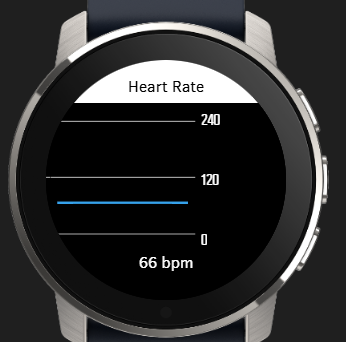
but when I upload app to watch (Suunto 5 or Race 2), than there is no graph line for Heart Rate:
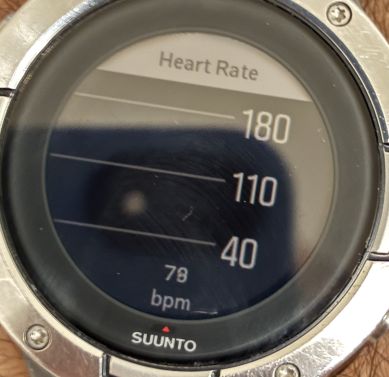
Suunto Ambit 2 > Suunto 5 > Suunto Race 2
-
guys I need help, anyone know how to use the crown/middle button to scroll to the next ui?
-
@ook i would try “onEvent(input, output, eventId)” and display value of eventId on screen and than see if crown produce some events.








Hello! It looks like you're interested in this conversation, but you don't have an account yet.
Getting fed up of having to scroll through the same posts each visit? When you register for an account, you'll always come back to exactly where you were before, and choose to be notified of new replies (either via email, or push notification). You'll also be able to save bookmarks and upvote posts to show your appreciation to other community members.
With your input, this post could be even better 💗
Register Login