Suunto Routeplanner
-
-
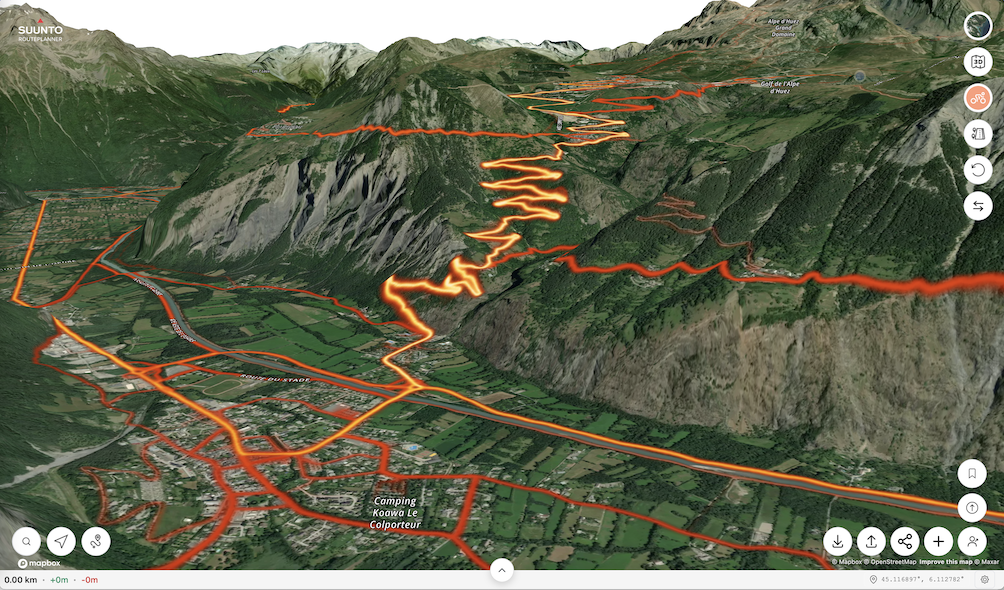
I thought I’d start a topic with Suunto Routeplanner, a web tool for planning and sharing routes and viewing Suunto heatmaps. It is mainly targeted for desktop use and is especially useful when you want to share routes, heatmaps and/or location among people from different sports communities, not only Suunto, which on a group ride/hike/run is the case most of the times. As I have been responsible of bringing this tool to life I’m eager to hear how the community like it and I am also ready to spend (some) time answering questions about it. Below is a short list of highlights of Suunto Routeplanner. Go and have a look
 .
.High quality map styles
Heatmaps for 17 different sports
View map in 2D or view and rotate as 3D terrain (ctrl+mouse drag)
Click to create, edit and share routes with friends
Click a planning point to rename it as waypoint
Drag any point on the route to edit the route
Different routing options
Move mouse to follow location and altitude, ascent and descent on graph
Load GPX, KML and FIT files to be stored as routes
Upload FIT files as routes or exercise logs to your Suunto account
Share a link to the route on the site, save route locally or upload to Suunto
Support for 21 user interface languages
Support for metric and imperial units
Support for many different map coordinate systems
Create route collections linking several routes behind a button (with a user selected image) -
P pavel.samokha moved this topic from Watches on
-
Here the URL: https://routeplanner.suunto.com/
Nice tool! Great Work.
Import too Suunto and Watch works great.
Displaying routs from App / Account too.What I miss. Maybe for 2.0
- Rotating / 3D Tilting only works with touch, there is no button on Desktop for that at the moment (Ctrl+Mouse Move works too)
- Show activites on a Route or directly open route from activity and replay it
- I haven’t figured out Route Collections yet is it just for friends or will there be public shared routes?
- Maybe let’s add segments
- anonymized flybys
- live tracking e.g. are there friends / people at the trail start to join …
https://www.strava.com/athletes/37982563
https://www.instagram.com/macdev -
@Ecki-D. I like this…what I’d like even more, if I create one route, and then edit a version of it, is if TBT directions remained for the whole route, instead of only activating for the edited part of the route.
-
This is how Vienna looks like just searching for the city and clicking the 3D button on MacOS Tahoe 26.2 and Safaria on a Mac Mini M1 2020
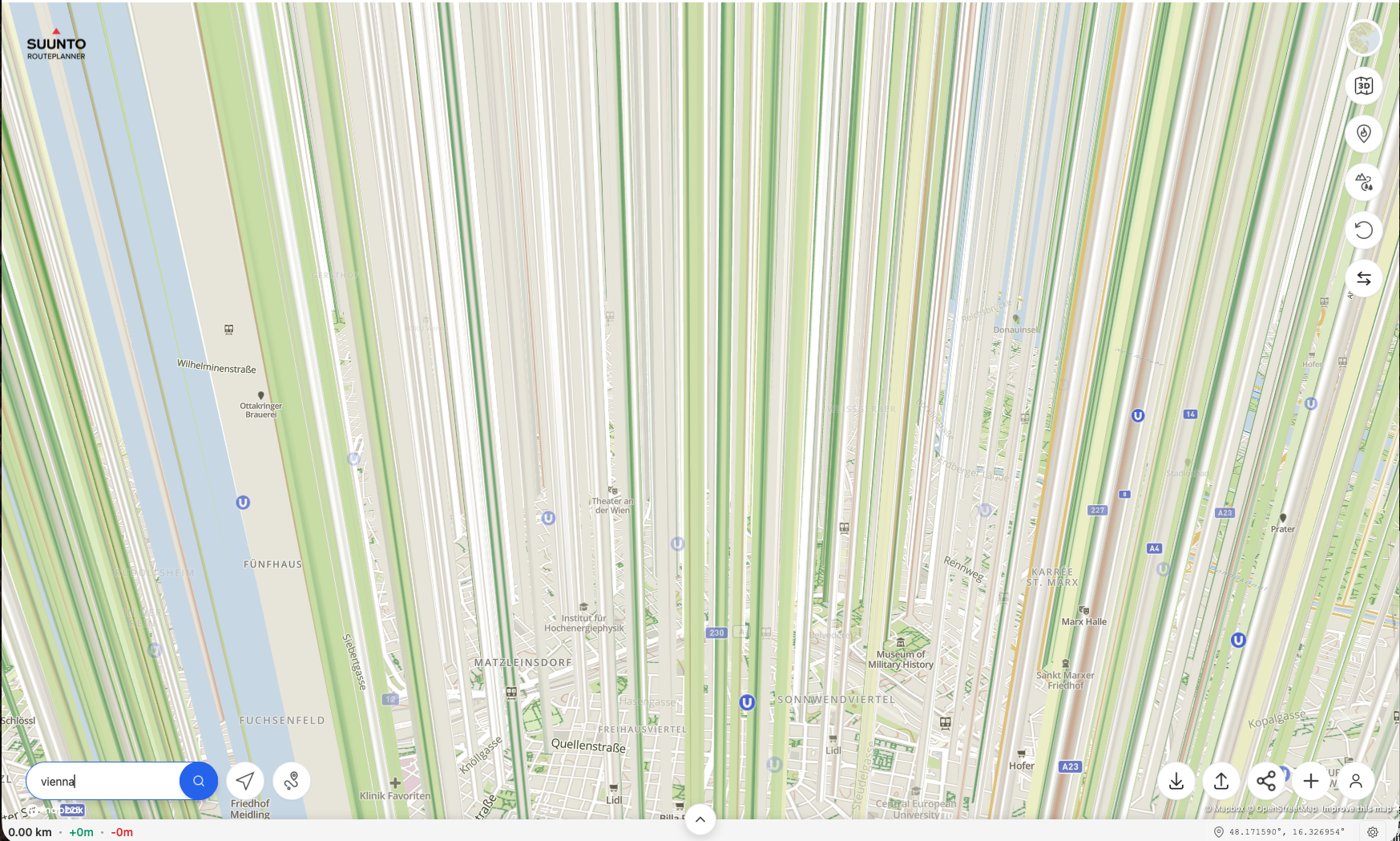
On the positive side - 2d and route creation works great and DC Rainmaker also wrote about it: Suunto Route Planner
-
Routeplanning should have a heatmap option for “All Running” similarly to how it has “All Trails”, “All Walking”, etc. That is because many users record trail runs using Run mode, so heatmap gets “diluted” between running and trail running when looking at trail running areas and neither running nor trail running heatmaps are complete.
Also, when looking at the 3D map, there should be an option to rotate the map; otherwise it is impossible to see north facing slopes.
-
said in Suunto Routeplanner:
Also, when looking at the 3D map, there should be an option to rotate the map; otherwise it is impossible to see north facing slopes.
Actually, as another comment mentioned Ctrl + mouse movement allows to rotate and tilt the map. That is pretty cool!
Suunto: Ambit, Ambit 3 Peak, 9 Baro, Race S, Race Ti, Vertical 2 Ti
Garmin: Forerunner 210, Forerunner 610, Fenix 6X, Fenix 7X Ti -
There are at least a gazillion of these routeplanner websites/apps.
The only two things I’m interested in are
Can it autogenerate a route for me of a certain length, roadtype and hills, like garmin does (very poorly) and strava can do (for paid subscription)?
If I upload a gpx, can it generate a fitfile for my watch with tbt notifications, like garmin does (very poorly) or now I have to use kamoot. But kamoot changes the route even if you tell it not to snap the route to known paths.
-
@sky-runner or keeping the right click
-
@kemetter Couple of the issues I’ve noticed when trying to load many routes that I already have on my laptop.
-
Many longer routes are incomplete when loading, missing beginning or end parts, or both. Suunto App loads the same routes correctly.
-
Waypoints don’t load from GPX files when waypoints are stored with a route.
When routes are incomplete, it seems routes get trimmed at a waypoint, if there was a waypoint in the GPX file.
Suunto: Ambit, Ambit 3 Peak, 9 Baro, Race S, Race Ti, Vertical 2 Ti
Garmin: Forerunner 210, Forerunner 610, Fenix 6X, Fenix 7X Ti -
-
@Ecki-D. Thanks for adding the URL


To your comments and requests:
- I thought about adding a button/way to drag 3D view, but I have really been fighting against filling the screen with buttons. I think there are too many route planners out there with a zillion configuration options and my aim is to keep this simple. I know the ctrl-mouse isn’t ideal, but I haven’t figured out a way to make a simple UI that won’t add another button.
- Starting to show activities open up a whole new box of worms, I have thought about that and it would be doable, but I have decided not to do that at least yet. It will then trigger a load of different things you would want to see from your activity and soon we would have a web based Suunto app. Which I think many would like though…
- I’m currently continuing working on route collections as I can notice that people don’t figure it out. A route collection can be created by anyone, currently intended to be among friends, clubs, race organizers to share the link of their own collection, but I am working (as we speak) on making them public in the generic UI if the creator wants to. They are public to anyone anyway but currently requires the correct link. I will try to make them more intuitive.
- Segments have been on my todo list, let’s see.
- Actually I did implement a flyover feature already earlier, but it’s really difficult to make that look good and work fluently in every situation for every route, so I decided to hide the feature for now and maybe look at it later when there is nothing else to do
- Livetracking yes, an even bigger box of worms, but very much requested. However that requires much more support from the whole system, watches, app and backed so will take time to plan that in. But some day…maybe

-
@Nigel-Taylor-0 Ok, that sounds like a bug. Need to check.
-
@johann.fuehrer said in Suunto Routeplanner:
This is how Vienna looks like just searching for the city and clicking the 3D button on MacOS Tahoe 26.2 and Safaria on a Mac Mini M1 2020
On the positive side - 2d and route creation works great and DC Rainmaker also wrote about it: Suunto Route Planner
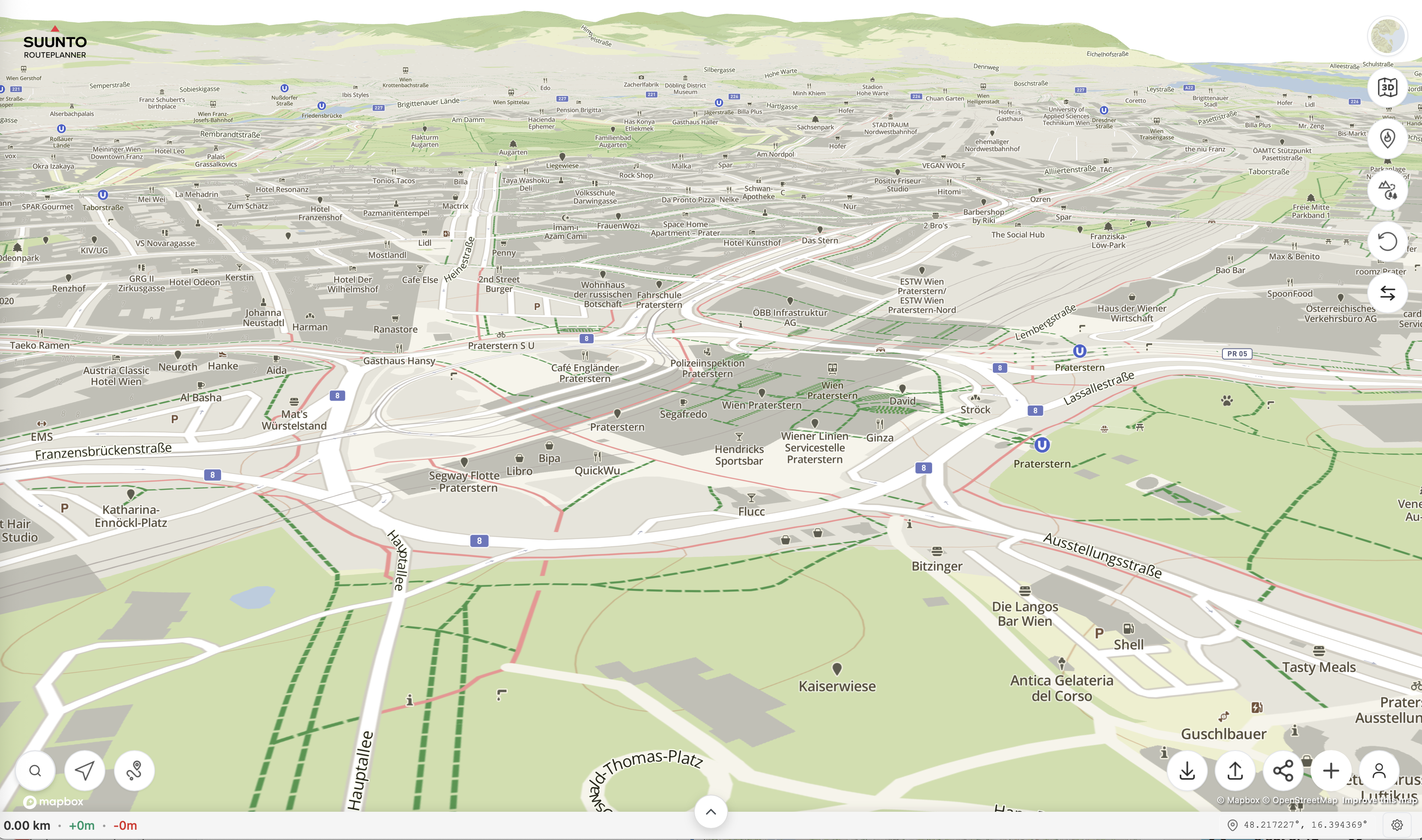
I don’t see similar with the same configuration. I think this does not have to do with the site code, but something else on your side…

-
@sky-runner said in Suunto Routeplanner:
@kemetter Couple of the issues I’ve noticed when trying to load many routes that I already have on my laptop.
-
Many longer routes are incomplete when loading, missing beginning or end parts, or both. Suunto App loads the same routes correctly.
-
Waypoints don’t load from GPX files when waypoints are stored with a route.
When routes are incomplete, it seems routes get trimmed at a waypoint, if there was a waypoint in the GPX file.
-
This should match Suunto app quite well, but some GPX files have quite odd content. I would need the original GPX file in question to be able to resolve this.
-
Waypoints should load if GPX is exported from Suunto app, but from other sites it’s not a standard how they mark user named waypoints.
-
-
@kemetter I can confirm that it must be something in my setup, all other devices here work. I have full reset Safari and removed the config folder in “Libraries”, I have no addons, tried private and not private window. I also thought about having issues with my 4K monitor and set resolution tho FullHD - no change. No idea so far

When I find some time I will set up MacOS on an external USB disk and check again …
-
@kemetter
 Sounds Great!
 -
@kemetter said in Suunto Routeplanner:
This should match Suunto app quite well, but some GPX files have quite odd content. I would need the original GPX file in question to be able to resolve this.
Waypoints should load if GPX is exported from Suunto app, but from other sites it’s not a standard how they mark user named waypoints.
Here is one example, which I think I created this in Strava:
Issy Alps 50k.gpxWhen I load this in Suunto App it shows all waypoints and the distance is 50 km:
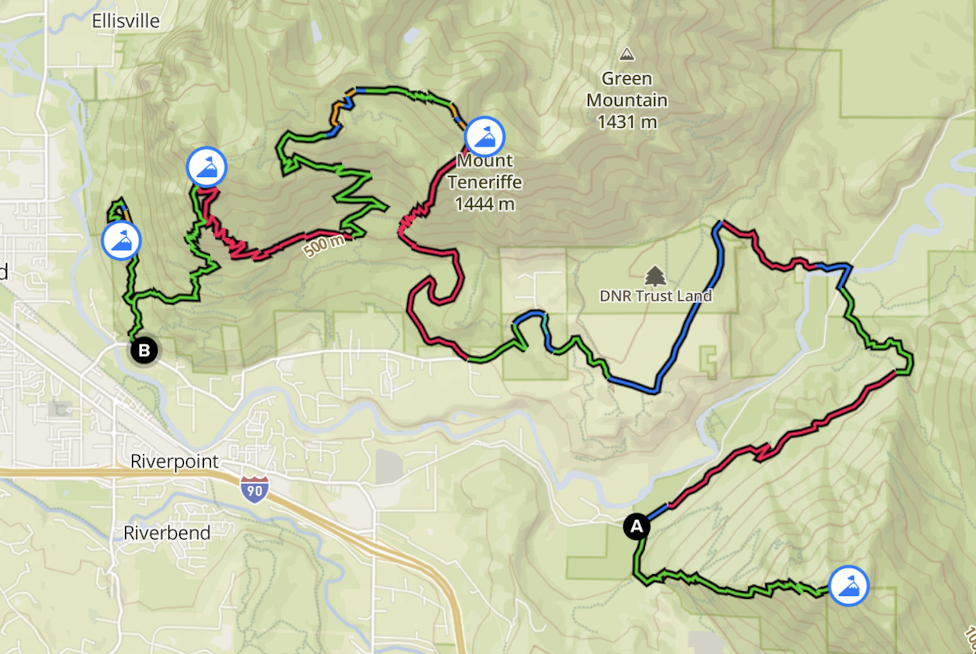
When I load the same GPX file in the routeplanner, no waypoints are shown and the distance is 42 km:
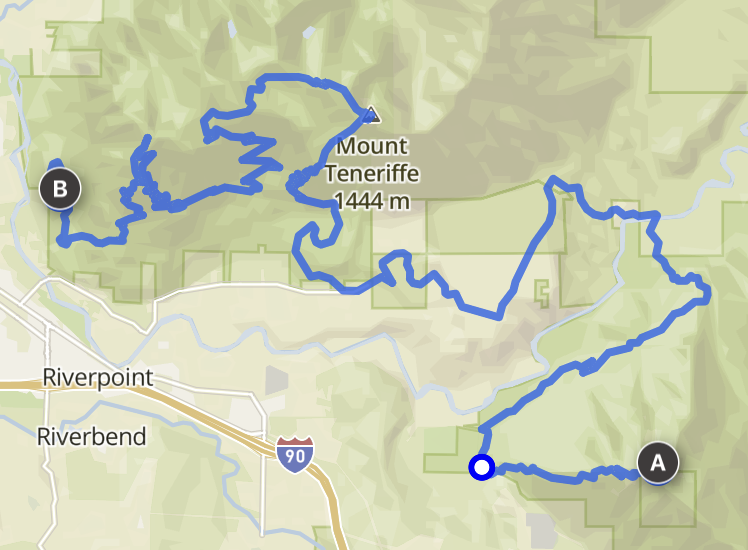
It may not be obvious by looking at the screenshots but the missing parts are from the start to the first waypoint and from the last waypoint to the finish. Basically, the route now starts at the top of the first mountain and ends at the top of the last mountain.
I’ve had similar issues with a few more GPX routes.Also, I should mention that on-route waypoints can also be present in routes that are saved as FIT files. Those can be generated by some route planners such as PlotARoute and are natively supported by Garmin. It would be great if the route planner could load routes in the FIT format too. Also, routes in FIT format can embed turn directions, and some route editors (e.g. PlotARoute) can create those too. It would be awesome is Suunto followed the same standard.
-
-
@sky-runner said in Suunto Routeplanner:
@kemetter said in Suunto Routeplanner:
This should match Suunto app quite well, but some GPX files have quite odd content. I would need the original GPX file in question to be able to resolve this.
Waypoints should load if GPX is exported from Suunto app, but from other sites it’s not a standard how they mark user named waypoints.
Here is one example, which I think I created this in Strava:
Issy Alps 50k.gpxWhen I load this in Suunto App it shows all waypoints and the distance is 50 km:
When I load the same GPX file in the routeplanner, no waypoints are shown and the distance is 42 km:
It may not be obvious by looking at the screenshots but the missing parts are from the start to the first waypoint and from the last waypoint to the finish. Basically, the route now starts at the top of the first mountain and ends at the top of the last mountain.
I’ve had similar issues with a few more GPX routes.Also, I should mention that on-route waypoints can also be present in routes that are saved as FIT files. Those can be generated by some route planners such as PlotARoute and are natively supported by Garmin. It would be great if the route planner could load routes in the FIT format too. Also, routes in FIT format can embed turn directions, and some route editors (e.g. PlotARoute) can create those too. It would be awesome is Suunto followed the same standard.
I fixed a bug with GPX loading and that file should load better now. Still some uncertainty about the user waypoints, it seems to load two of them but there apparently should exist four. I will look into that.
Regarding FIT files Routeplanner supports loading them but as they are usually made from exercise logs, there is no turn-by-turn or waypoint support when loading FIT files.
-
@kemetter many thanks for maintaining and developing this great tool.
Sadly, the area I frequent the most (Dolomites, Italy) have a poor rendering quality, frequently distorted by artefacts that cause the maps to be sometimes completely unreliable
(e.g. https://forum.suunto.com/topic/10992/artefacts-on-maps?_=1770025858529) -
@kemetter
I am very happy with the new Route Planner. It’s much more comfortable to plan routes on a PC compared to using the app, and the direct upload to Suunto is really useful. Thanks Suunto for that WebApp!I have a few feature requests that would be great to see:
Reset Button: An option to clear the currently planned route and start fresh on an empty map.
Estimated Time of Arrival (ETA) based on Pace: The ability to input a target pace to get a time estimation for the planned route. It would be great to see how long a route will take based on my expected speed directly in the planner. This is crucial for planning nutrition and logistics for long trail runs.
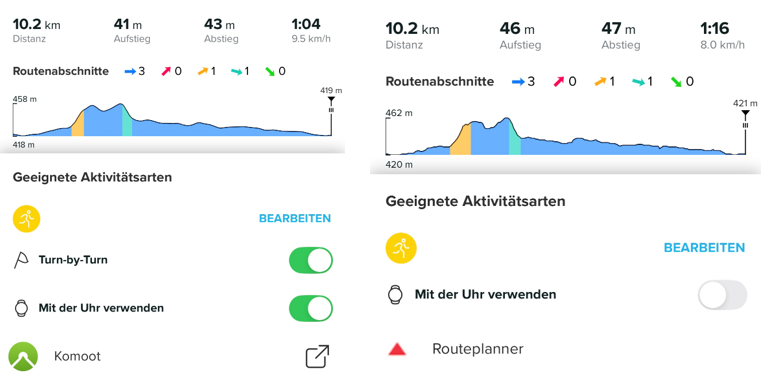
Turn-by-Turn (TbT) Navigation Toggle: Currently, I can’t enable or disable TbT navigation in the Suunto App for routes imported via the Web Route Planner (though it works for Komoot imports). It would be great if Suunto supported this option natively within their own ecosystem.
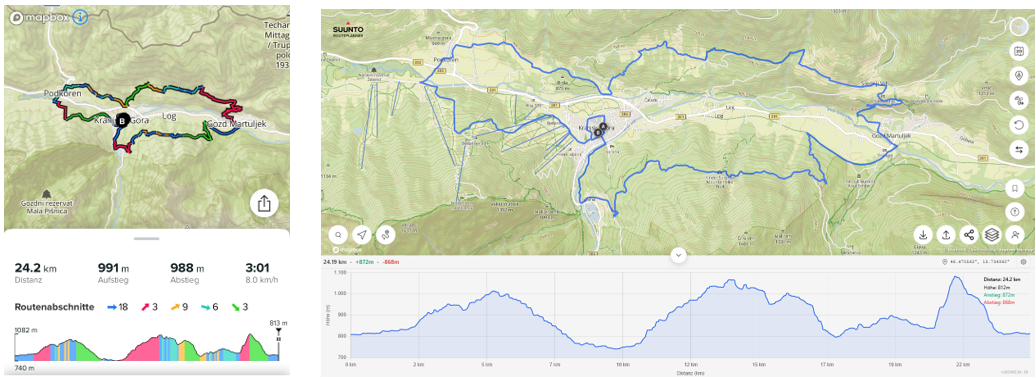
Colored Map Layers (Ascents/Descents): It would be helpful to have a toggle in the Web App to show colored segments for ascents/descents on the route and elevation profile, just like in the mobile app.
Garmin Vivoactive 5 | Garmin Epix | Garmin Fenix 8 | Suunto Race S | Suunto Race 2 | Suunto Vertical 2 | Coros Pace Pro | Coros Apex 4









Hello! It looks like you're interested in this conversation, but you don't have an account yet.
Getting fed up of having to scroll through the same posts each visit? When you register for an account, you'll always come back to exactly where you were before, and choose to be notified of new replies (either via email, or push notification). You'll also be able to save bookmarks and upvote posts to show your appreciation to other community members.
With your input, this post could be even better 💗
Register Login