Suunto 2.50.26 – Q4 2025 Release Notes
-
@DrSilverthorn said in Suunto 2.50.26 – Q4 2025 Release Notes:
@sky-runner I too have noticed that the SA ascent numbers are very wrong. They appear to be too low.
It seems that the digital elevation model Suunto is using is better in some places than others. It looks like it’s pretty accurate for users in Europe, but less so for those of us in North America. Most of the routes I’ve planned in SA have very jagged elevation profiles suggesting that there are very few elevation reference points in my area. Not exactly sure which service Suunto is using (I’m assuming they are paying a third party for the data), but it makes sense they would prioritize Europe first. Although I’m also not sure why they can’t get a globally accurate model.
-
@GiPFELKiND are the stats on strava ok ?
if not there, then you got a dirty sesnor
Community Manager / Admin @Suunto
Creator of quantified-self.io - sync Garmin and COROS activities to Suunto, import Suunto routes, deliver Suunto routes to Garmin courses, and analyze training data in one private dashboard. -
@Dimitrios-Kanellopoulos for reference…
I did an almost similar round of running before and after the firmware update of my SV1.
The route is totally flat except for one tunnel. This explains the small dips in the altitude graph.Before the firmware update: ascent 0m, descent 0m
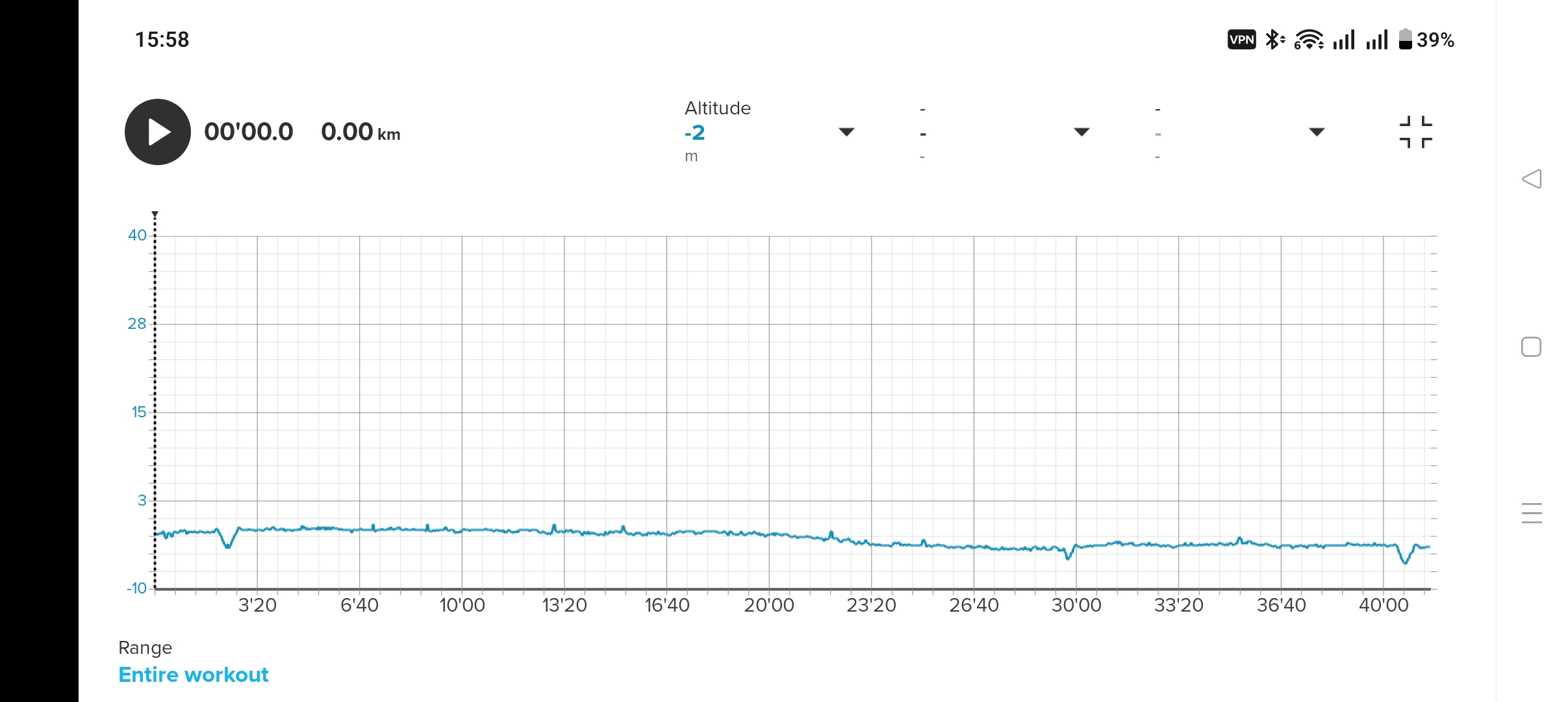
After the firmware update: ascent: 4m, descent 19m
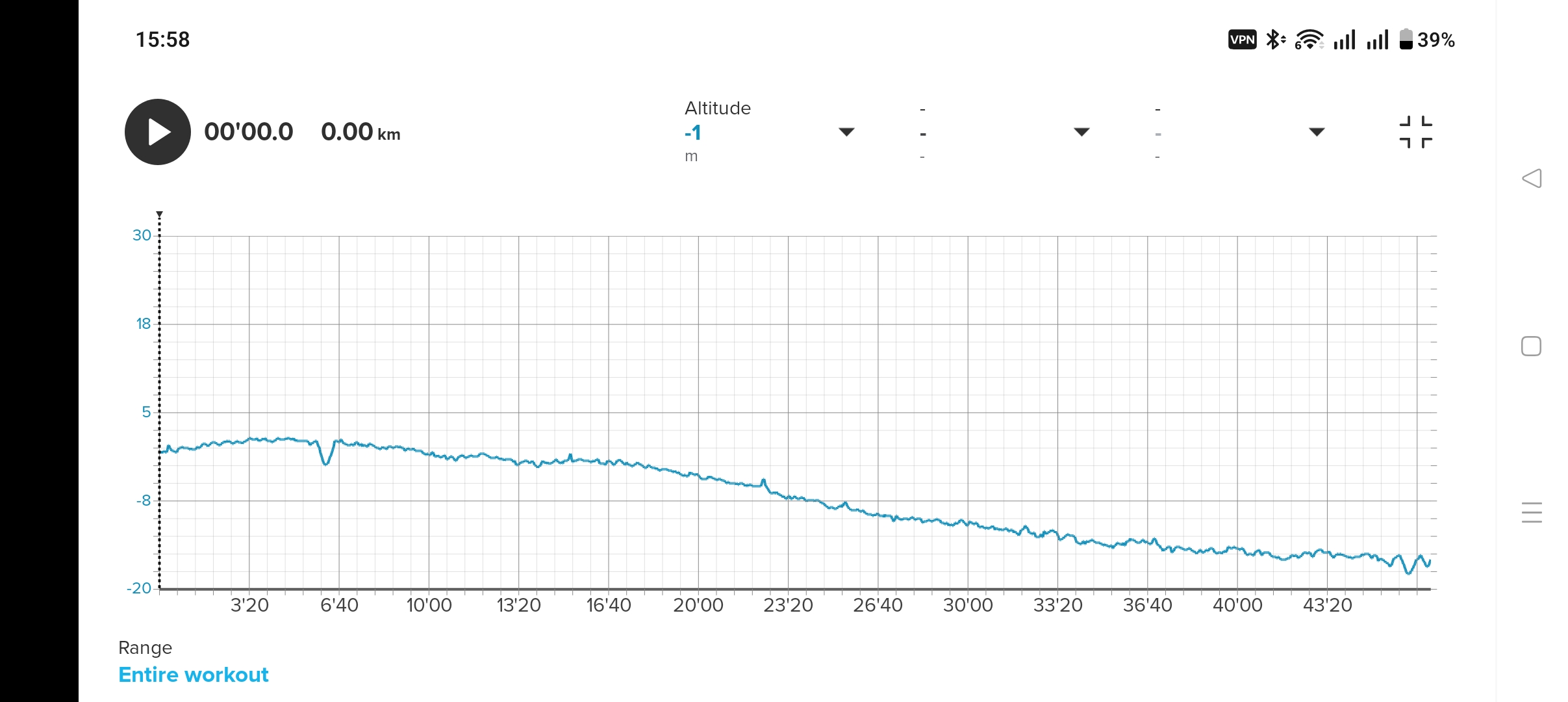
I live 1m below sea level which was nicely recorded before the firmware update. After the firmware I ended the run with -18m
-
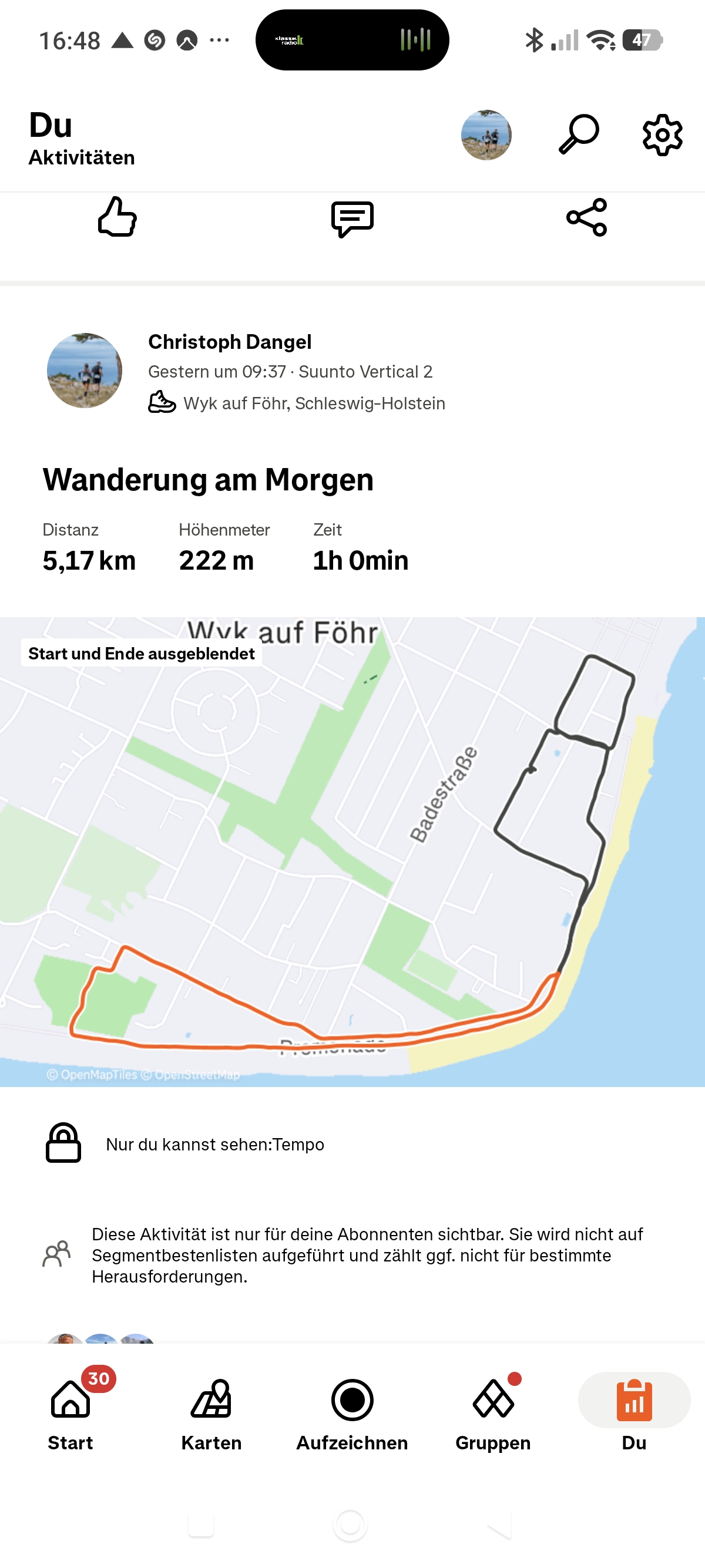
@Dimitrios-Kanellopoulos same here
-
Great to see that it is now possible to select ZoneSense for indoor rowing.
And even better that now the multiple heart rate monitors (optical and traditional belts) are handled smoothly.
Not to forget that an older model such as 9PP would even receive and upgrade. Good job, Suunto.
9PP since 09-2025.
-
for any person getting too much ascent / descent on flat routes please open a new thread and post there are relevant info and files
Community Manager / Admin @Suunto
Creator of quantified-self.io - sync Garmin and COROS activities to Suunto, import Suunto routes, deliver Suunto routes to Garmin courses, and analyze training data in one private dashboard. -
@Dimitrios-Kanellopoulos @Dimitrios-Kanellopoulos i opened a separate Post now for this.
-
@jussim Zone Sense was able to work for a long time before the last update.
-
@Dimitrios-Kanellopoulos said in Suunto 2.50.26 – Q4 2025 Release Notes:
Per-sport mode persistent configuration
Each sport mode stores its own user configuration:Intensity zones
Map color
Connected sensors
Data screens
Autolap
Custom settings such as autopause, voice feedback, etc.I’m still missing the option to enable tones specifically for workouts. I have all system tones muted on my watch, but I’d like to have them active during training only. Unfortunately, even with the new update, this feature is still not available. That being said, I really like the new options Suunto has already brought us with this update.
-
I also see extremely high recovery time after the update.
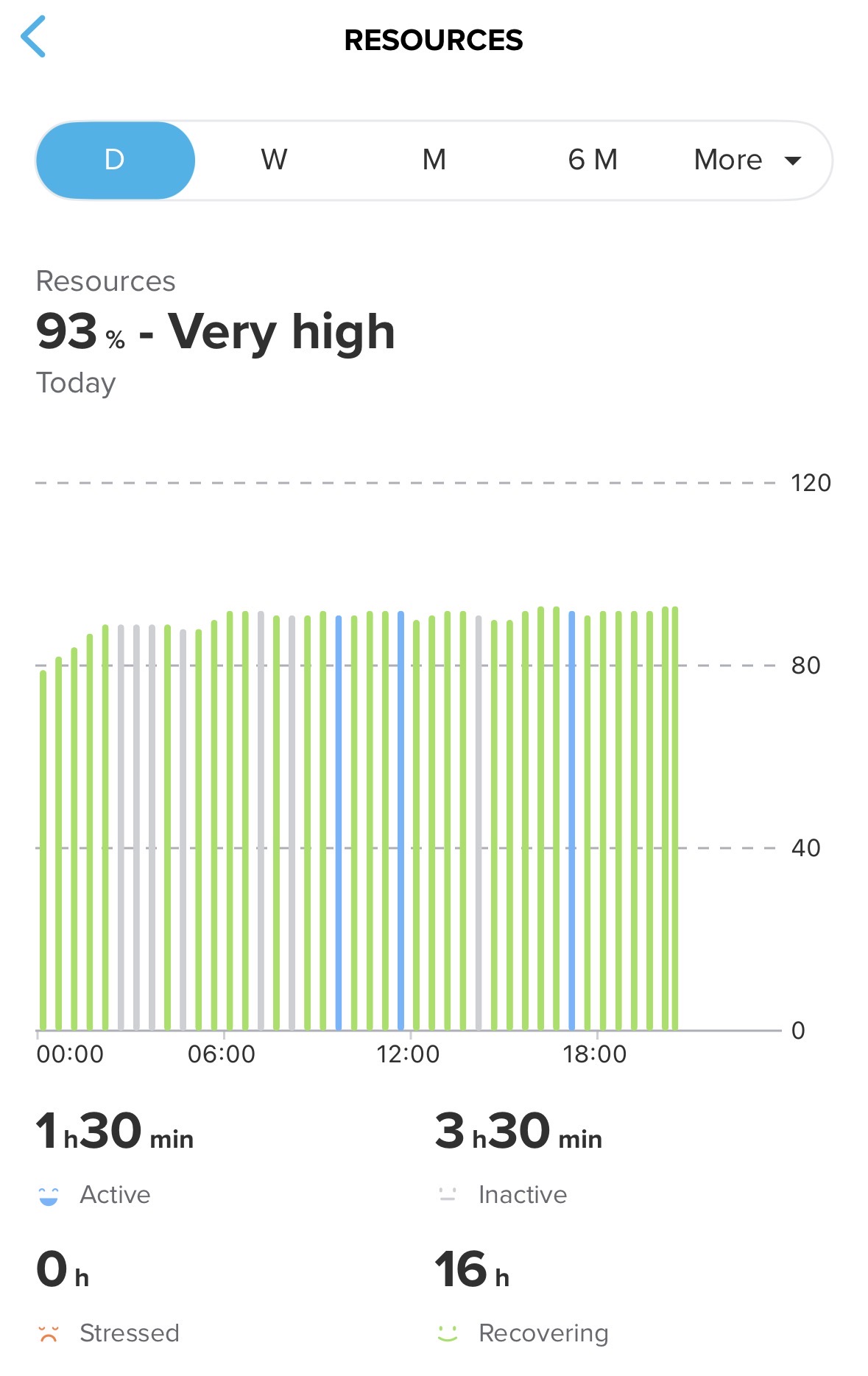
Resources used to work good for me on the Race I -
I was very impressed with the scope of this FW update, but less so when I discovered nothing much changed in a way my external HR sensors are handled. I tried 3 different ones (Polar H10, polar Verity Sense, Garmin HRM Pro+) and each of them fails to record any HR data points after 8-15 minutes into the exercise. I also had occasional dropouts of Stryd connection. Sometimes my Race S can re-establish it in a few seconds, but sometimes just drops it for good. I did not do hard reset, but I removed all my sensors and paired them from scratch.
On the other hand, navigation screen makes more sense now. North up setting is a useful feature. Also finally direction arrows are legible. I wouldn’t mind them being even bigger, but it is significant improvement anyway. I can see which direction I am guided at a turn without having to use a microscope. Now it’s time to do something about the font displayed between workout steps (the screen with light grey background which tells you what to do in the next step)…
It’s been only a couple of days, but sleep tracking seems to be more precise. It does not seem to have the same tendency to log sitting still on a chair as a nap.
Keep up the good work Suunto Devs!
-
Does anyone know or tested if the Garmin wheel and crank sensor now work?
-
@brechtvb Misuro B still doesn’t deliver Speed, so I guess it will be a problem with all sensors. Still

-
I’m having continued issues with multiple bluetooth sensors as reported by other users (e.g. @Bartek-W and myself), where the heart rate sensor is detected (Verity Sense and H10), and connected, but there is no heart rate data. I discovered another issue, which may be related and the cause of other people having bluetooth HR issues. When using either the Zonesense or Live t (live tracking app), and either the H10 or the Verity Sense, the heart rate data gets stuck at a low number (in my case 87), and does not change. Disabling the S+ app while in the activity does not solve the problem, you need to start a new activity with those apps disabled to get heart rate data. I have not checked other S+ apps. I think these two are fairly resource intensive and the bluetooth sensor thread or process is probably not getting serviced enough (speculation).
I am using a Race 1.
-
I thought I read in the release notes (or perhaps a YouTube video on the update) that scrolling the lap table was available after this release, so during yesterday’s structured workout (using Guides), I tried and it didn’t work. Going back over the release notes and the video, I see I was mistaken.
However, I when twisting the digital crown while the buttons are locked, the display informs me that the buttons are indeed locked. Unlocked, scrolling the lap table doesn’t do anything. So the fact that I get a display reminder that the buttons are locked while twisting the digital crown with the lap table display focused seems to indicate that this feature might be in the works?
Will scrolling the lap table be something we can look forward to in a future update? Just curious.
Suunto Race S / 9 Baro / Ambit 3 Peak / Observer
Polar H10 / Verity Sense / OH1
Stryd Duo / Wind
r/suunto mod -
@Dimitrios-Kanellopoulos, here is another comparison of distance and ascent before and after this update:
Before: 14.15 mi (22.77 km) and 2,625 ft (801 m) of ascent
Now: 14.00 mi (22.53 km) and 2566 ft (783 m) of ascentSo the distance is shorter by 1% and ascent is smaller by 2+%. This route was a combination of rolling terrain and a few steeper climbs, 100% singletrack trails in a densely wooded area. I used the highest accuracy GNSS setting both times. The watch is Race 1. I am not so happy that I am getting smaller than before elevation numbers because in my experience ascent was already too conservative and usually smaller than what I had with Garmin. But I’ll keep testing. I understand that ascent can be influenced by weather and this difference is well within the margin of what can be influenced by weather.
The distance reduction is also odd. I’ve seen complains about the reduced distance in Race 2, but I have Race 1. Not sure if this was a one time fluke. I’ll keep testing.
Suunto: Ambit, Ambit 3 Peak, 9 Baro, Race S, Race Ti, Vertical 2 Ti
Garmin: Forerunner 210, Forerunner 610, Fenix 6X, Fenix 7X Ti -
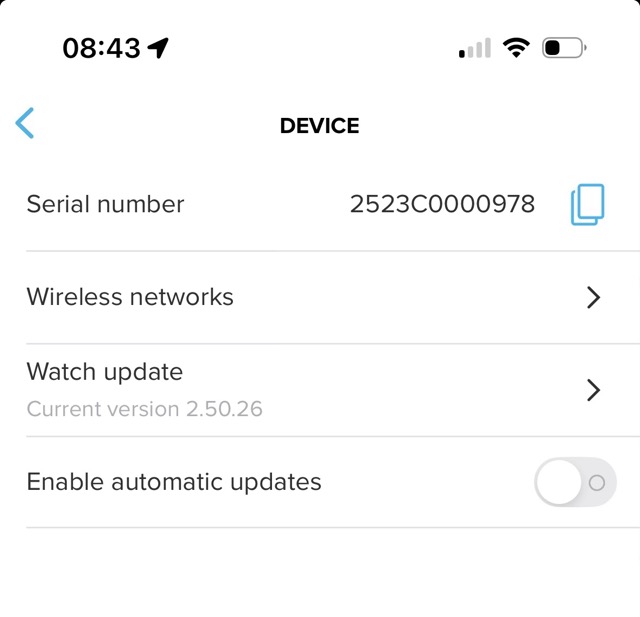
Even though I kept my watch off from updating software automatically.
This morning, I found that it had been updated automatically to the latest update.What kind of bug is this?
-
@Sportsfreund Ah, good then, I thought so too but for some reason I was having trouble activating it. I admit that I didn’t look into it thoroughly after failing with it.
9PP since 09-2025.
-
@ChrisA if the algorithm is now same as with Race 2 and Vertical 2, it takes about week to start showing good results. At the beginning just recovering all the time.
-
@DrSilverthorn Pour ma part, les problèmes d’appairage de la Suunto Race 2 avec les ceintures thoraciques semblent réglés après la mise à jour … mais toujours pas de Zone Sense avec les ceintures Garmin HRM-Pro et HRM-Pro+ … par contre avec la Polar H10 et la Garmin HRM 200 ça fonctionne ainsi qu’avec la ceinture Suunto.










Hello! It looks like you're interested in this conversation, but you don't have an account yet.
Getting fed up of having to scroll through the same posts each visit? When you register for an account, you'll always come back to exactly where you were before, and choose to be notified of new replies (either via email, or push notification). You'll also be able to save bookmarks and upvote posts to show your appreciation to other community members.
With your input, this post could be even better 💗
Register Login