I'm impressed with the AoD battery life. 2 days with 18% left. Anyone else?
-
I’ve got tilt to wake, power saver tilt, touch to wake disabled (so basically I’ve got the power saver watch face always on, and if I want to wake the screen I have to press a button)
AoD enabled and I’ve finished 2 days with 18% left. Mind you I didn’t track any actual activities during those 2 days, but still!
Anyone else?
-
Just changed the settings to mirror yours, I’ll now recharge my watch and see what I get.
-
About what I am finding with my battery analytics; as I generally find that using the AOD, with an ambient screen usually uses around 2% battery per hour. Based on that its 2 days with approx 4% left. However that can be longer or shorter depending on how often/many notifications you get etc and how often you check the watch.
If AOD is off I tend to find battery consumption is around 1% per hour which suggests you may be able to get just over 3 days (I doubt 4 is acheivable due to checking notifications etc).
This of course assumes connected to a phone via bluetooth (and assumes play store is not auto update - and assumes that at no point an app decides to check for updates/etc on its own - i.e. weather apps etc and asummes you aren’t tracking HR 24/7).
-
Running watch connected to phone, display off, did one hour of activity tracking yesterday (approx 13%), had loads on notifications today and yesterday. Took watch off charger at 8am, is now 5:30pm following day and I still have 44%, 33.5 hours later. 1.3% battery use per hour (24HR off) and should easily make it to tomorrow morning even with another hour of activity tracking.
-
Same settings here ( press button to activate watchface).
1 hour 45 min of cycling.
Heart trace app activ.
Watch lasted for 2 days and now 4 hours left.
Very pleased with that
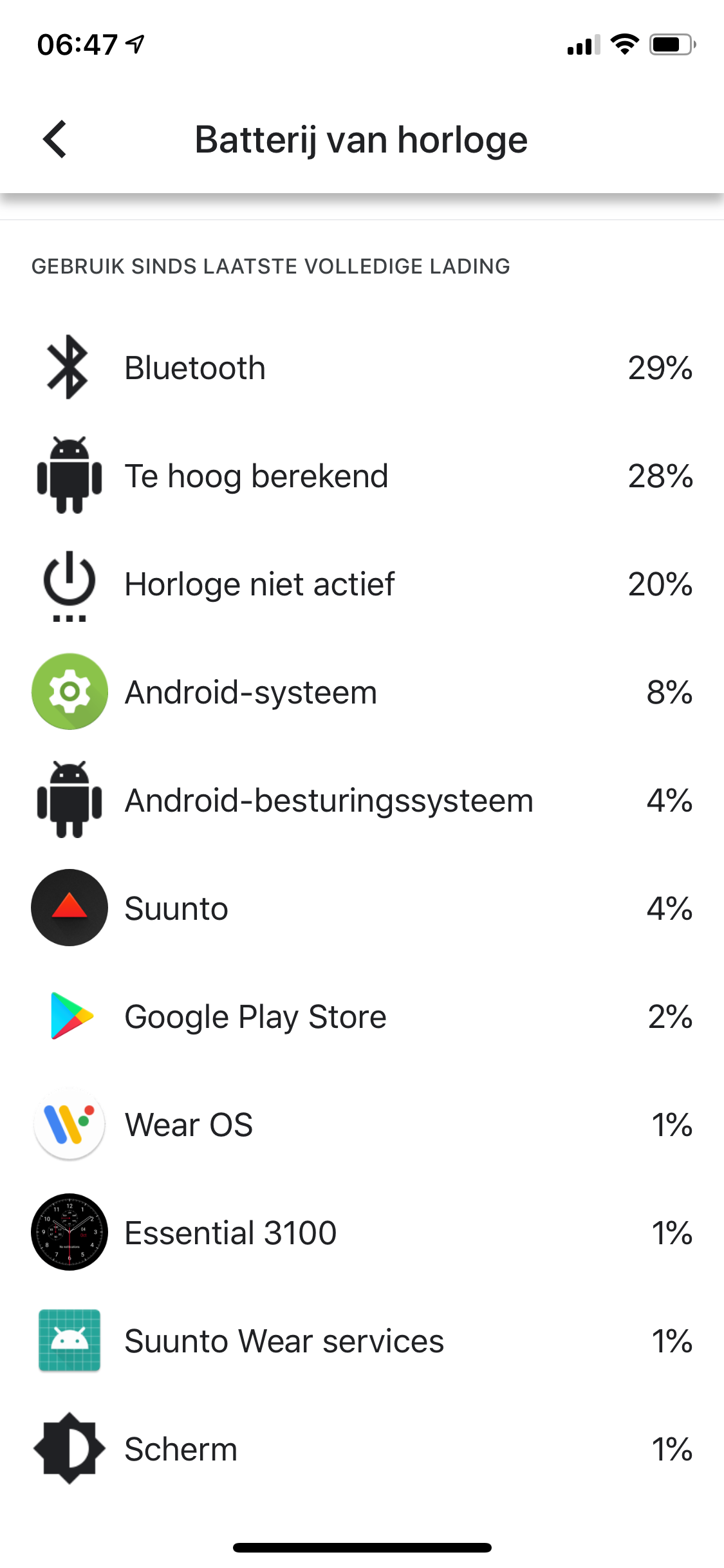
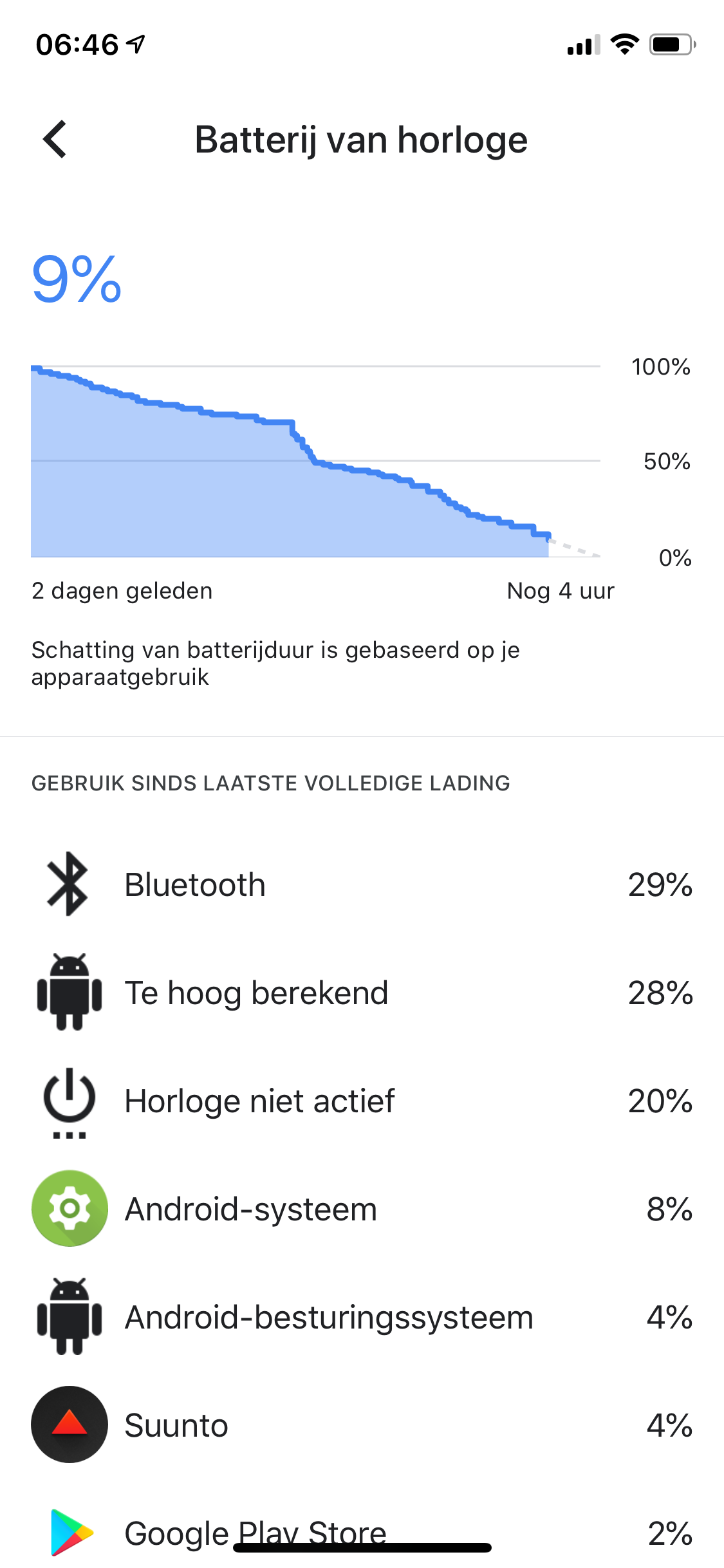
-
I easily did two days (without activities), and still had battery left.
Watch: Suunto Vertical 2 Titanium Black
Blog: isazi's home
-
yesterday I did a 3 hour padding session on a SUP, and then in the afternoon I did about an hour of hiking. Watch easily made it through all of this and through to the next morning where I still had around 15% of battery left (and that includes me forgetting to switch off the screen while paddling - unfortunately the tilt to wake screen off switch in the Suunto app settings doesn’t work - and when you paddle if activates the screen on vritually every stroke - forgot about that for the first half hour so battery usage probably should have been less).
-
@Jamie-BG that should be fixed with the AOD
Community Manager / Admin @Suunto
Creator of quantified-self.io — a next gen training dashboard with MCP access, cross-service activity and route sync
-
@Dimitrios-Kanellopoulos - yes that is certainly one solution
-
Is the AoD = “Always on Screen” display setting in the watch display section? I am guessing by AoD you means “Always on Display” but I am confused because the watch says “Always on Screen”
-
@Kai-Liu AOD = AOS





Hello! It looks like you're interested in this conversation, but you don't have an account yet.
Getting fed up of having to scroll through the same posts each visit? When you register for an account, you'll always come back to exactly where you were before, and choose to be notified of new replies (either via email, or push notification). You'll also be able to save bookmarks and upvote posts to show your appreciation to other community members.
With your input, this post could be even better 💗
Register Login