Parallel use with MC App
-
@dimitrios-kanellopoulos Yes, and the Suunto App will be on ”feature review mode only” while I am temporarily on the other side.
-
@jarlin said in Parallel use with MC App:
@dimitrios-kanellopoulos Yes, and the Suunto App will be on ”feature review mode only” while I am temporarily on the other side.
You will be ok.
Just for the sake of this conversation I have personally hacked it.
I use both on the same phone and works great. How? (at your own rist)
Reqs
a) Uninstall and upair all
b) Know how to close an app that runs a service (BLE sync) on Android. You can do that via Settings -> Apps -> {{ App name }} -> Details -> Force stop- Install both apps and login but do not pair
- Make sure no app is running via -> b)
- Open the MC app and pair the watch
- Let it sync
- Force close the MC app via -> b)
- Open the Suunto app. Pair if prompted, and no code will be asked. It should connect.
- Let it sync
- Enjoy
Repeat steps 3-8 for next activities.
Community Manager / Admin @Suunto
Creator of quantified-self.io - sync Garmin and COROS activities to Suunto, import Suunto routes, deliver Suunto routes to Garmin courses, and analyze training data in one private dashboard. -
@dimitrios-kanellopoulos thanks, might also try something like this on iOS

-
@nigel-taylor thanks for tip and I can’t resist asking: you mean SportsTracker App? Salomon stuff?
-
@jarlin I cannot pair my watch at the same time to the beta app on an iPhone and MC on the iPad. As @Dimitrios-Kanellopoulos said you will have to unpair and re-pair each time…a pain. I gave up on trying this and just wait to sync till I can.
-
@brad_olwin Yes, that would be too much stress. I will use the SA on iPad w/o pairing to SSU for time being.
-
I use both in parallel at the same time without pairing watch to apps, just made sure that I do not run both at the same time and MC is having background app refresh off. When I want to sync workout to MC I just kill suunto app and starting MC after sync completes killing the MC.
-
@slashas said in Parallel use with MC App:
I use both in parallel at the same time without pairing watch to apps, just made sure that I do not run both at the same time and MC is having background app refresh off. When I want to sync workout to MC I just kill suunto app and starting MC after sync completes killing the MC.
nice
-
@jarlin yup, I’ve always used SportsTracker app on phone as I much prefer it to Movescount…it now (in UK at least) has Salomon competitions and news embedded along with a few other tweaks last few weeks.
I was so happy that SA seemed to be basically “SportsTracker + Sync” initially (which is the holy grail as far as I was concerned!)…but seems that’s just a temporary situation.

-
@slashas I am confused, if the watch is not paired, it does not show up in the app and will not sync, correct? This is iOS I am referring to.
-
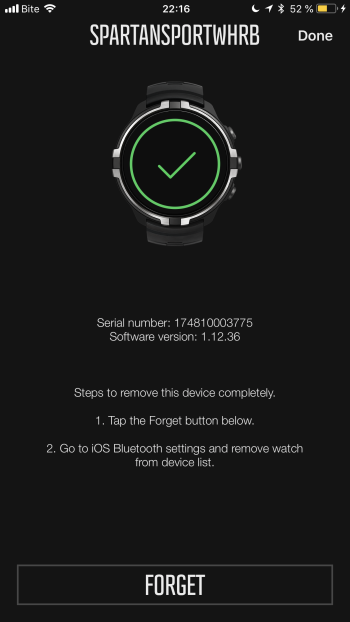
@brad_olwin what I did is only forgot watch on the MC and it reappeared again after relaunch of Mc app and works till now with suunto app in parallel. I haven’t read suunto app installation guide
-
@slashas ahhhh, to forget the watch completely it asks you to go into BT settings and forget…this will unpair from the iPhone. I had not thought of your trick. Kudos!!! I will try this out. and Thanks. This should help @jarlin
-
Tried this several times on iOS, and unpairing and pairing every time worked for me, but yes, it was a pain to do every time.
-
My Android phone is rooted, so I only freeze one app while using the other and vice versa.
-
@jthomi I have been trying too and am required to pair and unpair as well. I will delete MC and just use the cable for MC sync. Happy with that.
-
@brad_olwin Same here!
-
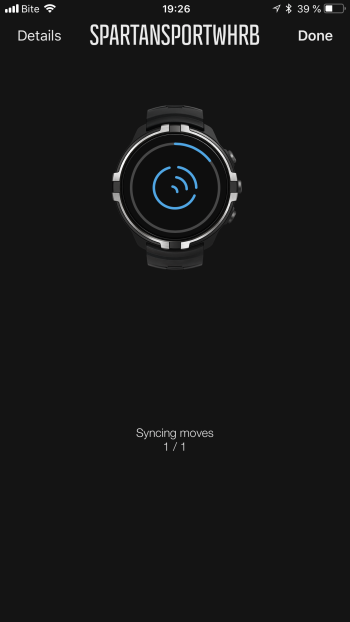
For me works both without pairing anything, uploading walk which happened half hour ago:
-
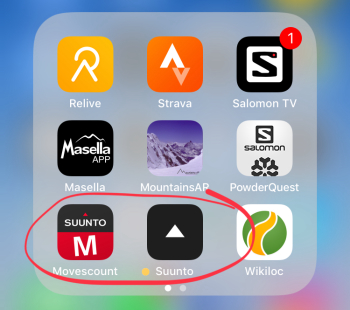
@slashas same for me. Both apps installed on my iPhone and syncing every activity with both apps through the phone with no need to forget watch nor pair every time. I just close the first app after syncing and then start the other app and sync, no matter what order I use for syncing.
-
hm, might have to test that again, I was doing that in the very beginning of the beta phase…
-
@carlos-avila said in Parallel use with MC App:
@slashas same for me. Both apps installed on my iPhone and syncing every activity with both apps through the phone with no need to forget watch nor pair every time. I just close the first app after syncing and then start the other app and sync, no matter what order I use for syncing.
Perfect.







Hello! It looks like you're interested in this conversation, but you don't have an account yet.
Getting fed up of having to scroll through the same posts each visit? When you register for an account, you'll always come back to exactly where you were before, and choose to be notified of new replies (either via email, or push notification). You'll also be able to save bookmarks and upvote posts to show your appreciation to other community members.
With your input, this post could be even better 💗
Register Login