Button shortcuts
-
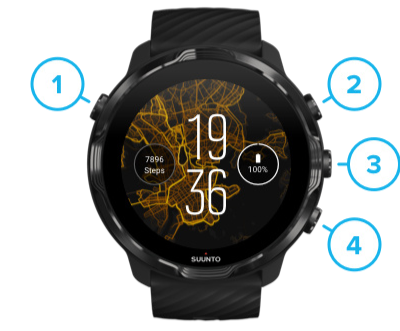
Hi, is somehow possible not to have a shortcut on the button. During activity I sometimes activate it. Button 3. I only can change but something must be chosen

-
-
@macdav during an activity it’s the button for changing to the next screen, isn’t it?
-
Yes. And when I train golf and have no activity started, it activate some app. Which is anoying.
-
@macdav for correct OHR I wear the watch behind the wrist and it is impossible to activate accidentally one of the buttons without breaking my hand.

-
@pilleus good point. I try
-
If I remember correctly, you can lock the watch by keep pressing the middle button. You will have to long press the same button to unlock.
I know it works during workouts, I can’t assure it works on the watch face
-
@macdav said in Button shortcuts:
Yes. And when I train golf and have no activity started, it activate some app. Which is anoying.
At this time, you can only change it to another, hopefully less annoying app. Hardware button customization, under settings, will only allow you to select an app.
You can, however, install an app that let’s you customize buttons actions in-app, like Sporty Go, and assign unused buttons to nothing.



Hello! It looks like you're interested in this conversation, but you don't have an account yet.
Getting fed up of having to scroll through the same posts each visit? When you register for an account, you'll always come back to exactly where you were before, and choose to be notified of new replies (either via email, or push notification). You'll also be able to save bookmarks and upvote posts to show your appreciation to other community members.
With your input, this post could be even better 💗
Register Login