Canvas rendering limits on the watch — findings and a tiling solution
-
Hi all,
I’ve seen a posts here about canvas drawing problems, and ran into them myself. For me the chart worked fine in the simulator but failed silently on the actual watch once it grew past a certain width. The behaviour initially seemed inconsistent. I did some systematic testing to try to understand what’s going on and wanted to share what I found — others may have hit the same wall, and I’d be curious whether anyone can confirm or add to this.
The symptoms
The canvas stops rendering past a certain number of drawing operations per frame. There’s no JavaScript exception, no entry in the system log — the canvas just goes blank, or partially blank, with no indication of why. The simulator doesn’t reproduce this at all, which makes it hard to debug.
The limits
Through binary-search testing on a Suunto Race S I found two independent constraints:
-
Per-path limit: max ~24 lineTo calls per beginPath/stroke cycle.
Draw more than that in a single path and the whole stroke is silently discarded. -
Per-frame render budget: 2 × numStrokes + numLineTo ≤ ~200
Each beginPath/stroke pair costs 2 units; each lineTo costs 1 unit. Exceed roughly 200 total and everything is silently dropped — including fillRect and fillText calls, not just line drawing.
These appear to be a fixed-size firmware render queue, not a time or CPU budget. The formula held consistently across chunk sizes from 2 to 40 in my tests.
The fix: chunked paths
Instead of one beginPath → many lineTo → stroke, break the drawing into small chunks. I use chunks of 20 lineTo calls, which stays safely under both limits:
var drawChunk = function(ctx, index, cnvOffset, cnt) {
  ctx.beginPath();
  ctx.moveTo(index - cnvOffset, yScale - hrRecord[index]);
  for (i = 1; i <= cnt; i++) {
    ctx.lineTo(index - cnvOffset + i, yScale - hrRecord[index + i]);
  }
  ctx.stroke();
}
With 20 lineTo per chunk: each chunk costs 2 + 20 = 22 budget units, so you can draw about 9 chunks = ~180 points before hitting the frame budget. That matches the 180 px canvas width, which isn’t a coincidence — the documentation hint “store max the pixels to show the data” is exactly right, and now I understand why.
A quick note on ES5.1: var i and all other loop variables must be declared outside the render function (at load time), not inside. Creating any variable inside a function called at 10 Hz causes heap exhaustion over time.
I did separately try to determine the available heap. I found that I could allocate a single Uint8Array of 4000 elements and a total of seven such arrays before exhausting memory on a Race S.
Going further: canvas tiling
Each canvas element has its own independent render queue. Two 180 px canvases placed side by side behave as two independent budgets — so you can draw 360 points total. Here’s the structure:
// Left canvas — draws data[0..179]
var renderChart = function(ctx) {
  ctx.fillStyle = '#333333';
  ctx.fillRect(chartX, chartY, chartWidth, chartHeight);
  ctx.lineWidth = 3;
  ctx.strokeStyle = '#FF0000';
  dataIndex = 0;
  maxIndex = Math.min(hrTickCount - 1, chartWidth);
  while (dataIndex < maxIndex) {
    cnt = Math.min(hrTickCount - 1 - dataIndex, hrChunkSize);
    drawChunk(ctx, dataIndex, 0, cnt);
    dataIndex += cnt;
  }
}

// Right canvas — draws data[180..359]
var renderChart2 = function(ctx) {
  ctx.fillStyle = '#666666';
  ctx.fillRect(chartX, chartY, chartWidth, chartHeight);
  ctx.lineWidth = 3;
  ctx.strokeStyle = '#FF0000';
  dataIndex = chartWidth;
  while (dataIndex < hrTickCount - 1) {
    cnt = Math.min(hrTickCount - 1 - dataIndex, hrChunkSize);
    drawChunk(ctx, dataIndex, chartWidth, cnt);
    dataIndex += cnt;
  }
}
Both canvases are refreshed from the same 10 Hz tick:
$.subscribe('/Dev/Time/Tick10hz', function() {
  control('#cnv2', 'REFRESH');
  control('#cnv3', 'REFRESH');
})
The two canvas elements sit flush side by side in the layout:
<object id="cnv2" type="canvas" build="ctx => renderChart(ctx)"
  style="position:absolute; left: 50px; width: 180px; top: 233px; height: 160px;" />
<object id="cnv3" type="canvas" build="ctx => renderChart2(ctx)"
  style="position:absolute; left: 230px; width: 180px; top: 233px; height: 160px;" />
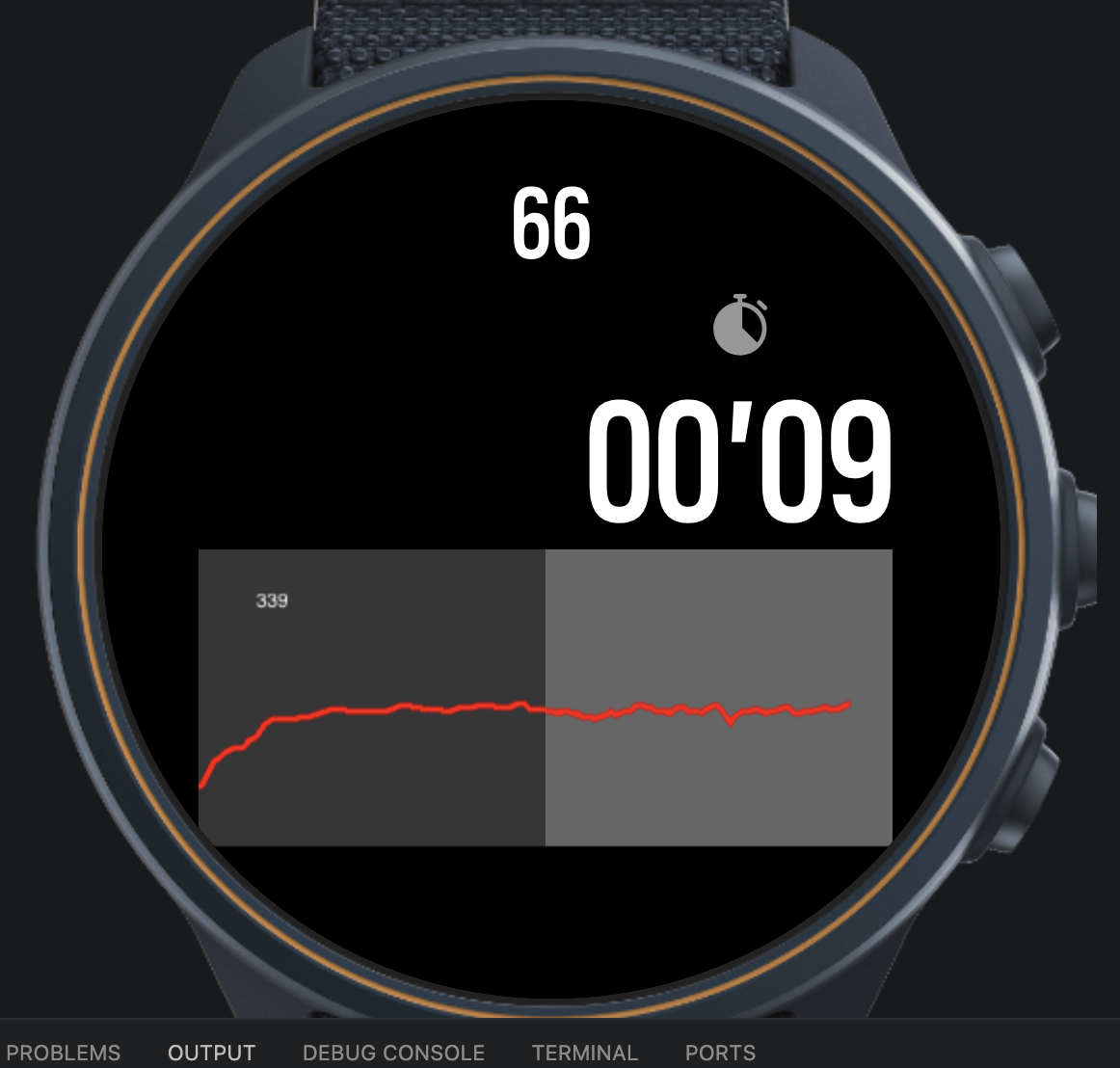
The result is a seamless 360 px HR chart — six minutes of data at 1 Hz — with room to spare in both render budgets. Here’s what it looks like with real HR data from a training run, showing the warmup ramp and settling into aerobic pace:
Suggestions for the documentation
The SDK documentation is genuinely helpful in many areas, and the “Optimizing applications” section points in the right direction with its advice about heap allocation and pre-allocating arrays. A few additions that would save developers a lot of trial and error on device:
- Explicit canvas budget numbers. Even an approximate figure (“each canvas has a render queue of approximately 200 operations per frame”) would immediately explain the silent-failure behaviour and let developers design within the limits from the start.
- A note that the simulator does not enforce canvas limits. Right now there’s no way to know that your app will fail on device until you test it. A simulator warning, or even just a documentation note, would help.
- The per-path lineTo limit. The advice to “store max the pixels to show the data” implies it exists, but stating the limit directly — “keep individual paths to approximately 20–25 lineTo calls” — would be actionable immediately.
- The canvas-tiling pattern. Multiple canvases with independent budgets is a clean solution to the width constraint. It would be worth a short example in the documentation.
Thanks to the community here for pointers in the questions thread!
Happy to share the full source if anyone wants to build on it. And if anyone has tested these limits on other watch models (Race 2, Vertical, etc.) I’d be very curious whether the numbers differ.
-
-
@matram so, tl;dr:
- Native graphs are capped at a too-short window for your needs.
- Solution: plot two half-width graphs, different windows, put them side-by-side, one perfect megaGraph?
Nice!
-
@matram this is golden, thanks. I’ll add it to the suuntoplus skill I’ve been working on. I’m trying to aggregate all knowledge about hardware limitations and things that docs or examples don’t cover. Perhaps I should open source it? There are plenty of quirks I’ve stumbled upon, like colors on MIP displays - for example if the color is too dark - it’ll be rendered as black. Or the issue of “back on track” that I’m fighting with currently.
-
@Łukasz-Szmigiel
Promise to be brief this time.In LOTS of additional testing we have confirmed an exact limit of drawing line segments in a canvas is 181 line segments if they are chunked in blocks of 20. One more and it always fails silently resulting in a black canvas on a Race S.
But we have also found another resource limit that manifest itself in the event log as
#3505354 03.06.2026 06:30:14 : WRN WBMAIN : pool id:0 full! (S 120/120)Exactly what the pool is, we are not sure. We speculate that it has to do with communication between FW, app (main.js) and UI (t.html).
Symptoms on the watch when this happens is that the watch becomes extremely sluggish, takes several seconds to react to the press of a pause button and the pause / resume screen renders slowly in steps over several seconds.
We think the root cause is the simultaneous pressure from drawing in multiple canvases at the same time, we currently have three.
The current solution is staggering redraws in different 10Hz ticks and to refresh only when content of the canvas has truly changed. So far it appears to work!
-
#3505354 03.06.2026 06:30:14 : WRN WBMAIN : pool id:0 full! (S 120/120)
Don’t you think it’s related to total runtime output subs allowed?
-
@Łukasz-Szmigiel
No I do not think so, there is only a single output in the manifest and three inputs.It seemed more load related as staggering canvas refreshes removed the problem.
Worth nothing, on at least one occasion the canvas went black first then as a consequence of the load resulting in handling of that exception (we think) we got the pool full.


Hello! It looks like you're interested in this conversation, but you don't have an account yet.
Getting fed up of having to scroll through the same posts each visit? When you register for an account, you'll always come back to exactly where you were before, and choose to be notified of new replies (either via email, or push notification). You'll also be able to save bookmarks and upvote posts to show your appreciation to other community members.
With your input, this post could be even better 💗
Register Login